
Your Browsing History

Meet Your Seller

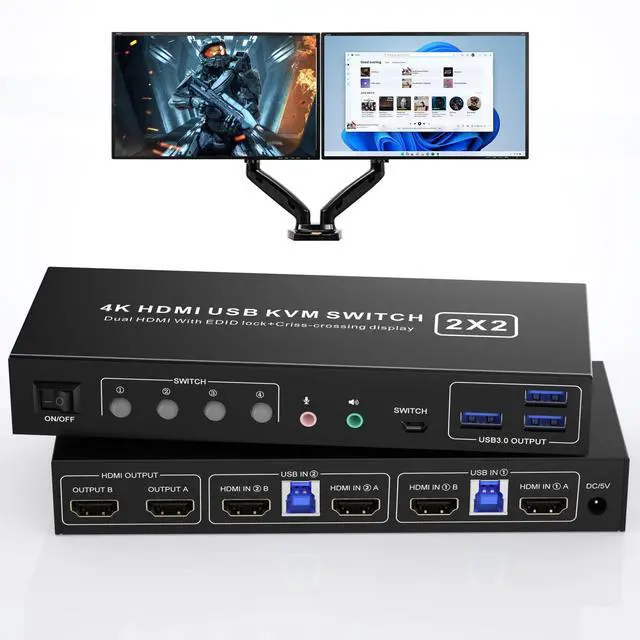



Vszerda HDMI KVM Switch 2 Montiors 2 Computers USB 3.0, 4K@60Hz KVM Switch Dual Monitor with 3 USB 3.0 Ports and Audio, 2 Port KVM Switch with Dual Monitor Cross Display for 2 Computers
- USB 3.0 Dual Monitor KVM Switch HDMI 2 Port:This dual monitor KVM Switch is for you to control them using one set of keyboard, mouse and single or dual monitors to make your work space tidy and efficient, also a premium choice for working from home. Only when your computer supports dual display or multi display, you can use this KVM to achieve 2 PC to share 2 monitors.
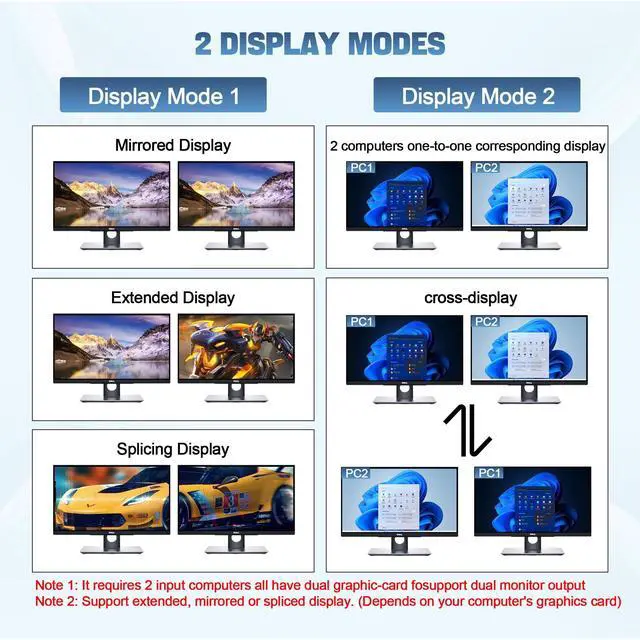
- Multiple Display Methods: Dual monitors not only support output expansion, mirroring and splicing modes, but also support cross-display between the two pcs, upgraded features to make life and office more convenient.Extended, mirrored or spliced display modes depend on your computer's graphics.
- Support Simulation EDID: This HDMI KVM dual monitor switch can simulate the EDID of the display, store the resolution and refresh rate of the display,With EDID emulators in each input port, your computers always receive the correct display information and preventing displays setting change.
- 4K@60hz & Extra USB 3.0 Output: Our KVM supporting high resolution max up to 4K@60Hz, and also supports 3D and 1080P@60Hz or other lower resolution (Downward Compatible). Note: Only when both your computer Graphics card and monitor support 4K@60Hz then you can get 4K@60Hz effect, so if you want the max resolution you have to check your devices first. Also supports separate audio and microphone output.
+
+
Overview
Specs
Reviews
USB 3.0 Dual Monitor HDMI Switch for 2 Computers
Advantages:
Easily have a dual monitor setup per system or switch it to a single monitor system showing both systems (one on each monitor) and then easily toggle the keyboard/mouse between the 2 systems;
Support maximum resolution up to 4K 60Hz, with EDID Emulator;
Dual monitors output not only support expansion, mirroring and splicing modes, but also support cross-display between the two pcsDepends on your computer's graphics card.;
No complicated installation is required, and non-professionals can easily operate it, Ideal for multi-tasking professionals and gamers who need to access multiple devices quickly and efficiently;
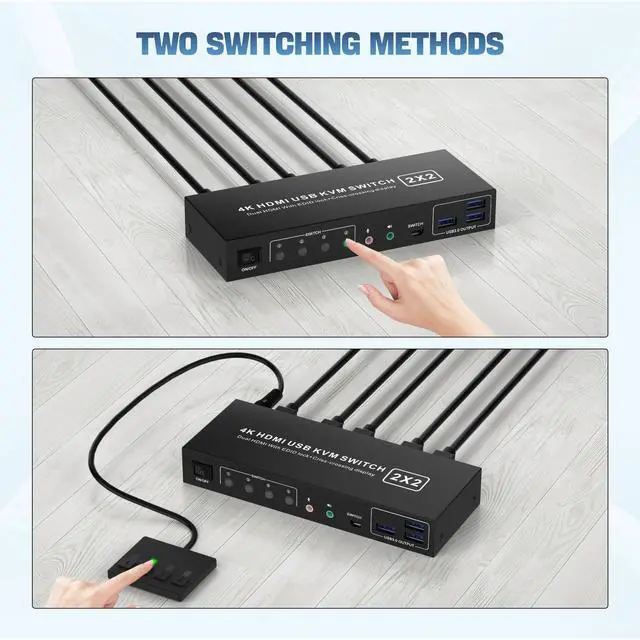
Switching modes: Buttons on the front panel and wired remote;
The ports that need to plug in HDMI/USB cables are all hidden behind the KVM, so the desktop doesn't get cluttered;
A USB hub can expand the USB3.0 ports if multiple connections are required, Microphones and headphones can also be connected.
Advantages of our dual-channel KVM:
Display Mode 1: Mirror/Copy Display; Extended Display; Surround/Splicing Display
How to switch:
1:Press the button to switch from PC1 A to output A, and frorm PC1 B to output B
2:Press the button to switch from PC2 A to output A, and frorm PC2 B to output B
Display Mode 2: 2 computers one-to-one corresponding display, crossing Display
How to switch:
3:Press the button to switch from PC1 A to output A, and from PC2 A to output B
4:Press the button to switch from PC1 A to output B, and from PC2 A to output A
Support EDID Lock Screen
Dual monitor KVM switch can simulate the EDID of the display, when the monitor is switched between two computers, the original window order will not change.
Additional Features
- 2 Switching modes and Wide Compatibility: Button switch and Wired remote switch. Compatible with a variety of computer systems,such as Windows, Linux, Mac, Unix, Ubuntu, Raspberry and most other major OS; also supports HDMI devices without USB signal input like DVR, NVR etc. Support wired, wireless, mechanical, multimedia.
Warranty & Returns
Warranty, Returns, And Additional Information
Warranty
- Please contact the Seller directly for warranty information. Warranty information may also be found on the Manufacturer's website.
- CONTACT
Return Policies
- Return for refund within: 15 days
- Return for replacement within: 90 days
- This item is covered by Jinwen Electronics Return Policy
Manufacturer Contact Info
- For a directory of all our manufacturers, please click below.
- Manufacturers Directory
LOADING...