


Best Sellers
 Hot Seller
- $575.22
- + $10.99 Shipping
 Top Rated
- $587.00
- + FREE SHIPPING
Hot Seller- $609.06
- + FREE SHIPPING

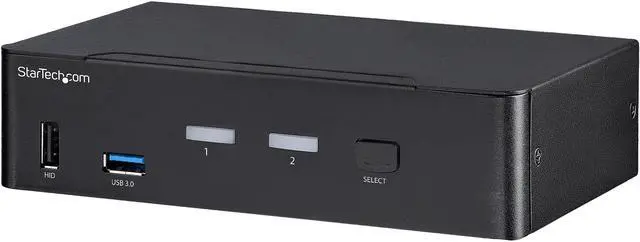


StarTech.com SV231DPU34K 2-Port DisplayPort KVM Switch - 4K 60Hz - DisplayPort 1.2 KVM Switch
- TAA compliant 4 port DP USB KVM switch
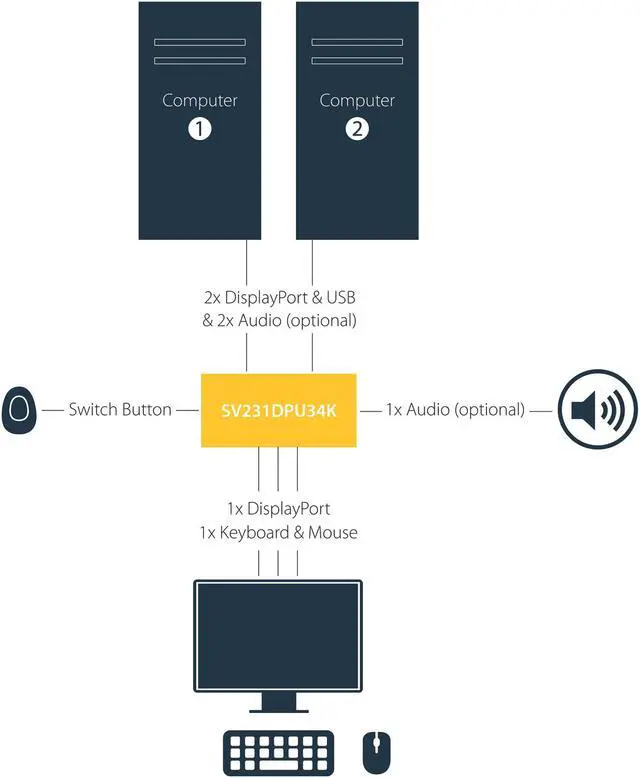
- 2 port KVM controls up to 2 multimedia computers from one DisplayPort workstation
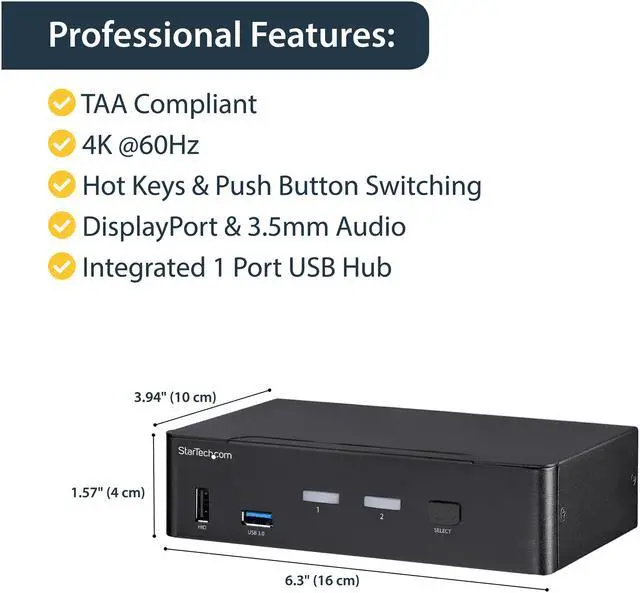
- DisplayPort 1.2 KVM switch supports resolutions up to 4K 60Hz
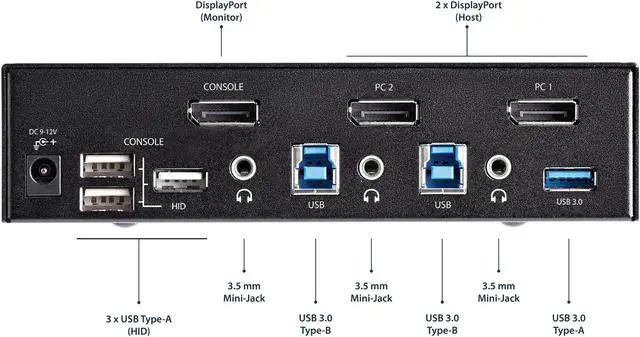
- Supports 3.5mm stereo audio or microphone
- Integrated 2 port USB 3.0 KVM switch hub
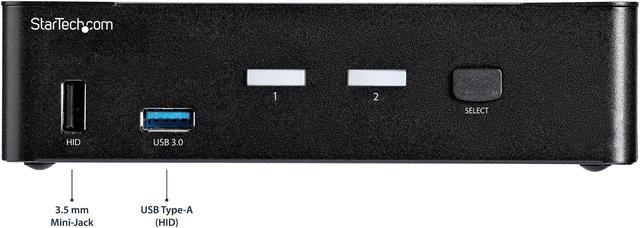
- Front panel push-button and hotkey selection
+
+
Overview
Specs
Reviews (16)
TAA compliant DisplayPort KVM switch - 2 port KVM controls 2 computers - 2 port
Warranty & Returns
Warranty, Returns, And Additional Information
Warranty
- Limited Warranty period (parts): 2 years
- Limited Warranty period (labor): 2 years
- Read full details
Return Policies
- Return for refund until: January 31, 2027
- Return for replacement until: January 31, 2027
- This item is covered by Newegg.ca's Extended Holiday Return Policy.
- Read full return policy for details.
We want to ensure your holiday shopping this year is hassle-free. That’s why we’re automatically extending our return policies on almost every product! For purchases placed between November 1st, 2026 and December 31, 2026 you will have until January 31, 2027 to return your product.
Manufacturer Contact Info
- Manufacturer Product Page
- Manufacturer Website
- Support Phone: 1-800-265-1844
- Support Email: support@startech.com
- Support Website
- View other products from STARTECH
LOADING...
LOADING...
The StarTech.com SV231DPU34K is a 2-computer DisplayPort KVM switch for controlling two multimedia PCs from one workstation, with support for up to 4K at 60Hz, stereo audio, and a built-in 2-port USB 3.0 hub. It suits users who want to share a monitor, keyboard, mouse, and USB devices between two computers.
Recommended For
- People who alternate between a work computer and a personal desktop at one DisplayPort monitor, and want to switch the keyboard, mouse, and other USB devices without reconnecting them. A customer review describes this work-laptop/desktop setup in long-term use.
- Desk users with two DisplayPort computers and a 4K monitor who want to share one screen and switch between systems using a front-panel button or hotkey.
- Home-office or small-workstation users who want to share a keyboard, mouse, and up to two additional USB peripherals—such as a printer or scanner—between two computers.
- Users who need to switch audio along with video and USB, using a compatible DisplayPort audio setup or the separate 3.5 mm stereo connections.
Real-World Use Scenarios
- At a desk shared by a work computer and a personal PC, switch one DisplayPort monitor, keyboard, and mouse between them instead of reconnecting those essentials by hand.
- When moving between two computers during the day, use the front button or hotkey to change which one controls the monitor and shared USB devices; switching is more convenient than keeping duplicate desk peripherals.
- For a 4K 60Hz DisplayPort monitor shared by two compatible computers, keep the monitor at its supported 4K 60Hz mode while switching between systems.
- At a shared workstation, connect compatible USB accessories such as a printer or scanner to the KVM’s USB hub so either selected computer can use them without moving their cables.
- In a setup with two computers and shared speakers or a microphone, route compatible audio through the KVM so the selected computer uses the connected audio equipment.
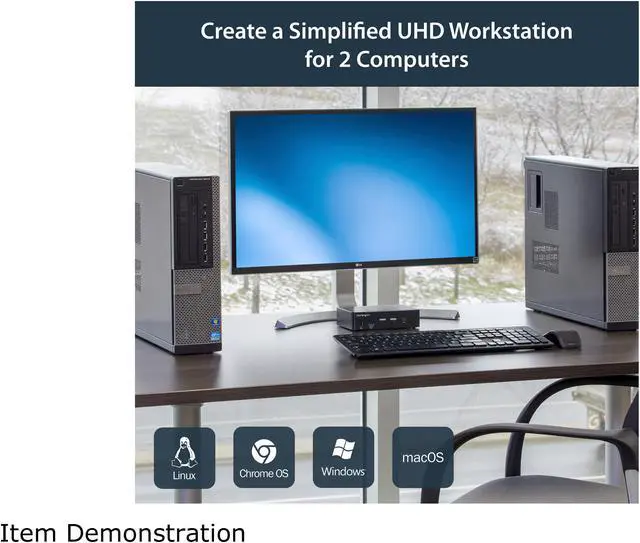
- In a mixed Windows, Mac, or Linux workspace, use the same monitor and USB peripherals with either connected computer; the switch does not require a dedicated operating-system driver.
Spec Summary
| Attribute | Value |
|---|---|
| Best For | Sharing one DisplayPort workstation setup between two computers for personal, gaming, or business use |
| Video And Display | Supports resolutions up to 3840 × 2160 (4K) at 60 Hz, with additional listed modes from 1024 × 768 through 2560 × 1600 |
| Ports And Connectivity | Connects two computers through DisplayPort, USB 3.0, and 3.5 mm audio inputs; console connections include one DisplayPort output, USB 1.1 HID ports, two USB 3.0 ports, and a 3.5 mm audio output. Includes a built-in 2-port USB 3.0 hub |
| Audio | Supports 2-channel stereo audio with separate 3.5 mm audio connections |
| Power | Includes an AC adapter; accepts 100–240 V AC input and provides 12 V DC output, with 18 W power consumption |
| Operating Environment | Operating temperature: 0–40 °C (32–104 °F); humidity: 0–80%, non-condensing |
| Status Indicators | Two green and two red LED indicators |
| Compliance | TAA compliant |
| Physical Specifications | Black; 6.3 × 3.9 × 1.6 inches; 1.38 lb |
| Included Accessories | Universal power adapter for NA/JP, EU, UK, and ANZ; four rubber foot pads; quick-start guide |
| Model Identifiers | StarTech.com SV231DPU34K |