





German Design
A German-based company, Perixx specialized in innovative computer peripherals, such as keyboards, mice, touchpad, and more.
Our mission is to engineer the most suitable solutions for everyone to make the best experience out of their daily tasks.
We are the “Value Creator,” this has always been our company’s vision to continuously engineer innovative solutions for everyone — everywhere around the globe.
Ergo Series

Office Series
How did we get our start?
Founded in 2006, in Düsseldorf, Germany, we design a variety of product lines, including ergonomic, industrial, and business products.
What makes our products unique?
Our mission is to engineer the most suitable solutions for everyone to make the best experience out of their daily tasks.
Why do we love what we do?
Perixx specialized in innovative computer peripherals, such as keyboards, mice, touchpad, and more.


Keyboard Specifications:
- Wireless 2.4 GHz Technology
- 12 Multimedia Function Keys
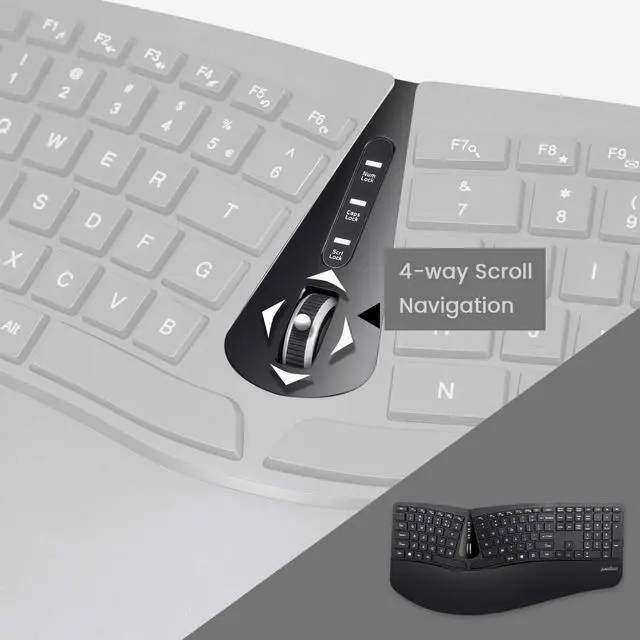
- Keyboard with Built-in Scroll Wheel
- Dimensions: 13.82 x 8.94 x 2.56 inches (35.1 x 22.7 x 6.5 cm )
- Weight: 1.5 lbs (682 g)
- Plug-and-Play Installation
- System Requirements: Windows 7, 8, 10, and later versions
PERIDUO-605
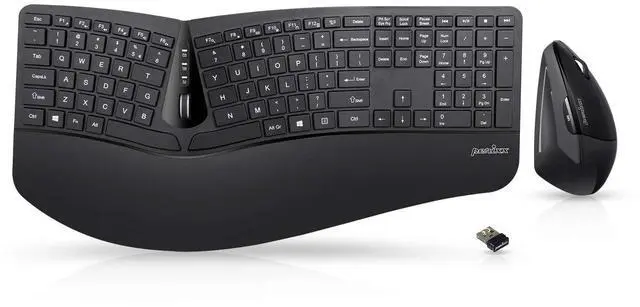
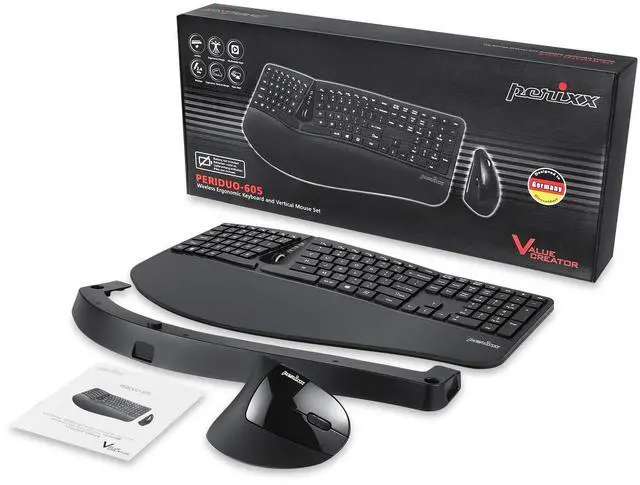
Wireless and Compact Keyboard and Mouse Set
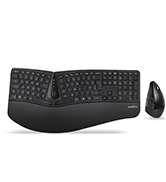
Our PERIDUO-605 is a set of wireless ergonomic keyboard and mouse. The keyboard has an adjustable foot stand and an extra attachable palm rest extender. Discover the function of the 12 multimedia keys, for endless comfort and convenience to reach your media, browsing, and e-mail surfing.
How to Rebind the Keyboard Connection to the Receiver:
- Plug the receiver into the USB port on the computer.
- Insert fully charged batteries into your keyboard.
- Switch the keyboard on.
- Press the "Connect" button for several seconds. If the number lock light keeps flashing for 8 seconds, it means that it's connected.
Features:

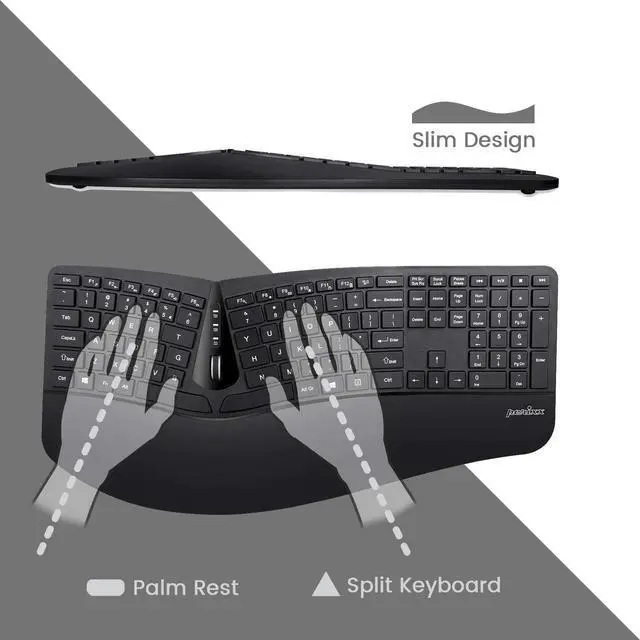
Compact 3D-split keyboard
Dress up your desktop with this sleek modern combo with 1.54 inches (38 mm) at its thickest.
The 3D Design of the keyboard refers to the undulations in the height of the key set that is beneficial to improve comfort while typing.
This is a one-piece device with the keys separated into two groups, allowing the user to type at a different angle than the typical basic keyboard.

Comfort and convenience
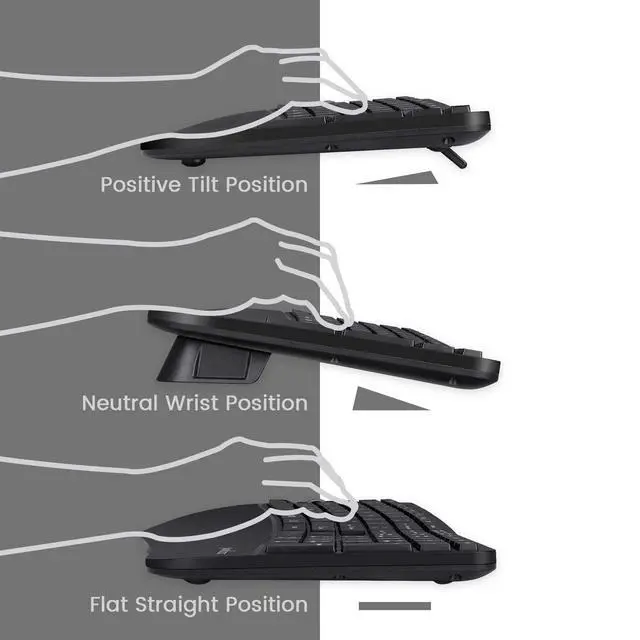
The tilt scroll wheel of the keyboard can be tilted 4 ways for page navigation (up, down, left, and right). Additionally, comes with a built-in tilted foot stand to adjust the height to suit your arm positions.

True ability to adjust to your perfect typing angle
It has adjustable feet for those who need to see the keys more easily and it also comes with a magnetic palm rest extender that can be attached to the bottom of the palm rest. This setting will give you a negative tilt position to give you a neutral wrist position.

Mouse Specifications:
- Silent Click Vertical Mouse
- 5-Button
- Dimensions: 4.5 x 2.64 x 2.28 inches (11.44 x 6.7 x 5.8 cm)
- Weight: 0.18 lb (80 g)
- Adjustable DPI (800/1200/1600)
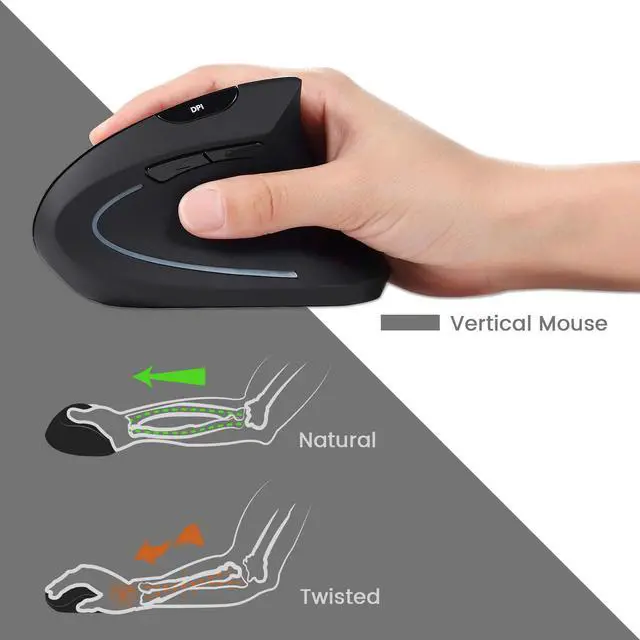
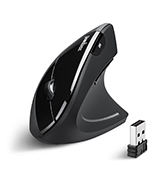
Vertical Mouse
High Resolution Optical Sensor
This set comes with a wireless ergonomic vertical mouse with a high-definition optical sensor with 800/1200/1600 DPI that will provide you comfortable tracking movements to work for long hours, which makes it a perfect combination to increase your productivity every day.
How to Rebind the Keyboard Connection to the Receiver:
- Insert fully charged batteries into your mouse.
- Switch the mouse on.
- Press down on the right mouse button and the scroll wheel at the same time for several seconds.
- Plug the receiver into the USB port on the computer.
Questions & Answers about PERIDUO-605:
Q: Where can I find the receiver?
A: In the receiver compartment inside on the backside of the keyboard.
Q:Why I only have one receiver?
A: The keyboard and mouse share the same receiver, so you only need one receiver to connect both devices.
Q: How to rebind the connection of the keyboard and mouse to the receiver?
A: Please check the keyboard and mouse product description sections above. Under "How to Rebind the Keyboard Connection to the Receiver" and "How to Rebind the Mouse Connection to the Receiver."

Keyboard Specifications:
- Wireless 2.4 GHz Technology
- 12 Multimedia Function Keys
- Keyboard with Built-in Scroll Wheel
- Dimensions: 13.82 x 8.94 x 2.56 inches (35.1 x 22.7 x 6.5 cm )
- Weight: 1.5 lbs (682 g)
- Plug-and-Play Installation
- System Requirements: Windows 7, 8, 10, and later versions
PERIDUO-605
Wireless and Compact Keyboard and Mouse Set
Our PERIDUO-605 is a set of wireless ergonomic keyboard and mouse. The keyboard has an adjustable foot stand and an extra attachable palm rest extender. Discover the function of the 12 multimedia keys, for endless comfort and convenience to reach your media, browsing, and e-mail surfing.
How to Rebind the Keyboard Connection to the Receiver:
- Plug the receiver into the USB port on the computer.
- Insert fully charged batteries into your keyboard.
- Switch the keyboard on.
- Press the "Connect" button for several seconds. If the number lock light keeps flashing for 8 seconds, it means that it's connected.
Features:
Compact 3D-split keyboard
Dress up your desktop with this sleek modern combo with 1.54 inches (38 mm) at its thickest.
The 3D Design of the keyboard refers to the undulations in the height of the key set that is beneficial to improve comfort while typing.
This is a one-piece device with the keys separated into two groups, allowing the user to type at a different angle than the typical basic keyboard.
Comfort and convenience
The tilt scroll wheel of the keyboard can be tilted 4 ways for page navigation (up, down, left, and right). Additionally, comes with a built-in tilted foot stand to adjust the height to suit your arm positions.
True ability to adjust to your perfect typing angle
It has adjustable feet for those who need to see the keys more easily and it also comes with a magnetic palm rest extender that can be attached to the bottom of the palm rest. This setting will give you a negative tilt position to give you a neutral wrist position.
Mouse Specifications:
- Silent Click Vertical Mouse
- 5-Button
- Dimensions: 4.5 x 2.64 x 2.28 inches (11.44 x 6.7 x 5.8 cm)
- Weight: 0.18 lb (80 g)
- Adjustable DPI (800/1200/1600)
Vertical Mouse
High Resolution Optical Sensor
This set comes with a wireless ergonomic vertical mouse with a high-definition optical sensor with 800/1200/1600 DPI that will provide you comfortable tracking movements to work for long hours, which makes it a perfect combination to increase your productivity every day.
How to Rebind the Keyboard Connection to the Receiver:
- Insert fully charged batteries into your mouse.
- Switch the mouse on.
- Press down on the right mouse button and the scroll wheel at the same time for several seconds.
- Plug the receiver into the USB port on the computer.
Questions & Answers about PERIDUO-605:
Q: Where can I find the receiver?
A: In the receiver compartment inside on the backside of the keyboard.
Q:Why I only have one receiver?
A: The keyboard and mouse share the same receiver, so you only need one receiver to connect both devices.
Q: How to rebind the connection of the keyboard and mouse to the receiver?
A: Please check the keyboard and mouse product description sections above. Under "How to Rebind the Keyboard Connection to the Receiver" and "How to Rebind the Mouse Connection to the Receiver."
German Design
A German-based company, Perixx specialized in innovative computer peripherals, such as keyboards, mice, touchpad, and more.
Our mission is to engineer the most suitable solutions for everyone to make the best experience out of their daily tasks.
We are the “Value Creator,” this has always been our company’s vision to continuously engineer innovative solutions for everyone — everywhere around the globe.
Ergo Series
Office Series
How did we get our start?
Founded in 2006, in Düsseldorf, Germany, we design a variety of product lines, including ergonomic, industrial, and business products.
What makes our products unique?
Our mission is to engineer the most suitable solutions for everyone to make the best experience out of their daily tasks.
Why do we love what we do?
Perixx specialized in innovative computer peripherals, such as keyboards, mice, touchpad, and more.