What is/are in the package?
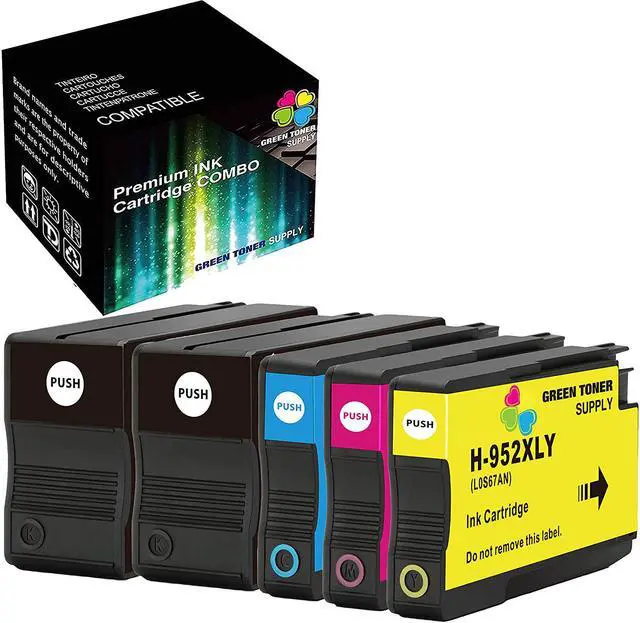
5 pack 952(2xBlack+1xCyan+1xYellow+1xMagenta) Ink Cartridge
How many pages does this print up to?
Black up to 2,000 pages at 5% coverage; Color up to 1,600 pages at 5% coverage
How do you install the toner cartridge?
Remove the orange cover, if applicable
Pull out the plastic tag (where you see the orange ring) which is on the side of the cartridge, if applicable
Insert into the printer
Enjoy printing!
What are the compatible printers?
HP Officejet Pro 7720 7740 8702 8710 8715 8720 8725 8730 8740 8210 8216 All-in-One Printer
What is the warranty?
Green Toner Supply offers 1-Year money back warranty on defective toner cartridges
What is the shelf life?
Suggested shelf life: Up to 36 months
Please store the unused/unopened toner cartridges in a dry and cool place. Avoid sun exposure
Have a question or a problem?
Please do not hesitate to contact us, our Customer Services Team will usually response your email or message within 1-2 business days.
TROUBLESHOOTING
a) If the units does not fit - Please remove the unit and reinstall
b) If there is an unrecognized error, please try the below reset instructions:
1. Press X to clear the error message.
2. Press the tools button (picture of a spanner).
3. Press All Settings.
4. Press Machine Info.
5. Press Parts Life.
6. Press # until the touch screen message changes.
7. Press the color of the drum that was replaced.
8. Press Yes.





 We‘re shipping as usual! The Canada Post strike only affects certain remote deliveries and PO Boxes. Details
 Holiday Shipping Details & Extended Holiday Returns


