


Out of stock
  • $119.99
  • Free 15-day Returns
Ships from China.
Most customers receive within 10-17 days.
Sold by fadaoe

Shipped by fadaoe

Price alert
Shop it at NeweggBusiness.

Meet Your Seller

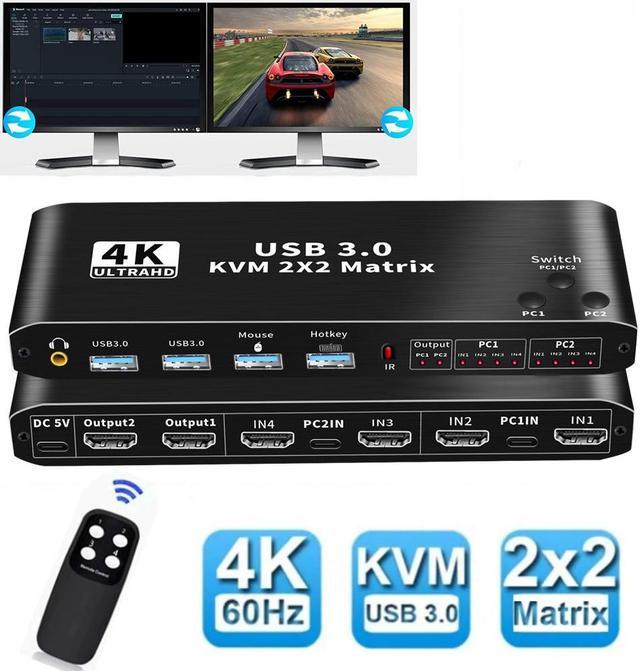
2x2 HDMI KVM Matrix Switch 2 Monitors 2 Computers 4K 60z, 2 PC 2 Monitor KVM Switch, Dual Monitor HDMI USB 3.0 KVM 2x2 Matrix Switch 2 in 2 Out, Support HDCP2.2, Hotkey,Extended And Mirror Display

  • [HDMI KVM USB Matrix dual monitor] The KVM Matrix allows control 2 computer with 1 set of controls (keyboard and mouse) and 2 display screen. Realizes 2 in and 2 out free selection synchronous switching.
  • [UHD 4K Visual Enjoyment] The KVM Switch Matrix supports HDMI 2.0b and standard HDCP 2.3. Support max resolution up to 4K@60Hz,1080@144Hz, also support 1080P@120Hz or lower resolution, makes image display more exquisite and realistic.
  • [Dual HDMI KVM Switch with USB 3.0 Port]- Supports Connecting your USB 3.0 port device such as Scanner/USB driver/3D Printer/Monitor Camera
  • [2.0CH Audio Extractor] Comes with a 3.5mm Audio Jack port with a DAC chip inside, which can be inserted into a 3-segment 3.5mm earpiece device.
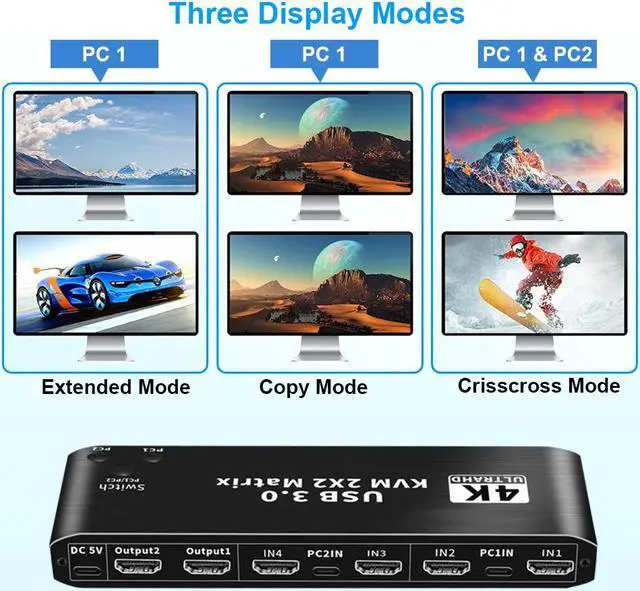
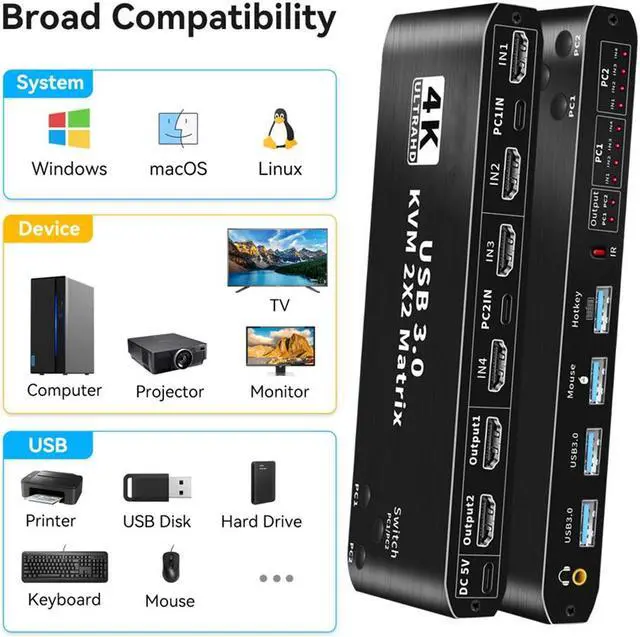
  • [Wide Compatibility] Support mirror mode,extended mode and crisscross mode ,it also can compatible with all laptops with HDMI port and other devices. It has adaptive EDID, adapt to Windows, macOS, Linux, UNIX and other operating systems.
+
+
Overview
Specs
Reviews
KVM Matrix

Features
- Support HDMI 2.0b HDCP 2.3
--compliant with DVI to HDMI,DP to HDMI
- Resolution: Support 1080P/1080@144Hz, 3840x2160p, 4K/60Hz resolution, adaptive screen resolution
- Support system: Windows XP,7,8,10, MacOS Linux, Unix etc. 
- Supports high current hard disk devices

Extended / Mirror mode Switching Method:
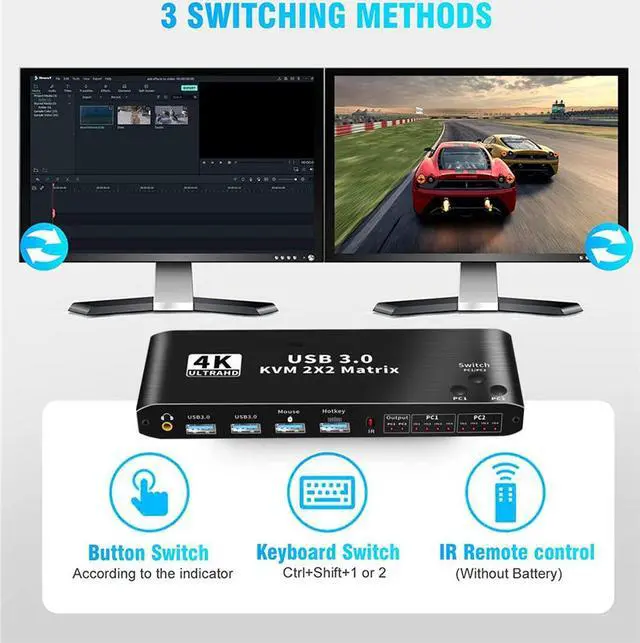
1.Press the Switch(PC 1 / PC 2) button on the KVM switch panel to switch between the two source devices;
2.use hotkey switch(Ctrl+Shift+ 1 / 2 to PC1 / PC2 or Ctrl + Ctrl),Ctrl+Shift+ K to turn ON/OFF hotkey;


Crisscross/Matrix Mode Switching Method:
1.Press the PC 1 Button,OUTPUT 1 is selected by PC 1,Each time press PC 1 button,it will switch to HDMI IN 1 / 2 / 3 / 4;
Press the PC 2 Button,OUTPUT 2 is selected by PC 2,Each time press PC 2 button,it will switch to HDMI IN 1 / 2 / 3 / 4.
2. Press the PC 1 Button,OUTPUT 1 is selected by PC 1,Use IR remote control to press [1] [2] [3] [4] button,it will switch to HDMI IN 1 / 2 / 3 / 4;
Press the PC 2 Button,OUTPUT 2 is selected by [PC 2],Use IR remote control to press [1] [2] [3] [4] button,it will switch to HDMI IN 1 / 2 / 3 / 4.


Specifications:
- Product Type: HDMI USB 3.0 KVM Matrix (2 in 2 out)
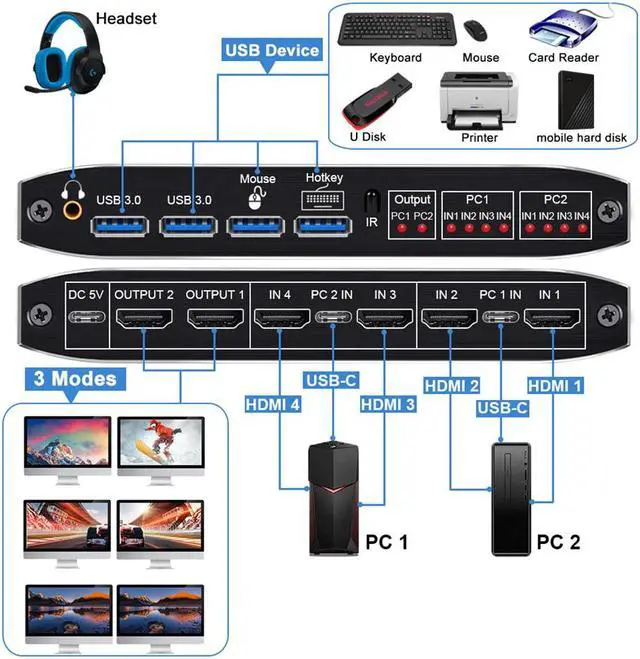
- Input Port: HDMI 2.0 x 4,USB-C x2, USB 3.0 x 4
- Output Port: 2 x HDMI 2.0,1 x L/R audio
- Dimensions: 176x51x21mm
- Material: Aluminum Alloy shellanti-rust, anti-corrosion, anti-interference, fast transmission, surtace oxidation

Warm Tips:
Warm Tips:


1.To get dual monitor display, each computer / laptop needs 2 video connections to correspondent HDMI Input A and Input B port on the KVM Matrix.

2.To get L/R output: Select HDMI audio output in sound settings.

3.Please install AAA battery before use (battery not included).

4.please do not use any USB HUB to USB port

5.when use this KVM Matrix,please power on it firstly,and use our USB-C to USB 3.0 data cable.

6.when you want to display PC 1 to monitor 1 and display PC 2 to monitor 2,please you IR control or panel switch(Press "PC 1" or "PC 2") to control Matrix mode.

3 display
Three Display Modes

The USB KVM matrx 2x2 Switch support 3 display modes: Extended Mode, Copy Mode, and Crisscross Mode

USB 3.0
USB3.0 KVM Switch with Audio Output

The integrated 2 USB 3.0 hub ports allow you to share 2 USB peripherals between 2 computers, such as printers, scanners, webcams and hard disks, with a data transfer rate of up to 5Gbp/s (10 times faster than USB 2.0).Our 2 PC 2 Monitor Switch comes with 3.5mm Audio Jack ports, which can be inserted into a 3.5mm earpiece device.

switching modes
Three switching modes

The USB KVM Switch provides a variety of switching methods: manual switching through buttons, infrared remote control, keyboard hotkeys for quick channel selection. Note: If you don't want to use the hotkey function, you can disable it.

jina
4K Switch
USB3.0
PC1 2
packagein
Package contents
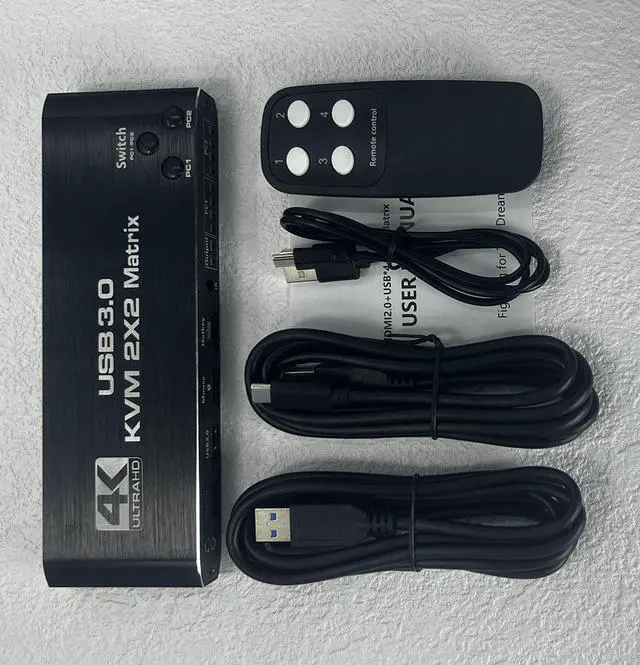
  • 1 x HDMI KVM USB Matrix
  • 2 x USB data cable
  • 1 x USB power cable
  • 1 x IR Remote Control(Without AAA battery)
  • 1 x User Manual
Features
- Support HDMI 2.0 b HDCP 2.3
--compliant with DVI to HDMI, DP to HDMI
- Resolution: Support 1080P/1080@144Hz, 3840x2160p, 4K/60Hz resolution, adaptive screen resolution
- Support system: Windows XP, Windows7, Windows10, Apple MAC, Linux, Unix and other operating systems
- Supports high current hard disk devices

- Extended / Mirror mode Switching Method:
1. Press the "Switch(PC 1 / PC 2)" button on the KVM switch panel to switch between the two source devices;
2. use hotkey switch(Ctrl+Shift+ 1 / 2 to PC1 / PC2 or Ctrl + Ctrl), Ctrl+Shift+ K to turn ON/OFF hotkey;

- Crisscross/Matrix Mode Switching Method:
1. Press the "PC 1" Button, OUTPUT 1 is selected by " PC 1", Each time press "PC 1" button, it will switch to HDMI IN 1 / 2 / 3 / 4;
Press the "PC 2" Button, OUTPUT 2 is selected by " PC 2", Each time press "PC 2" button, it will switch to HDMI IN 1 / 2 / 3 / 4.


2. Press the "PC 1" Button, OUTPUT 1 is selected by " PC 1", Use IR remote control to press " 1" "2" "3"4"button, it will switch to HDMI IN 1 / 2 / 3 / 4;
Press the "PC 2" Button, OUTPUT 2 is selected by " PC 2", Use IR remote control to press " 1" "2" "3"4"button, it will switch to HDMI IN 1 / 2 / 3 / 4.

Warranty & Returns

Warranty, Returns, And Additional Information

Warranty

  • Please contact the Seller directly for warranty information. Warranty information may also be found on the Manufacturer's website.
  • CONTACT

Return Policies

  • Return for refund within: 15 days
  • Return for replacement within: 30 days
  • This item is covered by fadaoe Return Policy

Manufacturer Contact Info

LOADING...