

  • $99.39
  • Free 15-day Returns
Ships from China.
Price alert
Shop it at NeweggBusiness.

Meet Your Seller

USB 3.0 2x2 KVM Switch 2 Monitors 2 Computers, USB3.0 HDMI KVM Switch Dual Monitor Sharing 4 USB Devices for Keyboard Mouse Scanner, 4K @60Hz KVM Switches Support Audio, Hotkey, Button Switching

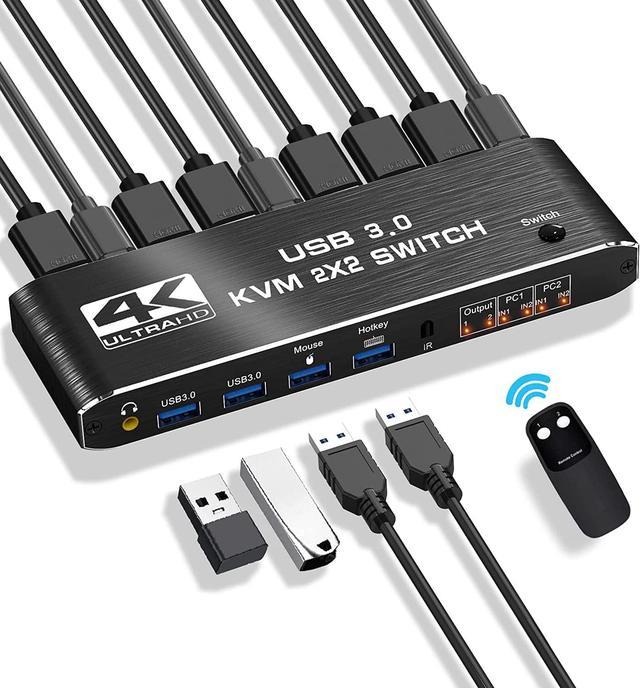
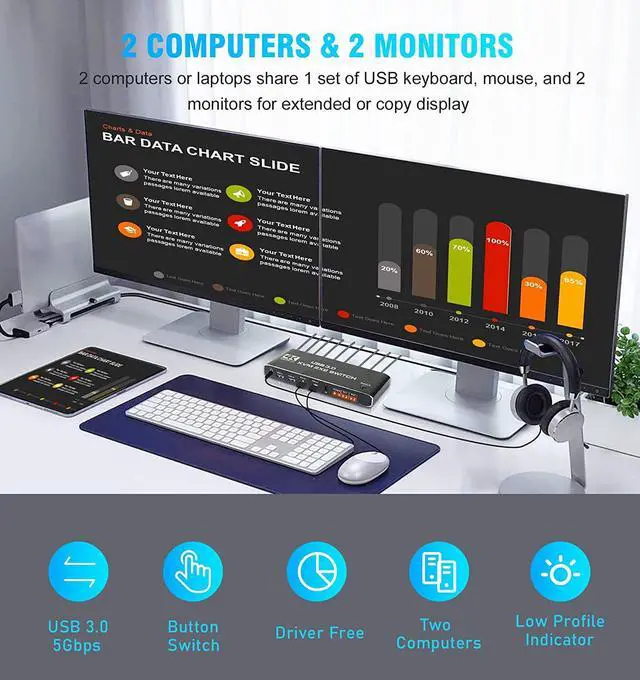
  • [KVM Switch 2 Monitors 2 Computers] The KVM switches allow you to share 2 monitors and 4 USB peripherals (a mouse, keyboard, printer, scanner etc) between 2 computers.
  • [4K@60Hz Ultra HD Visual Enjoyment] Supports up to 4K@60Hz resolution (supports 3D, 1080P), making the image display more fascinating and realistic. 2 additional USB 3.0 ports are added to transmit various video information at extremely high speeds without lag
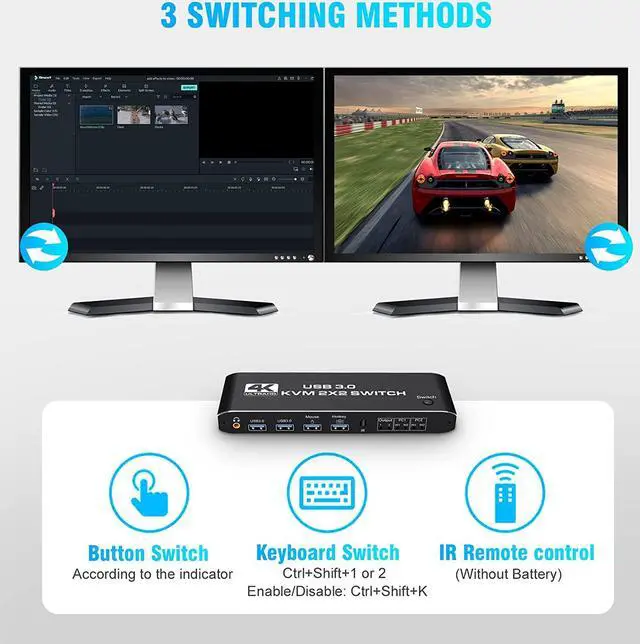
  • [3 Switching Methods & 2 Modes] 3 fast-switching methods: button, hotkey, and IR remote control. For hotkeys, use Ctrl+Shift+1/2 or quickly tap the Ctrl key to switch between computers (Ctrl+Shift+K can disable/enable this function). It also supports copy and extended modes, which will meet more user needs
  • [Easy to Install & Use] plug and play, ideal for beginners. Compatible with Windows 10/8/8.1/7/Vista/XP, MacOS X, Linux etc..
  • [Perfect Accessories] 1* KVM Switch, 2x HD MI Cable, 1x IR Remote, 3x USB cable, 1* User manual.
+
+
Overview
Specs
Reviews
image for this item
Aluminum KVM Switch Dual Monitor, Enjoy a Simpler and More Efficient Life!
 

Overview:

  • The KVM switches allow you to share 2 monitors and 4 USB peripherals between 2 computers, such as a Mouse, Keyboard, Printer, Scanner, USB stick, etc. No need to constantly swap cables or set up complicated tethering software, making your life simpler and more efficient.


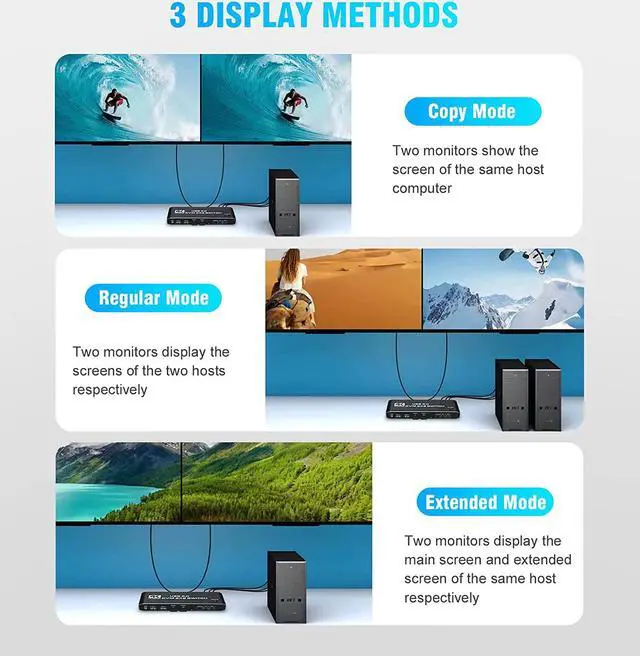
  • Two display modes:
  1. Copy Mode: Two monitors show the screen of the same host computer;
  2. Extended Mode: Two monitors display the main screen and extended screen of the same


Notice:

  1. Computer needs to support 2 screens or more;
  2. If your computer lacks the required connectors, you can use an adapter or conversion cable;
  3. Need to be connected to a power source, which ensures that the devices can work together;
  4. Make sure both computers support HDMI 2.0! You can't connect two computers and set one to 4K@60Hz and the other to 4K@30Hz because it won't work and your screen will stay blank, they both have to be able to display 4K@60Hz or both are 4K @30Hz.
image for this item
Introduction of ports:


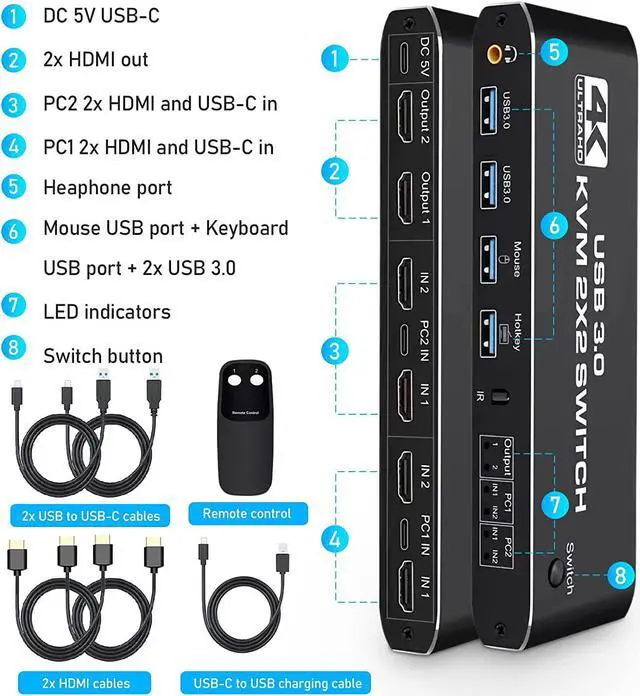
  • PC1: USB C + HDMI IN 1 + HDMI IN 2
  • PC1: USB C + HDMI IN 1 + HDMI IN 2
  • Monitor: HDMI Output 1 + HDMI Output 2
  • Devices: 2 x USB-A 3.0, Mouse, Keyboard (Hotkey)
  • Audio: 3.5mm Jack
  • Power: USB C 5V1A


How to quickly master this KVM switch?

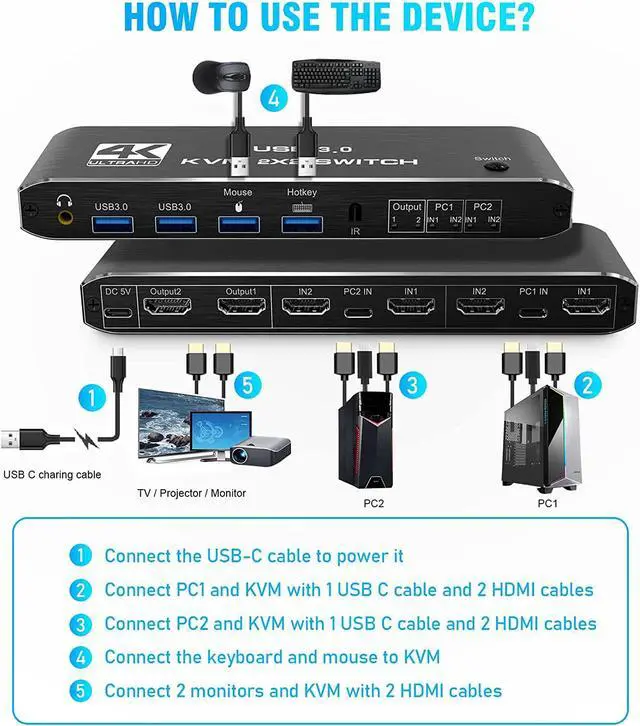
  1. Connect the USB-C cable to power it;
  2. Connect PC1 and KVM with 1 USB C cable and 2 HD MI cables;
  3. Connect PC2 and KVM with 1 USB C cable and 2 HD MI cables;
  4. Connect the keyboard and mouse to KVM;
  5. Connect 2 monitors and KVM with 2 HD MI cables.
image for this item
image for this item
image for this item
3 Quick Switching Methods
  1. Hotkey switch: Ctrl+shift+ 1/2=PC1 /2, Ctrl+Ctrl = PC1/2; Ctrl+Shift+K = enable/disable hotkey function.
  2. Remote Control (battery not included)
  3. Button Switch
image for this item
Metal Housing & Various Systems
  • Using metal aluminum as the shell is not only strong and light, but also has better anti-interference and heat dissipation performance.
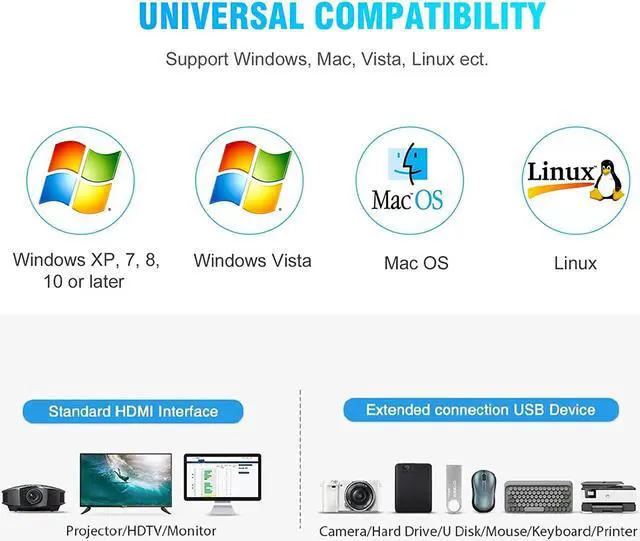
  • Compatible with Windows 10 / 8 / 8.1 / 7 / Vista /XP, Mac OS X, Linux, Chrome OS and other operating systems.
image for this item
Comes with High-quality Cables
  • 1 x Dual Monitor HD MI KVM
  • 2 x HD MI Cable
  • 1 x IR Remote Control
  • 2 x Type-c to USB-A Cable
  • 1 x 5V1A USB C Power Cable
  • 1 x IR Remote Control
  • 1 x User Manual
image for this item
Overview:

The KVM switches allow you to share 2 monitors and 4 USB peripherals between 2 computers, such as a Mouse, Keyboard, Printer, Scanner, USB stick, etc. No need to constantly swap cables or set up complicated tethering software, making your life simpler and more efficient.
Two display modes:
Copy Mode: Two monitors show the screen of the same host computer;
Extended Mode: Two monitors display the main screen and extended screen of the same

Introduction of ports:

PC1: USB C + HDMI IN 1 + HDMI IN 2
Monitor: HDMI Output 1 + HDMI Output 2
Devices: 2 x USB-A 3.0, Mouse, Keyboard (Hotkey)
Audio: 3.5 mm Jack
Power: USB C 5V1A
How to quickly master this KVM switch?

Connect the USB-C cable to power it;
Connect PC1 and KVM with 1 USB C cable and 2 HD MI cables;
Connect PC2 and KVM with 1 USB C cable and 2 HD MI cables;
Connect the keyboard and mouse to KVM;
Connect 2 monitors and KVM with 2 HD MI-cables.

Package included:
1 x Dual Monitor HDMI KVM
2 x HD MI-Cable
1 x IR Remote Control
2 x Type-c to USB-A Cable
1 x 5V 1A USB C Power Cable
1 x IR Remote Control
1 x User Manual

Warranty & Returns

Warranty, Returns, And Additional Information

Warranty

  • Please contact the Seller directly for warranty information. Warranty information may also be found on the Manufacturer's website.
  • CONTACT

Return Policies

  • Return for refund within: 15 days
  • Return for replacement within: 30 days
  • This item is covered by fadaoe Return Policy

Manufacturer Contact Info

LOADING...