




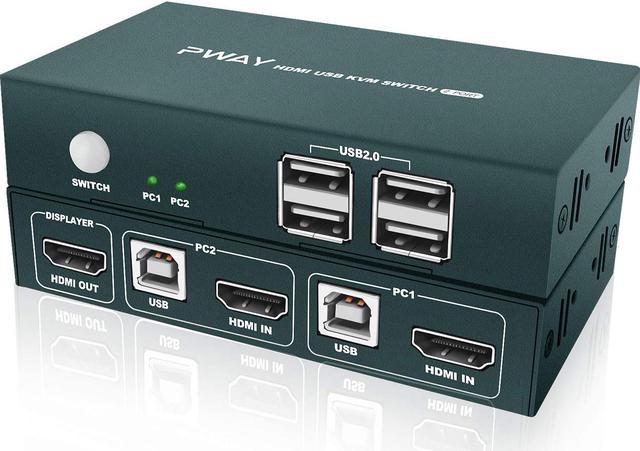


2 x 1 KVM Switch Connects 2 Computers to a Single Keyboard, Mouse and Monitor
HDMI KVM SWITCH can implement free switching between two groups of high-definition video source and USB interface. The equipment has excellent image processing and transmission capacity, make the output signal more smooth and steady, it is a reliable, high performance and efficient way of HDMI USB switch.
How to Connect the KVM switch:
1. Connect USB-B cable and HDMI cable (or DVI/VGA/DP/Type-C to HDMI cables) from your computer 1 to the "PC1" port section of KVM.
2. Connect USB-B cable and HDMI cable (or DVI/VGA/DP/Type-C to HDMI cables) from your computer 2 and "PC2" port section of KVM.
3. Connect the HDMI output port on the KVM to your monitors with HDMI to HDMI/DVI/VGA/DP cables.
4. Connect the mouse and keyboard or USB 2.0 device into the USB 2.0 port on the KVM.

UHD 4K@30Hz VISUAL ENJOYMENT
Supporting high resolution max up to 4K x 2K@30Hz, makes image display more exquisite and realistic. It also supports 3D & 1080P or lower resolution, really enjoy you want.

4 USB 2.0 Port
Having 4 USB 2.0 hubs, transfer rate of up to 480 Mbps. Sharing devices as scanners, printers, flash drives etc.

Powered by USB-B
Powered by USB-B cable, no external power adapter is needed, saving your space, simpler and smarter.

Button Switch
Button switch, not the Hotkey switch, freely switch between 2 computers by pressing a button.

Small and Exquisite
Small volume, even smaller than your palm, does not take up space.

2 IN 1 OUT HDMI KVM SWITCH NEW MODEL
2 computers share one set of keyboard and mouse and monitor, 4 USB 2.0 devices for one button swapping. Saving your space, make your work and life easier and smarter.