





+
+
Overview
Specs
Reviews
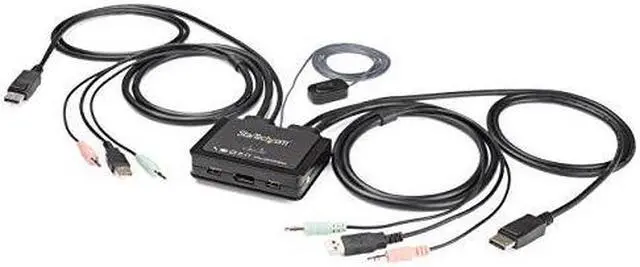
The SV211DPUA4K 2-Port 4K60Hz DisplayPort® Cable KVM Switch with Audio and Remote Switching Control gives you control of two DisplayPort, USB equipped computers with a single monitor, keyboard, mouse and audio peripheral set.
4K60 Picture & Full Audio SupportThe DisplayPort KVM switch supports resolutions up to 4K at 60Hz and can drive one large DP display with ease, maximizing viewing space. With support for separate 3.5 mm stereo audio, the KVM switch delivers full audio compatibility across connected computers.
OS IndependentWhile supporting most PC operating systems, this DP KVM switch is OS independent which means it works with Mac computers (an adapter may be required) and any other laptops, notebooks, and tablets.
Simple to OperateThe switch features a remote push-button on a 1.5 meter (4ft) integrated cable that can be placed in an easily accessible location, as well as keyboard hot-keys, and PC or Mac® compatible software for switching between systems.
StarTech.com KVM Switches & ConsolesStarTech.com offers a wide selection of high-quality KVM switches and KVM-related products to help you access your systems more efficiently without the expense and clutter of extra keyboards, mice and monitors. This USB KVM switch is backed by a 2-year warranty and free lifetime technical support.
The SV211DPUA4K is backed by a 2-year StarTech.com warranty and free lifetime multilingual technical support.
Warranty & Returns
Warranty, Returns, And Additional Information
Warranty
- Limited Warranty period (parts): 1 year
- Limited Warranty period (labor): 1 year
- Read full details
Return Policies
- Return for refund until: January 31, 2027
- Return for replacement until: January 31, 2027
- This item is covered by Newegg.ca's Extended Holiday Return Policy.
- Read full return policy for details.
We want to ensure your holiday shopping this year is hassle-free. That’s why we’re automatically extending our return policies on almost every product! For purchases placed between November 1st, 2026 and December 31, 2026 you will have until January 31, 2027 to return your product.
Manufacturer Contact Info
- Manufacturer Website
- Support Phone: 1-800-265-1844
- Support Email: support@startech.com
- Support Website
- View other products from STARTECH
LOADING...
LOADING...
The StarTech SV211DPUA4K is a two-computer DisplayPort KVM switch that lets you use one monitor, keyboard, mouse, and audio setup with two USB-equipped computers, making it suitable for desk users who switch between systems.
Recommended For
- Desk users who regularly switch between two DisplayPort computers and want to share one monitor, keyboard, and mouse without adding a second peripheral set.
- Home-office users who alternate between a work computer and a personal computer at the same desk, with one DisplayPort monitor running at up to 4K 60Hz.
- Users who want to switch computers from their seat using a keyboard hotkey or a separate push-button, rather than reaching behind the computers to reconnect peripherals.
- Two-computer desk setups that share wired stereo audio along with the monitor, keyboard, and mouse.
Real-World Use Scenarios
- At a home-office desk with a work computer and personal PC, use one DisplayPort monitor, keyboard, and mouse for both; switch computers when moving between work and personal tasks instead of keeping two full sets of desk peripherals.
- For a laptop-and-desktop setup, connect both systems if they have DisplayPort and USB-A; use the wired button or hotkeys to move the shared display and controls between them.
- In a compact workstation, keep one monitor and set of controls for two computers; the integrated cables and small switch help avoid adding another keyboard-and-mouse station.
- When alternating between two computers for tasks that use speakers or headphones, connect the 3.5 mm audio path as well; switching systems can also switch the connected audio setup.
- For a two-computer desk where the switch itself is tucked away, place the wired push-button within reach and use it to change the active computer without reaching behind the monitor.
Spec Summary
| Attribute | Value |
|---|---|
| Best For | Switching a USB and DisplayPort setup between two computers |