
Your Browsing History

Meet Your Seller



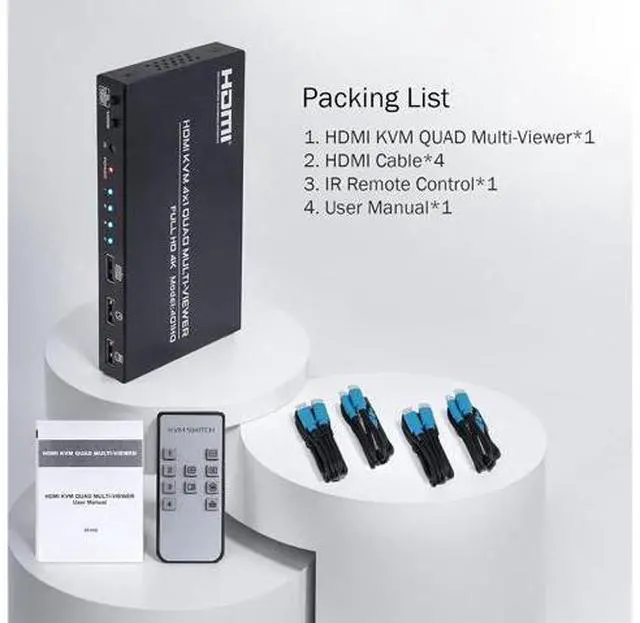


4 in 1 Out KVM HDMI Switch, 4K Quad Multi Viewer 4x1 Seamless Switcher with Keyboard Hotkey, 4 Port HDMI KVM Quad Multi-Viewer 4 Computers share 1 Monitor Keyboard Mouse with IR Remote Control
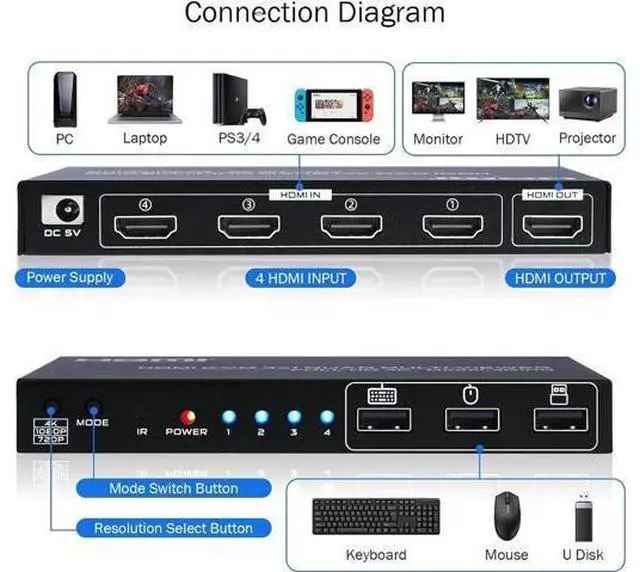
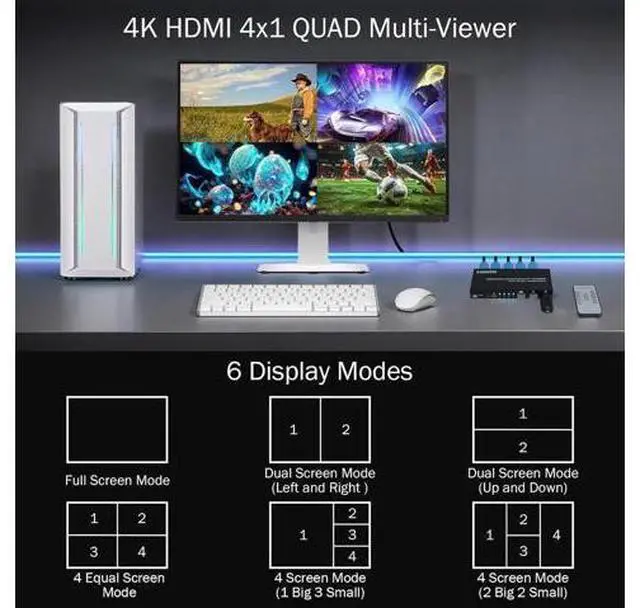
- 4x1 Quad Multiviewer KVM Switch: This 4 in 1 out HDMI KVM Switch allows you to control 4 computers/ PC with 1 set of monitor, mouse and keyboard. Seamless switching between 4 HDMI sources without frequently changing devices.
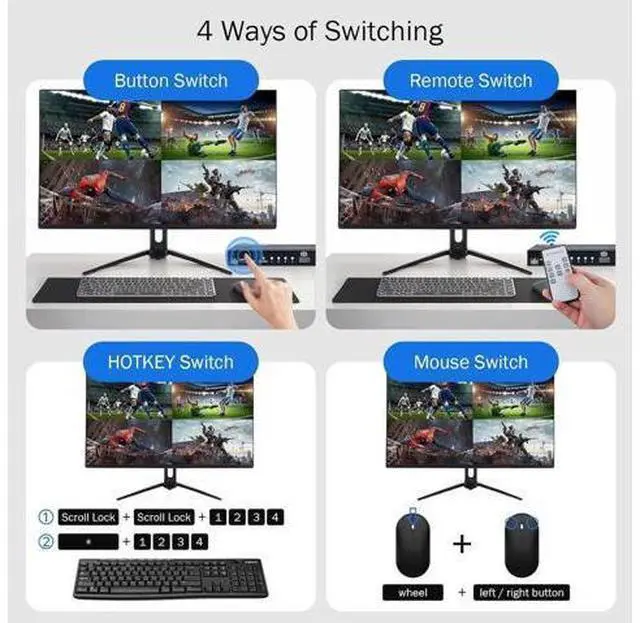
- Hotkey Switching for USB Devices: (1)scroll lock + scroll lock + 1/2/3/4; (2)numeric keypad * + 1/2/3/4 (Simultaneously press); (3)mouse wheel + left / right mouse button (Simultaneously press).
- On/Off multi-screen crossing mode: scroll lock + scroll lock + F12. Crossing mode allows keyboard and mouse cross between HDMI sources, which means you can control max 4 computer at the same time.
- Multi screen synchronous control mode: numeric keypad * + 0 (Simultaneously press). Synchronous control mode means the USB devices will operate multi HDMI sources with the same way at the same time.
- Keyboard shortcut replacement: The above shortcut key [Scroll lock] can be replaced with Ctrl or CapsLock or NumLock according to personal habits.
+
+
Overview
Specs
Reviews
4K HDMI KVM Switch 4 in 1 out Quad Multiviewer supports 4 Computers share 1 Monitor, Keyboard, Mouse or other USB devices at the same time
Hotkey Notes:
1.
Keyboard shortcut replacement: (The following shortcut key "Scroll lock" can be replaced with Ctrl / CapsLock / NumLock according to personal habits) scroll lock + scroll lock + "Ctrl / CapsLock / NumLock " + Enter
2. Single screen control switching for
USB devices: 1) scroll lock + scroll lock + 1/2/3/4 2) numeric keypad * + 1/2/3/4 (Simultaneously press) 3) Switch to the front / back screen of the current control screen: Press the mouse wheel + left / right mouse button (Simultaneously press) Follow the above hotkey to choose which computer that the USB devices is controlling when multi HDMI sources showing on 1 monitor.
3.
On/Off multi-screen keyboard-and-mouse crossing mode: scroll lock + scroll lock + F12 Crossing mode allows keyboard and mouse cross between HDMI sources, which means you can control max 4 computer at the same time.
4.
Multi screen synchronous control mode: numeric keypad * + 0 (Simultaneously press) Synchronous control mode means the USB devices will operate multi HDMI sources with the same way at the same time.
5.
Restore factory settings: scroll lock + scroll lock + ESC / R
Hotkey Notes:
1.
Keyboard shortcut replacement: (The following shortcut key "Scroll lock" can be replaced with Ctrl / CapsLock / NumLock according to personal habits) scroll lock + scroll lock + "Ctrl / CapsLock / NumLock " + Enter
2. Single screen control switching for
USB devices: 1) scroll lock + scroll lock + 1/2/3/4 2) numeric keypad * + 1/2/3/4 (Simultaneously press) 3) Switch to the front / back screen of the current control screen: Press the mouse wheel + left / right mouse button (Simultaneously press) Follow the above hotkey to choose which computer that the USB devices is controlling when multi HDMI sources showing on 1 monitor.
3.
On/Off multi-screen keyboard-and-mouse crossing mode: scroll lock + scroll lock + F12 Crossing mode allows keyboard and mouse cross between HDMI sources, which means you can control max 4 computer at the same time.
4.
Multi screen synchronous control mode: numeric keypad * + 0 (Simultaneously press) Synchronous control mode means the USB devices will operate multi HDMI sources with the same way at the same time.
5.
Restore factory settings: scroll lock + scroll lock + ESC / R
Warranty & Returns
Warranty, Returns, And Additional Information
Warranty
- Please contact the Seller directly for warranty information. Warranty information may also be found on the Manufacturer's website.
- CONTACT
Return Policies
- Return for refund within: 30 days
- Return for replacement within: 90 days
- This item is covered by ApexGadgets Return Policy
Manufacturer Contact Info
- For a directory of all our manufacturers, please click below.
- Manufacturers Directory
LOADING...