


- Free 15-day Returns
$281.97
Ships from China.

Meet Your Seller

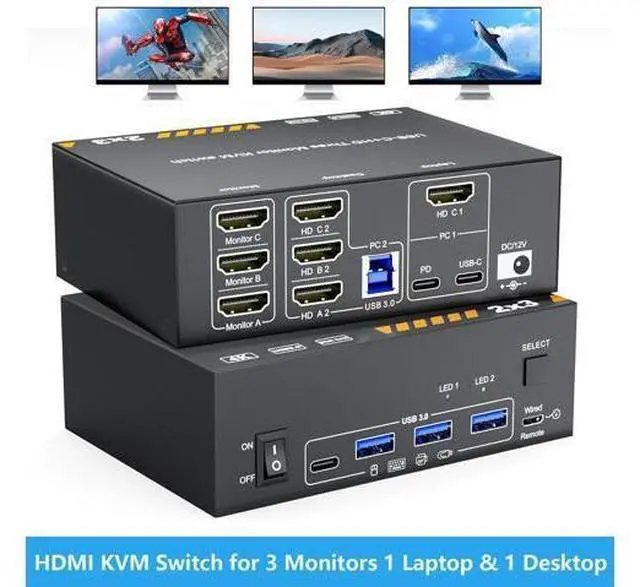



DIXSG HDMI KVM Switch for 1 Laptop & 1 Desktop Share 3 Monitors, 4K HDMI USB Switch, 3 Monitors KVM Switches for 1 Laptop & 1 Desktop PC Share Monitor with 3 USB 3.0 Ports, Keyboard, Mouse & Printer
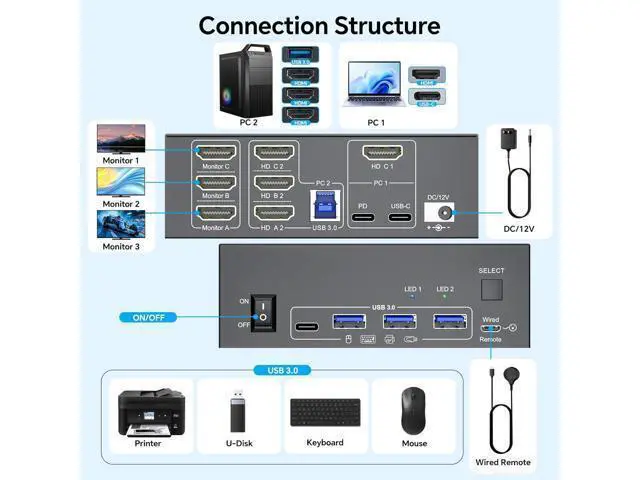
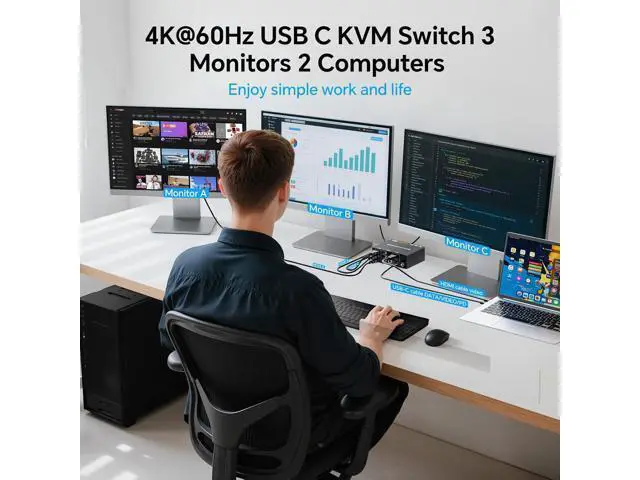
- KVM Switch 3 Monitors for 1 Desktop &1 Laptop: This KVM switch enables control of 2 computers with 3 monitors through a HDMI/USB C matrix. It also allows shared use of 3 USB 3.0 devices (such as keyboards, mouse, printers) and 1 USB C port via a single hub -- cutting down on desktop clutter while increasing multitasking efficiency by 20%.
- Support for High Resolution & High Refresh Rate: Supports resolutions and refresh rates up to 4K@60Hz/30Hz. Tip: For an optimal experience, use HDMI 2.1 and USB C cables. When distance permits, shorter cables are preferred for better performance.
- Easy Cable Management with the 3-Monitor KVM Switch: The KVM switch features thoughtfully arranged cable ports, designed to facilitate neat, straight connections. This eliminates cable tangles and ensures a clean, streamlined look for your setup.
- Effortless Multitasking & a Clutter-Free Setup: No more wasting time swapping cables! This KVM switch lets you manage multiple devices from a single central hub-n
+
+
Overview
Specs
Reviews
Features: KVM
Switch: 3 Monitors for 1 Desktop &1 LaptopThis KVM switch enables control of 2 computers with 3 monitors through a HDMI/USB C matrix. It also allows shared use of 3 USB 3.0 devices (such as keyboards, mouse, printers, and cameras) and 1 USB C port via a single hubcutting down on desktop clutter while increasing multitasking efficiency by 20%. Support for High Resolution & High Refresh RateThis KVM switch supports resolutions and refresh rates up to 4K@60Hz/30Hz.
Tip: For an optimal experience, use HDMI 2.1 and USB C cables. When distance permits, shorter cables are preferred for better performance. Easy Cable Management with the 3-Monitor KVM SwitchThe KVM switch features thoughtfully arranged cable ports, designed to facilitate neat, straight connections. This eliminates cable tangles and ensures a clean, streamlined look for your setup. Effortless Multitasking & a Clutter-Free SetupNo more wasting time swapping cables! This 2-PC KVM switch lets you manage multiple devices from a single central hubno repeated unplugging and reinserting required. Its the perfect choice for busy workstations, technical setups, or home entertainment centers. 2 Display Modes for
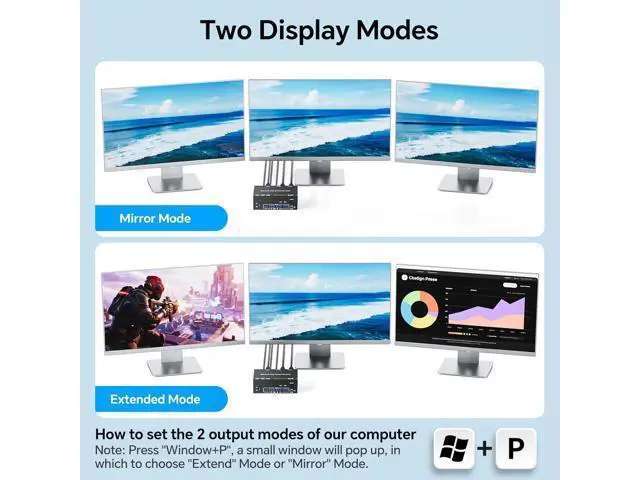
All NeedsExtended Mode: Transform 3 screens into your ultimate multitasking workspaceideal for editing documents, coding, and monitoring data all at the same time.
Duplicate Mode: Use the HDMI switching function to seamlessly sync content across all displaysgreat for presentations, classroom settings, or sharing movies with everyone in the room.
Switch: 3 Monitors for 1 Desktop &1 LaptopThis KVM switch enables control of 2 computers with 3 monitors through a HDMI/USB C matrix. It also allows shared use of 3 USB 3.0 devices (such as keyboards, mouse, printers, and cameras) and 1 USB C port via a single hubcutting down on desktop clutter while increasing multitasking efficiency by 20%. Support for High Resolution & High Refresh RateThis KVM switch supports resolutions and refresh rates up to 4K@60Hz/30Hz.
Tip: For an optimal experience, use HDMI 2.1 and USB C cables. When distance permits, shorter cables are preferred for better performance. Easy Cable Management with the 3-Monitor KVM SwitchThe KVM switch features thoughtfully arranged cable ports, designed to facilitate neat, straight connections. This eliminates cable tangles and ensures a clean, streamlined look for your setup. Effortless Multitasking & a Clutter-Free SetupNo more wasting time swapping cables! This 2-PC KVM switch lets you manage multiple devices from a single central hubno repeated unplugging and reinserting required. Its the perfect choice for busy workstations, technical setups, or home entertainment centers. 2 Display Modes for
All NeedsExtended Mode: Transform 3 screens into your ultimate multitasking workspaceideal for editing documents, coding, and monitoring data all at the same time.
Duplicate Mode: Use the HDMI switching function to seamlessly sync content across all displaysgreat for presentations, classroom settings, or sharing movies with everyone in the room.
Warranty & Returns
Warranty, Returns, And Additional Information
Warranty
- Please contact the Seller directly for warranty information. Warranty information may also be found on the Manufacturer's website.
- CONTACT
Return Policies
- Return for refund within: 15 days
- Return for replacement within: 30 days
- This item is covered by TechMax Depot Return Policy
Manufacturer Contact Info
- For a directory of all our manufacturers, please click below.
- Manufacturers Directory
LOADING...