
Your Browsing History
- Free 30-day Returns
$373.99
Ships from Hong Kong.
Sold by Guhong Trade'Shop
Shipped by Guhong Trade'Shop

Meet Your Seller

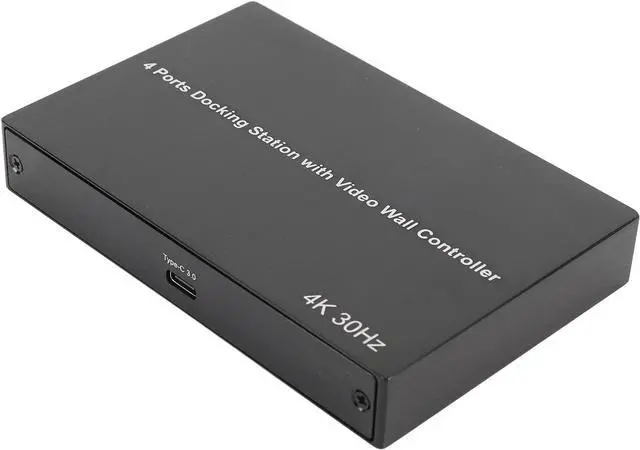

KUIDAMOS USB 3.0 to Quad HD Interface Adapter for Wins, 4K30Hz X 2 1080P 60Hz X 2 Docking Station Efficient Display Expansion for Gaming, Office Work, Streaming Aluminum Alloy Material (US Plug)
- [MULTIPLE DISPLAY SUPPORT] Easily connect up to four HD Multimedia Interface displays with 4K 30Hz x 2 and 1080P 60Hz x 2. Enjoy multitasking, gaming, or streaming on external UHD screens.
- [ENHANCED WORKFLOW] Included software supports multitasking and window arrangement. Simply drag and drop onto chosen displays to zoom, split, or zoom out for efficient workflow.
- [HIGH-SPEED FILE TRANSFER] Type C 3.0 port transmits files at double the speed of USB 2.0, ideal for quick file management. Transfer a 5GB movie in just 1-3 seconds.
- [WIDE COMPATIBILITY] Compatible with various operating systems including for Wins 11 10 7 8.1, OS X 10.10+, and 7.1+. Ensure versatile usage across different devices.
- [PLUG AND PLAY] Easy to use without complicated setups. Simply plug in the adapter and start enjoying the of multiple displays and high-speed data transfer.
+
+
Overview
Specs
Reviews
[MULTIPLE DISPLAY SUPPORT] Easily connect up to four HD Multimedia Interface displays with 4K 30Hz x 2 and 1080P 60Hz x 2. Enjoy multitasking, gaming, or streaming on external UHD screens.
[ENHANCED WORKFLOW] Included software supports multitasking and window arrangement. Simply drag and drop onto chosen displays to zoom, split, or zoom out for efficient workflow.
[HIGH-SPEED FILE TRANSFER] Type C 3.0 port transmits files at double the speed of USB 2.0, ideal for quick file management. Transfer a 5GB movie in just 1-3 seconds.
[WIDE COMPATIBILITY] Compatible with various operating systems including for Wins 11 10 7 8.1, OS X 10.10+, and 7.1+. Ensure versatile usage across different devices.
[PLUG AND PLAY] Easy to use without complicated setups. Simply plug in the adapter and start enjoying the of multiple displays and high-speed data transfer.
[ENHANCED WORKFLOW] Included software supports multitasking and window arrangement. Simply drag and drop onto chosen displays to zoom, split, or zoom out for efficient workflow.
[HIGH-SPEED FILE TRANSFER] Type C 3.0 port transmits files at double the speed of USB 2.0, ideal for quick file management. Transfer a 5GB movie in just 1-3 seconds.
[WIDE COMPATIBILITY] Compatible with various operating systems including for Wins 11 10 7 8.1, OS X 10.10+, and 7.1+. Ensure versatile usage across different devices.
[PLUG AND PLAY] Easy to use without complicated setups. Simply plug in the adapter and start enjoying the of multiple displays and high-speed data transfer.
Warranty & Returns
Warranty, Returns, And Additional Information
Warranty
- Please contact the Seller directly for warranty information. Warranty information may also be found on the Manufacturer's website.
- CONTACT
Return Policies
- Return for refund within: 30 days
- Return for replacement within: 90 days
- This item is covered by Guhong Trade'Shop Return Policy
Manufacturer Contact Info
- For a directory of all our manufacturers, please click below.
- Manufacturers Directory
LOADING...