1MULTI-DEVICE WORKFLOW2CONNECTION INSTRUCTIONS3WIDELY COMPATIBLE1MORE CONVENIENT2LIGHTWEIGHT AND PORTABLE1TRAVEL2CAFE3CABIN There's a problem with my keyboard that I can't solve, what should I do?
Please check the manual and find MEETION support team immediately, we will be 100% responsible for each of our products and customers.
What can I do if MEETION keyboard Fail to connect
1. Charge keyboard for 30 minutes. On your device, delete/remove/forget the previous connection record.
2. On your device, turn Bluetooth off and turn Bluetooth on again.
3. Follow the Pairing Instruction to connect it again.
Why is there input delay or key skipping when typing?
1. Please make sure the keyboard is fully charged, otherwise charge the keyboard.
2. Ensure connection is within 33 feet.
3. Please try to stay away from metal and other sources of wireless signals.
Is there a sleep mode to save power? Can I change this mode?
Yes, it has an automatic sleep mode to save energy and extend battery life after 20 min of inactivity. This mode cannot be changed.
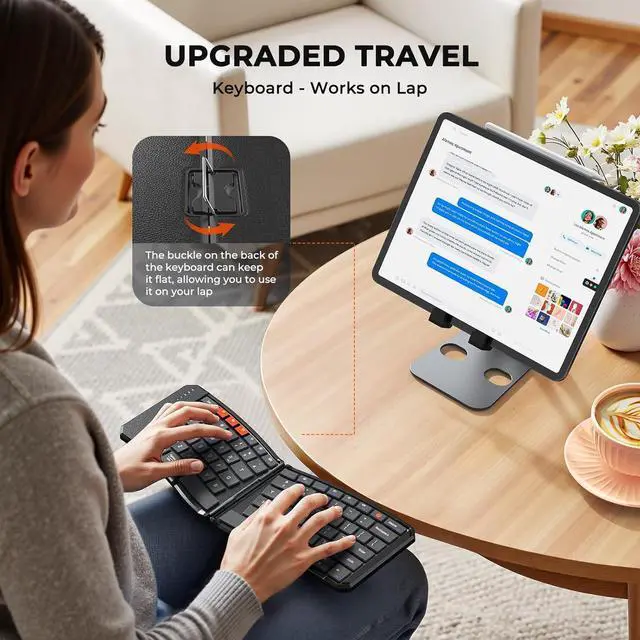
Can this keyboard be used as a wired USB keyboard? Do the hinges lock in place? Can I use it on my lap?
1. This keyboard can only be connected via Bluetooth, and the charging cable is for charging purposes only!
2. The hinge can be locked to keep the keyboard flat, allowing it to be used on your knees (as long as your knees aren't too far apart).
TRANSFORMED YOUR ON-THE-GO WORK SETUP There's a problem with my keyboard that I can't solve, what should I do?
What can I do if MEETION keyboard Fail to connect
Why is there input delay or key skipping when typing?
Is there a sleep mode to save power? Can I change this mode?
Can this keyboard be used as a wired USB keyboard? Do the hinges lock in place? Can I use it on my lap?



 We‘re shipping as usual! The Canada Post strike only affects certain remote deliveries and PO Boxes. Details
 Holiday Shipping Details & Extended Holiday Returns


