


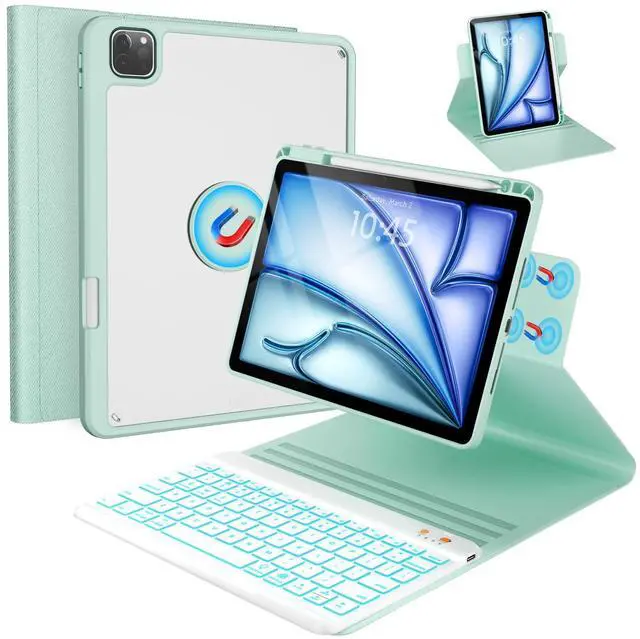



BLUTLOTUS 360 ROTATABLE DETACHABLE KEYBOARD CASE FOR IPAD
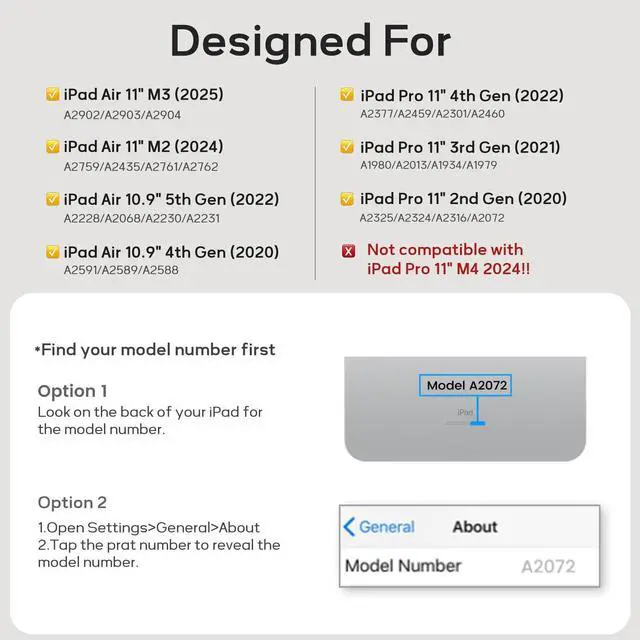
iPad Air 4th/5th Gen 2020/2022 10.9 inch Model:A2325/A2324/A2316/A2072/A2591/A2589/A2588
iPad Pro 4th Generation 2022 11 inch Model:A2435/A2759/A2761/A2762
iPad Pro 3rd Generation 2021 11 inch Model:A2301/A2377/A2459/A2460
iPad Pro 2nd Generation 2020 11 inch Model:A2228/ A2068/ A2230/ A2231
iPad Pro 1st Generation 2018 11 inch Model:A1980/A2013/A1934/A1979

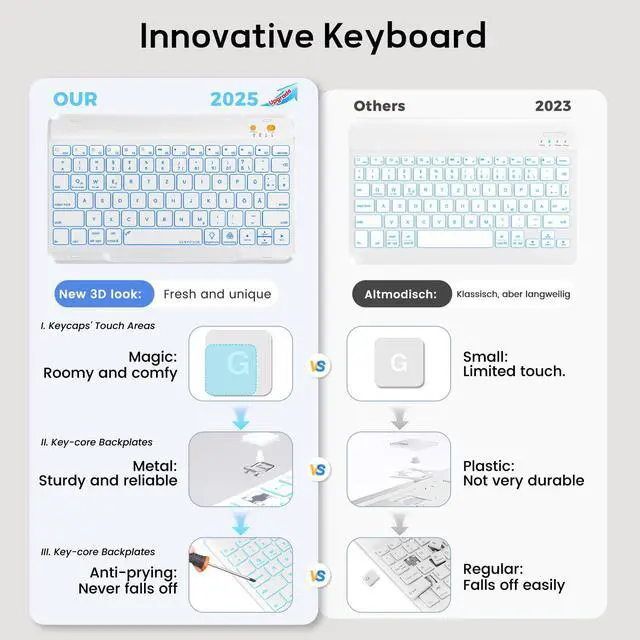
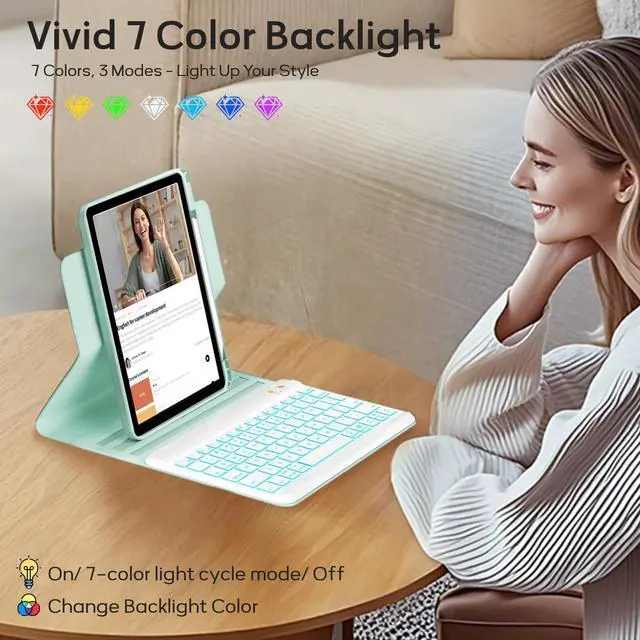
7 Color Backlit Keyboard
Three Model of The Backlit Color:
1.Press the "light bulb" key(Next to the space bar) once:Turn on the keyboard backlit,then you can press the "RGB" key to change color one by one.2.Press the "light bulb" key twice to turn on the 7 light cycle mode.3.Press the third time to turn off the backlit.
Creative Powerful Magnet

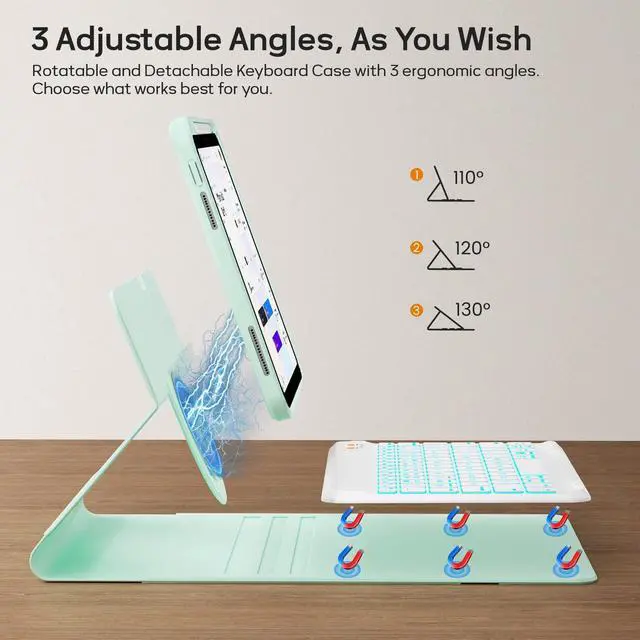
The powerful magnet let you put the case on in seconds.And you can attach your device to the frige easily,so you can do other things while cooking.
Detachable Clear Case Design

The detachable design allows you to use it as a separate protective cover, which provides convenience for your daily use or travel.
Comparison of Each Series
 360 Rotatable for 10.9/11 |  360 Rotatable for 10.9/11 |  360 Rotatable for 10.9/11 |  360 Rotatable for 10.9/11 |  for iPad 10.9"/11" |  Leather Case for 10.9/11 |  Leather Case for 10.9/11 | |
|---|---|---|---|---|---|---|---|
Customer Reviews | — | — | — | — | — | — | — |
Price | — | — | — | — | — | — | — |
360 Rotatable | ? | ? | ? | ? | ? | ? | ? |
Detachable Magnetic Case | ? | ? | ? | ? | ? | ? | ? |
7 Color Backlit | ? | ? | ? | ? | ? | ? | ? |
Keyboard Color | Black,White,Teal | Black,White,Teal | Black,White,Teal | Black,Teal,Purple,Blue,Pink | Black,White,Teal | - | - |
Year of Release | 2022/2021/2020/2018 | 2022/2021/2020/2018 | 2022/2021/2020/2018 | 2022/2021/2020/2018 | 2022/2021/2020/2018 | 2022/2021/2020/2018 | 2022/2021/2020/2018 |
How to connect the bluetooth keyboard?
1.Turn on the keyboard, press the "connect" button for 3s until the WIFI light flashes.
2.Press "Fn" plus "C" at the same time to turn on the bluetooth of the keyboard.
3.Turn on the Bluetooth of your iPad and choose “Bluetooth Keyboard" to adapt.
How to keep the keyboard color unchanged?
After turning on the keyboard, press the "light bulb" key(Next to the space bar) to turn on the keyboard backlit. Then press the RGB button next to it to switch to the color you like. If you want to switch to another color later, press the "RGB" key.
What's in the package?
You will receice 1*User Manual,1*Keyboard,1*PU Leather Case,1*USB Cable.(*There is no pen or charger included!)

A New Way to Use Your iPad
BLUTLOTUS 360 ROTATABLE DETACHABLE KEYBOARD CASE FOR IPAD
iPad Air 4th/5th Gen 2020/2022 10.9 inch Model:A2325/A2324/A2316/A2072/A2591/A2589/A2588
iPad Pro 4th Generation 2022 11 inch Model:A2435/A2759/A2761/A2762
iPad Pro 3rd Generation 2021 11 inch Model:A2301/A2377/A2459/A2460
iPad Pro 2nd Generation 2020 11 inch Model:A2228/ A2068/ A2230/ A2231
iPad Pro 1st Generation 2018 11 inch Model:A1980/A2013/A1934/A1979

7 Color Backlit Keyboard
Three Model of The Backlit Color:
1.Press the "light bulb" key(Next to the space bar) once:Turn on the keyboard backlit,then you can press the "RGB" key to change color one by one.2.Press the "light bulb" key twice to turn on the 7 light cycle mode.3.Press the third time to turn off the backlit.
Creative Powerful Magnet

The powerful magnet let you put the case on in seconds.And you can attach your device to the frige easily,so you can do other things while cooking.
Detachable Clear Case Design

The detachable design allows you to use it as a separate protective cover, which provides convenience for your daily use or travel.
Comparison of Each Series
360 Rotatable for 10.9/11 | 360 Rotatable for 10.9/11 | 360 Rotatable for 10.9/11 | 360 Rotatable for 10.9/11 | for iPad 10.9"/11" | Leather Case for 10.9/11 | Leather Case for 10.9/11 |
|---|---|---|---|---|---|---|
| Customer Reviews | ||||||
| — | — | — | — | — | — | — |
| Price | ||||||
| — | — | — | — | — | — | — |
| 360 Rotatable | ||||||
| ? | ? | ? | ? | ? | ? | ? |
| Detachable Magnetic Case | ||||||
| ? | ? | ? | ? | ? | ? | ? |
| 7 Color Backlit | ||||||
| ? | ? | ? | ? | ? | ? | ? |
| Keyboard Color | ||||||
| Black,White,Teal | Black,White,Teal | Black,White,Teal | Black,Teal,Purple,Blue,Pink | Black,White,Teal | - | - |
| Year of Release | ||||||
| 2022/2021/2020/2018 | 2022/2021/2020/2018 | 2022/2021/2020/2018 | 2022/2021/2020/2018 | 2022/2021/2020/2018 | 2022/2021/2020/2018 | 2022/2021/2020/2018 |
How to connect the bluetooth keyboard?
1.Turn on the keyboard, press the "connect" button for 3s until the WIFI light flashes.
2.Press "Fn" plus "C" at the same time to turn on the bluetooth of the keyboard.
3.Turn on the Bluetooth of your iPad and choose “Bluetooth Keyboard" to adapt.
How to keep the keyboard color unchanged?
After turning on the keyboard, press the "light bulb" key(Next to the space bar) to turn on the keyboard backlit. Then press the RGB button next to it to switch to the color you like. If you want to switch to another color later, press the "RGB" key.
What's in the package?
You will receice 1*User Manual,1*Keyboard,1*PU Leather Case,1*USB Cable.(*There is no pen or charger included!)