
Your Browsing History



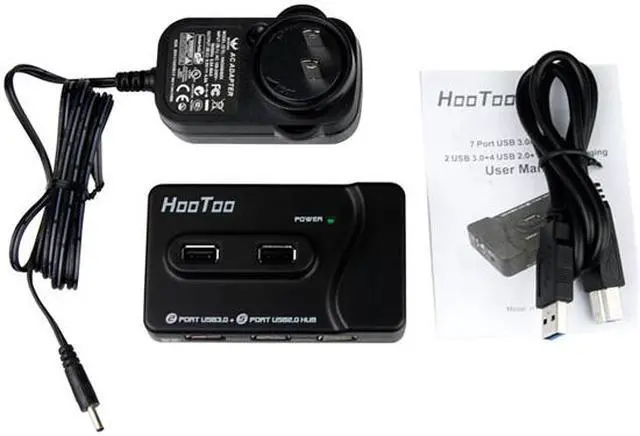


HooToo HT-UH003 7-Port Hub - (2) USB 3.0 (4) USB 2.0, (1) 5V/2A Charging Port, (1) 5V/4A Power Adapter, and 3ft. USB 3.0 Data Cable
- Add up to 7-Port
- USB 2.0 (4) & USB 3.0 (2)
- 5V/2A Power Adapter
- USB Data Cable
- Plug-and-Play function
Overview
Specs
Reviews (15)
HooToo HT-UH003 mounts as many as 6 devices to your computer, while charging another. A 2 USB 3.0 and 4 USB 2.0 combo meets your various needs. Charge your iPhone, iPad, or other mobile devices by way of a super-fast 5V 2A port. The heavy-duty 5V/4A adapter included with the device supplies 48W of power, providing more stable input and output.
Features:
- [4+2+1]: 4 USB 2.0 ports, 2 USB 3.0 ports and 1 5V/2A charging port which can charge various mobile devices, such as smartphones, iPads, iPhones and more with an output current up to 2A.
- USB supports data transfer rate of super speed up to 5Gbps, high speed up to 480Mbps, and full speed up to 12Mbps
- Latest VIA VL812 chipset offers stable high speech connection compatible with Windows, Mac and Linux systems
- With a 5V/4A PSU powered and over current protection design
- Plug-n-play, hot swappable. No driver needed
Specifications:
- USB Type: USB 3.0 + USB 2.0 + Charging Port
- No. of Ports: 7
- Weight: 2.55 oz
- Dimension: L*W*H: 3.91*2.36*0.79(inches)
Operation Environment:
Windows 7, 8, XP, Vista; Mac OS X or above
Package Includes:
- 1 * USB 3.0/2.0 7 Port Hub
- 1 * 5V/4A Power Adapter
- 1 * 3ft USB 3.0 Cable
- 1 * User Manual.
Note:
- 2.4 GHz wireless devices may not work in close proximity to USB 3.0 devices or hubs.
- The charging port (5V/2A) is designed for charging your mobile devices only and will not support data transfers..
- Mac OS X Lion 10.7.4 needs to be upgraded to Mountain Lion 10.8.2 or later. 2012 June MacBook Air and MacBook Pro users can download "MacBook Air and MacBook Pro Update 2.0” from the official Apple website as improvement of USB 3.0 performance and compatibility.
HooToo® Superior Product Quality
We only supply superior quality products. All of our products are brand new and manufactured by ours large hi-tech factories. All products strictly follow the standards of CE, FCC and RoHS, and are carefully inspected by a responsible QA team before packaging.
Frequently Asked Question:
1. Why is the transfer rate far slower than 5Gbps as promoted?
A: The USB 3.0 transfer rate of 5Gbps, with a theoretical transfer speed of 625MB/s, is about 10 times faster than of the mainstream USB 2.0 transfer rate of 480Mb/s, which has a theoretical transfer speed of 60 MB/s. Taking current usage conditions into consideration, the transfer speed can achieve about 3 times that of USB 2.0. The actual transfer speed depends on the specific environment the product is used in.
2. The hub keeps suddenly disconnecting with the device while transferring data. Why is this happening?
A: If this problem is occurring with properly-installed devices, it is usually due to insufficient power supply. When the hub is transferring data - especially big data - make sure it is connected to a power source. In addition, we recommend connecting the hub to your computer with the cable provided. If not, please make sure the cable length is less than 1m, so as to ensure stable data transfer.B: Please gently push and pull the outer devices cable to let it better connected to the hub and shake the hub gently to see if they are connected solidly before use it to transfer data.
3. The devices are not being identified by my computer when connected to the USB hub, but they are being identified when connected directly to the computer. Why is this happening?
A: This problem may be the result of one of the following causes:
a. Insufficient power supply. Please connect the USB hub to a power source.
b. Compatibility between the motherboard and system. Please try refreshing the BIOS in the motherboard.
c. System or BIOS settings. The USB may be disabled in your BIOS or operating system. Please turn on the computer, press F2 or DEL to enter the BIOS interface, then select “Enable USB device”.
d. Incorre
Features:
- [4+2+1]: 4 USB 2.0 ports, 2 USB 3.0 ports and 1 5V/2A charging port which can charge various mobile devices, such as smartphones, iPads, iPhones and more with an output current up to 2A.
- USB supports data transfer rate of super speed up to 5Gbps, high speed up to 480Mbps, and full speed up to 12Mbps
- Latest VIA VL812 chipset offers stable high speech connection compatible with Windows, Mac and Linux systems
- With a 5V/4A PSU powered and over current protection design
- Plug-n-play, hot swappable. No driver needed
Specifications:
- USB Type: USB 3.0 + USB 2.0 + Charging Port
- No. of Ports: 7
- Weight: 2.55 oz
- Dimension: L*W*H: 3.91*2.36*0.79(inches)
Operation Environment:
Windows 7, 8, XP, Vista; Mac OS X or above
Package Includes:
- 1 * USB 3.0/2.0 7 Port Hub
- 1 * 5V/4A Power Adapter
- 1 * 3ft USB 3.0 Cable
- 1 * User Manual.
Note:
- 2.4 GHz wireless devices may not work in close proximity to USB 3.0 devices or hubs.
- The charging port (5V/2A) is designed for charging your mobile devices only and will not support data transfers..
- Mac OS X Lion 10.7.4 needs to be upgraded to Mountain Lion 10.8.2 or later. 2012 June MacBook Air and MacBook Pro users can download "MacBook Air and MacBook Pro Update 2.0” from the official Apple website as improvement of USB 3.0 performance and compatibility.
HooToo® Superior Product Quality
We only supply superior quality products. All of our products are brand new and manufactured by ours large hi-tech factories. All products strictly follow the standards of CE, FCC and RoHS, and are carefully inspected by a responsible QA team before packaging.
Frequently Asked Question:
1. Why is the transfer rate far slower than 5Gbps as promoted?
A: The USB 3.0 transfer rate of 5Gbps, with a theoretical transfer speed of 625MB/s, is about 10 times faster than of the mainstream USB 2.0 transfer rate of 480Mb/s, which has a theoretical transfer speed of 60 MB/s. Taking current usage conditions into consideration, the transfer speed can achieve about 3 times that of USB 2.0. The actual transfer speed depends on the specific environment the product is used in.
2. The hub keeps suddenly disconnecting with the device while transferring data. Why is this happening?
A: If this problem is occurring with properly-installed devices, it is usually due to insufficient power supply. When the hub is transferring data - especially big data - make sure it is connected to a power source. In addition, we recommend connecting the hub to your computer with the cable provided. If not, please make sure the cable length is less than 1m, so as to ensure stable data transfer.B: Please gently push and pull the outer devices cable to let it better connected to the hub and shake the hub gently to see if they are connected solidly before use it to transfer data.
3. The devices are not being identified by my computer when connected to the USB hub, but they are being identified when connected directly to the computer. Why is this happening?
A: This problem may be the result of one of the following causes:
a. Insufficient power supply. Please connect the USB hub to a power source.
b. Compatibility between the motherboard and system. Please try refreshing the BIOS in the motherboard.
c. System or BIOS settings. The USB may be disabled in your BIOS or operating system. Please turn on the computer, press F2 or DEL to enter the BIOS interface, then select “Enable USB device”.
d. Incorre
Warranty & Returns
Warranty, Returns, And Additional Information
Return Policies
- Return for refund within: 30 days
- Return for replacement within: 30 days
- This item is covered by Newegg.ca's Standard Return Policy.
- Read full return policy for details.
Manufacturer Contact Info
- Manufacturer Website
- Support Phone: 888-456-8468EXT2
- Support Email: [email protected]
- Support Website
- View other products from HooToo
LOADING...