








Corsair SCIMITAR RGB ELITE MOBA/MMO Gaming Mouse, 18,000 DPI, 17 Programmable Buttons, Adjustable Key Slider Side Panel, Black
- Loaded with 17 fully programmable buttons, ideal for performing frequent actions and executing complex macros in MMOs and MOBAs.
- Unique Key Slider control system lets you reposition the 12 side buttons to comfortably fit your grip.
- Equipped with a custom PixArt PMW3391 native 18,000 DPI optical sensor, adjustable in 1 DPI resolution steps, for highly accurate and customizable tracking.
- The SCIMITAR RGB ELITE's 50 million click-rated Omron switches, durably constructed scroll wheel, and braided cable ensure that it stands up to the wear-and-tear of extended gaming.
- Sculpted to comfortably fit the contours of your palm, regardless of hand size or grip style, with a right-side finger rest for added support.
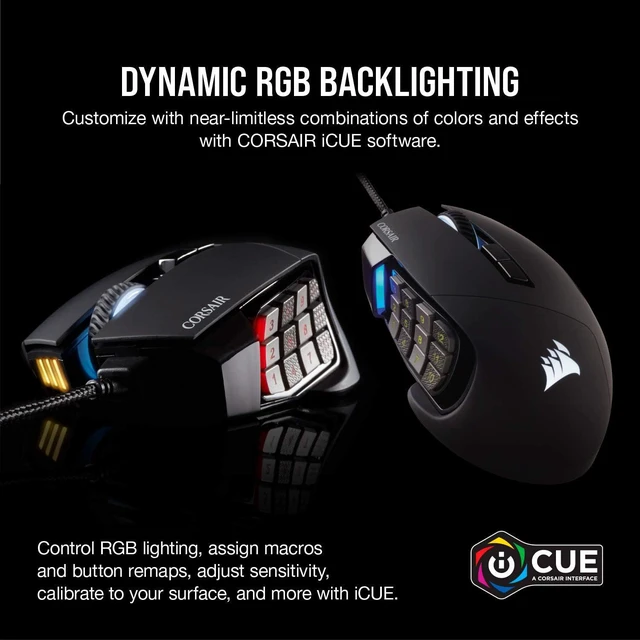
- Dynamic RGB backlighting with near limitless customization across four lighting zones.
- Powerful CORSAIR iCUE software enables RGB lighting control, sophisticated macro programming and button remaps, sensitivity customization, surface calibration, and more.
Overview
Specs
Reviews (91)
Warranty & Returns
Warranty, Returns, And Additional Information
Warranty
- Limited Warranty period (parts): 2 years
- Limited Warranty period (labor): 2 years
- Read full details
Return Policies
- Return for refund within: 30 days
- Return for replacement within: 30 days
- This item is covered by Newegg.ca's Standard Return Policy.
- Read full return policy for details.
Manufacturer Contact Info
- Manufacturer Product Page
- Manufacturer Website
- Support Phone: 1-888-222-4346
- Support Website
- View other products from Corsair
LOADING...
LOADING...
The Corsair SCIMITAR RGB ELITE is a wired right-handed MMO/MOBA gaming mouse with 17 programmable buttons, an adjustable 12-button side panel, and an 18,000 DPI optical sensor, making it ideal for players who want fast access to macros, keybind-heavy skills, and finely tuned control.
Recommended For
- MOBA players or ARPG users who benefit from quick access to item slots, pings, push-to-talk, and repeated ability bindings on the thumb side, especially when they prefer keeping their left hand focused on movement keys.
- MMO players who want most of their rotation, utility, or targeting mapped to the mouse instead of relying on keyboard reaches. The 12-button side grid and macro support are consistently positioned for this style of play.
Real-World Use Scenarios
- For buyers who want onboard-style convenience, setup is the main caveat: remapping and profile management typically depend on Corsair iCUE, so the mouse is a better fit for users willing to spend time configuring buttons than for plug-and-play use.
- For general FPS or everyday desktop use, the mouse is usable but usually feels more specialized than necessary; users who do not rely on many side-button binds may find the extra thumb buttons add complexity without much benefit.
- For editing or creative apps, users can assign timeline, tool, or macro shortcuts to the extra buttons, which can reduce repeated keyboard commands and speed up routine actions more than precision-focused work.
- In games with many keybinds, the mouse works best for users who want to move core hotkeys off the keyboard; the likely experience is better one-hand access to combat and utility actions, but with an adjustment period before the side grid feels natural.
- For players with shorter or longer thumb reach, the adjustable side-button panel can be moved to fit hand position better, which usually makes the 12-button layout easier to identify and press consistently during long sessions.
- In MMO or MOBA games, a player can map frequently used abilities, items, and push-to-talk commands to the side grid, reducing keyboard reach and making repeated actions faster once the layout is learned.
Spec Summary
| Attribute | Value |
|---|---|
| Best For | MMO and MOBA PC gamers who need many programmable buttons and an adjustable 12-button side panel for complex macros; right-handed players seeking a contoured palm shape with a finger rest for extended play |
| Physical Design and Ergonomics | Right-handed contoured shell with right-side finger rest, adjustable grip (Key Slider), adjustable weight, black plastic enclosure |
| Buttons And Controls | 17 fully programmable buttons including a 12-button adjustable side panel (Key Slider) plus a clickable scroll wheel; onboard profile storage for macros and lighting |
| Sensor And Tracking | Custom PixArt PMW3391 optical sensor, native 18,000 DPI adjustable in 1 DPI steps with surface calibration utility for pad-specific tuning |
| Connectivity And Power | Wired corded connection via USB 2.0 Type-A (corded electric); product attributes indicate no batteries required or included |
| Software And Onboard Memory | CORSAIR iCUE software support for RGB lighting control, macro programming, sensitivity customization and surface calibration; onboard storage retains profiles without software |
| Build And Durability | 50 million click-rated Omron switches, braided cable and reinforced scroll wheel designed for extended gaming durability |
| Lighting | Dynamic four-zone RGB backlighting with extensive customization through CORSAIR iCUE |
| Compatibility And System Requirements | Designed for PC/Windows; internal listing provides legacy Windows support (Windows 98/ME/NT4/2000/XP/Vista) and system requirement of a PS/2 or USB port and CD-ROM drive while external attributes list Windows 10 as a required minimum |
| Dimensions And Weight | Mouse weight 122 g; package weight ~0.26 kg; package/item dimensions listed (Item Package Dimensions 8.1 L x 11.6 W x 17.8 H cm; item length 6.89 in; item width 4.49 in) |
| Packaging And Contents | Includes SCIMITAR RGB ELITE gaming mouse, Allen key, quick start guide and warranty card; single-unit pack |
| Model Identifiers | Corsair SCIMITAR RGB ELITE model CH-9304211-NA |
Reference Q&A
Q: Is the Corsair Scimitar RGB Elite better than the older Scimitar Pro RGB?
A: The Corsair Scimitar RGB Elite is usually the safer buy over the older Scimitar Pro RGB because it updates the sensor and keeps the signature adjustable 12-button slider design. For most buyers, this is less about a dramatic shape change and more about choosing the newer revision with current retail support and the Elite's 18,000 DPI sensor. If you already own the Pro and it still fits your needs, the upgrade is incremental. If you are buying new, the RGB Elite is the more straightforward choice.
Q: Should I get the Corsair Scimitar RGB Elite or pay more for the Scimitar Elite Wireless?
A: Buy the Corsair Scimitar RGB Elite if you want the same core Scimitar concept at lower cost and prefer a wired connection for desk-based MMO play. Buy the Scimitar Elite Wireless if cable freedom matters more than price and weight. Reviews generally describe the wireless model as an iteration of the same idea rather than a fundamentally different mouse, so the wired RGB Elite remains the more practical pick when value and stable wired use matter most.
Q: Is the Corsair Scimitar RGB Elite a good replacement for the Logitech G600?
A: Yes, the Corsair Scimitar RGB Elite is one of the most common G600 replacement choices if you want to stay with a wired MMO mouse and keep a 12-button thumb layout. The main reason to move to the Scimitar is current market availability and active Corsair support, plus the adjustable side-button slider that helps with fit. The trade-off is that longtime G600 users may miss Logitech's third-click G-shift style layout, which some MMO players still value for extra bindings. Buy the Scimitar when your priority is a currently sold wired MMO mouse with a familiar button count and more adjustable thumb positioning.
Q: Should I buy the Corsair Scimitar RGB Elite or the Razer Naga X for MMO gaming?
A: Choose the Corsair Scimitar RGB Elite if you want a full 12-button side grid with adjustable positioning and broader macro-heavy MMO use. Its sliding keypad is a recurring reason people pick it over fixed-grid alternatives, and Corsair positions it specifically around MMO/MOBA control with iCUE-based remapping and onboard profiles. Choose the Razer Naga X if you want a lighter wired MMO mouse and can accept fewer total buttons. In practice, the Scimitar fits buyers who prioritize thumb-button access and keypad fit adjustment more than reduced weight.
Q: Do you need Corsair iCUE software, or can you use it without installing software all the time?
A: You generally need iCUE to set up advanced button remaps, macros, DPI, and lighting the way you want. However, the mouse does support onboard profile storage, so once profiles are saved, it can be more practical on systems where you do not want to keep iCUE installed. The main trade-off is that buyers who dislike device software may find setup less convenient than a basic plug-and-play mouse.
Q: How does it compare with alternatives like the Razer Naga or Logitech G600?
A: The Scimitar RGB Elite stands out for its adjustable 12-button side panel, which can be easier to fit to different thumb positions than fixed-grid MMO mice. Compared with a wireless option like the Razer Naga V2 HyperSpeed, the Corsair is simpler and avoids battery concerns but gives up wireless freedom and extra buttons. Compared with older wired MMO options like the Logitech G600, the Corsair offers a more current sensor and adjustable side-button placement, while buyers may still prefer competitors based on software preference or button layout familiarity.
Q: Who is this mouse most suitable for?
A: It is most suitable for right-handed users who want a palm-focused MMO mouse with a large number of programmable buttons. It is especially relevant for players who rely on cooldowns, macros, or frequent keybinds, and for users who care about adjusting the side-button reach. It is less suitable for left-handed users or buyers who prefer a compact ambidextrous shape.
Q: Is it good for office work or work-from-home use?
A: It can work well for office or work-from-home use if you specifically want many programmable shortcuts for apps, macros, or repetitive tasks. The onboard profile storage is useful when you cannot install software on a work PC. The downside is that it is large, right-handed, and overbuilt for basic browsing or light office work, so it is not the most practical choice if you just need a simple everyday mouse.
Q: Is the Corsair Scimitar RGB Elite a good choice for MMO or MOBA players?
A: Yes. The Scimitar RGB Elite is best suited to MMO and MOBA players who want many thumb-accessible inputs. Its main advantage is the 12-button side grid plus 17 total programmable buttons, and the side-button panel can slide to better fit different hand positions. The trade-off is that this is a specialized right-handed wired mouse, so it makes more sense for macro-heavy games than for simple everyday use.
Q: What are the main trade-offs of choosing the Corsair Scimitar RGB Elite?
A: The main trade-offs are software dependence and complexity. Community discussion repeatedly focuses on iCUE setup, remapping behavior, onboard-profile quirks, and side-button configuration issues. In practical terms, the hardware feature set is strong for macro-heavy use, but buyers should expect more setup and troubleshooting than with a basic two-side-button mouse.
Q: Is the Corsair Scimitar RGB Elite a good replacement for a Logitech G600 or similar MMO mouse?
A: Usually yes, if your priority is keeping a 12-button MMO layout and a wired design. Reddit discussions commonly frame it as a practical replacement when buyers want a similar thumb-button-heavy setup, especially for MMO keybinds and macros. The main adjustment is Corsair's shape and iCUE-based setup, which may differ from what G600 users are used to.
Q: Who is the Corsair Scimitar RGB Elite best suited for?
A: It is best suited for right-handed users who play MMOs, MOBAs, or other games that benefit from many programmable commands on the mouse. It also fits buyers who prefer a palm-oriented shape and want to shift the 12-button side panel forward or backward to match hand position. It is less suitable for users who want a small, simple, or ambidextrous mouse.
Q: Is the Corsair Scimitar RGB Elite worth buying for MMO or MOBA players?
A: Yes, if you specifically want a wired MMO-style mouse with many thumb-accessible inputs. The main reasons discussed repeatedly are its 12-button side grid, adjustable side-button position, and comfortable palm-focused shape. The trade-off is that it is more specialized than a standard mouse, so it can feel excessive for simpler games or general use.
Q: What is the maximum DPI resolution of the SCIMITAR RGB ELITE gaming mouse?
A: The SCIMITAR RGB ELITE gaming mouse has a maximum DPI resolution of 18,000 DPI.
Q: How many programmable buttons does the Corsair SCIMITAR RGB ELITE mouse have?
A: The Corsair SCIMITAR RGB ELITE mouse has 17 fully programmable buttons.