
Your Browsing History
- Shop Category
Gaming & Streaming Gear Featured Items
Shop all products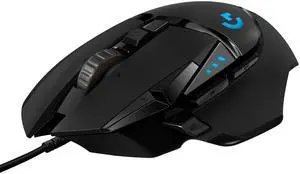
Logitech G502 HERO High Performance Wired Gaming Mouse, HERO 25K Sensor, 25,600 DPI, RGB, Adjustable Weights, 11 Programmable Buttons, On-Board Memory, PC / Mac

- Brand: Logitech
- Name: G502 HERO
- Type: Wired
- Interface: USB
- Model #: 910-005469
- Item #: 3C6-0064-00002
- Return Policy: Standard Return Policy
- $74.99
- $59.99 –
- Save: 20%
- More options from $59.99 - $177.88
- Free Shipping
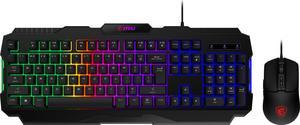
MSI Forge GK100 Combo – Gaming RGB Keyboard & Mouse Set, 19-Key Anti-Ghosting, 6400 DPI Optical Sensor, 6-Mode RGB, up to 6,400 DPI, Black

- Brand: MSI
- Name: FORGE GK100 COMBO
- Keyboard Interface: USB 2.0
- Design Style: Standard
- Model #: FORGEGK100C
- Item #: N82E16823167058
- Return Policy: Standard Return Policy
- $44.99
- $29.99 –
- Save: 33%
- More options from $29.99 - $111.46
- $0.99 Shipping
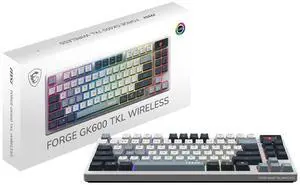
MSI Forge GK600 TKL Wireless Gaming Keyboard - Mechanical Linear Switches, Dye-Sublimated PBT Keycaps, Anti-Slip Base, RGB, USB 2.0, Bluetooth, 2.4 GHz - White
- Brand: MSI
- Keyboard Interface: USB + 2.4GHz + Bluetooth
- Design Style: Standard
- Layout: TKL
- Model #: FORGE GK600 TKL
- Item #: N82E16823167065
- Return Policy: Standard Return Policy
- $134.99
- $89.99 –
- Save: 33%
- More options from $89.99 - $182.99
- Free Shipping
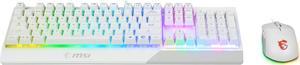
MSI Vigor GK30 Gaming Keyboard & GM11 Gaming Mouse Combo - Mechanical Membrane Switches, 6-Zone RGB, Water Repellent & Splash-Proof, 5000 DPI - White
- Brand: MSI
- Name: Vigor GK30 White Gaming Combo
- Keyboard Interface: USB 2.0
- Design Style: Standard
- Model #: VigorGK30COMBOWHITE
- Item #: N82E16823167047
- Return Policy: Standard Return Policy
- $99.99
- $69.99 –
- Save: 30%
- More options from $69.99 - $177.21
- Free Shipping
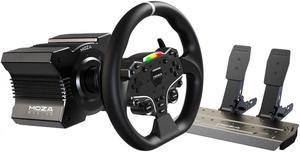
MOZA R5 All-in-One PC Gaming Racing Simulator 3PCS Bundle: 5.5Nm Direct Drive Wheel Base, 11-inch Racing Wheel, Anti-Slip Pedals and a Desk Clamp, Cloud-based App Control
- Type: Bundle
- Model #: RS20-MozaR5-Bundle
- Item #: 232-0173-00015
- Return Policy: Replacement Only Return Policy
- $609.00
- $549.00 –
- Save: 9%
- More options from $527.44 - $719.93
- Free Shipping
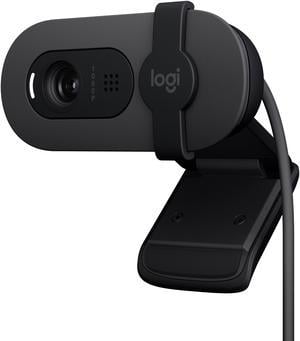
Logitech Brio 100 Full HD Webcam for Meetings and Streaming, Auto-Light Balance, Built-In Mic, Privacy Shutter, USB-A, for Microsoft Teams, Google Meet, Zoom and More - Graphite
- Brand: Logitech
- Name: Brio 100 Full HD Webcam
- Interface: USB
- Image Sensor: -
- Model #: 960-001580
- Item #: N82E16826197634
- Return Policy: Standard Return Policy
- $59.99
- $39.99 –
- Save: 33%
- More options from $39.99 - $100.57
- $0.99 Shipping
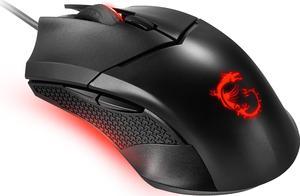
MSI Clutch GM08 Gaming Mouse, 4200 DPI, Optical Sensor, 3 Adjustable Weights, Red LED Lighting, Symmetrical Design
- Mouse Grip Style: Palm / Claw
- Resolution (DPI): 4200 dpi
- Hand Orientation: Both Hands
- Mouse Adjustable Weight: Yes
- Model #: S12-0401800-CLA
- Item #: N82E16826554042
- Return Policy: Standard Return Policy
- $29.99
- $20.99 –
- Save: 30%
- More options from $20.99 - $49.49
- Est. Shipping Fee $2.99
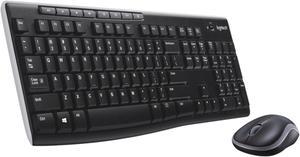
Logitech MK270 Wireless Keyboard And Mouse Combo For Windows, 2.4 GHz Wireless, Compact Mouse, 8 Multimedia And Shortcut Keys, For PC, Laptop - Black
- Keyboard Interface: USB 2.0
- Keyboard Color: Black
- Brand: Logitech
- Name: Wireless Combo MK270
- Model #: 920-004536
- Item #: 9SIB277HUC7996
- Return Policy: View Return Policy
- $43.98 –
- More options from $34.99 - $109.41
- Free Shipping
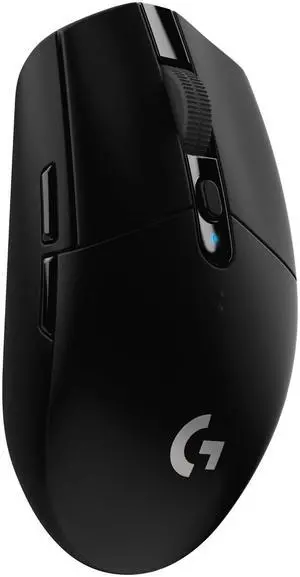
Logitech G305 LIGHTSPEED Wireless Gaming Mouse, Hero 12K Sensor, 12,000 DPI, Lightweight, 6 Programmable Buttons, 250h Battery Life, On-Board Memory, PC/Mac - Black
- Brand: Logitech
- Name: G305
- Type: Lightspeed Wireless
- Tracking Method: HERO
- Model #: 910-005280
- Item #: N82E16826197308
- Return Policy: Standard Return Policy
- $69.99
- $49.99 –
- Save: 28%
- More options from $49.99 - $134.16
- Est. Shipping Fee $1.99
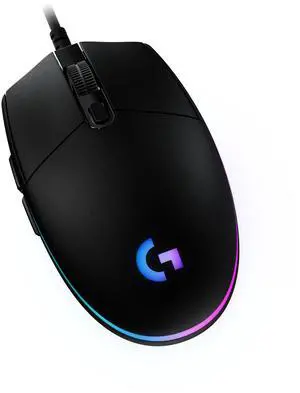
Logitech G203 Wired Gaming Mouse, 8,000 DPI, Rainbow Optical Effect LIGHTSYNC RGB, 6 Programmable Buttons, On-Board Memory, Screen Mapping, PC/Mac Computer and Laptop Compatible - Black
- Brand: Logitech
- Name: G203 LIGHTSYNC
- Type: Wired
- Interface: USB
- Model #: 910-005790
- Item #: N82E16826197390
- Return Policy: Standard Return Policy
- $39.99
- $27.99 –
- Save: 30%
- More options from $27.99 - $103.57
- Est. Shipping Fee $4.99
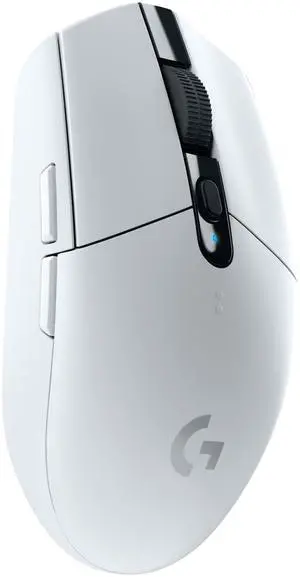
Logitech G305 LIGHTSPEED Wireless Gaming Mouse, Hero 12K Sensor, 12,000 DPI, Lightweight, 6 Programmable Buttons, 250h Battery Life, On-Board Memory, PC/Mac - White
- Brand: Logitech
- Name: G305
- Type: Wireless
- Resolution (DPI): 12000 dpi
- Model #: 910-005289
- Item #: N82E16826197309
- Return Policy: Standard Return Policy
- $69.99
- $49.99 –
- Save: 28%
- More options from $49.99 - $131.24
- Free Shipping
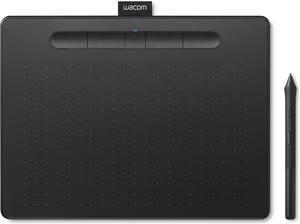
Wacom Intuos Medium Bluetooth Graphics Drawing Tablet, Portable for Teachers, Students and Creators, 4 Customizable ExpressKeys, Compatible with Chromebook Mac OS Android and Windows - Black
- Model #: CTL6100WLAK0
- Item #: N82E16823100277
- Return Policy: Standard Return Policy
- $199.95
- $145.99 –
- Save: 26%
- Free Shipping
Related searches
An input device is essentially any hardware or tool you use to enter information into a computer so that you can control it, whether you're talking about PC game controllers, microphones or many other types of devices. The category of input devices is pretty comprehensive, with items ranging from computer mice to keyboards to VR headsets to microphones. The input devices you need to get will be dependent on what you're going to be using them for. You can divide input devices into several different categories, including human interface devices, composite devices and video input devices.
Wireless Keyboards Reduce Clutter
The one input device that many people have is the computer keyboard, and it is considered a human interface device, or a device that takes input from people and gives the output. There are many different types of keyboards, so choose the one that works best with your needs. Wireless keyboards rely on WiFi to keep you connected, making them ideal for anyone who wants to cut down on wires and cords. Gaming keyboards let you easily maneuver and work your way through your favorite games. Bluetooth keyboards offer another great way to go cordless, and they often connect more seamlessly than wireless keyboards do.
Touchpads Give Sketch Artists a Platform
Your pointing input devices are the devices that you'll use to move your cursor around the screen to complete specific commands. Tools range from standard corded mouses to wireless gaming mice to touchpads to PC game controllers. At the end of the day, which pointing input device you use depends on what you're doing and what you feel most comfortable with. Whether you're an artist, writer or gamer, choose the one that is easiest for you to complete your tasks. Some people can't live without their touchpads, while others never leave home without their wireless gaming mouses.
Video-Input Devices Transport Your Video Data
Video input devices are the ones that you use to digitize video or any other sorts of images that you take outside and transfer or upload into the computer. These devices include digital cameras, digital camcorders, webcams, fingerprint scanners, image scanners and portable media players.
Composite Devices Hold a Little Bit of Everything
Composite input devices are input devices that have different input elements on a single machine. Gaming devices are the first things that come to mind when people think about composite devices since they have at least two different forms of input. The most common types of composite devices are gamepads, gaming joysticks and paddle.
Audio Input Devices Channel Sound
Audio input devices are the ones that capture sound. These devices allow you to send audio signals to a computer so that you can record, process or perform certain commands. Some examples of audio input devices include microphones and digital instruments like MIDI keyboards. A microphone allows you to speak into the computer and record information, or it will enable you to control and manage computer commands with your voice. Nearly everyone needs audio input devices, including musicians, gamers and writers.
An input device is essentially any hardware or tool you use to enter information into a computer so that you can control it, whether you're talking about PC game controllers, microphones or many other types of devices. The category of input devices is pretty comprehensive, with items ranging from computer mice to keyboards to VR headsets to microphones. The input devices you need to get will be dependent on what you're going to be using them for. You can divide input devices into several different categories, including human interface devices, composite devices and video input devices.
Wireless Keyboards Reduce Clutter
The one input device that many people have is the computer keyboard, and it is considered a human interface device, or a device that takes input from people and gives the output. There are many different types of keyboards, so choose the one that works best with your needs. Wireless keyboards rely on WiFi to keep you connected, making them ideal for anyone who wants to cut down on wires and cords. Gaming keyboards let you easily maneuver and work your way through your favorite games. Bluetooth keyboards offer another great way to go cordless, and they often connect more seamlessly than wireless keyboards do.
Touchpads Give Sketch Artists a Platform
Your pointing input devices are the devices that you'll use to move your cursor around the screen to complete specific commands. Tools range from standard corded mouses to wireless gaming mice to touchpads to PC game controllers. At the end of the day, which pointing input device you use depends on what you're doing and what you feel most comfortable with. Whether you're an artist, writer or gamer, choose the one that is easiest for you to complete your tasks. Some people can't live without their touchpads, while others never leave home without their wireless gaming mouses.
Video-Input Devices Transport Your Video Data
Video input devices are the ones that you use to digitize video or any other sorts of images that you take outside and transfer or upload into the computer. These devices include digital cameras, digital camcorders, webcams, fingerprint scanners, image scanners and portable media players.
Composite Devices Hold a Little Bit of Everything
Composite input devices are input devices that have different input elements on a single machine. Gaming devices are the first things that come to mind when people think about composite devices since they have at least two different forms of input. The most common types of composite devices are gamepads, gaming joysticks and paddle.
Audio Input Devices Channel Sound
Audio input devices are the ones that capture sound. These devices allow you to send audio signals to a computer so that you can record, process or perform certain commands. Some examples of audio input devices include microphones and digital instruments like MIDI keyboards. A microphone allows you to speak into the computer and record information, or it will enable you to control and manage computer commands with your voice. Nearly everyone needs audio input devices, including musicians, gamers and writers.
Bestselling Gaming & Streaming Gear Reviews:
Rafael P.
3/23/2026 11:53:10 PM
Amazing Keyboard, only minor issues
“ It's a very solid keyboard for what it costs, however still could be improved. ”
ASUS ROG Strix Scope II X 100% Gaming Keyboard, hot-swappable pre-lubed NX Snow V2 Mechanical switches, Multifunction Controls, PBT doubleshot keycaps, Silicone dampening Foam, and a Wrist RestAnonymous
3/22/2026 4:45:31 PM
Durable, fantastic feel and acoustics! A few minor flaws.
“ Minor annoyances aside I definitely recommend this keyboard. ”
ASUS ROG Strix Scope II X 100% Gaming Keyboard, hot-swappable pre-lubed NX Snow V2 Mechanical switches, Multifunction Controls, PBT doubleshot keycaps, Silicone dampening Foam, and a Wrist RestTom
3/5/2026 7:44:15 AM
Quality/Value mechanical keyboard that should hold up to gaming demands.
“ Being the Dad around here I usually end up with the "included keyboards" or hand me downs. ”
MSI Forge GK320 Combo RED US - Gaming RGB Keyboard & Mouse Set, Full Keys Anti-Ghosting, 12,800 DPI Optical Sensor, 13-Mode RGB, up to 12,800 DPI, BlackAnonymous
2/28/2026 3:16:20 PM
Perfect mouse to use for gaming and more
“ Absolutely perfect feels great and wont feel like i need to get a new mouse till a new model comes out ”
Logitech G PRO 2 LIGHTSPEED Wireless Gaming Mouse, Right- or Left-Handed Mouse with up to 4 Customizable and Switchable Magnetic Side Buttons, 44K DPI Sensor, USB-C Charging, for PC/MacAnonymous
2/28/2026 6:10:39 AM
good looking keyboard
“ very functional for those that need a full sized keyboard ”
Razer Huntsman V3 Pro Analog Optical Esports KeyboardAnonymous
2/28/2026 6:08:45 AM
light
“ mouse work good multiple settings! ”
Razer Viper V3 Pro Ultra-lightweight Wireless Symmetrical Esports Gaming MouseZach
2/25/2026 7:55:25 AM
It's known for a reason.
“ Sweet mouse. ”
Logitech G502 HERO High Performance Wired Gaming Mouse, HERO 25K Sensor, 25,600 DPI, RGB, Adjustable Weights, 11 Programmable Buttons, On-Board Memory, PC / MacClaude T.
2/23/2026 8:43:26 AM
Best mouse for the money
“ Everybody fights ove this mouse instead of the much more expensive Razer V3. ”
Logitech G502 HERO High Performance Wired Gaming Mouse, HERO 25K Sensor, 25,600 DPI, RGB, Adjustable Weights, 11 Programmable Buttons, On-Board Memory, PC / Mac