


Featured Brands




Quick View
Seagate 20TB USB 3.0 3.5" Desktop Hard Drive STKP20000400 Black
OUT OF STOCK
- Dimensions: 7.03'' x 1.65' 'x 4.92
- Weight: 2.59lb
- Package Contents: Seagate® Expansion desktop hard drive 18-inch (45.72cm) USB 3.0 cable 18W power adapter Quick Start Guide Rescue Data Recovery Services 3
- Model #: STKP20000400
- $884.99 –
- More options from $790.30 - $1,599.99
- $9.99 Shipping
Quick View
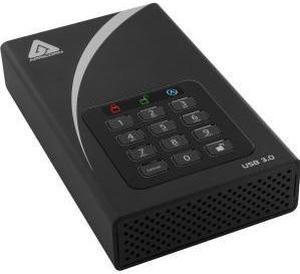
Apricorn Aegis Padlock DT ADT-3PL256-8000 8 TB 3.5" External Hard Drive
OUT OF STOCK
- Cache: 8MB
- Parts: 1 Year
- Model #: ADT-3PL256-8000
- $879.99 –
- $7.99 Shipping
External Hard Drives
External hard drives are ideal for backing up your hard drive or storing additional media separately from your main hard drive. Photos, videos, and digital music have all become so popular in recent years that people need a place to put it all. CDs and DVDs do not have the capacity to hold PC backups and are not all that convenient. However, the prices of external hard drives have come down so much that they are perfect for backing up your important data.
The two most common interfaces for hooking up external drives to your computer are USB and FireWire with eSata now becoming popular also. USB has been around for years and are standard on just about all computers today while FireWire ports are newer and if you use a digital video camera with your computer you probably already have one. In terms of access speeds the latest eSata standard offers the fastest connection however that comes with a price. USB 2.0 and Firewire can cover most of your general needs without having to upgrade your system with a new eSata card. Any of the interfaces will do the job however be sure to purchase an external hard drive with the same type of port that your computer has.
Your backup drive should have a capacity at least as big as your computer's largest hard drive. That will leave you with plenty of room to back up your important files or mirror/clone your current drive. You can also buy an external hard drive case and mount an internal hard drive inside it. This method will give you a choice of brands and models, and if anything goes wrong with your internal hard drive, you can simply install the external one inside your computer to replace it.
Considerations for External Hard Drives
One drawback to using external hard drives for backups is that they are still relatively new for home computer use. They come with Windows drivers; should Windows fail, you will not be able to access your external drive through DOS. There are DOS drivers available but they can be difficult to find and most manufacturers do not provide support for them. This isn't a frequent occurrence, just something to keep in mind as you select your external hard drive.
Bestselling Desktop External Hard Drives Reviews:
Gary
6/13/2026 12:38:22 PM
Good product
“ My desktop computer easily recognized this hard drive when I connected them. ”
Seagate Expansion 8TB External Hard Drive HDD - USB 3.0, with Rescue Data Recovery Services (STKP8000400)adrian s.
4/23/2026 10:59:16 AM
Exactly what you'd expect
“ Yet to have a failure with this series of hard drives from seagate ”
Seagate Expansion 26TB USB 3.0 Desktop Hard Drive STKP26000400 BlackWW in AZ
4/7/2026 11:18:16 PM
Easy to Set Up and Use
“ I have mostly WD drives for my external and a couple of my internal drives. ”
WD Elements 8TB USB 3.0 Desktop External Hard Drive WDBWLG0080HBK-NESN BlackJaime G.
1/24/2026 7:24:21 PM
Spacious and fast!
“ All in all, this is a great external HDD if you're looking to expand your storage capabilities. ”
WD Elements 24TB Desktop External Hard Drive WDBWLG0240HBK-NESN BlackGeR2
12/25/2025 5:46:24 PM
Works great for my POV videos
“ I bought this hard drive to store my POV GoPro videos. ”
Seagate Expansion 26TB USB 3.0 Desktop Hard Drive STKP26000400 BlackAnonymous
12/14/2025 8:23:01 PM
Under $10 per TeraByte!
“ Seagate is a pretty good brand - I have 6 Seagate drives in my two Synology NAS for last 4-8 years with no issues. ”
Seagate Expansion 26TB USB 3.0 Desktop Hard Drive STKP26000400 BlackDave
12/11/2025 1:57:28 PM
Good product, great price, but noisy.
“ I've so far had good luck with WD drives. ”
WD Elements 14TB USB 3.0 Desktop External Hard Drive WDBWLG0140HBK-NESN BlackBrian
9/26/2025 1:16:11 AM
Works like advertised
“ I would suggest this product if your looking for a good storage unit holds everything I have frees up my PC hard drive. ”
WD Elements 6TB USB 3.0 Desktop External Hard Drive WDBWLG0060HBK-NESN Black