



Skip to: |

Newegg.ca - A great place to buy computers, computer parts, electronics, software, accessories, and DVDs online. With great prices, fast shipping, and top-rated customer service - once you know, you Newegg.

If you are reading this message, Please click this link to reload this page.(Do not use your browser's "Refresh" button). Please email us if you're running the latest version of your browser and you still see this message.

Newegg.ca - Computer Parts, Laptops, Electronics, HDTVs, Digital Cameras and More!

  • | Wish List
  • Help
Home
Home > 
Computer Hardware > 
Motherboards > 
Intel Motherboards > 
GIGABYTE > 
Item#: N82E16813128543

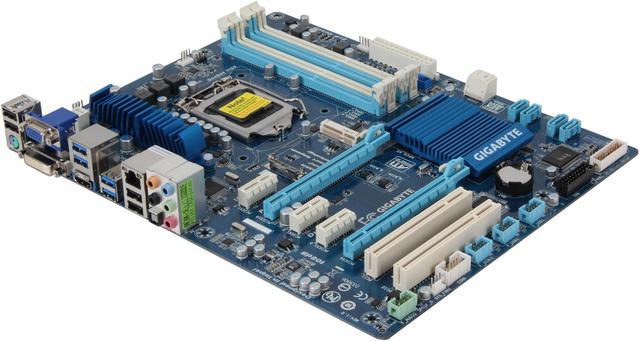
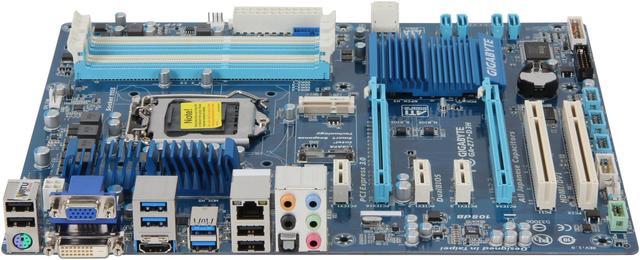
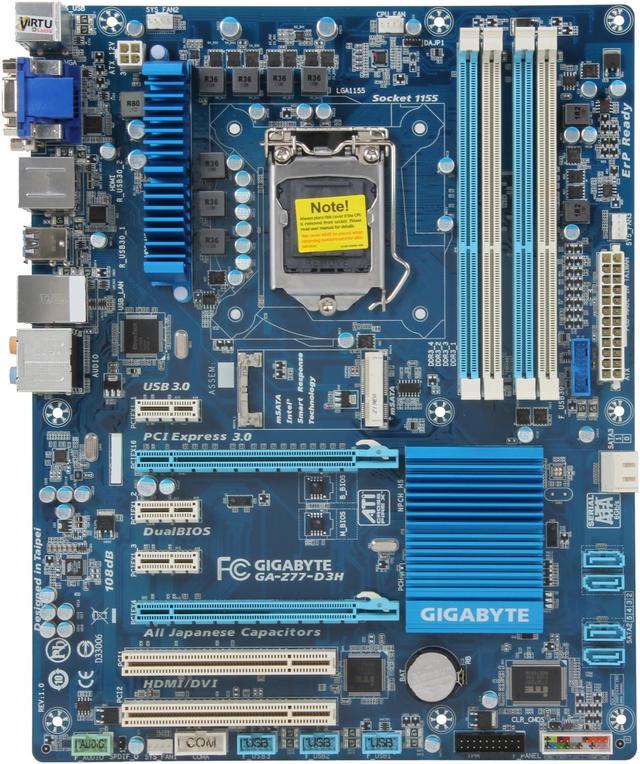
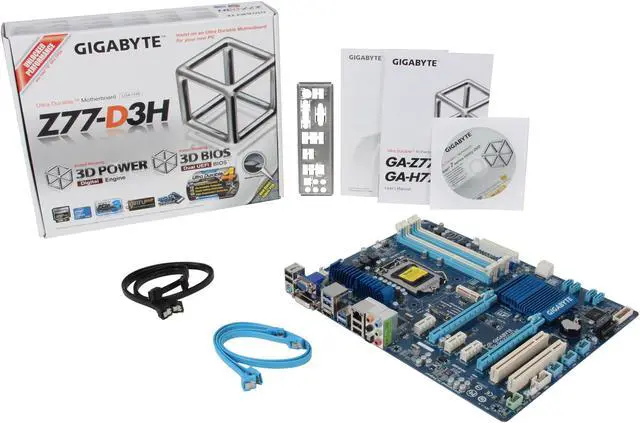
GIGABYTE GA-Z77-D3H LGA 1155 Intel Z77 HDMI SATA 6Gb/s USB 3.0 ATX Intel Motherboard

GIGABYTE Exclusive On/Off Charge™ for USB devices

neweggOUT OF STOCK.

  • LGA 1155
  • Intel Z77
  • 4×240pin DDR3 2400(OC)/1600/1333/1066
ICON Loading...

Learn more about the GIGABYTE GA-Z77-D3H

Model

Brand
GIGABYTE
Model
GA-Z77-D3H

Supported CPU

CPU Socket Type
LGA 1155
CPU Type
Core i7 / i5 / i3 / Pentium / Celeron (LGA1155)

Chipsets

North Bridge
Intel Z77

Memory

Number of Memory Slots
4×240pin
Memory Standard
DDR3 2400(OC)/1600/1333/1066
Maximum Memory Supported
32GB
Channel Supported
Dual Channel

Expansion Slots

PCI Express 3.0 x16
1
PCI Express 2.0 x16
1 @x4
PCI Express x1
3
PCI Slots
2

Storage Devices

SATA 3Gb/s
4 x SATA 3Gb/s
1 x mSATA connector (The SATA2 5 connector will become unavailable when the mSATA connector is installed with a solid state drive.)
SATA 6Gb/s
2 x SATA 6Gb/s
SATA RAID
0/1/5/10

Onboard Video

Onboard Video Chipset
Supported only by CPU with integrated graphic

Onboard Audio

Audio Chipset
VIA VT2021
Audio Channels
8 Channels

Onboard LAN

Max LAN Speed
10/100/1000Mbps

Rear Panel Ports

PS/2
1 x PS/2 keyboard/mouse port
Video Ports
D-Sub + DVI
HDMI
1 x HDMI
USB 1.1/2.0
4 x USB 2.0
USB 3.0
4 x USB 3.0
S/PDIF Out
1 x Optical
Audio Ports
5 Ports

Internal I/O Connectors

Onboard USB
2 x USB 3.0 + 6 x USB 2.0
Other Connectors
1 x 24-pin ATX main power connector
1 x 4-pin ATX 12V power connector
1 x mSATA connector
1 x CPU fan header
3 x system fan headers
1 x front panel header
1 x front panel audio header
1 x S/PDIF Out header
1 x serial port header
1 x Clear CMOS jumper
1 x Trusted Platform Module (TPM) header

Physical Spec

Form Factor
ATX
Dimensions
12.0" x 9.6"
Power Pin
24 Pin

Features

Features
The PCI Express x16 slot supports up to PCI Express 2.0 standard when an Intel 32nm (Sandy Bridge) CPU is installed.

GIGABYTE 3D Power: Digital Voltage, Frequency and Phase Control

GIGABYTE 3D BIOS

3rd Generation Intel Core processors

Designed for PCI Express Gen.3 Support

Intel Rapid Start Technology

Intel Smart Connect Technology

GIGABYTE Ultra Durable 4 Classic

Quick Info

Warranty

  • Limited Warranty period (parts): 3 years
  • Limited Warranty period (labor): 3 years


Customer Reviews of the GIGABYTE GA-Z77-D3H

Do you own this product? Write a Review

Filter Results

Go
  • D
  • 3/16/2013 11:27:53 PM
  • Tech Level: Somewhat High
  • Ownership: 1 month to 1 year
  • Verified Owner

2 out of 5 eggsPoor driver/support/software, and bad USB support

Pros: This was included in the second machine I built from scratch, and between the knowledge I had from that build and the scarce instructions that came with this MB, I managed to get everything going pretty quickly. In general it runs pretty fast, no issues with compatibility (everything I bought worked out fine). But I feel like this should be a given for any Motherboard.

Cons: there are three major subjects I'd like to cover in the Cons category: USB, startup, and software/support.

1. USB.
- The keyboard/mouse are plugged in directly via USB 2.0 to the motherboard. About 25% of the time when the computer comes back from off or standby, the USB connection seems to be lost then regained after about 15 seconds - the keyboard (logitech G15) loses power and connectivity for no apparent reason. It then pops back on - after no physical intervention by the user.
- Also, the case's front-panel USB ports (USB 3.0) do not work at all.
- Furthermore, (probably related to the point above), there is often an error saying there is an unsupported device. What gives? It is plugged in to the correct port.

2. Startup. Again, roughly 25% of the time, when coming back from a shut-down or restart, the computer starting locks up at the BIOS "welcome" screen. No error shown or anything, just stops booting. Usually turning off the machine then turning it back on gets us past it, but that is pretty annoying.

3. Software/Support.
- The other two problems wouldn't really be problems much at all if this was handled better.
- Software: I expected a company like GIGABYTE which sells quite a few MBs to have a pretty robust suite of tools to control/monitor the machine from Windows. I assumed wrong. The @BIOS software is extremely minimal. There is no fan monitoring or any other sort of tool like that. It is impossible to see what version of the BIOS you currently have installed, or any information about your motherboard. The "About" page only talks about the @BIOS software version, which is not helpful. Looking there and in the BIOS itself, I still cannot determine if I have version 1.0 or 1.1 of the motherboard. Trying to update the BIOS using @BIOS is not straightforward, and an error pops up which causes me to scratch the process. 0/10, I would expect this in an off-brand discount motherboard, but not GIGABYTE.
- Support. The website has all the technical specs you would need when deciding to purchase this motherboard, but the support/downloads page is not very helpful. After looking around the internet, it seems like the USB issues I've found are pretty common, so I would expect GIGABYTE to have some information on how to fix it. No such luck. I'll probably put in a support request and see where I could get with that.

Other Thoughts: This purchase has turned me off from the GIGABYTE brand. The first machine I built has an Asus motherboard with similar features/cost, and it not only has no problems, especially with the built in ports, but it also has a great AISuite including fan support and ways to tweak/overclock the system if I wanted. I would not recommend this motherboard, or this brand (based solely on this purchase), to anyone that I cared about.

Did you find this review helpful? Yes No

  • N/A
  • 2/9/2013 10:16:02 AM
  • Tech Level: High
  • Ownership: 1 week to 1 month
  • Verified Owner

5 out of 5 eggs

Pros: Excellent motherboard overclocked well

Cons: none

Did you find this review helpful? Yes No

  • Jim
  • 2/2/2013 9:40:57 AM
  • Tech Level: High
  • Ownership: 1 month to 1 year
  • Verified Owner

5 out of 5 eggsSupplemental Review

Pros: I have built two systems now with this board. Extremely easy--no difficulties with either. Fast, stable, great performer.

Cons: The only real con is the placement of two components: the 6 Gbps SATA ports come off the side of the motherboard, which is a bit awkward, and the PCIe X1 slots are clustered round the primary PCIe graphics card slot...any decent sized cooler will block the two on the right, and any card with a backplate will either block the one on the left or make it a very tight fit.

Other Thoughts: Some supplemental info: rev 1.0 boards have 4 pin supplemental power; rev 1.1 boards have 8 pin. I have one of each. The 1.0 board shipped with BIOS F16; the 1.1 shipped with BIOS F18.

I inquired of Gigabyte regarding the "On-Off Charge" function; per Gigabyte's response, the USB headers don't support this, only the USB ports on the back panel do.

Did you find this review helpful? Yes No

  • Bell
  • 1/23/2013 4:45:47 PM
  • Tech Level: Somewhat High
  • Ownership: 1 month to 1 year
  • Verified Owner

2 out of 5 eggsDisappointing

Pros: feature-rich, with mid-range cost
USB3.0 header
six SATA ports (2 are SATA 6Gb/s)
UEFI graphical BIOS

Cons: reliability, no pre-POST diagnostics or status LEDs

Other Thoughts: My first board (ver 1.0) ran great for 6 months and then died without warning, locking up and now it won't even POST. No beeps, no indication why it is dead. It just doesn't work. The power supply fan runs for 5 seconds and then all shuts down. CPU, RAM and power supply work fine on an Intel board.

Gigabyte tech support responded to my online queries, but concluded I need to do a warranty RMA. They have no advance exchange program, so I'd be down for probably another 2 weeks. I bought a new one (ver 1.1) here to get back up faster, but then the new one was DOA!

Back to newegg it goes - I've returned exactly one item to them in all these years. I expect this return will be easy too - thanks newegg!

I can't keep wishing for a good board although every maker seems to have some problems. I've had probably a dozen or more stable builds with various Gigabyte boards and until now, they were my favorite.

Did you find this review helpful? Yes No

  • pestoking
  • 1/19/2013 9:24:32 PM
  • Tech Level: High
  • Ownership: less than 1 day
  • Verified Owner

4 out of 5 eggsCPU Power Connect Update: 8 pin

Pros: Confirming a prior review: The CPU power connector on this mobo is 8-pin, NOT 4. That's actually a good thing, higher end mobos deliver more power to the CPU. But Newegg or Gigabyte should update the product specs and the product photos. They are aged.

Cons: None, just received the mobo.

Did you find this review helpful? Yes No

  • Walter
  • 1/4/2013 8:21:38 AM
  • Tech Level: Average
  • Ownership: 1 day to 1 week
  • Verified Owner

3 out of 5 eggsNew board

Pros: This board and a Core i7 CPU was intended to replace my old Core 2 system. Installation into my old box went smoothly. I like the menu-rich bios and the utilities. Still working on getting everything re-installed.

Cons: Unfortunately 2 of the PCIe slots do not work. The cards work fine, when I put them into the one PCIe slot they are recognized. Put them into one of the other two, they are not seen by the system.

Did you find this review helpful? Yes No

  • N/A
  • 12/31/2012 5:28:31 AM
  • Tech Level: Average
  • Ownership: 1 month to 1 year
  • Verified Owner

4 out of 5 eggsVery Annoying noise!

Pros: Work's great, very easy to setup, install and understand the manual ( if you wanna read it ) beware of getting big CPU cooler, cause it might cost you to buy a smaller heat spreader design RAM sticks, i couldn't fit mine properly. ( G.Skill Ripjaws Z series )

Cons: Somehow i feel like my volume is so low,, i had to put my volume up to 6%-10% to get satisfy my self.. I'm not slightly deaf, i never wear gaming head set or for MP3's ear phones. and one more thing there's a weird noise frequency coming from speaker going on even my pc is idle, when i tried to plug my speaker to other computer, the noises stops, i think this issue is from motherboard itself..

Other Thoughts: i had this board for about 3-4 months i think. and ever since that day i'm still hearing those frequencies, it's very loud when my room is very silent...

Did you find this review helpful? Yes No

  • N/A
  • 12/29/2012 6:55:45 PM
  • Tech Level: Somewhat High
  • Ownership: 1 day to 1 week
  • Verified Owner

3 out of 5 eggsNot for Linux

Pros: No problems with Win 7, relatively inexpensive for it's feature list, happy with Gigabyte in the past.

Cons: Upgraded from a Gigabyte P35 motherboard that worked well with my system that dual boots Fedora Linux 16. While Fedora booted up OK, there was no network connection. After researching, it's because there's an Atheros AR8161 LAN that doesn't appear to have Linux drivers. Additionally, Atheros AR8161 isn't mentioned in the Newegg motherboard description and it isn't on the Qualcomm Atheros website either. It will probably cost $30 for a new NIC card as a workaround, but that's really my cost for not researching adequately. I'm disappointed that Gigabyte went bleeding edge with Atheros and abandoned their Linux User Community. It would be wise to be careful buying Gigabyte boards if the LAN isn't branded.

Other Thoughts: No IDE connector. Worked fine without changing any BIOS settings.

0 out of 1 people found this review helpful. Did you? Yes No

  • tkwetzel
  • 12/27/2012 9:52:50 PM
  • Tech Level: Somewhat High
  • Ownership: 1 week to 1 month
  • Verified Owner

3 out of 5 eggsNow has an 8-pin power connector

Pros: Well built board, much nicer than a competitor's board that I just returned. The latches for the PCI-E slots and the memory work with ease like they should. Hopefully there are many other pros once I get it running.

Cons: 8-pin power connector, when the photos and description say it has a 4-pin connector.

Other Thoughts: I purchased this board in large part due to the 4-pin power connector it had. However, Gigabyte has since updated the board and it now has an 8-pin connector. At first I thought newegg sent me the wrong board until I did some investigation on the manufacturers website. I tried using just the 4-pin plug and it is a no-go, so I am waiting on a 4-pin to 8-pin adapter to arrive so I can use this mobo.

I want to rate this board higher, but because of the misinformation I can't. Shame on Newegg for not updating their website.

1 out of 1 people found this review helpful. Did you? Yes No

  • Jim
  • 12/21/2012 9:12:11 AM
  • Tech Level: High
  • Ownership: 1 day to 1 week
  • Verified Owner

5 out of 5 eggsNice board!

Pros: Super easy install...easiest build I've ever done. Came up correctly on first attempt. Full-featured board and very fast.

Cons: The 3 Gbps SATA connectors on the board facing upward and are very easy to access, but the 6 Gbps connector is coming off the side of the motherboard. It's a minor annoyance, but this is an awkward placement.

If your graphics card has a backplate and even a medium sized cooler, you will not be able to access the PCI-e X1 slots as they will be covered...minus one star for this and for not supporting SLI. Crossfire is supported.

Other Thoughts: In spite of the above frustrations, a very nice board. I am pleased with this purchase.

1 out of 1 people found this review helpful. Did you? Yes No

ICON Loading...
Discontinued
  • This item is currently out of stock and it may or may not be restocked.
  • $11.49 Shipping
Discontinued
Are you an E-Blast Insider? Subscribe Newegg e-Blast

Buzz

4 out of 5 eggs
Fast and feature rich board for the price.

Lots of USB3 ports.

Graphical BIOS UI is nice, but a little weird ...
— Chiper 6/2/2012

PCIE compatibility issue

2 out of 5 eggs
This board has hard time to recognize a video card that is PCIE 2.0 or PCIE 2.1. I have tried to install a Radeon 6870 to ...
— 8/24/2012


Home
Home > 
Computer Hardware > 
Motherboards > 
Intel Motherboards > 
GIGABYTE > 
Item#: N82E16813128543
LOADING... LOADING...
Shop by Region: United States | Canada | China
Follow us:   RSS Feeds Youtube
VeriSign Reliability Seal1 PaypalVerify GoldenSeal InteracThis site protected by Trustwave's Trusted Commerce program Inc500

Policy & Agreement | Privacy Policy

 © 2000-2013 Newegg Inc.  As used herein, “Newegg.ca” means Newegg Canada Inc. unless the context specifically refers to the www.newegg.ca web address.
If the Adobe Reader does not appear when you click on a link for a PDF file, you can download Adobe Reader from the Adobe web site. nassau