



Newegg.ca - A great place to buy computers, computer parts, electronics, software, accessories, and DVDs online. With great prices, fast shipping, and top-rated customer service - once you know, you Newegg.

If you are reading this message, Please click this link to reload this page.(Do not use your browser's "Refresh" button). Please email us if you're running the latest version of your browser and you still see this message.

Newegg.ca - Computers, Computer Parts and Electronics

My Account
All prices shown in Canadian dollars unless otherwise specified. 

About UsBrowse Entire SiteShop All BrandsHelp & Info
topNavRowBottom  
Home
Home. > 
Computer Hardware0_. > 
Motherboards1_. > 
Intel Motherboards2_. > 
GIGABYTE3_. > 
Item#: N82E16813128362

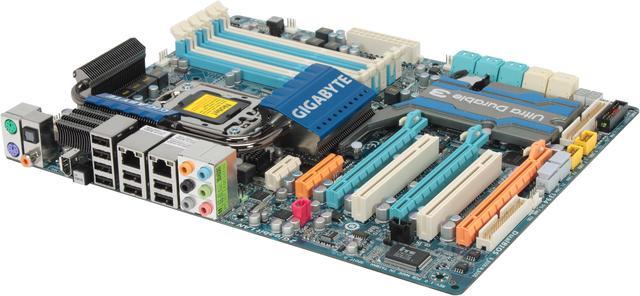
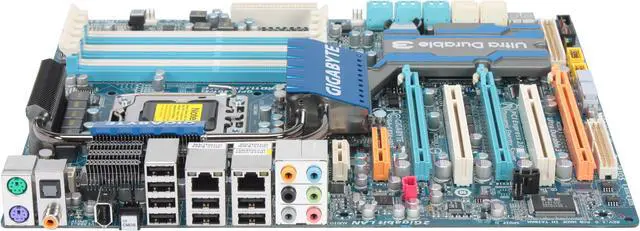
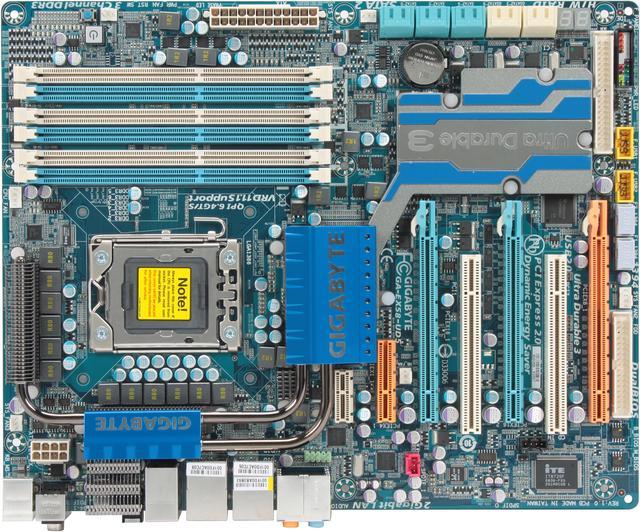
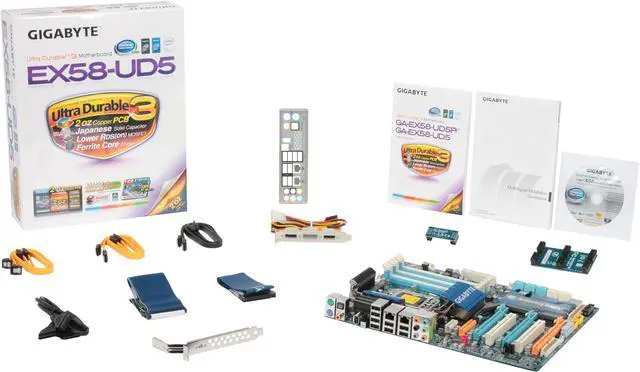
GIGABYTE GA-EX58-UD5 LGA 1366 Intel X58 ATX Intel Motherboard

Average Rating

4 out of 5 eggs(247 reviews)

OUT OF STOCK.

Deactivated. This item is currently out of stock and it may or may not be restocked.
$4.99 Shipping
Buzz
So far so good
5 out of 5 eggs
Wish I could give this ~4.8 eggs, some minor issues, but overall great board.

Easy setup, nice layout, rock solid ...
— Dipman 11/21/2008
Excellent Board
4 out of 5 eggs
When I first started building computers in the mid-1990s, I used Asus motherboards. Then I moved to Tyan and Supermicro, ...
— Monsuun 11/20/2008


Quick Info
Manufacturer Warranty
  • Manufacturer Limited Warranty period (parts): 3 years
  • Manufacturer Limited Warranty period (labor): 3 years


Return Policies

This item is covered by Newegg.ca's Limited Replacement Only Return Policy.

  • Return for refund within: Non-Refundable
  • Return for replacement within: 30 days

Learn more about the GIGABYTE GA-EX58-UD5

Model
Brand
GIGABYTE
Model
GA-EX58-UD5
Supported CPU
CPU Socket Type
LGA 1366
CPU Type
Core i7 (LGA1366)
FSB
QPI 6.4GT/S
Chipsets
North Bridge
Intel X58
South Bridge
Intel ICH10R
Memory
Number of Memory Slots
6×240pin
Memory Standard
DDR3 2100+/1333/1066/800
Maximum Memory Supported
24GB
Channel Supported
Triple Channel
Expansion Slots
PCI Express 2.0 x16
2 x PCI Express x16

(Note: For optimum performance, if only one PCI Express graphics card is to be installed, be sure to install it in the PCIEX16_1 slot; if you are installing two PCI Express graphics cards, it is recommended that you install them in the PCIEX16_1 and PCIEX16_2 slots)
PCI Express x8
1 x PCI Express x8

(Note: The PCIEX8_1 slot shares bandwidth with the PCIEX16_2 slot. When PCIEX8_1 is populated with a PCI Express graphics card, the PCIEX16_2 slot will operate at up to x8 mode)
PCI Express x4
1
PCI Express x1
1
PCI Slots
2
Storage Devices
PATA
1 x ATA133 2 Dev. Max
SATA 3Gb/s
10
SATA RAID
0/1/5/10
Onboard Video
Onboard Video Chipset
None
Onboard Audio
Audio Chipset
Realtek ALC889A
Audio Channels
8 Channels
Onboard LAN
LAN Chipset
Realtek 8111D
Second LAN Chipset
Realtek 8111D
Max LAN Speed
Dual 10/100/1000Mbps
Rear Panel Ports
PS/2
2
USB 1.1/2.0
8 x USB 2.0
IEEE 1394
1 x IEEE 1394a
S/PDIF Out
1 x Optical, 1 x Coaxial
Audio Ports
6 Ports
Onboard USB
Onboard USB
4 x USB 2.0
Onboard 1394
Onboard 1394
2 x 1394a
Physical Spec
Form Factor
ATX
Dimensions
12.0" x 9.6"
Power Pin
24 Pin
Features
Features
Supports 3 channel DDR3 2100+ memory

Supports 2-Way/3-Way NVIDIA SLI / ATI CrossFireX technology

Advanced 12+2+2 power phase design with VRD 11.1 support

2 Gigabit Ethernet LAN with Teaming functionality

Power/reset/Clr CMOS onboard button for easily operation on the workbench

Blu-ray playback outputs supported by high quality 106dB SNR ALC889A HD audio
Manufacturer Warranty
Parts
3 years limited
Labor
3 years limited

Customer Reviews of the GIGABYTE GA-EX58-UD5

Do you own this product? Write a Review
Filter Results
Go
  • Mackilroy
  • 4/25/2010 9:45:43 AM
  • Tech Level: above average
  • Ownership: 1 week to 1 month
  • Verified Owner
5 out of 5 eggsGood motherboard for building a hackintosh

Pros: I built myself a hackintosh with this motherboard. It's well-supported, has a plethora of USB ports, and plenty of SATA ports if you need them.

Cons: What's with the metal covers on the Ethernet ports? Seems a little strange.

Other Thoughts: This is the first computer I've built, and I love having a high-end motherboard at the heart of it.

1 out of 1 people found this review helpful. Did you? Yes No

  • James Gentile
  • 4/19/2010 7:14:55 PM
  • Tech Level: above average
  • Ownership: less than 1 day
  • Verified Owner
5 out of 5 eggsGA-EX58-UD5 initial experience.

Pros: Got this board a few hours ago, installed it, booted it, set drive boot priority and booted Windows, windows installed motherboard devices (came from an ASUS P6T Deluxe mobo) and everything worked pretty much perfect so far.

Cons: Motherboard buzzed when moving mouse or opening certain programs, going into bios options, and changing the cpu options to "allow all cores, enable turboboost, enabled hyperthreading, enable cpu thermal monitor" and disabling everything else, eliminated the buzz / squealing / whining noise completely. Gigabyte should fix this, because many people probably do not know how to fix it (I found it by searching google.)

Other Thoughts: Smooth experience. First time Gigabyte buyer, my initial impression is pretty good.

Did you find this review helpful? Yes No

  • BrienWarder
  • 4/11/2010 1:48:48 PM
  • Tech Level: above average
  • Ownership: 1 month to 1 year
  • Verified Owner
5 out of 5 eggseasily overclocked

Pros: Running this board with an Intel 980x and 12gb (6x 2gb) G.SKILL PIS PC3-19200 RAM air cooled with a V10 cooler. Overclocked easily to 3.6GHz. Absolutely certain I could go further but haven't spent the time adjusting frquencies and voltages to push it. I originally had the same problem that Ken (posted 4/6 had) but came to realize it was from pushing my BCLK to high. Brought it down a bit and everything is working perfectly. Great board with great features and as always with Gigabyte it is easily overclocked. I've been running Gigabyte boards for my last 3 upgrades (yearly) and haven't had any issues.

Cons: Poor location for SATA connectors. The should have had them standing on the board rather than pointing sideways off the edge of the board. Would have made making SATA connections so much easier. A little patience and time got me past that dilemna. This shouldn't be an item that prevents you from deciding to purchase this board.

3 out of 3 people found this review helpful. Did you? Yes No

  • Friction57
  • 4/8/2010 5:37:21 AM
  • Tech Level: above average
  • Ownership: 1 week to 1 month
  • Verified Owner
5 out of 5 eggsOne of the best!!

Pros: I purchased this motherboard as the foundation for a dual-boot "Hackintosh" and Windows 7 machine. I did extensive research into what motherboards, chipsets, and other hardware were compatible with a vanilla installation of OSX, and this motherboard has not failed me.
It has more options than I know what to do with, and it makes overclocking a breeze. There are extensive instructions available on the internet that will let you overclock a Core i7 to 4.0 Ghz on air-cooling. I run mine at 3.87 Ghz, and have yet to feel it slow.

This thing is SOLID. The PCB is THICK and sturdy and the board just feels like a slab of steel. It's awesome!

Lots of USB ports, and all the other expansion ports one could need.

Cons: A little more expensive than some other boards, but you really do get what you pay for...

Other Thoughts: Buy this board.

2 out of 2 people found this review helpful. Did you? Yes No

  • Ken
  • 4/6/2010 12:49:34 PM
  • Tech Level: above average
  • Ownership: 1 day to 1 week
  • Verified Owner
1 out of 5 eggsDefective

Pros: Looks nice. Seems fast. Lots of USB ports.

Cons: Lots. First, the item shipped was defective. It only recognized 4GB out of 6GB of RAM in the BIOS. Windows 7, strangely enough, saw all 6GB, but only 4GB was usable. I verified all my RAM was good. I called Gigabyte and they told me to RMA it. That was almost 2 weeks ago. Newegg received the item last Wednesday (3/31/2010) and as of right this minute (04/06/2010), the item still has a "received" status. I've called Newegg twice (yesterday and today) to find out what's going on and haven't gotten an answer yet other than "it's in inspections."

Oh yeah, the SATA connectors on this MB are in a HORRIBLE spot.

Other Thoughts: I thought Newegg would be better here and I'm disappointed in the turnaround time for the RMA. I'm also disappointed that this motherboard was defective... and after reading all of the similar issues people are having with it, I think I made a mistake by buying it.

1 out of 1 people found this review helpful. Did you? Yes No

  • kpen
  • 3/25/2010 11:32:35 AM
  • Tech Level: above average
  • Ownership: 1 week to 1 month
  • Verified Owner
4 out of 5 eggsgood overall

Pros: lots of connections, looks good, great software included. lots of extra gear included (cables, jumpers, etc). easy to overclock. Good overall.

Cons: -awkward sata ports, they are stacked sideways, facing opposite directions.
-expansion ports: if you have more than 1 PCI device, and a double sized video card in your PCIe, you're out of luck, because you wont be able to fit it in.
-audio connector is all the way across the board?! why?
-no software for a gadget on your screen to see your temperatures. :(

0 out of 1 people found this review helpful. Did you? Yes No

  • Frank236
  • 3/22/2010 8:49:24 PM
  • Tech Level: above average
  • Ownership: 1 week to 1 month
  • Verified Owner
5 out of 5 eggsGreat Board

Pros: User friendly BIOS, Lots of options. Auto settings work almost as well as fine tune. If bad setiings, easy to correct. Able to set Bclk to 195 with "all" settings on auto. (Gskill 1600 RAM, (watch multiplier,this Gskill will max out at 1800))

Cons: Pretty good manual (not great). Have no idea why I would ever use 2 internet connections. IDE connection wasted space. Eliminating it could have freed up PCI slot when using a big GPU. Everything could be cheaper...

Other Thoughts: Had to contact support to find out you have to connect "BOTH" the 24 pin "AND" the 8 pin power supply to work correctly. Maybe "Operator headspace" but couldn't find this anywhere in manual.

0 out of 3 people found this review helpful. Did you? Yes No

  • elmore4030
  • 3/22/2010 4:34:29 PM
  • Tech Level: above average
  • Ownership: 1 month to 1 year
  • Verified Owner
5 out of 5 eggsGreat Motherboard

Pros: It will run SLI or Crossfire ,but running three big cards is difficult since the last slot covers up everthing and the power supply needs to be in the top to run three big cards in SLI ,but it can be done ,I ran three GTX 280's for a long time.It has 10 SATA ports so you can hook up plenty of harddrives.Lots of overclock features.

Cons: The cards are to close together when running SLI or TRI SLI ,they are sandwhich together,so you need a case with a Fan blowing on the cards.but most motherboards have them this close.

Other Thoughts: I don't see why people complain about the SATA ports ,I like haveing them on the side ,makes it easier for installing your video cards ,you just need a big case.The HAF932 has plenty of room.I never read in the manual that it would run three cards at 16x,16x,8x, It says if you use the third one ,it shares lanes with PCIe2 and will run at 16x,8x,8x wihich is not really a problem since the benchmarks show little to no increase in haveing 16x,16x,16x,.I have had this Gigabyte for over a year and it has never gave me no problems so far.I am going to go with two Gigabytes HD5870's in cross-fire and install Windows 7 64bit pro.I hope it works as good as vista 64 bit and SLI,I will find out soon.

1 out of 1 people found this review helpful. Did you? Yes No

  • ApolloX
  • 3/21/2010 4:48:05 AM
  • Tech Level: above average
  • Ownership: more than 1 year
5 out of 5 eggsRuns Gulftwon i7 980X Perfectly!

Pros: Excellent board after 1 year of use. I installed and ran Gulftown i7 980X 6 core CPU without any issue. Solid construction, plenty of features, excellent stability and ease of use. 980x runs like a beast on any motherboard!

Cons: The dynamic energy saver, when enabled, can cause some stability issues. I tend to leave it off.

Other Thoughts: Gulftown i7 980X requires BIOS update to F11 or higher.

2 out of 2 people found this review helpful. Did you? Yes No

  • rocky3598
  • 3/10/2010 2:01:44 PM
  • Tech Level: above average
  • Ownership: 1 month to 1 year
3 out of 5 eggsI like it but

Pros: I love the board amazing it put up with anything i made it do including gaming and HD video editing

Cons: had it for 3 months the south bridge controller went out on. :( had to RMA it took about 2 weeks from RMA to get it back not its working great but not sure how long

Other Thoughts: a little pricey

1 out of 1 people found this review helpful. Did you? Yes No

Home
Home. > 
Computer Hardware0_. > 
Motherboards1_. > 
Intel Motherboards2_. > 
GIGABYTE3_. > 
Item#: N82E16813128362
Shop by Region: United States | Canada | China
Affiliated Sites:
EggXpert.com
Newegg Community
VeriSignReliability Seal1PaypalVerify GoldenSealThis site protected by Trustwave's Trusted Commerce program

Policy & Agreement | Privacy Policy

 © 2000-2010 Newegg Inc.  As used herein, “Newegg.ca” means Newegg Canada Inc. unless the context specifically refers to the www.newegg.ca web address.
If the Adobe Reader does not appear when you click on a link for a PDF file, you can download Adobe Reader from the Adobe web site. nassau