Newegg.ca - A great place to buy computers, computer parts, electronics, software, accessories, and DVDs online. With great prices, fast shipping, and top-rated customer service - once you know, you Newegg.

If you are reading this message, Please click this link to reload this page.(Do not use your browser's "Refresh" button). Please email us if you're running the latest version of your browser and you still see this message.

Newegg.ca - Computers, Computer Parts and Electronics

My Account
All prices shown in Canadian dollars unless otherwise specified. 

About UsBrowse Entire SiteShop All BrandsHelp & Info
topNavRowBottom  
Home
Home. > 
Computer Hardware0_. > 
Motherboards1_. > 
Intel Motherboards2_. > 
GIGABYTE3_. > 
Item#: N82E16813128357

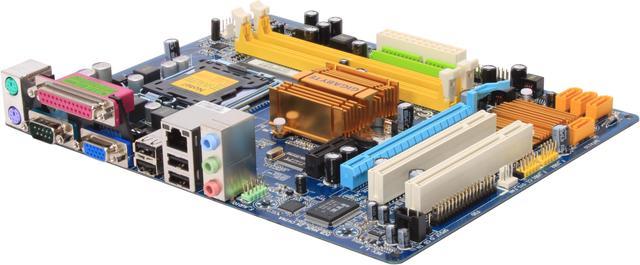
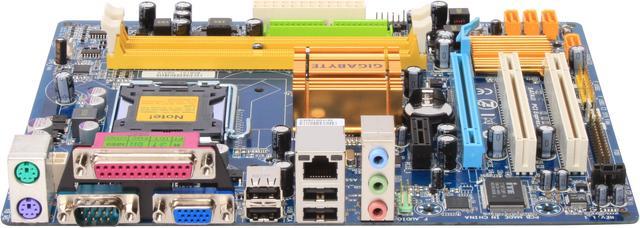
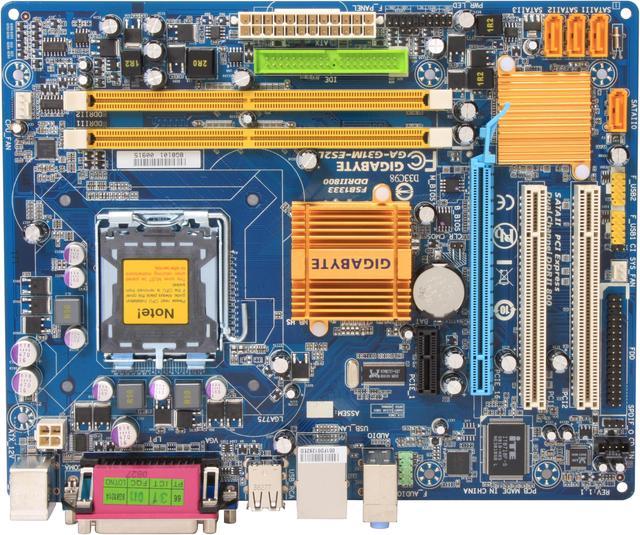
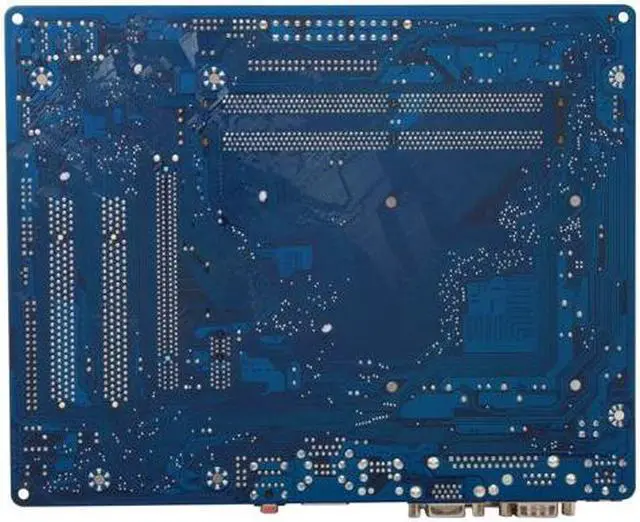
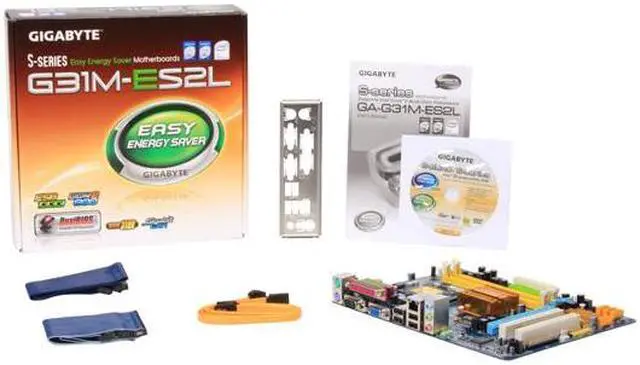
GIGABYTE GA-G31M-ES2L LGA 775 Intel G31 Micro ATX Intel Motherboard

Average Rating

4 out of 5 eggs(581 reviews)

In stock. Limit 5 per order.

Now: $60.99
 Add to Cart
  • Add to WishlistAdd to Wishlist
  • Log In RequiredPrice Alert
  • PrintPrint This Page
  • Email This Page Facebook Twitter Sharethis Share...
$11.49 Shipping
Buzz
Excellent board!
5 out of 5 eggs
I bought this board to replace a Mach Speed MS945G-GLV, which didn't like the new processor I got for it (dual-core ...
— 5/27/2009
Cheap Hackintosh
5 out of 5 eggs
I have built 4 hackintosh boxes with this board. Absolutely wonderful! Sleep works perfectly. ALC883 audio is the only ...
— ebuychance 4/30/2009


Quick Info
Manufacturer Warranty
  • Manufacturer Limited Warranty period (parts): 3 years
  • Manufacturer Limited Warranty period (labor): 3 years


Return Policies

This item is covered by Newegg.ca's Standard Return Policy.

  • Return for refund within: 30 days
  • Return for replacement within: 30 days
  • Restocking Fee: Yes
 
South Bridge:
Intel ICH7
Number of Memory Slots:
2×240pin
Memory Standard:
DDR2 800
Onboard Video Chipset:
Intel GMA 3100
Audio Chipset:
Realtek ALC883
Max LAN Speed:
10/100/1000Mbps
PCI Express x16:
1
SATA 3Gb/s:
4

Get the most from your GIGABYTE GA-G31M-ES2L with these extras!

Select Additional Items
Popular Intel Core 2 Duo E8400 Wolfdale 3.0GHz LGA 775 65W Dual-Core Processor BX80570E8400Intel Core 2 Duo E8400 Wolfdale 3.0GHz LGA 775 65W Dual-Core Processor BX80570E84000
EVGA 512-P3-1213-LR GeForce 210 512MB 64-bit DDR2 PCI Express 2.0 x16 HDCP Ready Video CardEVGA 512-P3-1213-LR GeForce 210 512MB 64-bit DDR2 PCI Express 2.0 x16 HDCP Ready Video Card1
Suggested GIGABYTE GV-R435OC-512I Radeon HD 4350 512MB 64-bit GDDR2 PCI Express 2.0 x16 HDCP Ready CrossFireX Support Low Profile Ready Video CardGIGABYTE GV-R435OC-512I Radeon HD 4350 512MB 64-bit GDDR2 PCI Express 2.0 x16 HDCP Ready CrossFireX Support Low Profile Ready Video Card0
Rosewill Wind Knight Gaming ATX Mid Tower Computer Case with pre-installed 2x 120mm Fan, Support up to 1x 140mm top fan, 2x 140mm side fan, 1x 140mm front fan, 1x 120mm rear fanRosewill Wind Knight Gaming ATX Mid Tower Computer Case with pre-installed 2x 120mm Fan, Support up to 1x 140mm top fan, 2x 140mm side fan, 1x 140mm front fan, 1x 120mm rear fan1
  • Selected Items: 0
  • Featured Product plus Selected: $60.99
Add to cart

Learn more about the GIGABYTE GA-G31M-ES2L

Model
Brand
GIGABYTE
Model
GA-G31M-ES2L
Supported CPU
CPU Socket Type
LGA 775
CPU Type
Core 2 Quad / Core 2 Extreme / Core 2 Duo
FSB
1333/1066MHz
Chipsets
North Bridge
Intel G31
South Bridge
Intel ICH7
Memory
Number of Memory Slots
2×240pin
Memory Standard
DDR2 800
Maximum Memory Supported
4GB
Channel Supported
Dual Channel
Expansion Slots
PCI Express x16
1
PCI Express x1
1
PCI Slots
2
Storage Devices
PATA
1 x ATA100 2 Dev. Max
SATA 3Gb/s
4
Onboard Video
Onboard Video Chipset
Intel GMA 3100
Onboard Audio
Audio Chipset
Realtek ALC883
Audio Channels
2/4/5.1/7.1-channel (Note)
Note: To configure 7.1-channel audio, you need connect with the port of HD Audio standard via front panel and enable the multi-channel audio feature through the audio driver.
Onboard LAN
LAN Chipset
Realtek 8111C
Max LAN Speed
10/100/1000Mbps
Rear Panel Ports
PS/2
2
COM
1
LPT
1
Video Ports
D-Sub
USB 1.1/2.0
4 x USB 2.0
Audio Ports
3 Ports
Onboard USB
Onboard USB
2 x USB 2.0/1.1 headers
Physical Spec
Form Factor
Micro ATX
Dimensions
9.6" x 7.6"
Power Pin
24 Pin
Packaging
Package Contents
GA-G31M-ES2L
Driver Disk
User Manual
Rear I/O Panel Shield
IDE/PATA Cable
FDD Cable
SATA Cable
Manufacturer Warranty
Parts
3 years limited
Labor
3 years limited

Customer Reviews of the GIGABYTE GA-G31M-ES2L

Do you own this product? Write a Review
Filter Results
Go
  • Scott
  • 8/31/2010 2:06:43 PM
  • Tech Level: above average
  • Ownership: 1 week to 1 month
  • Verified Owner
4 out of 5 eggsGreat Motherboard

Pros: Nice small size, inexpensive, supports wide variety of CPU's, Good documentation. Perfect upgrade for aging WinXP system,

Cons: none

Other Thoughts: Great to give the kids a PC that doesn't take forever to boot and load like the old P4 it replaced that maxed at 512 Ram

Did you find this review helpful? Yes No

  • Mr. Happy
  • 8/23/2010 3:54:59 AM
  • Tech Level: above average
  • Ownership: 1 month to 1 year
  • Verified Owner
5 out of 5 eggsGood Litttle Board

Pros: The best G31 board out there, Gigabyte is changing though in my opinion, I trust all thier LGA 775 chipset boards.

Cons: None

Other Thoughts: E8500 @ 3.15 x 9.5 multiplyer
G31m-ES2L
G.Skill ddr2 800 2x2gig
WD 500gig Black 32 cache
Sapphire 4850x2
750 Cosair wt PSU
Xigmatek rifle 120mm cooler
Creative xf-fi xgramer

Did you find this review helpful? Yes No

  • Direfox
  • 8/15/2010 4:23:53 PM
  • Tech Level: above average
  • Ownership: more than 1 year
  • Verified Owner
5 out of 5 eggsGA-G31M-ES2L- best budget gaming board ever

Pros: I have been using this board for over a year so I figured time to do a follow up review.

First of all, worked great with my E5200 CPU, easily overclocked it to 3500 (from 2500) and is now running my q9550 at 3500 with just two voltage bumps. No bios upgrade was needed for either of these CPUs to work. Onboard sound is adequate and so is the onboard LAN.

BIOS settings are perfectly adequate for normal overclocking and with the shift/F1 command you can access some more advanced functions. Onboard video is perfectly fine for everything except gaming, but there is of course the PCI-16 slot for adding a video card (like the gtx 260 I stuck in mine). Everything worked for me and its kept on ticking for over a year. The ability to start with a budget build CPU and upgrade to a quad core later was a big selling point for me.

Cons: There are some things to point out about this, no so much cons... more along the lines of limitations because of the nature of what it is. This is a budget micro-atx board, so be aware...

The PCI-E slot is not 2.0 but is fast enough for almost any video card out there.
The northbridge gets too hot and there is no temp diode on the mobo so you dont know how hot without a thermometer. I replaced the northbridge passive cooler and suddenly could do higher overclocks. There are several choices, both passive or with a fan. Any would be better than stock.
SATA plugs can be blocked by the video card, 90 degree cables and advanced planning helps.
No SLI or Xfire obviously.
Limited to 4 gigs of ram in two slots (which honestly is plenty for the vast majority of people).
I had to mount a Thermaltake V1 with airflow pointed up instead of back because its pretty tight around the CPU socket (and the V1 is a huge heatsink)

This is a budget overclocker, not an enthusiast board.

Other Thoughts: In my opinion this is pretty much the ultimate budget board for the standard gamer. Buying a cheaper CPU like the E5200 and overclocking it along with a decent video card, 4 gigs of ram and case/psu of your choice you can have a very cheap system that will handle just about any game out there. When the time comes to step up you can upgrade the CPU to a quad core and get a new video card to have a system every bit as fast as an 1156 i7 quadcore system (once mildly overclocked). Its also a great mobo for a web browser or HTML build.

If your building a complete new system you will probably be better off with a 1156 or 1366 socket system, but if you have any parts you need to use (775 CPU, DDR2 memory) this mobo would be a fantastic choice.

2 out of 2 people found this review helpful. Did you? Yes No

  • Ching
  • 8/15/2010 1:57:21 PM
  • Tech Level: above average
  • Ownership: 1 month to 1 year
  • Verified Owner
2 out of 5 eggsWouldn't Buy Another

Pros: Worked pretty well for a year.

Cons: Now I’m having issues with all of the USB Ports.

Other Thoughts: When I installed a PCI To USB Card, no USB device issues.

Did you find this review helpful? Yes No

  • Raven
  • 8/12/2010 9:26:48 PM
  • Tech Level: above average
  • Ownership: 1 month to 1 year
5 out of 5 eggsThis IS the board for $50!

Pros: Well I've written a review on this motherboard back a few months ago and just decided to make an update. This is a very impressive motherboard, great overclocking features, energy saving feature, and supports the latest 45nm Intel Processors.

My last review stated that I couldn't get this thing to overclock. But after I removed this motherboard from my older Compaq into my new case 2 weeks later, it magically applied my overclocking settings... Since then, I got my E5200 running at 3.80GHz 24/7 and it's FREAKIN amazing. Overclocked it without tweaking the voltages either.

Cons: I wished they gave us a bag of candy in the box.

Other Thoughts: Windows Experience Index took my CPU score from a 5.9 (2.5GHz stock) to a 6.9 (3.8GHz). With a dual-core processor, that's an impressive score.

I did manage to reach 4.0GHz, but after a few weeks it sort of blue screened on me lol. But it's okay, 3.8GHz with this motherboard is impressive because most of the higher-end boards can't even reach 3.5GHz without crashing.

If you're looking for a cheap motherboard that will give you quality, value, expansion, overclocking features, and get you from A to B, look no further.

Did you find this review helpful? Yes No

  • Mark
  • 8/10/2010 8:38:31 AM
  • Tech Level: above average
  • Ownership: 1 day to 1 week
  • Verified Owner
5 out of 5 eggsNice motherboard for home server

Pros: No frills motherboard, works great

Cons: 1 minor issue is that you can't set the speed of the chassis fan - it always spins full speed.

Other Thoughts: Bought this mobo for my home server and it works great. Gigabyte website is also easy to navigate and find drivers.

1 out of 1 people found this review helpful. Did you? Yes No

  • handydandy
  • 8/6/2010 9:06:09 PM
  • Tech Level: above average
  • Ownership: less than 1 day
  • Verified Owner
5 out of 5 eggsGigabyte ! LOVE THIS MOBO Co. !

Pros: G*I*G*A*B*Y*T*E ! awesome boards. Repairs, upgrades, new builds etc. ALL 5 of my own PC's rocka GB MOBO!

Cons: not always the cheapest, but ill take that over lack of quality anytime

Other Thoughts: THEY WORK! Windows 7 Home Premium on a very basic build. Replaced a BRAND NEW cheaper mobo from a different company that arrived DOA! Only a handful of MOBO companies out there I will now use. 4 was my last count.

Did you find this review helpful? Yes No

  • N/A
  • 8/3/2010 7:49:49 PM
  • Tech Level: above average
  • Ownership: 1 day to 1 week
  • Verified Owner
1 out of 5 eggs

Pros: Didn't explode.

Cons: Didn't work. Hangs on boot no matter what I hook up to it or how I configure it.

Other Thoughts: This is the third non-functional mobo I've bought from Newegg. First time I let it go, and the old mobo's sitting around collecting dust. Not this time. Get ready for an RMA Newegg, you can have the last two paperweights back, I don't want 'em.

What happened to competent people being able to build their own PCs? I've built every PC I've had for the last ten years, but I'm considering throwing in the towel and buying pre-built for the first time since my first PC. Just not worth the hassle. Used to be you could kill two birds by building yourself, 1 you knew you wouldn't get shafted by some proprietary, non-upgradable junk builders (Dell) like to use, and 2 you saved money. Well, I'm not saving money if I'm paying shipping both ways to Newegg to RMA junk products. Taiwan, PRC and Korea need to get their sheet together and stop selling DOA products. If they can't make a profit selling mobos for 60 USD, then they should start selling them for more and quality testing them.

1 out of 2 people found this review helpful. Did you? Yes No

  • bgavin
  • 8/3/2010 2:46:02 PM
  • Tech Level: above average
  • Ownership: 1 month to 1 year
  • Verified Owner
4 out of 5 eggsOK For The Money

Pros: Onboard video. LPT and Serial ports. Lots of USB. Excellent performance with E8400. One IDE and FDD each. Four SATA.

Cons: No RAID Southbridge. Northbridge runs very hot. Will not power up with multiple Corsair Dominator, XMS installed. Likes cheap 512mb sticks and G.Skill 1.8v 4-4-4-12 memory just fine. KZG electrolytic caps. Atheros LAN hardware.

Other Thoughts: Gigabyte is apparently developing a chronic memory problem across its product lines with memory, especially DDR3.

This board is useful for business class workstations.
This is the 2nd board I've placed with a customer.
Memory errors beep using corrupted BIOS codes. Odd.

1 out of 1 people found this review helpful. Did you? Yes No

  • N/A
  • 8/3/2010 6:26:55 AM
  • Tech Level: above average
  • Ownership: 1 week to 1 month
  • Verified Owner
2 out of 5 eggsGood board. Overclocking Problems.

Pros: Solid board, good bundle for the price.

Cons: None as far as everyday use. Couldn't get it to overclock, though.

Other Thoughts: I bought this board after reading about how well it could overclock with the intent to bring an e8500 up to 4.0ghz. I was able to do that (and a little more) at stock voltages with temps peaking around 60 degrees under load. The only curious thing was that I couldn't get it to POST if I manually set the PCIe frequency to 100; it had to be on auto.

While doing a stress test, I noticed a popping noise coming from speakers on the TV I had connected to the box. I was running both audio and video through an HDMI connection on the vid card connected to the PCIe slot. Once I undid the overclock the popping noise went away.

After a few google searches, I realized that the PCIe frequency was the problem. With this board you have to leave it on auto with this board so that the PCIe frequency goes up in proportion to your FSB. The problem is that any PCIe frequency above 100 can fry the card you put in your PCIe slot... like your pricey graphics card.

1 out of 1 people found this review helpful. Did you? Yes No

Home
Home. > 
Computer Hardware0_. > 
Motherboards1_. > 
Intel Motherboards2_. > 
GIGABYTE3_. > 
Item#: N82E16813128357
Shop by Region: United States | Canada | China
Affiliated Sites:
EggXpert.com
Newegg Community
VeriSignReliability Seal1PaypalVerify GoldenSealThis site protected by Trustwave's Trusted Commerce program

Policy & Agreement | Privacy Policy

 © 2000-2010 Newegg Inc.  As used herein, “Newegg.ca” means Newegg Canada Inc. unless the context specifically refers to the www.newegg.ca web address.
If the Adobe Reader does not appear when you click on a link for a PDF file, you can download Adobe Reader from the Adobe web site. nassau