





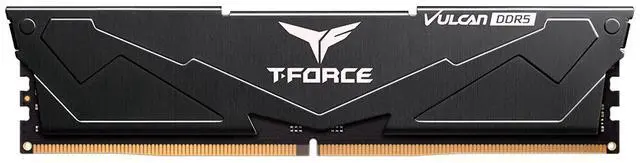
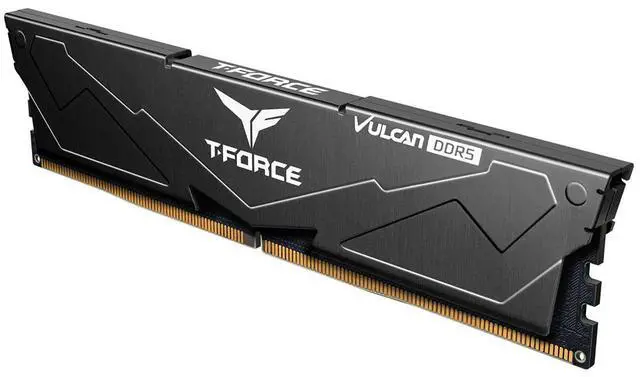
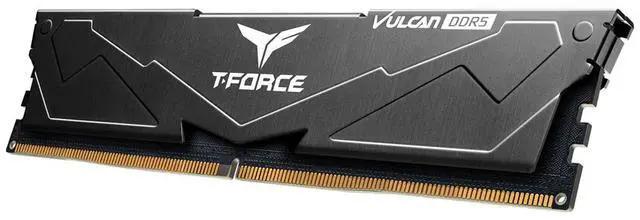


Team T-Force Vulcan 16GB 288-Pin PC RAM DDR5 6000 (PC5 48000) Memory Model FLBD516G6000HC38A01
+ $20 off w/ promo code CASF95, limited offer
- DDR5 6000 (PC5 48000)
- Timing 38-38-38-78
- CAS Latency CL38
- Voltage 1.25V
+
+
Specs
Reviews (3)
Learn more about the Team Group FLBD516G6000HC38A01
| Best Seller Ranking | #24 in Desktop Memory |
|---|
| Brand | Team |
|---|---|
| Series | T-Force Vulcan |
| Model | FLBD516G6000HC38A01 |
| Capacity | 16GB |
|---|---|
| Type | 288-Pin PC RAM |
| Speed | DDR5 6000 (PC5 48000) |
| CAS Latency | CL38 |
| Timing | 38-38-38-78 |
| Voltage | 1.25V |
| Multi-channel Kit | Dual Channel Kit |
| BIOS/Performance Profile | AMD EXPO / Intel XMP 3.0 / Intel XMP 3.0 and AMD EXPO |
| Color | Black |
| Heat Spreader | Yes |
| Recommend Use | AMD & Intel Compatible / AMD 600 Series / AMD 800 Series / AMD B650 / AMD B850 / AMD Ryzen Compatible / AMD X670 / AMD X870 / High Performance or Gaming Memory / Intel 600 Series / Intel 700 Series / Intel 800 Series / Intel B660 / Intel B670 / Intel B760 / Intel Compatible / Intel H770 / Intel Z690 / Intel Z790 / Intel Z890 |
| LED Color | None |
| First Listed on Newegg | July 06, 2026 |
|---|
Warranty & Returns
Warranty, Returns, And Additional Information
Warranty
- Limited Warranty period (parts): Lifetime
- Limited Warranty period (labor): Lifetime
- Read full details
Return Policies
- Return for refund within: 30 days
- Return for replacement within: 30 days
- This item is covered by Newegg.ca's Standard Return Policy.
- Read full return policy for details.
Manufacturer Contact Info
- Manufacturer Product Page
- Manufacturer Website
- Support Phone: 1-833-574-4629
- Support Website
- View other products from Team Group
LOADING...
The Team T-Force Vulcan is a 16GB DDR5 desktop memory module rated at 6000 MT/s, with CL38 timings and a black heat spreader. It suits compatible AMD or Intel desktop builds for gaming and other performance-focused use.
Recommended For
- PC builders starting with 16GB who expect to add a second compatible module later; this model is a single 16GB DIMM, so plan around a one-module starting configuration.
- Desktop upgraders replacing or matching a single DDR5 module in a compatible system, especially when they want a low-profile, non-RGB heat-spreader design.
- Builders with a compatible Intel or AMD desktop who want a DDR5-6000 module and are comfortable enabling and validating XMP 3.0 or EXPO in BIOS.
Real-World Use Scenarios
- Starting a DDR5 desktop build on a limited budget: use this 16GB module as an initial memory purchase, then add a compatible module later for more capacity. Because this model is one 16GB stick, it does not provide the same two-module setup as a dual-channel kit.
- Building or upgrading a compatible desktop for everyday work—such as web browsing, office apps, and streaming: 16GB can cover a moderate workload, though many demanding apps or heavy multitasking may benefit from more memory.
- Putting together a DDR5 gaming PC where the memory budget is limited: the module can suit a modest 16GB setup, but game performance and multitasking depend on the whole system, and a single stick is not equivalent to the two-stick configuration commonly tested in memory reviews.
- Tuning a compatible AMD or Intel DDR5 desktop: enable the supported EXPO or XMP profile in BIOS to target the module’s rated memory speed; actual operation depends on the processor, motherboard, and BIOS settings.
Spec Summary
| Attribute | Value |
|---|---|
| Best For | High-performance or gaming desktop memory in compatible AMD or Intel systems |
| Capacity | 16GB |
| Memory Type And Platform Compatibility | DDR5 288-pin PC RAM; compatible with AMD and Intel platforms |
| Speed And Timings | 6000 MT/s (PC5 48000), CL38, timings 38-38-38-78, at 1.25V |
| Memory Configuration And Profiles | Dual-channel kit with AMD EXPO and Intel XMP 3.0 performance profiles |
| Heat Spreader And Appearance | Black heat spreader; no LED lighting |
| Model Identifiers | Team T-Force Vulcan; model FLBD516G6000HC38A01 |
Reference Q&A
Q: Should I choose this 16GB DDR5-6000 CL38 module or a 32GB DDR5-6000 CL30 kit?
A: Choose this Team T-Force Vulcan module if 16GB is sufficient and its price or upgrade path suits your build. Choose a 32GB (2×16GB) DDR5-6000 CL30 kit if you want more capacity, lower CAS latency, and two modules from the start. The listed model is a single 16GB DIMM; its 6000 MT/s profile requires a compatible system and enabling EXPO or XMP. TechSpot recommends DDR5-6000 CL30 for Ryzen AM5, though performance differences depend on the CPU and workload.
Q: Is one 16GB DDR5-6000 stick enough, or should I get a 2×16GB kit?
A: One stick provides 16GB and can suit a budget build or a planned capacity upgrade, but a matched 2×16GB kit provides 32GB and generally offers more memory bandwidth than one DIMM. In Tom’s Hardware testing, single-DIMM gaming performance varied by CPU and was lower than with two DIMMs; the difference was smaller on the tested Ryzen 7 9800X3D than on several other CPUs. Choose the two-stick kit if you want 32GB and prioritize performance without adding another module later.
Q: Should I pay extra for this DDR5-6000 module instead of DDR5-5600?
A: Choose DDR5-6000 if your CPU and motherboard support its EXPO or XMP profile and the price difference is small; choose DDR5-5600 if it better fits your budget or system limits. DDR5-6000 is a commonly recommended target for Ryzen AM5, but benchmark results show that real-world gains over nearby memory configurations can be modest and vary by workload. Check motherboard and processor support before buying, since the advertised profile is not guaranteed on every system.
Q: Will this RAM work in my desktop PC?
A: It is desktop DDR5 memory with a 288-pin DIMM form factor, so it requires a motherboard with compatible DDR5 desktop memory slots. Check the motherboard or PC manual for supported capacity and memory speeds before buying; DDR4 systems and laptop SODIMM slots are not compatible.
Q: Does it support AMD EXPO and Intel XMP?
A: The provided specifications list AMD EXPO and Intel XMP 3.0 profiles. Use the profile supported by your motherboard and processor in BIOS; exact compatibility depends on the system.
Q: Will it run at 6000 MT/s as soon as I install it?
A: The memory is rated for DDR5-6000, but that speed is not guaranteed on every system by default. The motherboard and processor must support the setting, and you may need to enable the compatible EXPO or XMP profile in BIOS.
Q: Is 16GB enough for gaming and everyday use?
A: The listed 16GB capacity can suit everyday desktop use and gaming, depending on the games and applications. Heavy multitasking or memory-intensive work may benefit from more capacity; check your system’s supported maximum and the kit’s module configuration before planning an upgrade.
Q: Can I use this RAM with an AMD or Intel build?
A: The provided specifications list both AMD EXPO and Intel XMP 3.0 profiles. Check your motherboard and processor’s memory support, and enable the appropriate profile in BIOS if you want to run at the advertised DDR5-6000 speed. A Reddit discussion about T-Force Vulcan DDR5-6000 notes that advertised speeds may require enabling a BIOS profile.
Q: Can I add this to another RAM kit later?
A: Mixing separate kits is not guaranteed to run at their rated speed or timings, even when their specifications look similar. A Reddit discussion about adding similar DDR5-6000 CL38 memory describes stability and speed concerns with four sticks. For a more predictable upgrade, use a matched kit with the capacity you need.
Q: Is CL38 a drawback compared with DDR5-6000 CL30?
A: CL38 is a looser latency rating than CL30 at the same DDR5-6000 data rate. Reddit build discussions compare these options and often favor CL30 when the price difference is small. Whether that trade-off matters depends on the price and your workload; the provided specifications do not include a price.