







We want to ensure your holiday shopping this year is hassle-free. That’s why we’re automatically extending our return policies on almost every product! For purchases placed between November 1st, 2026 and December 31, 2026 you will have until January 31, 2027 to return your product.
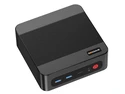
The GEEKOM A8 MAX is a compact Windows 11 Pro mini PC for home, office, and everyday multitasking users who want Ryzen 7 8745HS performance, 16GB DDR5 memory, a 1TB SSD, and Radeon 780M graphics in a small desktop footprint.
| Attribute | Value |
|---|---|
| Best For | Mainstream consumer and home use that needs a compact, VESA-mountable mini PC with Ryzen 7 8745HS performance, 16GB DDR5 memory and 1TB SSD storage |
| Processor | AMD Ryzen 7 8745HS (AMD Ryzen 7 8000 Series) with 8 MB L2 cache and 16 MB L3 cache |
| Memory And Expansion | 16GB DDR5 memory installed, supports up to 128 GB of memory for larger multitasking or heavier workloads |
| Storage And Expansion | 1TB SSD internal storage |
| Graphics | AMD Radeon 780M graphics |
| Wired Networking | Dual 2.5Gbps Ethernet for faster wired LAN connectivity |
| Power And Thermal | 120W power supply |
| Operating System | Windows 11 Pro |
| Physical Specifications | Mini PC form factor, silver color, dimensions 46.9 x 135 x 132 mm and weight 700 g |
| Included Accessories & Package Contents | A8 Max MINI PC, 1 3.3V Button Battery, VESA Mount, HDMI Cable (100mm±10mm), AC Power Line (120cm±30cm), User Guide, 6 screws, Thank You Card, Power Adapter |
| Model Identifiers | GEEKOM A8 MAX — Part Number GMA8MAXR78745HS-161-US |
Q: Should I choose the GEEKOM A8 MAX Ryzen 7 8745HS or a Ryzen 7 8845HS mini PC?
A: Choose the GEEKOM A8 MAX with Ryzen 7 8745HS if you want strong everyday CPU performance, Radeon 780M graphics, dual 2.5GbE, and a compact mini PC for office work, media, light creation, and casual gaming. Choose a Ryzen 7 8845HS mini PC if you specifically want the newer Hawk Point positioning with Ryzen AI / NPU support for AI-assisted apps. In normal CPU and iGPU use, the two chips are widely treated as close because both pair 8 Zen 4 cores with Radeon 780M, so the decision is usually about AI features, pricing, ports, cooling, and vendor implementation rather than a large real-world speed gap.
Q: Is the GEEKOM A8 MAX Ryzen 7 8745HS worth it over a cheaper Ryzen 7 6800H or Radeon 680M mini PC?
A: The A8 MAX is the better fit if you want a newer platform, faster integrated graphics class, DDR5-era responsiveness, and more headroom for modern 1080p low-to-medium gaming or GPU-accelerated workloads. A Ryzen 7 6800H mini PC still makes sense for basic office use, streaming, and older games at a lower price, but the 8745HS plus Radeon 780M combination is generally positioned as the more capable choice for buyers who want longer useful life and stronger graphics without moving to a larger desktop.
Q: Should I buy this 16GB GEEKOM A8 MAX or move up to a 32GB version?
A: Buy the 16GB version if your main use is web work, Office apps, streaming, remote work, and light photo editing. Move up to 32GB if you plan to keep many apps open, run virtual machines, use the Radeon 780M for gaming, or do heavier creation work, because integrated graphics shares system memory and benefits from more RAM headroom. The 16GB model is the more efficient starting point, while 32GB is the safer choice for multitasking and longer-term flexibility.
Q: Should I choose the GEEKOM A8 MAX Ryzen 7 8745HS or a Ryzen 9 8945HS mini PC?
A: Choose the Ryzen 7 8745HS A8 MAX if you want the same compact mini PC class and Radeon 780M graphics tier with lower cost focus and strong mainstream performance. Choose a Ryzen 9 8945HS model if your workloads are more CPU-heavy or you want the higher-tier AI-focused positioning available in many premium 8000-series mini PCs. For gaming without a discrete GPU, the trade-off is smaller than the CPU names suggest because both configurations typically rely on Radeon 780M, so the upgrade is more meaningful for sustained productivity and compute workloads than for casual graphics use.
Q: Is the GEEKOM A8 MAX a better choice than a laptop for a portable setup?
A: Choose the A8 MAX if you want a compact desk setup with more fixed I/O, dual 2.5GbE networking, easier monitor expansion, and easier memory or storage upgrades than most laptops. Choose a laptop if true portability matters more because the A8 MAX still needs external power, a display, and peripherals. In practice, the A8 MAX fits buyers who want small size and low desk footprint without giving up desktop-style connectivity.
Q: Is this a good mini PC for everyday office work, Zoom/Teams meetings, and multitasking?
A: Yes. This configuration is well suited for office work, web apps, video meetings, spreadsheets, and general multitasking. The Ryzen 7 8745HS is a high-performance laptop-class 8-core processor, 16GB DDR5 is enough for mainstream productivity, and the 1TB SSD gives ample fast storage. Compared with the low-power mini PCs commonly positioned for basic home-office use, this model sits a tier higher and is a better fit if you keep many tabs and apps open at once.
Q: Can it handle light gaming, or do I need a desktop with a dedicated GPU?
A: It can handle light to moderate gaming, but it is not the right choice if your priority is high-end AAA gaming. The Radeon 780M is one of the stronger integrated GPUs in a mini PC and is suitable for esports, older games, indie titles, and lower-settings 1080p play. The trade-off is that integrated graphics still trails a full desktop gaming PC with a dedicated graphics card, so buyers focused on maximum frame rates should look at a tower or a mini PC with eGPU support and a stronger graphics path.
Q: Is it worth buying as a travel work device?
A: It can work well for travel between fixed desks, but it is not a laptop replacement. The main advantages are its very small size and low weight, so it is practical for carrying between home, office, and hotel setups. The trade-off is that you still need external peripherals such as a monitor, keyboard, mouse, and power adapter wherever you use it. It makes sense for users who want a compact full Windows desktop, not for people who need true on-the-go use in meetings, airplanes, or classrooms.
Q: Who is this mini PC best for?
A: It is best for buyers who want a compact Windows desktop for home office use, everyday productivity, media, multitasking, and some light gaming without stepping up to a full tower. It is also a reasonable fit for multi-display desk setups and users who value fast wired networking, since this model includes dual 2.5GbE LAN. It is less suitable for buyers who need a battery-powered mobile computer or workstation-class graphics performance.
Q: What is the main trade-off versus a similar mini PC with 32GB RAM?
A: The main trade-off is headroom. This A8 MAX configuration has a strong processor and fast integrated graphics, but 16GB RAM is more limiting than 32GB for heavier multitasking, larger creative workloads, or keeping many demanding apps open long term. If your use is mostly office work, browsing, meetings, and media, 16GB is still a sensible starting point. If you expect heavier parallel workloads, a comparable 32GB mini PC will usually feel more forgiving.
Q: Is the GEEKOM A8 MAX a good fit for everyday work and general home use?
A: Yes. Based on its Ryzen 7 8745HS, 16GB DDR5, and 1TB SSD, it is well suited to office work, web apps, media playback, multitasking, and general home computing. Community discussion around the A8 series repeatedly treats it as a compact desk PC with enough performance for mainstream use. The main limitation is not basic speed, but mini-PC trade-offs like limited internal expansion compared with a full desktop.
Q: Is the GEEKOM A8 MAX good for light gaming and emulation?
A: Yes, for light to moderate gaming. The Radeon 780M integrated graphics are suitable for indie games, older titles, emulation, and lower-settings gaming without needing a separate GPU. It is a better fit for casual gaming than for demanding AAA gaming at high settings. Buyers expecting console-class performance in newer heavy games may find it limiting.
Q: Is the GEEKOM A8 MAX a worthwhile upgrade from a handheld PC like the ROG Ally Z1 Extreme?
A: Usually not if your goal is a major gaming-performance jump. Reddit discussion around this comparison points out that systems in this class can share broadly similar CPU and GPU foundations, so the benefit is more about better sustained power, desktop ports, fixed-desk convenience, and thermals than a dramatic increase in frame rates. It makes more sense as a compact desktop replacement than as a big gaming upgrade over a Z1 Extreme handheld.
Q: Who is the GEEKOM A8 MAX best suited for?
A: It is best suited for buyers who want a very small Windows desktop for work, media, light creative tasks, light gaming, or a tidy living-room or desk setup. It is also a reasonable fit for users who value portability between rooms or locations. It is less suitable for buyers who need strong internal upgrade flexibility, a dedicated GPU, or heavier virtualization and workstation workloads.
Q: What are the main trade-offs of buying the GEEKOM A8 MAX instead of a larger desktop?
A: The main trade-offs are limited internal expandability and lower graphics headroom than a desktop with a dedicated GPU. The included 16GB RAM and 1TB SSD are solid for mainstream use, and the platform supports memory upgrades, but mini-PC buyers still give up easier cooling upgrades, larger component choices, and stronger gaming upside. In return, the A8 MAX offers a much smaller footprint and lower-power all-in-one convenience.