





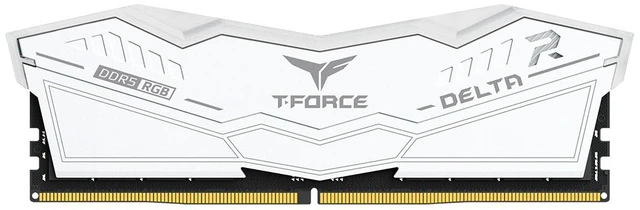
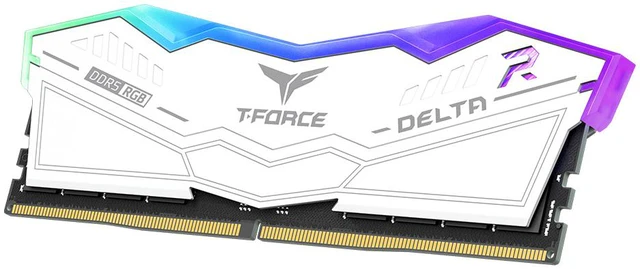
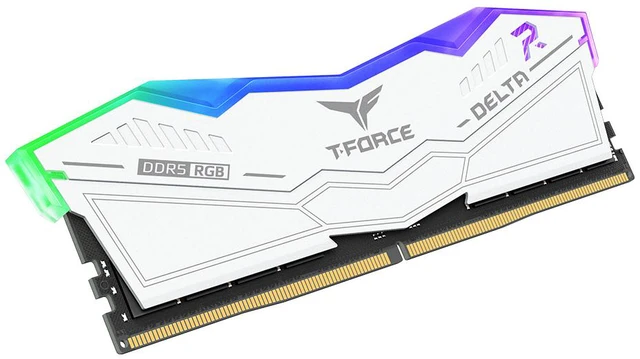
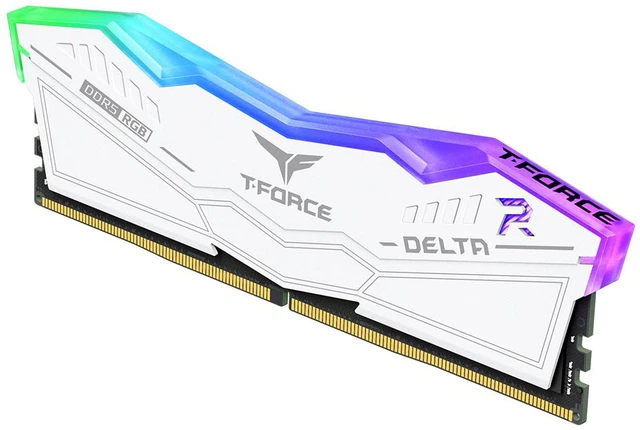


Team T-Force Delta RGB (1x16GB) 16GB 288-Pin PC RAM DDR5 6000 (PC5 48000) Desktop Memory Model FF4D516G6000HC38A01 White CL38
- DDR5 6000 (PC5 48000)
- Timing 38-38-38-78
- CAS Latency CL38
- Voltage 1.25V
- 120° ultra-wide RGB lighting
- Intel XMP 3.0 / AMD EXPO
+
+
Reviews
Warranty & Returns
Warranty, Returns, And Additional Information
Warranty
- Limited Warranty period (parts): Lifetime
- Limited Warranty period (labor): Lifetime
- Read full details
Return Policies
- Return for refund until: January 31, 2027
- Return for replacement until: January 31, 2027
- This item is covered by Newegg.ca's Extended Holiday Return Policy.
- Read full return policy for details.
We want to ensure your holiday shopping this year is hassle-free. That’s why we’re automatically extending our return policies on almost every product! For purchases placed between November 1st, 2026 and December 31, 2026 you will have until January 31, 2027 to return your product.
Manufacturer Contact Info
- Manufacturer Product Page
- Manufacturer Website
- Support Phone: 1-833-574-4629
- Support Website
- View other products from Team Group
LOADING...
Team T-Force Delta RGB is a single 16GB DDR5-6000 desktop memory module with CL38 timing, 1.25V operation, and Intel XMP 3.0 and AMD EXPO support, suited to compatible desktop builds or upgrades seeking a fast module with RGB lighting.
Recommended For
- White-build PC builders who want a visible RGB memory module to match a themed desktop; the Delta RGB’s white heat spreader and wide RGB lighting suit showcase builds.
- Builders with a compatible DDR5 motherboard who want one memory profile option for either an Intel XMP or AMD EXPO setup, and are prepared to enable the profile in BIOS.
- Budget-conscious builders assembling a PC in stages who need one 16GB DDR5 module now and plan to add memory later; treat the second-module upgrade as a plan, not a guarantee of a matched pair.
- Desktop users with light memory demands—such as everyday applications and occasional gaming—who value DDR5-6000 and RGB styling more than having 32GB installed from the start.
Real-World Use Scenarios
- For everyday tasks such as web browsing, office work, and light multitasking, this 16GB module provides a DDR5 memory upgrade; running many demanding apps at once can still make 16GB a limit.
- For a budget gaming PC, one 16GB stick can get a compatible DDR5 system running, but it uses one memory module and may deliver lower performance than a matched two-stick setup in some games—particularly when the CPU is the bottleneck.
- For a PC build that will be expanded later, this single module lets the owner start with 16GB and add memory later; check motherboard guidance and use a compatible matching module, since adding a second stick can affect memory speed and stability.
- For a white-windowed PC build, the white heat spreader and RGB lighting add visible color and lighting inside the case; the lighting is an appearance feature rather than a performance benefit.
- When assembling a compatible Intel or AMD desktop, users can enable the supported XMP 3.0 or EXPO memory profile in BIOS to target the module's rated DDR5-6000 speed; the achievable setting depends on the CPU and motherboard.
Spec Summary
| Attribute | Value |
|---|---|
| Best For | Desktop memory upgrades for systems compatible with DDR5 RAM |
Reference Q&A
Q: Should I buy this 1x16GB DDR5-6000 stick or a 2x16GB DDR5-6000 kit?
A: Choose this single 16GB stick if you want a lower-capacity starting point and plan to add a compatible matching module later. Choose a 2x16GB kit if you want 32GB and both memory slots populated from the start; testing by TechSpot found that one stick can perform well, but results varied by game and using two modules provided more memory bandwidth and capacity. This product is one 16GB module, not a 32GB kit.
Q: Is DDR5-6000 CL38 worth choosing over DDR5-6000 CL30?
A: Choose this CL38 module if its price, white finish, or RGB design suits your build and you want DDR5-6000. A CL30 kit has tighter rated timings and may perform better in CPU-limited workloads, but TechSpot’s testing found that DDR5-6000 CL40 and CL30 were close in several game tests. Those results are directional, not a direct benchmark of this exact 1x16GB model; capacity and number of modules also affect comparisons.
Q: Should I choose this DDR5-6000 stick over a lower-speed DDR5-4800 module?
A: Choose this module if your motherboard and processor support DDR5-6000 memory profiles and you want a higher rated data rate. A DDR5-4800 module may suit a build prioritizing basic memory capacity or standard-speed operation. Real-world gains depend on the CPU, workload, and whether the system is limited by memory; TechSpot found memory-speed differences mattered more in some CPU-limited gaming tests than in GPU-limited scenarios.
Q: Will this RAM work with my desktop PC?
A: It is a 16GB, 288-pin DDR5 desktop memory module. Your motherboard must support DDR5 desktop DIMMs; it will not fit a laptop that uses smaller SO-DIMM memory. Check your motherboard’s memory support list and the CPU’s supported speeds before buying, since compatibility and 6000 speed can depend on the system.
Q: Will it run at 6000 MT/s automatically?
A: Not necessarily. The module is rated for DDR5-6000 and includes Intel XMP 3.0 and AMD EXPO profiles. Reaching that rated speed may require enabling the supported profile in BIOS, and the motherboard, CPU, and BIOS version can affect the speed and stability achieved.
Q: Is this one 16GB stick or a two-stick kit?
A: It is one 16GB memory module, not a two-stick kit. A single module may be suitable for a basic capacity upgrade, but it provides less total memory than a larger-capacity configuration; check your system’s workload needs and available memory slots before buying.
Q: Is 16GB enough for my PC?
A: This module adds 16GB of memory, which can suit everyday computing and moderate workloads. Whether that is enough depends on the apps you run and how much multitasking you do; users with memory-heavy workloads should check their system’s capacity needs before choosing a 16GB module.
Q: Is this single 16GB stick a sensible choice if I plan to add more RAM later?
A: It provides 16GB in one module, and Reddit discussions show some builders choose a single stick with a later upgrade in mind. For an upgrade, matching capacity, speed, timings, and voltage matters; buying a matched kit is another option if you cannot find a suitable matching stick.
Q: Should I mix this stick with RAM I already have?
A: Mixing modules can make compatibility and stable operation less predictable, even when their advertised specifications are similar. Reddit discussions recommend matching the modules or replacing the existing RAM with a matched kit; check your motherboard and processor support before upgrading.
Q: Can I count on reaching DDR5-6000 if I install multiple sticks?
A: No. This module is rated for DDR5-6000 and lists Intel XMP 3.0 and AMD EXPO, but the enabled speed also depends on the system. Reddit users report that running four DDR5 modules at the advertised speed can require lower settings or troubleshooting, so check your CPU and motherboard guidance rather than assuming 6000 is guaranteed.