


Best Sellers
 Hot Seller
- $366.11
- + $38.45 Shipping
 Top Rated
- $426.99
- + FREE SHIPPING
- $460.42
- + FREE SHIPPING

Get Educated
Make informed decisions with expert advice. Learn More

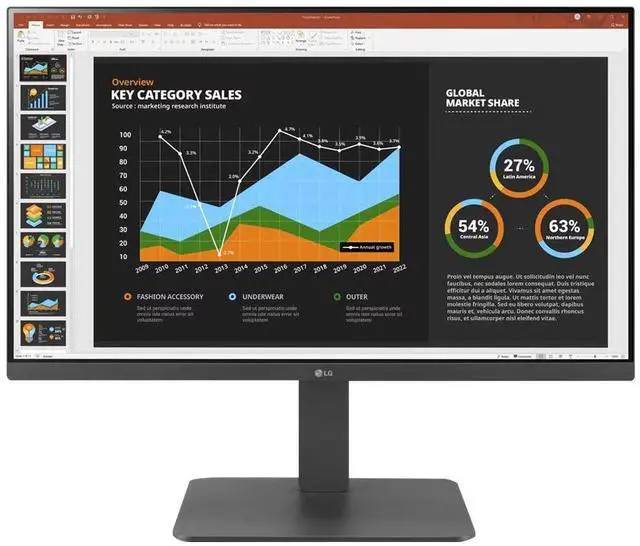
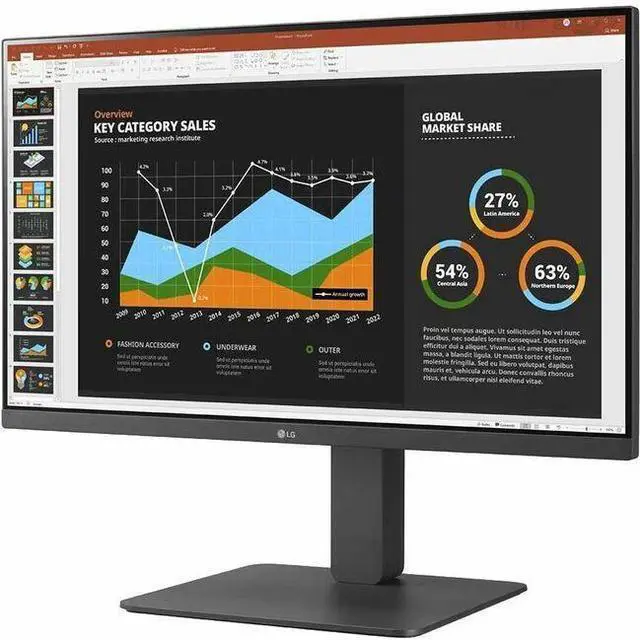


LG 24BR650B-C 23.8-inch Full HD (1920x1080) IPS Monitor with USB Type-C
- 23.8" Full HD (1920x1080) IPS Display
- Color Calibrated
- Daisy Chain & USB Type-C
- Reader Mode & Flicker Safe
- Tilt/Height/Swivel/Pivot (Bi-Direction)
- Built-in Speakers
+
+
Overview
Specs
Reviews
Technical Information
- Number of Screens: 1
- Screen Size Class: 24"
- Viewable Screen Size: 24"
- Screen Mode: Full HD
- Panel Technology: In-plane Switching (IPS) Technology
- Aspect Ratio: 16:9
- Stand Adjustments: Pivot
- Stand Adjustments: Swivel
- Maximum Resolution: 1920 x 1080
- HDMI: Yes
- USB: Yes
- DisplayPort: Yes
- USB Type-C: Yes
Warranty & Returns
Warranty, Returns, And Additional Information
Warranty
- Limited Warranty period (parts): 1 year
- Limited Warranty period (labor): 1 year
- Read full details
Return Policies
- Return for refund until: January 31, 2027
- Return for replacement until: January 31, 2027
- This item is covered by Newegg.ca's Extended Holiday Return Policy.
- Read full return policy for details.
We want to ensure your holiday shopping this year is hassle-free. That’s why we’re automatically extending our return policies on almost every product! For purchases placed between November 1st, 2026 and December 31, 2026 you will have until January 31, 2027 to return your product.
Manufacturer Contact Info
- Manufacturer Website
- Support Phone: 1-800-243-0000
- Support Website
- View other products from LG Electronics
LOADING...
LOADING...
The LG 24BR650B-C is a 23.8-inch Full HD IPS monitor with a height-, tilt-, swivel-, and pivot-adjustable stand, making it well suited to office and home-office users who want flexible screen positioning for everyday work.
Recommended For
- Laptop users building a tidy desk setup: USB-C carries display and data while supplying up to 65W of charging, reducing the need for separate laptop cables.
- Office and remote workers who spend the day on documents, email, and video calls: its 23.8-inch IPS Full HD screen, adjustable stand, and built-in speakers suit a fixed workstation.
- Users assembling a two-monitor work desk: DisplayPort output supports a daisy-chain setup, which can simplify connecting another compatible display.
- People who want to switch between landscape and portrait for reading, coding, or long documents: the stand supports height adjustment and pivot, and the panel can be viewed from wide angles.
Real-World Use Scenarios
- At a home or office desk, a laptop user can connect by USB-C for the display, laptop charging, and access to the monitor’s USB ports and Ethernet connection, reducing the need for a separate dock. Charging is up to 65 W, so check that it meets the laptop’s power needs.
- For office multitasking, connect a compatible second monitor through DisplayPort out to extend the desktop, keeping more documents or apps visible without routing separate video cables from the computer to each screen.
- For everyday tasks such as email, spreadsheets, web browsing, and video meetings, the 23.8-inch Full HD screen provides a straightforward desktop display; built-in speakers can handle basic audio without adding desk speakers.
- When reading long documents or reviewing code, users can rotate the screen to portrait and adjust its height and angle, making it easier to fit tall pages or more lines on screen.
- In a shared or compact workspace, the height-, tilt-, and swivel-adjustable stand helps users reposition the screen for their seating position, while the anti-glare surface is suited to typical indoor office lighting.
Spec Summary
| Attribute | Value |
|---|---|
| Best For | Desktop work and general viewing, with a Full HD IPS screen, USB-C and DisplayPort connectivity, and an adjustable stand |
| Panel And Resolution | 23.8-inch flat IPS LCD with 1920 × 1080 resolution, 16:9 aspect ratio, 178° horizontal and vertical viewing angles, and anti-glare finish |
| Refresh Rate And Response | 75 Hz refresh rate, 5 ms GtG response time, and G-Sync compatibility |
| Image Quality And Display Features | 250 cd/m² brightness, 1,000:1 contrast ratio, 16.7 million colors, 72% NTSC color gamut, and 0.2745 mm pixel pitch; includes color calibration, Reader Mode, Flicker Safe, Color Weakness, Super Resolution+, Black Stabilizer, Dynamic Action Sync, Crosshair, and Smart Energy Saving |
| Ports And Connectivity | 1 HDMI, 2 DisplayPort, and 1 USB-C with DisplayPort Alternate Mode; 1 USB 3.0 upstream, 3 USB 3.0 Type-A downstream, and a headphone connection |
| Stand And Ergonomics | Height, tilt, swivel, and pivot adjustments; supports 100 × 100 mm VESA mounting |
| Audio | Built-in speakers |
| Power | 100–240 VAC, 50/60 Hz input; typical consumption 23 W, maximum 130 W, Energy Star consumption 14.8 W, sleep consumption below 0.5 W, and DC-off consumption below 0.3 W |
| Dimensions And Weight | With stand: 21.57 × 21.24 × 10.08 inches and 14.33 lb; without stand: 12.72 × 21.24 × 1.97 inches and 8.16 lb |
| Model Identifiers | LG 24BR650B-C, black cabinet |
Reference Q&A
Q: Should I choose the LG 24BR650B-C or 24BR550Y-C for a laptop desk setup?
A: Choose the LG 24BR650B-C if you want USB-C video and up to 65W laptop power delivery through the monitor, plus a USB hub and DisplayPort output. The 24BR550Y-C is a fit for a standard HDMI or DisplayPort desktop setup; both are 23.8-inch Full HD IPS monitors with adjustable stands and built-in speakers.
Q: LG 24BR650B-C or 27BR650B-C: which size should I get?
A: Choose the 24BR650B-C for a more compact desk setup and a finer pixel pitch: it uses the same 1920 × 1080 resolution on a 23.8-inch screen. Choose the 27BR650B-C if you prefer a larger 27-inch screen. Both models share the BR650 series’ Full HD IPS format and core connectivity features.
Q: Is the LG 24BR650B-C a good fit for a one-cable laptop workstation?
A: The 24BR650B-C is designed for a streamlined laptop workstation: its USB-C connection carries video and provides up to 65W of power delivery, while the monitor’s USB-A ports can connect peripherals. It also has HDMI and DisplayPort inputs for other devices.
Q: Can I connect and charge my laptop with one USB-C cable?
A: Yes, the monitor’s USB-C port supports DisplayPort video and up to 65W Power Delivery. A compatible laptop can use one USB-C connection for display and charging; check that the laptop supports video over USB-C and that 65W meets its charging needs.
Q: Is this monitor suitable for everyday office work and meetings?
A: Yes. Its 23.8-inch Full HD IPS screen is suited to documents, browsing, and general office tasks, and the built-in speakers can play meeting audio. The listed features do not specify a webcam or microphone, so plan to use separate meeting equipment if needed.
Q: Can I adjust the screen height or use it in portrait mode?
A: Yes. The stand supports height adjustment, tilt, swivel, and pivot, so you can set the screen position for desk work or rotate it to portrait orientation. It also supports a 100 × 100 mm VESA mount.
Q: Does it have built-in speakers?
A: Yes. It has built-in speakers for basic audio playback, such as system sounds or meeting audio. If stronger or more detailed sound matters, use external speakers or headphones.