
Your Browsing History
- Free 45-day Returns
$125.99
Ships from China.

Meet Your Seller

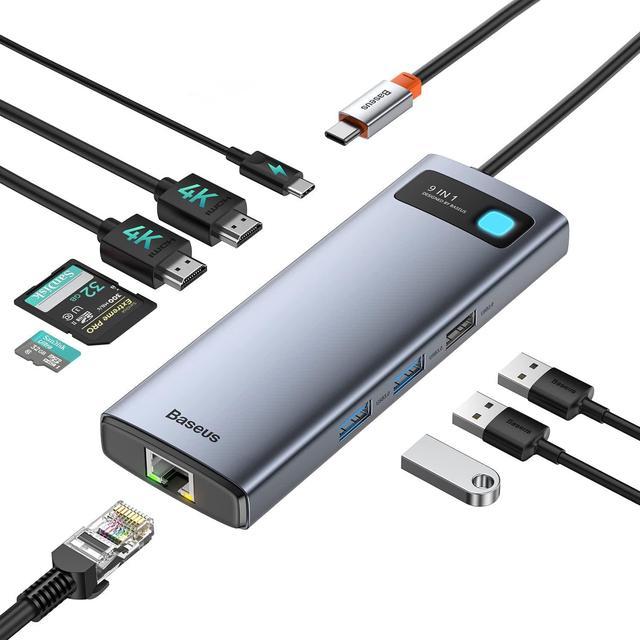


Baseus Laptop Docking Station Dual Monitor 4K@120Hz, 9 in 1 USB C Hub with 2 HDMI, 1000Mbps LAN, 100W PD, 3 USB, SD Card Reader, USB C Dock Compatible with MacBook/Dell/HP/Surface/Lenovo/Steam Deck
Limited time offer, ends 09/30 By Zhiyi Technology
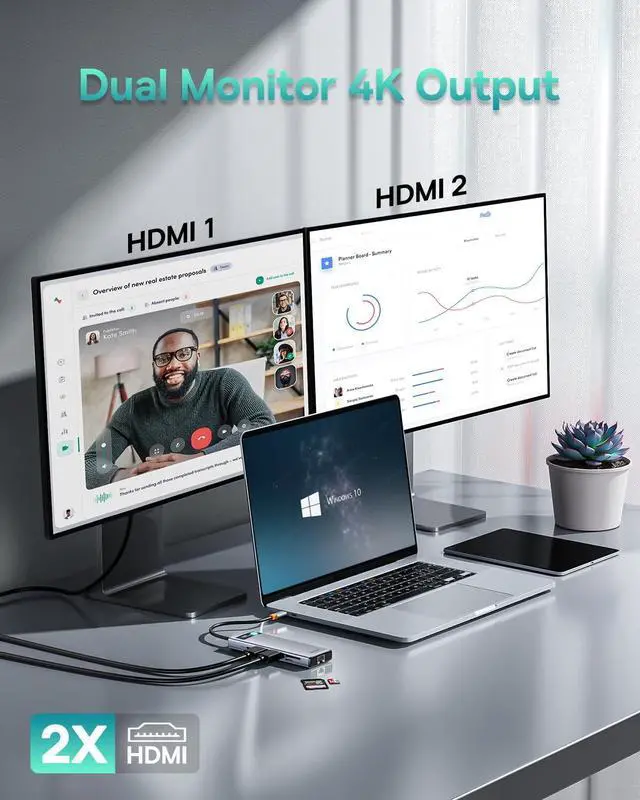
- 120Hz USB C to HDMI AdapterSimply connect docking station with the HDMI port and you can enjoy Ultra HD audio instantly(Single Display Up to 4K@120Hz). Hdmi splitter for dual monitors support mirror or extend mode with crystal clear 3D visual and high quality video experience through 2 HDMI ports. You can do different project on different monitors which provide you more space for work, good for home office.
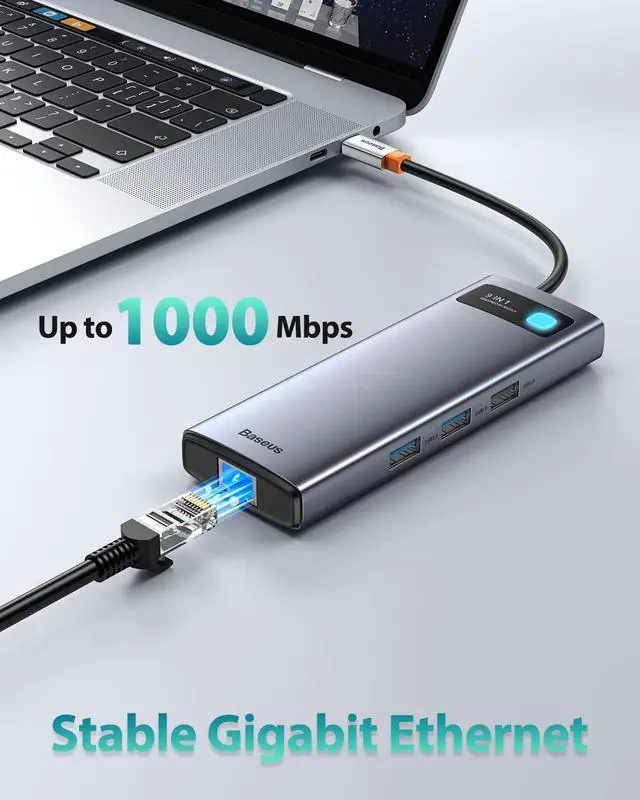
- Stable 1000Mbps EthernetUSB to ethernet adapter provides faster data transfers and better security than most Wi-Fi connections; Simply Plug the usb c hub to your laptop and plug in an ethernet cable, you will enjoy an ultra-fast surfing feeling. Baseus usb docking station which is the Ideal solution for unstable Wi-Fi or a failed network card.
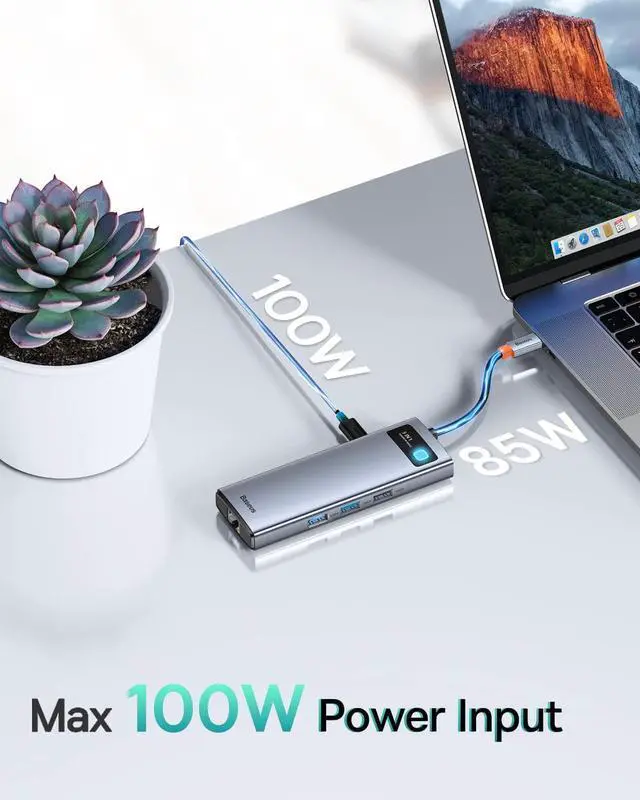
- Fast Power Delivering HubThe usb c multiport adapter equipped with one type-c charging port for connecting extra power supply which supports charging your laptop(Powered up to 85W). No need to worry about losing laptop's power when us
+
+
Overview
Specs
Reviews
Previous page
Next page Ensure that your laptops USB-C port supports the Power Delivery, DP Alt Mode and Data Transfer to access the full feature of this USB-C hub.
Not all laptop's USB-C port support video output. Only USB-C port that support the DP protocol can support external displays, the DP1.4 protocol support resolution up to 4K120Hz.
If you have any confusion about this, be free to reach our support team by providing your laptops brand and model so that we could help you out.
NOTE with 120HZ Output:
The USB-C port of laptop must support the DP1.4 protocol.
External Monitor must support 120HZ or Higher Refresh Rate.
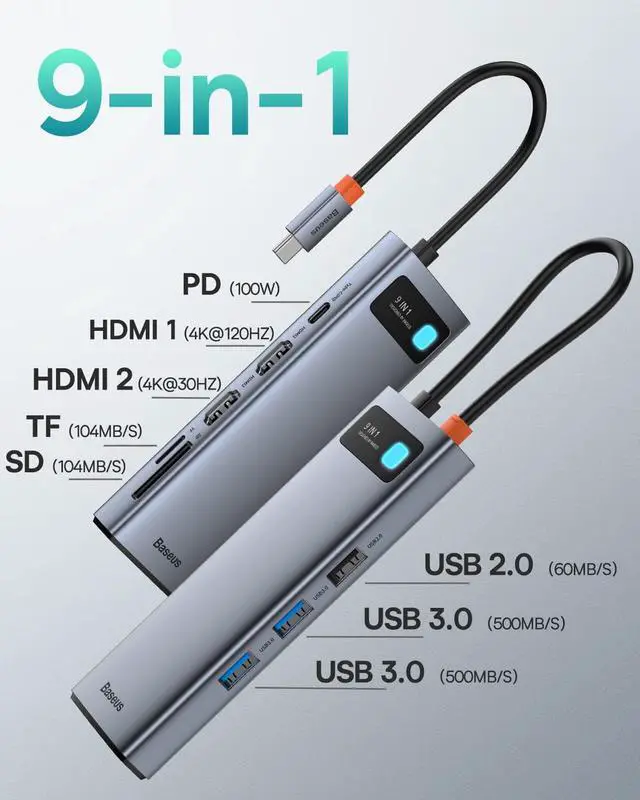
Only HDMI 1 of dock output up to 4K@120Hz, HDMI 2 display up to 4K@30Hz.
Other NOTES:
When more external devices are connected through this hub, it is recommended to connect with power supply through the USB-C PD port.
For MacBook users, settings are required to use LAN ethernet port. Go to: System Preferences Network, click on + icon and selecting usb 10 / 100 / 1000 LAN to create an application
If the HDMI isnt stable when extending on monitor, ensure to firmly plug the HDMI cable and assure that the hub is powered through the USB-C port
This USB-C hub docking station much be directly plug to the USB-C port of your laptop. It may not work if plugged to a convert or other port adapters.
Some users' laptop upgrade from Windows 10 to Windows 11, which cause the USB-C interface of laptop cannot recognize the usb c hub. Please upgrade the "USB-C interface" driver of laptop
Some laptop interface have an over-discharge protection protocol. Please keep the PD adapter connected with docking station while using for a long time.
Due to the limitation of ASUS ROG ALLY itself, all third-party docking station has no access to the 30W turbo mode during using, and this may get resolved on the next generation of ROG ALLY system. You can still use Baseus docking station to achieve PD fast charging.
The PD charging port supports delivering power to your devices quickly. You can use this docking station to power your laptop with the original power supply.
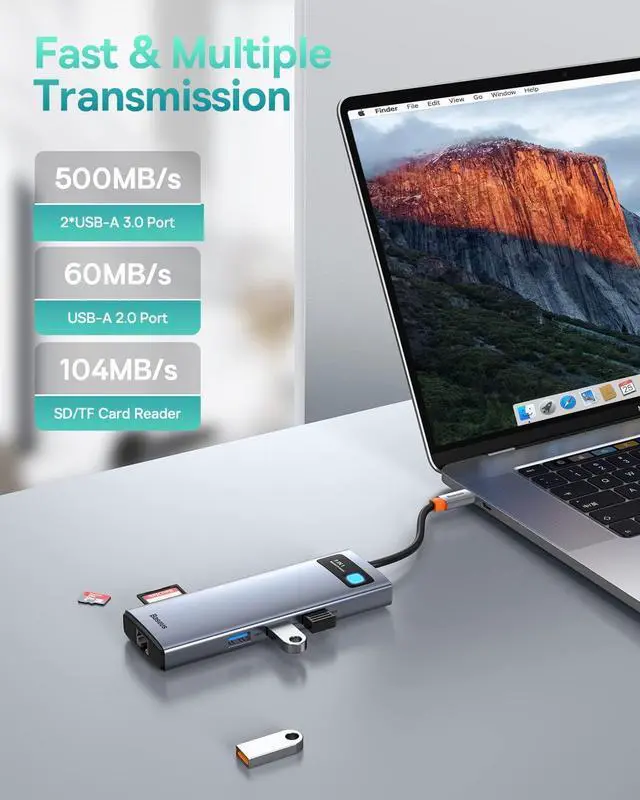
2*USB 3.0 Ports with 5Gbps transfer speed and 1*USB 2.0 Port with 480Mbps transfer speed, also allows you to connect keyboard or mouse without any lag.
The SD/TF Card reader can read at the same time, immediately transfer pictures to your phone, tablet or laptop everywhere.(Speed up to 104 MB/s)
Get a stable high-speed network connection on the USB-C device.Supports max 1000Mbps ethernet, backwards compatible with 100Mbps/10Mbps RJ45 LAN.
The baseus uniquely designed indicator shines icy blue light, can visually display the working status of the USB C hub but not disturbing you at night.
Baseus originates from our core value Based on User. With more than a decade of focus on consumer electronics, innovation and creativity led us to where we are right now with numerous patents, international design awards, and a vast variety of product.
The version of DP on your device directly determines the actual resolution when connecting to external monitors using the docking station.
If you're using a Windows device, you can know which version of DP you have by checking your CPU generation.
DP version 1.2 if your CPU is Intel generation 10 or earlier.
DP version 1.4 if your CPU is Intel generation 11 or later.
DP version 1.4 if you're using a workstation laptop with an NVIDIA GPU.
If you're using a MacBook, iMac, or iPad, you can find your DP version from the list below:
DP 1.4:iPad Pro (3rd generation and later), MacBook Pro ( 2017, 2019, 2020, 2021), MacBook Air (2020), MacBook Air (13-inch, M1, 2020), iMac (2017 and later), iMac Pro (2017 and later)
DP 1.2: iPad Air (4th generation), MacBook Air (2018), MacBook Pro (2016), Mac mini (2018)
For Apple:MacBook/ MacBook Pro(2021/2020/2019/2018); Macbook Air 2018-2020, Mac mini 20
Next page Ensure that your laptops USB-C port supports the Power Delivery, DP Alt Mode and Data Transfer to access the full feature of this USB-C hub.
Not all laptop's USB-C port support video output. Only USB-C port that support the DP protocol can support external displays, the DP1.4 protocol support resolution up to 4K120Hz.
If you have any confusion about this, be free to reach our support team by providing your laptops brand and model so that we could help you out.
NOTE with 120HZ Output:
The USB-C port of laptop must support the DP1.4 protocol.
External Monitor must support 120HZ or Higher Refresh Rate.
Only HDMI 1 of dock output up to 4K@120Hz, HDMI 2 display up to 4K@30Hz.
Other NOTES:
When more external devices are connected through this hub, it is recommended to connect with power supply through the USB-C PD port.
For MacBook users, settings are required to use LAN ethernet port. Go to: System Preferences Network, click on + icon and selecting usb 10 / 100 / 1000 LAN to create an application
If the HDMI isnt stable when extending on monitor, ensure to firmly plug the HDMI cable and assure that the hub is powered through the USB-C port
This USB-C hub docking station much be directly plug to the USB-C port of your laptop. It may not work if plugged to a convert or other port adapters.
Some users' laptop upgrade from Windows 10 to Windows 11, which cause the USB-C interface of laptop cannot recognize the usb c hub. Please upgrade the "USB-C interface" driver of laptop
Some laptop interface have an over-discharge protection protocol. Please keep the PD adapter connected with docking station while using for a long time.
Due to the limitation of ASUS ROG ALLY itself, all third-party docking station has no access to the 30W turbo mode during using, and this may get resolved on the next generation of ROG ALLY system. You can still use Baseus docking station to achieve PD fast charging.
The PD charging port supports delivering power to your devices quickly. You can use this docking station to power your laptop with the original power supply.
2*USB 3.0 Ports with 5Gbps transfer speed and 1*USB 2.0 Port with 480Mbps transfer speed, also allows you to connect keyboard or mouse without any lag.
The SD/TF Card reader can read at the same time, immediately transfer pictures to your phone, tablet or laptop everywhere.(Speed up to 104 MB/s)
Get a stable high-speed network connection on the USB-C device.Supports max 1000Mbps ethernet, backwards compatible with 100Mbps/10Mbps RJ45 LAN.
The baseus uniquely designed indicator shines icy blue light, can visually display the working status of the USB C hub but not disturbing you at night.
Baseus originates from our core value Based on User. With more than a decade of focus on consumer electronics, innovation and creativity led us to where we are right now with numerous patents, international design awards, and a vast variety of product.
The version of DP on your device directly determines the actual resolution when connecting to external monitors using the docking station.
If you're using a Windows device, you can know which version of DP you have by checking your CPU generation.
DP version 1.2 if your CPU is Intel generation 10 or earlier.
DP version 1.4 if your CPU is Intel generation 11 or later.
DP version 1.4 if you're using a workstation laptop with an NVIDIA GPU.
If you're using a MacBook, iMac, or iPad, you can find your DP version from the list below:
DP 1.4:iPad Pro (3rd generation and later), MacBook Pro ( 2017, 2019, 2020, 2021), MacBook Air (2020), MacBook Air (13-inch, M1, 2020), iMac (2017 and later), iMac Pro (2017 and later)
DP 1.2: iPad Air (4th generation), MacBook Air (2018), MacBook Pro (2016), Mac mini (2018)
For Apple:MacBook/ MacBook Pro(2021/2020/2019/2018); Macbook Air 2018-2020, Mac mini 20
Warranty & Returns
Warranty, Returns, And Additional Information
Warranty
- Please contact the Seller directly for warranty information. Warranty information may also be found on the Manufacturer's website.
- CONTACT
Return Policies
- Return for refund within: 45 days
- Return for replacement within: 45 days
- This item is covered by Zhiyi Technology Return Policy
Manufacturer Contact Info
- For a directory of all our manufacturers, please click below.
- Manufacturers Directory
LOADING...