


- Free 30-day Returns
$1,067.99
Ships from United States.
Sold by Ali Wangwang E-commerce Limited
Shipped by Ali Wangwang E-commerce Limited

Meet Your Seller

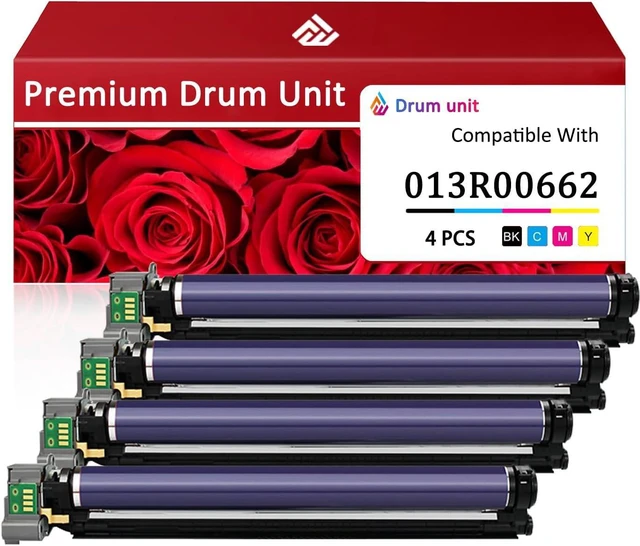








013R00662 Drum Unit Compatible for Xerox 013R00662 Imaging Drum Work for Xerox WorkCentre 7525 7530 7535 7545 7556 7830 7835 7845 7855 7970 Printers
- Compatibility With: For Xerox WorkCentre 7525 7530 7535 7545 7556 7830 7835 7845 7855 7970 EC7836 EC7856 EC8036 EC8056 AltaLink C8030 C8035 C8045 C8055 C8070 Printers
- Print capacity: With 5% coverage on A4 paper, up to 125,000 pages can be printed with the 013R00662 black drum unit, and up to 125,000 pages with the 013R00662 013R00662 013R00662 color drum unit
- Package Includes: One 013R00662 black drum unit; one 013R00662 cyan drum unit; one 013R00662 magenta drum unit; one 013R00662 yellow drum unit
- Effortless Installation: The 013R00662 drum units boast a straightforward installation process, unpack and install for a seamless experience
- After-sale Service: When purchasing the 013R00662 drum unit, please verify your printer model's compatibility. Should you encounter questions during the process , kindly contact us promptly. We're here to assist. Enjoy your shopping experience
+
+
Overview
Specs
Reviews
Compatible Models
The 013R00662 drum unitis compatible for Xerox WorkCentre 7525 7530 7535 7545 7556 7830 7835 7845 7855 7970 EC7836 EC7856 EC8036 EC8056 AltaLink C8030 C8035 C8045 C8055 C8070 Printers.
Package Contents
1 pack of 013R00662 Black drum unit.
1 pack of 013R00662 Cyan drum unit.
1 pack of 013R00662 Magenta drum unit.
1 pack of 013R00662 Yellow drum unit.
Print capacity:
013R00662 Black imaging drum unit: 125,000 pages.
013R00662 Cyan imaging drum unit: 125,000 pages.
013R00662 Magenta imaging drum unit: 125,000 pages.
013R00662 Yellow imaging drum unit: 125,000 pages.
Installation Method:
1.Remove all protective tapes and covers from the new drum unit before installation.
2.Hold the drum unit by the green handle to avoid touching the sensitive surface.
3.Slide the drum unit firmly into the printer until it clicks into place.
4.Close the printer cover and run a print test to ensure optimal performance.
Important Reminder
1.Please note that the drum unitmodels and versions may vary by region. Please verify the exact model of the drum unitand printer before purchasing our drum units.
2. To ensure optimal performance, avoid touching important parts on the drum unit.
The 013R00662 drum unitis compatible for Xerox WorkCentre 7525 7530 7535 7545 7556 7830 7835 7845 7855 7970 EC7836 EC7856 EC8036 EC8056 AltaLink C8030 C8035 C8045 C8055 C8070 Printers.
Package Contents
1 pack of 013R00662 Black drum unit.
1 pack of 013R00662 Cyan drum unit.
1 pack of 013R00662 Magenta drum unit.
1 pack of 013R00662 Yellow drum unit.
Print capacity:
013R00662 Black imaging drum unit: 125,000 pages.
013R00662 Cyan imaging drum unit: 125,000 pages.
013R00662 Magenta imaging drum unit: 125,000 pages.
013R00662 Yellow imaging drum unit: 125,000 pages.
Installation Method:
1.Remove all protective tapes and covers from the new drum unit before installation.
2.Hold the drum unit by the green handle to avoid touching the sensitive surface.
3.Slide the drum unit firmly into the printer until it clicks into place.
4.Close the printer cover and run a print test to ensure optimal performance.
Important Reminder
1.Please note that the drum unitmodels and versions may vary by region. Please verify the exact model of the drum unitand printer before purchasing our drum units.
2. To ensure optimal performance, avoid touching important parts on the drum unit.
Warranty & Returns
Warranty, Returns, And Additional Information
Warranty
- Please contact the Seller directly for warranty information. Warranty information may also be found on the Manufacturer's website.
- CONTACT
Return Policies
- Return for refund within: 30 days
- Return for replacement within: 90 days
- This item is covered by Ali Wangwang E-commerce Limited Return Policy
Manufacturer Contact Info
- For a directory of all our manufacturers, please click below.
- Manufacturers Directory
LOADING...