
Your Browsing History
- Free 15-day Returns
$80.14
Ships from Hong Kong.

Meet Your Seller

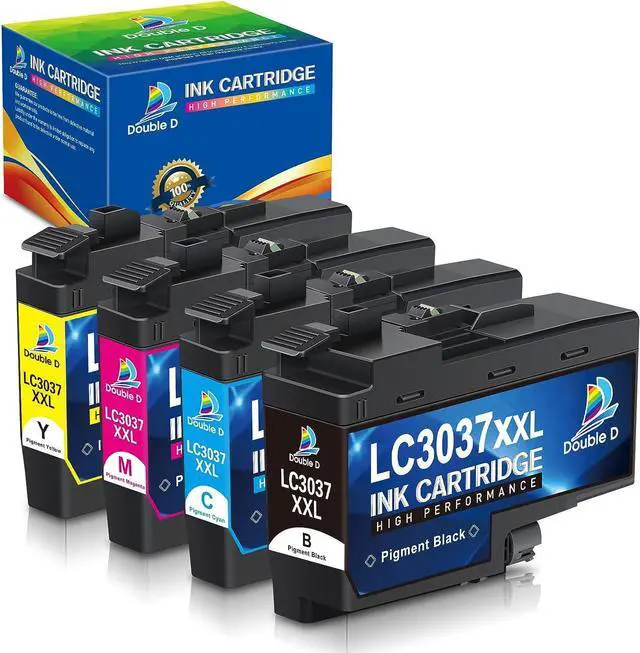



LC3037 LC3037XXL Ink Cartridges Compatible Work with Brother LC3037 LC3037XXL LC3039, High Yield for MFC-J6945DW MFC-J5845DW XL MFC-J5945DW MFC-J6545DW XL (BK/C/M/Y) 4 Pack
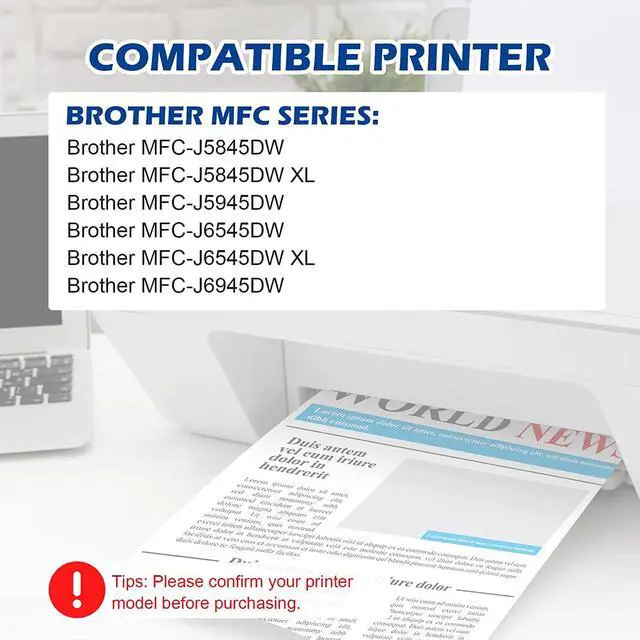
- Compatible Printers: Brother MFC-J5845DW XL, MFC-J5945DW, MFC-J6545DW XL, MFC-J6945DW Inkjet Printer
- Package Included1 x LC3037XXL Black, 1 x LC3037XXL Cyan, 1 x LC3037XXL Magenta, 1 x LC3037XXL Yellow (Total 4 Pack LC3037 bk/c/m/y )
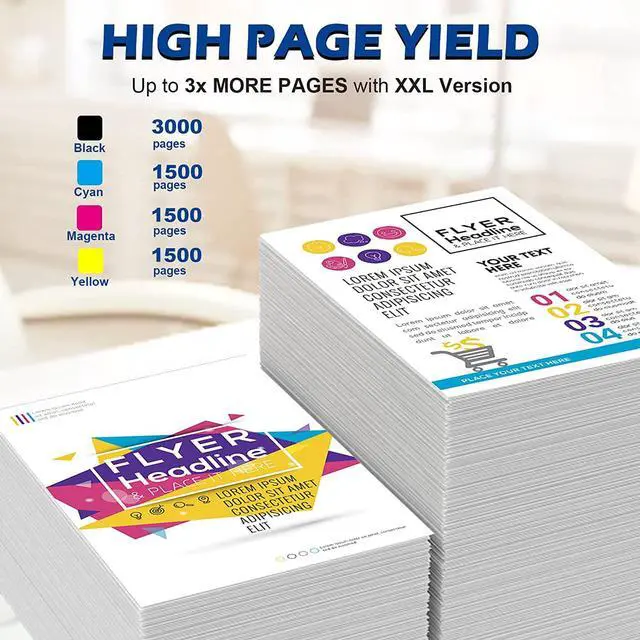
- Page Yield: Approx. 3000 pages per LC3037bk , 1500 pages per LC3037 color, at 5% coverage of A4 paper (XXL version X3 More than the standard yield)
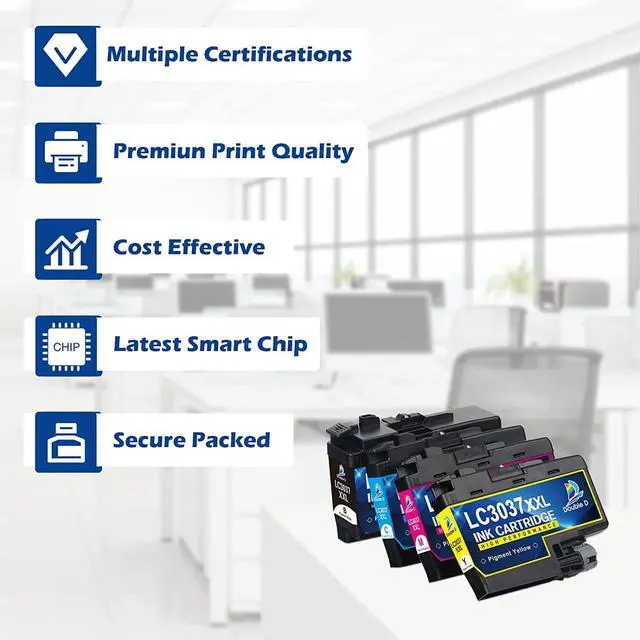
- Advantages: Multiple Certifications, Premium Print Quality, Cost Effective, Newest Chip, Secure Packed
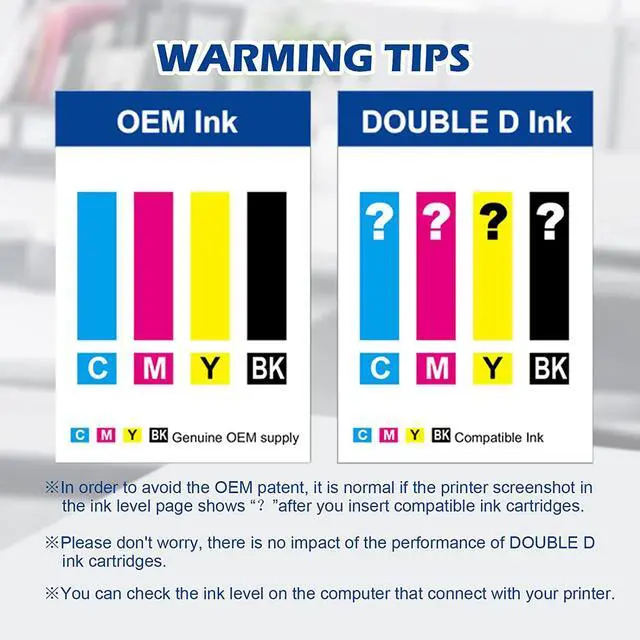
- Tips: It is normal if the printer screenshot in the ink level page shows after you insert compatible ink cartridges. Please disregard and keep printing, it will not effect the function of printer, you can check the ink level on the computer that connect with your printer
+
+
Overview
Specs
Reviews
Previous page
Each ink cartridge was packed in individual plastic bag. Multi-layer protective packaging to prevent the cartridge from being damaged during transporttion, convenient and easy to install on demand.
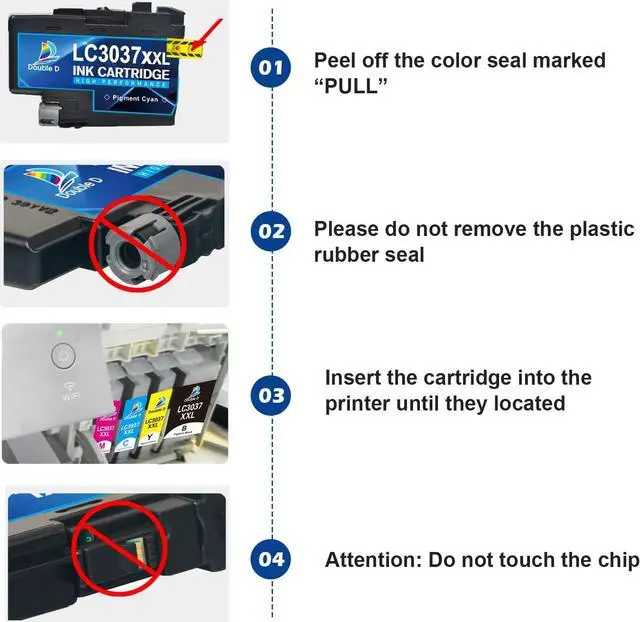
Next pagePrevious pageNext page1High Page Yield2Newest Chip3Excellent Performance Peal off the seal marked "PULL"
Insert the cartridge into the printer until they located
Do not remove the plastic rubber seal
Do not touch the chip
What should I do if the printer displays a "non-brother ink"?
Because all compatible LC3037XXL ink cartridges are not Brother OEM ink cartridges, please ignore it.
The sudden drop in print quality or ink clogging.
Please clean the nozzle of the printer 1~2 times, the printing will be restored to normal.
The printer displays "Cannot Detect".
Reinstall the cartridge after cleaning the contact points of the cartridge with a non-abrasive paper towel dipped in alcohol or a clean eraser. This operation can be repeated 2~3 times.
Why is the number of pages printed not as expected?
The number of pages printed depends on the coverage of the image you need to print on the paper. In addition, the printer settings and the ambient temperature will also have some influence.
LC3037XXL 4 Pack
LC3037XXL 2 Black
LC3037XXL 5 Pack
LC3037XXL 8 Pack
LC3039XXL 4 Pack
Package Contents 1BK, 1C, 1M, 1Y LC3037XXL 2BK LC3037XXL 2BK, 1C, 1M, 1Y LC3037XXL 2BK, 2C, 2M, 2Y LC3037XXL 1BK, 1C, 1M, 1Y LC3039XXLPage Yield (at 5% coverage) Black: 3,000 Color: 1,500 Black: 3,000 Black: 3,000 Color: 1,500 Black: 3,000 Color: 1,500 Black: 6,000 Color: 5,000Based Ink Pigment Pigment Pigment Pigment PigmentUpgraded Chip Premiun Print Quality Next page of related Sponsored Products Designed for Vibrant Color Replacement for Brother Replacement for HP Replacement for Canon STEP 1: STEP 2: TIPS: TIPS: DOUBLE D LC3037 LC3039XXL Ink Cartridges Warranty & Support Feedback Website (Online) Store (Offline)
Each ink cartridge was packed in individual plastic bag. Multi-layer protective packaging to prevent the cartridge from being damaged during transporttion, convenient and easy to install on demand.
Next pagePrevious pageNext page1High Page Yield2Newest Chip3Excellent Performance Peal off the seal marked "PULL"
Insert the cartridge into the printer until they located
Do not remove the plastic rubber seal
Do not touch the chip
What should I do if the printer displays a "non-brother ink"?
Because all compatible LC3037XXL ink cartridges are not Brother OEM ink cartridges, please ignore it.
The sudden drop in print quality or ink clogging.
Please clean the nozzle of the printer 1~2 times, the printing will be restored to normal.
The printer displays "Cannot Detect".
Reinstall the cartridge after cleaning the contact points of the cartridge with a non-abrasive paper towel dipped in alcohol or a clean eraser. This operation can be repeated 2~3 times.
Why is the number of pages printed not as expected?
The number of pages printed depends on the coverage of the image you need to print on the paper. In addition, the printer settings and the ambient temperature will also have some influence.
LC3037XXL 4 Pack
LC3037XXL 2 Black
LC3037XXL 5 Pack
LC3037XXL 8 Pack
LC3039XXL 4 Pack
Package Contents 1BK, 1C, 1M, 1Y LC3037XXL 2BK LC3037XXL 2BK, 1C, 1M, 1Y LC3037XXL 2BK, 2C, 2M, 2Y LC3037XXL 1BK, 1C, 1M, 1Y LC3039XXLPage Yield (at 5% coverage) Black: 3,000 Color: 1,500 Black: 3,000 Black: 3,000 Color: 1,500 Black: 3,000 Color: 1,500 Black: 6,000 Color: 5,000Based Ink Pigment Pigment Pigment Pigment PigmentUpgraded Chip Premiun Print Quality Next page of related Sponsored Products Designed for Vibrant Color Replacement for Brother Replacement for HP Replacement for Canon STEP 1: STEP 2: TIPS: TIPS: DOUBLE D LC3037 LC3039XXL Ink Cartridges Warranty & Support Feedback Website (Online) Store (Offline)
Warranty & Returns
Warranty, Returns, And Additional Information
Warranty
- Please contact the Seller directly for warranty information. Warranty information may also be found on the Manufacturer's website.
- CONTACT
Return Policies
- Return for refund within: 15 days
- Return for replacement within: 30 days
- This item is covered by haoyuzeshang Return Policy
Manufacturer Contact Info
- For a directory of all our manufacturers, please click below.
- Manufacturers Directory
LOADING...