
Your Browsing History
- $42.99
- Free 15-day Returns
Ships from China.

Meet Your Seller

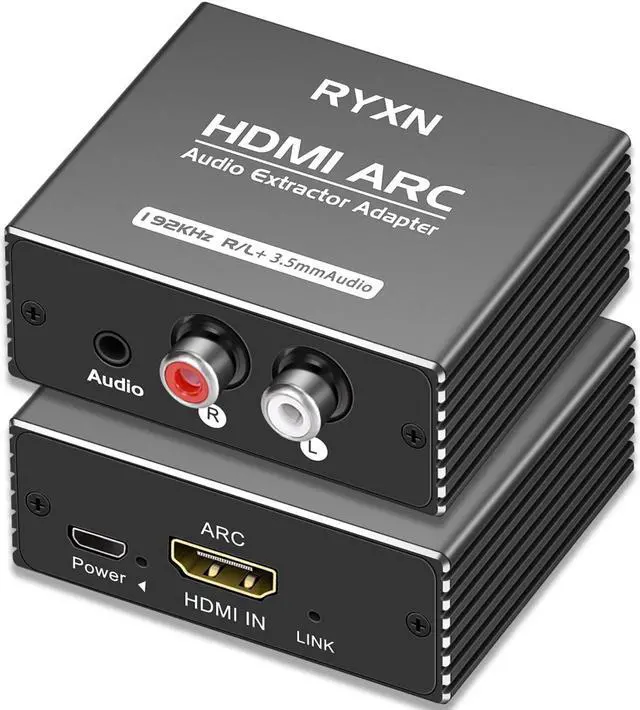




HDMI ARC Audio Extractor 192KHz, HDMI ARC Adapter with 3.5mm Audio and L/R Stereo Audio for HDTV Soundbar Speaker Amplifier
- HDMI ARC function (The TV must have an ARC port, otherwise it cannot be used). Extract audio from your TV to Soundbar or Amplifier via the TV's ARC port.
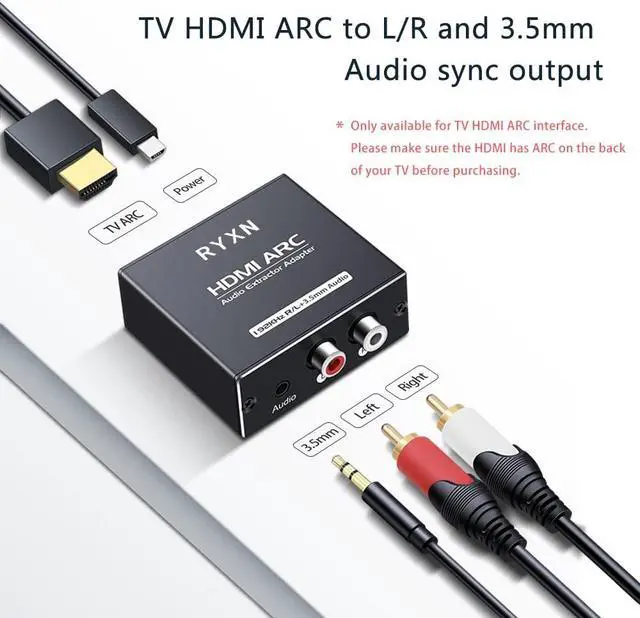
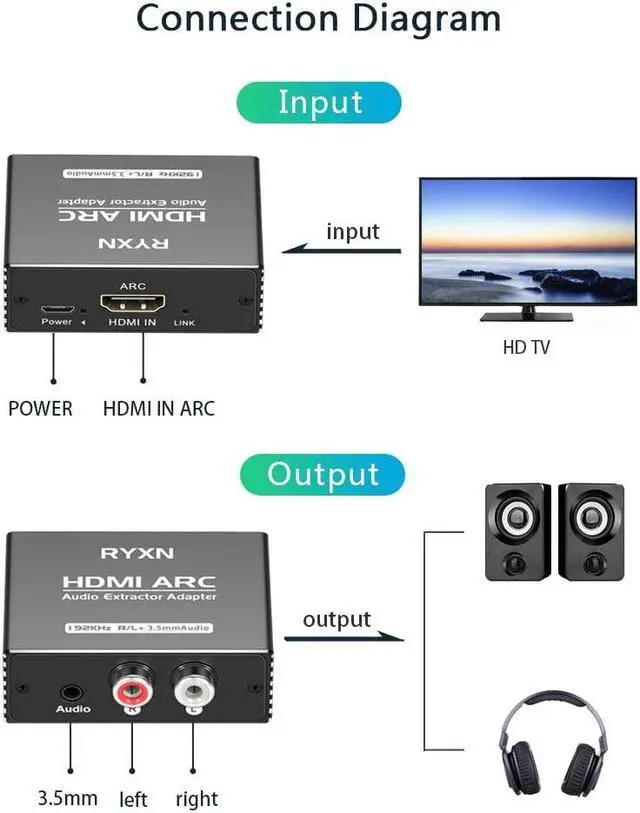
- 2 Ways to use1. Insert the HDMI cable into the ARC port of the TV, plug the other end into the HDMI ARC adapter, connect the power supply, connect the R/L or 3.5mm to the audio device, and finally set the TV audio output.
- 192KHz sampling rateBuilt-in CEC volume control protocol, the TV remote control can adjust the volume.
- USB sound card functionIt can be inserted into the computer device through the USB end of the micro cable, and the other end is connected to the ARC box, and the audio output is output through the ARC box.
- Digital Noise ReductionUsing high-end chips, digital noise reduction technology, signal gain technology, dual signal processing, the sound quality is clear and pleasant.
+
+
Overview
Specs
Reviews
2 Ways to use
HDMI ARC:
1. HDMI cable + ARC + speaker
Plug the HDMI cable into the ARC port of the TV, plug the other end into the HDMI ARC adapter (HDMI IN), connect the ARC to the power supply, connect the R/L or 3.5 mm back to the sound bar, power amplifier, speakers and other equipment, and finally set the TV audio output.
2. USB cable + ARC + speaker
Use the matching Micro cable, plug the USB port of the Micro cable into the TV, plug the other end into the HDMI ARC adapter (power supply at the same time), connect the R/L or 3.5 mm sound bar, power amplifier, speakers and other equipment, and finally set the TV audio output.
ARC settings for some brands of TV:
For Samsung:
1. Check whether HDMI CEC is turned on. Settings > General > External Device Management > Anynet+ (HDMI CEC).
2. Settings>Audio>Expert Settings>HDMI eARC Mode (On).
3. Sound > Expert Settings > Digital Output Audio Format (PCM).
4. TV Desktop > Video Source > HDMI 2/3 (ARC).
For Sony:
1. Settings > Expert Settings > HDMI eARC Mode (On).
2. Sound Settings > Speakers (Audio System) > Digital Audio Out (PCM).
3. HDMI>HDMI CEC (on), Audio Return Channel ARC (on).
4. TV Desktop > Video Source > HDMI 2/3 (ARC).
For LG:
1. Device>HDMI Settings>SIMPLINK(HDMI-CEC) open
2. Sound > Sound Output > HDMI ARC (On) > Advanced Settings > Digital Sound Output (Through), EARC Support (On).
3. TV Desktop > Video Source > HDMI 2/3 (ARC).
For TCL:
1. Settings > HDMI Device Control (on), ARC (on).
2. Sound>Audio Output Device>HDMI/ARC, Audio Output Format>Passthrough or PCM
3. TV Desktop > Video Source > HDMI 2/3 (ARC).
For Hisense:
1. Sound Settings>Audio Output>HDMI ARC (on), Audio Output Format>PCM
2. TV Desktop > Video Source > HDMI 2/3 (ARC).
Note:
1. If there is no sound when connected to the soundbar or amplifier, please enter the soundbar or amplifier settings and set HDMI to ON, Or set to ARC mode.
2. Please check the HDMI cable, it requires HDMI 2.0 (19+1) cable.
3. Due to the different TV settings of different brands, you will definitely encounter some audio settings problems, you can ask us for assistance.
HDMI ARC:
1. HDMI cable + ARC + speaker
Plug the HDMI cable into the ARC port of the TV, plug the other end into the HDMI ARC adapter (HDMI IN), connect the ARC to the power supply, connect the R/L or 3.5 mm back to the sound bar, power amplifier, speakers and other equipment, and finally set the TV audio output.
2. USB cable + ARC + speaker
Use the matching Micro cable, plug the USB port of the Micro cable into the TV, plug the other end into the HDMI ARC adapter (power supply at the same time), connect the R/L or 3.5 mm sound bar, power amplifier, speakers and other equipment, and finally set the TV audio output.
ARC settings for some brands of TV:
For Samsung:
1. Check whether HDMI CEC is turned on. Settings > General > External Device Management > Anynet+ (HDMI CEC).
2. Settings>Audio>Expert Settings>HDMI eARC Mode (On).
3. Sound > Expert Settings > Digital Output Audio Format (PCM).
4. TV Desktop > Video Source > HDMI 2/3 (ARC).
For Sony:
1. Settings > Expert Settings > HDMI eARC Mode (On).
2. Sound Settings > Speakers (Audio System) > Digital Audio Out (PCM).
3. HDMI>HDMI CEC (on), Audio Return Channel ARC (on).
4. TV Desktop > Video Source > HDMI 2/3 (ARC).
For LG:
1. Device>HDMI Settings>SIMPLINK(HDMI-CEC) open
2. Sound > Sound Output > HDMI ARC (On) > Advanced Settings > Digital Sound Output (Through), EARC Support (On).
3. TV Desktop > Video Source > HDMI 2/3 (ARC).
For TCL:
1. Settings > HDMI Device Control (on), ARC (on).
2. Sound>Audio Output Device>HDMI/ARC, Audio Output Format>Passthrough or PCM
3. TV Desktop > Video Source > HDMI 2/3 (ARC).
For Hisense:
1. Sound Settings>Audio Output>HDMI ARC (on), Audio Output Format>PCM
2. TV Desktop > Video Source > HDMI 2/3 (ARC).
Note:
1. If there is no sound when connected to the soundbar or amplifier, please enter the soundbar or amplifier settings and set HDMI to ON, Or set to ARC mode.
2. Please check the HDMI cable, it requires HDMI 2.0 (19+1) cable.
3. Due to the different TV settings of different brands, you will definitely encounter some audio settings problems, you can ask us for assistance.
Warranty & Returns
Warranty, Returns, And Additional Information
Warranty
- Please contact the Seller directly for warranty information. Warranty information may also be found on the Manufacturer's website.
- CONTACT
Return Policies
- Return for refund within: 15 days
- Return for replacement within: 30 days
- This item is covered by etruston008 Return Policy
Manufacturer Contact Info
- For a directory of all our manufacturers, please click below.
- Manufacturers Directory
LOADING...