


- Free 30-day Returns
$2,000.99


Meet Your Seller



Visit OWC Canada Store
FOLLOW
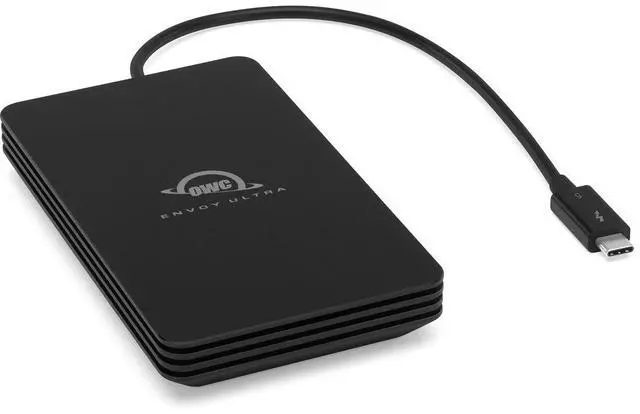
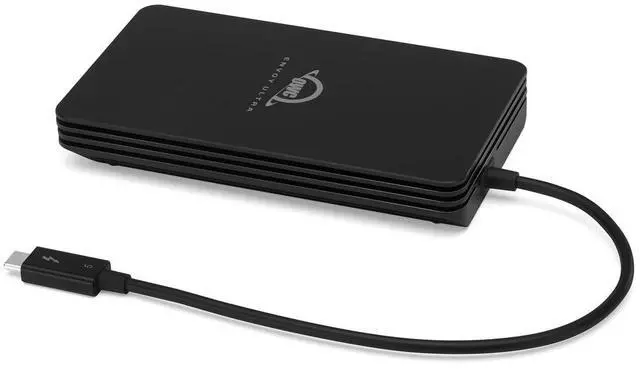
OWC 4TB Envoy Ultra Thunderbolt 5 (80Gb/s) Portable NVMe SSD - Over 6000MB/s - The First and Fastest Thunderbolt? 5 Portable SSD - Compatible With Thunderbolt 3/4 And USB4 - Weatherproof IP
- Over 6000MB/s
- The First and Fastest Thunderbolt™? 5 Portable SSD
- Compatible With Thunderbolt 3/4 And USB4
- Weatherproof IP66 Protection From Dust/Drops/Downpours
- Integrated Thunderbolt 5
+
+
Overview
Specs
Reviews

















Rugged. Reliable. Revolutionary. Built like a tank for go anywhere ruggedness. Bus-powered with a built-in cable for ultra convenience. Jaw-dropping mind-blowing revolutionary real-world speed over 6000MB/s. Envoy Ultra gives you the best of everything in the palm of your hand with reliability you can count on from the proven global leader of Thunderbolt innovations.
Ultra-Fast: Over 6000MB/s... up to 2x faster than Thunderbolt 4 and
USB4Ultra Maximizer: Gets the most speed possible from Thunderbolt 3, Thunderbolt 4, and USB4 machinesUltra
Ready: Easily handle daily data needs to pro level creative projects while matching internal storage performanceUltra
Compatible: Works with Macs, PCs, iPad Pros, Chromebooks, and Surface devices with
Thunderbolt or USB4Weatherproof: Protects data from dust, drops, and downpoursUltra
Convenient: Bus-powered with built-in
Thunderbolt cableUltra Silent: Fanless, heat dissipating aluminum designBe Your Best with the Best With the best data transfer rates available in an external drive, Envoy Ultra is the ultimate solution when you need to be your best: DITs needing a high-performance shuttle drive for backups. Professional video editors working with high bitrate codecs at high resolutions from cinema cameras. VFX artist and colorists handling DPX/EXR sequences. Sports, wedding, and high-volume photographers seeking the highest workflow efficiency. Performance enthusiasts seeking an external SSD with performance that matches internal storage. Gamers wanting fastest load times, lag-free performance, and quick social shares of their gameplay. Maximum Performance and Compatibility Envoy Ultra utilizes advanced Thunderbolt 5 technology for a one-two performance punch that lets you match your machine's internal storage speed. You'll also blow away bottleneck barriers when you connect Envoy Ultra to Thunderbolt 3, Thunderbolt 4, or USB4 machine. Simply connect Envoy Ultra's built-in cable to start enjoying maximum performance with maximum compatibility.
Envoy Ultra Connected to: Thunderbolt 5 - Real world speeds over 600MB/sThunderbolt 4 - Real world speeds over 2800MB/s up to 3800MB/sThunderbolt 3 - Real world speeds up to 2800MB/s (Mac only)
Warranty & Returns
Warranty, Returns, And Additional Information
Warranty
- Please contact the Seller directly for warranty information. Warranty information may also be found on the Manufacturer's website.
- Read full details
- CONTACT
Return Policies
- Return for refund within: 30 days
- Return for replacement within: 90 days
- This item is covered by OWC Canada Return Policy
Manufacturer Contact Info
- For a directory of all our manufacturers, please click below.
- Manufacturers Directory
LOADING...
The OWC 4TB Envoy Ultra is a portable NVMe SSD with Thunderbolt 5 connectivity and advertised speeds over 6,000MB/s, suited to creators and other users moving large files on compatible high-speed systems.
Recommended For
- Video editors with a Thunderbolt 5 computer who move large footage files or work directly from external media can benefit from the drive’s high sequential read speeds; reviewers tested it with large video files and high-bitrate video workflows.
- Photographers and other creators who regularly transfer large batches of photos or project files can use it as fast, bus-powered working storage, especially with a Thunderbolt 5 Mac or PC.
- Mobile creative professionals working between locations can use it for portable project storage where dust and water resistance are useful; its integrated cable means there is no separate cable to pack.
- Mac users with Thunderbolt 3 or 4 who want a fast external SSD now and may later move to Thunderbolt 5 can use it on supported older Macs, while reserving its top speeds for a Thunderbolt 5 system.
Real-World Use Scenarios
- A video editor copies camera footage onto the drive before starting a project; large transfers can finish quickly on a Thunderbolt 5 computer, making it practical to work from portable project media.
- A photographer or videographer transfers a large shoot to a computer or another drive; in one review, copying 50GB took about 15 seconds, though results depend on the computer and connection.
- A creator takes project files on location or while traveling; the dust- and water-resistant enclosure adds protection during transport, but the connector should be clean and dry before plugging it in.
- A user with a Thunderbolt 4 or USB4 computer keeps the same drive for portable media and file transfers; it remains compatible, but transfer performance depends on the host connection and will not match Thunderbolt 5 results.
- A photographer edits a photo library stored on an external drive; an owner described pairing the Envoy Ultra with an M4 Pro MacBook Pro for photo editing, while actual speed depends on the computer and workflow.