


- Free 30-day Returns
$217.49

Meet Your Seller





Visit OWC Canada Store
FOLLOW
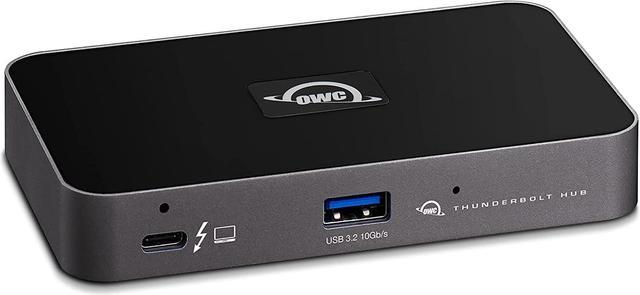
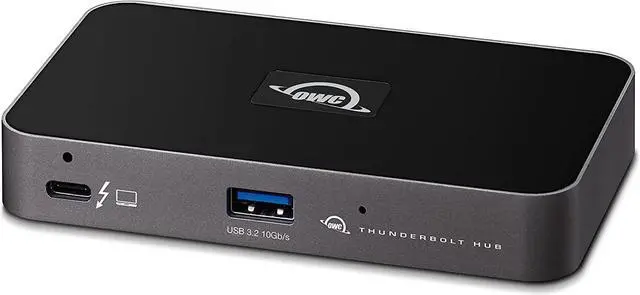
OWC 5 Port Thunderbolt Hub - 60W Charging, Thunderbolt 4, USB 3.2, Compatible with Macs and PCs
- Easy Port Expansion: add more universally compatible Thunderbolt (USB-C) ports to your Mac, PC, iPad, or dock to massively expand your device connections and productivity
- Ultimate Capabilities: utilize the full performance and power of your devices vs handcuffing them with a low-cost, limited capability bus-powered hub
- Works with Millions: no worries or confusionit works with your Thunderbolt 4, Thunderbolt 3, USB-C, or USB4 machine or device with 100% compatibility
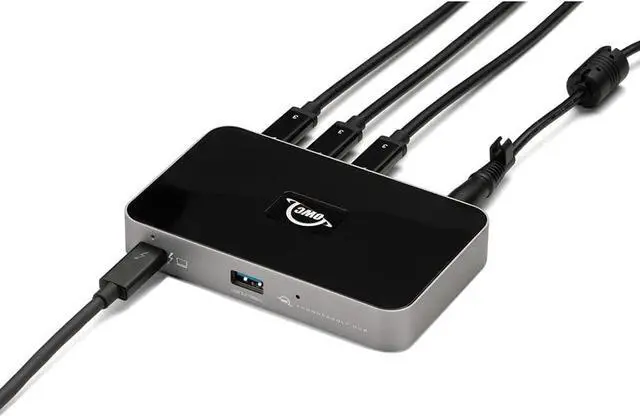
- Redefine Your Chain: create three separate daisy chains of devices even bus powered - so you can remove devices from one chain without affecting the other chains
- Thunderbolt Certified: Built-in OWC reliability and dependability for Mac and Windows
- 2 Year OWC Limited Warranty
+
+
Overview
Specs
Reviews


















We heard you loud and clear. You simply want to add more universally compatible Thunderbolt (USB-C) ports to your Mac, PC, iPad, or dock so you can connect more devices and create an expanded workflow that is as unique as your imagination.
Connect more storage, displays, and accessories. Create independent daisy chains. And do it all while charging your notebook. With the OWC Thunderbolt Hub, you can massively increase your productivity and connectivity while enjoying the same performance of your Thunderbolt and USB-C devices as if you had plugged them directly into your machine. In short, you get everything you want without compromise or unnecessary features.
The average cheap bus-powered hub doesnt have the all-important 3Ps of the
OWC Thunderbolt Hub: Power, Performance and Possibilities. Plug in a Thunderbolt external drive, and youll get Thunderbolt speeds. Plug in a 6K XDR monitor, and youll get full resolution. Plug in a USB-C bus-powered drive, and it will work flawlessly. Try all that with any other hub, and like the chart shows below, your use possibilities are severely limited.
Power Delivery: Thunderbolt 4 host port provides up to 60W of power to the host computer; Thunderbolt 4 device ports (for external drives and other devices) provide 15W of power; USB port provides up to 1.5A of power for bus-powered drives and device charging
Display Support: Up to one 8K display @ 60Hz, one 4K display @ 120Hz, two 4K displays @ 60Hz, one 4K display @ 60Hz, one 4K display @ 30Hz, or two 5K displays @ 60Hz; Display Support by
Port: Thunderbolt
4: Up to 8K @ 60Hz or 4K @ 120Hz via a native Thunderbolt 4 display or other display that supports USB-C connections and DisplayPort 1.4;
NOTE: Actual display support varies by computer specifications; Supported Intel-based Apple Mac models and Thunderbolt 4 PCs support two displays
Device Ports: (1) Host Port - Thunderbolt 4 up to 40 Gb/s (5000 MB/s); (3) Thunderbolt 4 Ports; (1) USB 3.2 Gen 2 Type-A Port up to 10Gb/s (1250MB/s) - USB 2.0 / 3.0 backwards compatible
Host Port Support: Thunderbolt or USB (USB-C or USB-A) port; Works with Thunderbolt 4, Thunderbolt 3, USB4, and USB host computers and mobile devices; Thunderbolt/Thunderbolt 2 Mac models are supported via USB-A host connection; Thunderbolt/Thunderbolt 2 host connection is not supported; USB connection may limit some functionality; certified OWC Thunderbolt 4 cable included
Compatible with: Macs with an available Thunderbolt 3 or later port running macOS 11.1 Big Sur or later, Windows PC with an available Thunderbolt 4 port and non-Thunderbolt USB-C machines like Chromebooks and iPads, USB-C equipped MacBook, iPad, Chromebook, Android device; 2 Year OWC Limited Warranty
Warranty & Returns
Warranty, Returns, And Additional Information
Warranty
- Please contact the Seller directly for warranty information. Warranty information may also be found on the Manufacturer's website.
- Read full details
- CONTACT
Return Policies
- Return for refund within: 30 days
- Return for replacement within: 90 days
- This item is covered by OWC Canada Return Policy
Manufacturer Contact Info
- For a directory of all our manufacturers, please click below.
- Manufacturers Directory
LOADING...
The OWC 5 Port Thunderbolt Hub is a Thunderbolt 4 and USB 3.2 connectivity hub with 60W charging for adding ports to compatible Macs, PCs, iPads, or docks. It suits users who need broader device connectivity and compatibility with Thunderbolt 4, Thunderbolt 3, USB-C, or USB4.
Recommended For
- Mac or PC laptop users with one Thunderbolt port who need to connect several Thunderbolt or USB-C peripherals, such as fast external storage and a display, without replacing their setup with a full docking station.
- Mac mini and other desktop-computer owners who want to add Thunderbolt ports for drives and peripherals; the hub’s separate downstream connections can make it easier to rearrange one device chain without disturbing others.
- Ultralight-laptop users whose computer can run from the hub’s up-to-60W host charging while they connect a monitor and high-speed external storage at a desk.
- Users building a Thunderbolt-based display setup who are comfortable choosing and connecting the appropriate Thunderbolt-to-video adapter, rather than needing built-in HDMI or DisplayPort sockets.
Real-World Use Scenarios
- When a Thunderbolt laptop runs short on USB-C ports, connect the hub once and keep several Thunderbolt accessories available, such as an external SSD, display, and other peripherals. The hub adds connections; it does not provide a full set of built-in dock ports like Ethernet or HDMI.
- For a desk setup with external storage and a large monitor, connect both through the hub instead of repeatedly swapping cables on the computer. The display connection may require a USB-C video adapter, and supported display setups depend on the host computer.
- When using multiple external SSDs for projects or backups, connect them to separate hub ports so they are easy to access alongside other Thunderbolt devices. Safely eject or unmount drives before unplugging them or disconnecting the hub.
- At a workstation that uses two external 4K displays, the hub can route both displays through one computer connection when the computer supports that setup. Check the host’s display limits before relying on two screens; some Macs support fewer external displays.
- When a connected Thunderbolt device needs to be removed, use the hub’s separate connection branches to reduce disruption to devices on other branches. Eject storage first, and expect connected devices to be unavailable if they depend on the device being removed.