
Your Browsing History
- Free 15-day Returns
$33.93
Ships from China.

Meet Your Seller

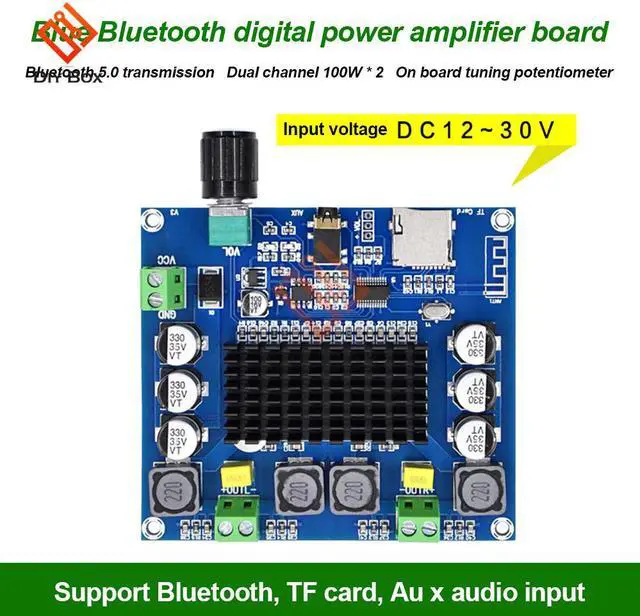
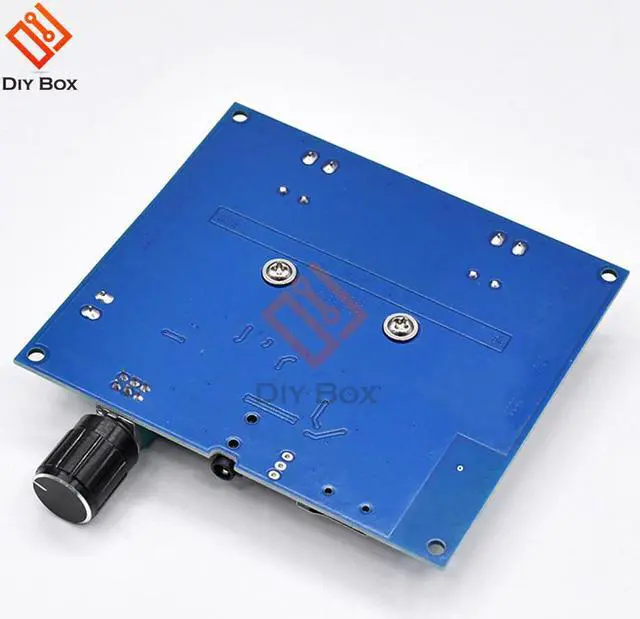


XH-A105 Bluetooth 5.0 TDA7498 digital amplifier board 2x100W Stereo Audio AMP Module Support TF Card AUX diy kit volume control
- XH-A105 Bluetooth 5.0 TDA7498 digital amplifier board 2x100W Stereo Audio AMP Module Support TF Card AUX diy kit volume control
+
+
Overview
Specs
Reviews
Certification:NONE
Origin:CN(Origin)
Compatible Audio & Video Equipment Style:Amplifier
Model Number:TDA7498 digital amplifier board module
Bundle:Bundle 1
Dimensions (WxHxD)):9.20cm*8.50cm*2.00cm
Weight:0.106kg
Package:Yes
feature 1:Support Bluetooth TF AUX input
feature 2:Two-channel Bluetooth 5.0 power amplifier board
feature 3:Max 100W
XH-A105 digital power amplifier board with high fidelity and two-channel stereo sound quality; input voltage is DC 12~24V, audio input supports Bluetooth, TF card, AUX 3.5mm audio line input, can be directly connected to mobile phone, MP3, etc.; power amplifier board It also comes with a volume adjustment function, which rotates the chirp potentiometer clockwise to zoom in and counterclockwise to decrease.
Product Name: Two-channel Bluetooth 5.0 power amplifier board
Product model: XH-A105
Input voltage: DC12-24V
Current: more than 3A
Output power: 100W*2
Audio input: Bluetooth, TF card, AUX
Number of channels: two channels
Size: 92*85*20MM
Installation aperture: 3MM
Installation hole distance: 85*5*78.5MM
Bluetooth operation instructions:
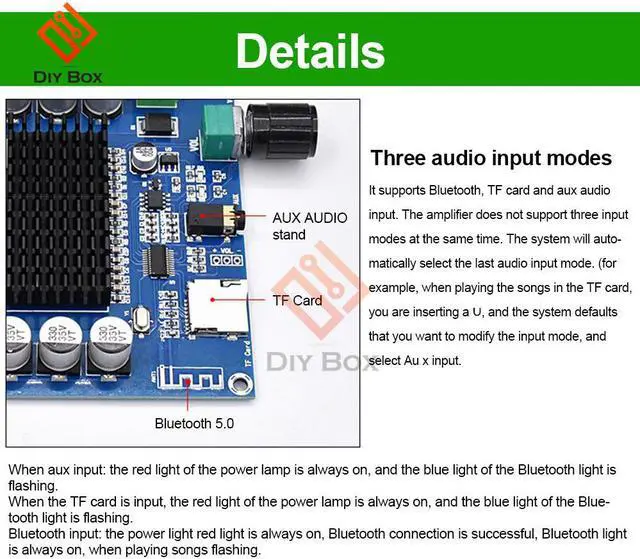
When the power amplifier board is connected to the power supply and the Bluetooth is not connected, the Bluetooth indicator will flash rapidly. When the Bluetooth connection is successful, the Bluetooth indicator will stop flashing. When the song is played, the Bluetooth indicator will flash slowly.
Note:
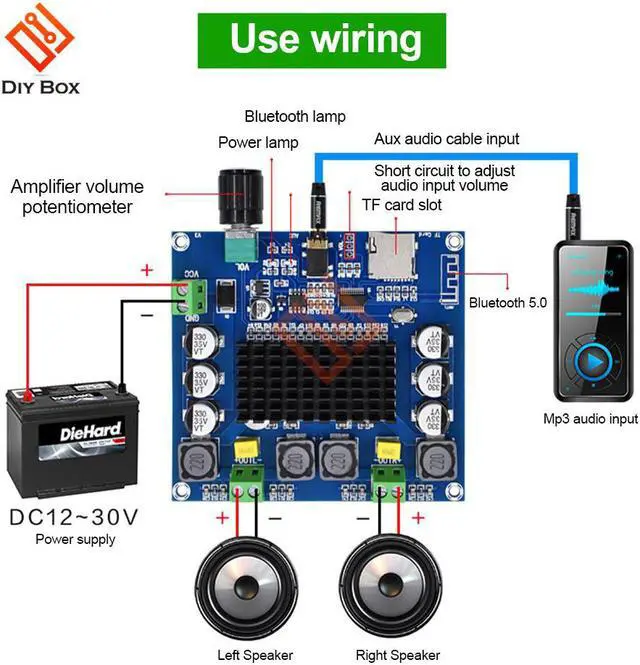
1. Connect the power input to the DC12-24V power supply. When the power is on, the power indicator will light red and the blue light will flash blue.
2. Connect the audio input to the audio source, such as MP3, mobile phone, computer, TF card, etc.
3. Connect the audio output to the speaker, paying attention to the positive and negative.
Bluetooth / TF card volume hole:
When the audio input uses Bluetooth or TF card, you can connect the power cord to the "+ VOL -" three holes to adjust the volume and switch songs.
1. "+" and "VOL" connection: increase the volume
2. "-" and "VOL" connection: reduce the volume
About choose Audio Input : The Board will Automatic Selection the last audio input .If you use the Bluetooth Audio input ,and then connect the AUX ,so the board will Automatic choose the AUX Audio input !
Origin:CN(Origin)
Compatible Audio & Video Equipment Style:Amplifier
Model Number:TDA7498 digital amplifier board module
Bundle:Bundle 1
Dimensions (WxHxD)):9.20cm*8.50cm*2.00cm
Weight:0.106kg
Package:Yes
feature 1:Support Bluetooth TF AUX input
feature 2:Two-channel Bluetooth 5.0 power amplifier board
feature 3:Max 100W
XH-A105 digital power amplifier board with high fidelity and two-channel stereo sound quality; input voltage is DC 12~24V, audio input supports Bluetooth, TF card, AUX 3.5mm audio line input, can be directly connected to mobile phone, MP3, etc.; power amplifier board It also comes with a volume adjustment function, which rotates the chirp potentiometer clockwise to zoom in and counterclockwise to decrease.
Product Name: Two-channel Bluetooth 5.0 power amplifier board
Product model: XH-A105
Input voltage: DC12-24V
Current: more than 3A
Output power: 100W*2
Audio input: Bluetooth, TF card, AUX
Number of channels: two channels
Size: 92*85*20MM
Installation aperture: 3MM
Installation hole distance: 85*5*78.5MM
Bluetooth operation instructions:
When the power amplifier board is connected to the power supply and the Bluetooth is not connected, the Bluetooth indicator will flash rapidly. When the Bluetooth connection is successful, the Bluetooth indicator will stop flashing. When the song is played, the Bluetooth indicator will flash slowly.
Note:
1. Connect the power input to the DC12-24V power supply. When the power is on, the power indicator will light red and the blue light will flash blue.
2. Connect the audio input to the audio source, such as MP3, mobile phone, computer, TF card, etc.
3. Connect the audio output to the speaker, paying attention to the positive and negative.
Bluetooth / TF card volume hole:
When the audio input uses Bluetooth or TF card, you can connect the power cord to the "+ VOL -" three holes to adjust the volume and switch songs.
1. "+" and "VOL" connection: increase the volume
2. "-" and "VOL" connection: reduce the volume
About choose Audio Input : The Board will Automatic Selection the last audio input .If you use the Bluetooth Audio input ,and then connect the AUX ,so the board will Automatic choose the AUX Audio input !
Warranty & Returns
Warranty, Returns, And Additional Information
Warranty
- Please contact the Seller directly for warranty information. Warranty information may also be found on the Manufacturer's website.
- CONTACT
Return Policies
- Return for refund within: 15 days
- Return for replacement within: 30 days
- This item is covered by Shengkedianzi Return Policy
Manufacturer Contact Info
- For a directory of all our manufacturers, please click below.
- Manufacturers Directory
LOADING...