


- Free 15-day Returns
$23.99
Ships from China.

Meet Your Seller



Eyewink Sinilink WIFI Mobile Phone Remote Control Relay Module DC6V~36V Smart Home Phone APP ESP-12F XY-WF36V
- Eyewink Sinilink WIFI Mobile Phone Remote Control Relay Module DC6V~36V Smart Home Phone APP ESP-12F XY-WF36V
+
+
Overview
Specs
Reviews
Certification:NONE
Origin:CN(Origin)
State of Assembly:Almost Ready
Model Number:WF36V WIFI mobile phone remote control relay module 6-36V
Compatibility:Others
Camera Equipped:No
Features:
1: Widely used
2: The system built with advanced architecture technology supports the concurrency of tens of millions of users. The system is stable and fast!
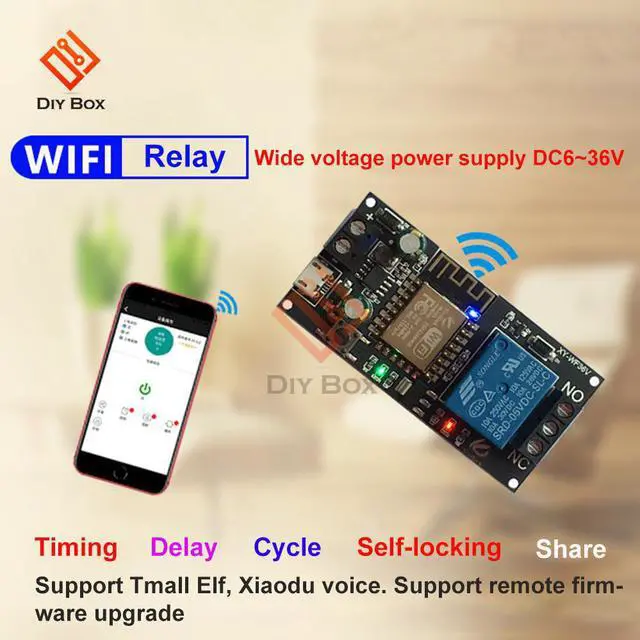
3: Timing / delay / cycle / self-locking / sharing
4: Support tmall elf and small voice. Support remote firmware upgrade
5: Convenient and convenient
Networking steps:
Step 1:
During the pairing process, the WiFi network must be 2.4G, and the 5g network cannot be paired. (if your WiFi router 2.4G and 5g are combined networks, please reconfigure the router, separate them, and select the 2.4G network)
Step 2:
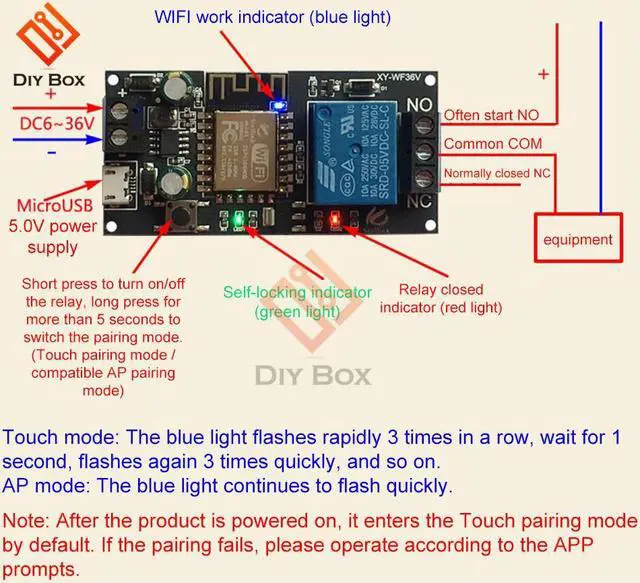
When the product is powered on, it enters touch pairing mode by default.
Step 3
Click "start connection""
Touch mode: the blue light flashes rapidly for 3 times continuously, wait for 1 second, and flash quickly for 3 times again
So back and forth.
AP mode: the blue light flashes continuously and quickly.
Note:
after the product is powered on, it will enter touch pairing mode by default. If pairing fails, Please follow the prompts of app.
Package Include:
1 * controller module
Origin:CN(Origin)
State of Assembly:Almost Ready
Model Number:WF36V WIFI mobile phone remote control relay module 6-36V
Compatibility:Others
Camera Equipped:No
Features:
1: Widely used
2: The system built with advanced architecture technology supports the concurrency of tens of millions of users. The system is stable and fast!
3: Timing / delay / cycle / self-locking / sharing
4: Support tmall elf and small voice. Support remote firmware upgrade
5: Convenient and convenient
Networking steps:
Step 1:
During the pairing process, the WiFi network must be 2.4G, and the 5g network cannot be paired. (if your WiFi router 2.4G and 5g are combined networks, please reconfigure the router, separate them, and select the 2.4G network)
Step 2:
When the product is powered on, it enters touch pairing mode by default.
Step 3
Click "start connection""
Touch mode: the blue light flashes rapidly for 3 times continuously, wait for 1 second, and flash quickly for 3 times again
So back and forth.
AP mode: the blue light flashes continuously and quickly.
Note:
after the product is powered on, it will enter touch pairing mode by default. If pairing fails, Please follow the prompts of app.
Package Include:
1 * controller module
Warranty & Returns
Warranty, Returns, And Additional Information
Warranty
- Please contact the Seller directly for warranty information. Warranty information may also be found on the Manufacturer's website.
- CONTACT
Return Policies
- Return for refund within: 15 days
- Return for replacement within: 30 days
- This item is covered by Shengkedianzi Return Policy
Manufacturer Contact Info
- For a directory of all our manufacturers, please click below.
- Manufacturers Directory
LOADING...