
Your Browsing History






Features:
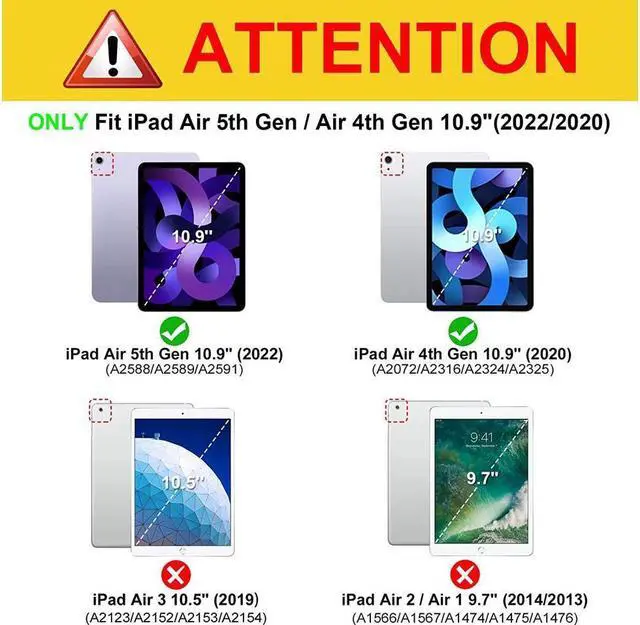
Compatible Models --- Designed for Apple iPad Air 5 10.9 Inch 2022 (5th Generation) (Model Number:A2588/A2589/ A2591) / iPad Air 4 10.9 Inch 2020 (4th Generation) (Model Number:A2072/A2316/A2324/A2325). Please Note: It doesn't fit for any other tablet models.
With touchpad --- iPad keyboard comes with a touchpad, which support multi-finger function will offer a great aid when you do not have a mouse in hand.iPad Touchpad SUPPORT Android,Windows and Apple IOS 13 or Above (Notice: To use the keyboard touchpad, Please go to the iPad accessibility setting to turn on the assistive touch function first and Upgrade Your iPad Software to iOS 13.0 Version or above).
Removable Keyboard Case --- This iPad air 5/air 4 keyboard is removable and the Bluetooth connectivity is easy. With this Stylish and Elegant design, it can transform your iPad into a laptop in less than a second and give your iPad a full protection.
With Pencil Holder --- Comes with a slot for holding your pencil that lets you effortlessly reach for your pen whenever you want to use the touch pen(PEN NOT INCLUDED)
Auto Sleep/Wake Function --- Support auto Sleep/Wake function (only works WITHOUT the keyboard attached); Precise cutouts allow full access to all features
KEY_TAB
How to get the keyboard sync with ipad:
1: Slide the "OFF/ ON" button to turn on the keyboard
2: Open your tablet's bluetooth, click "FN" + "C" keys on the keyboard until the blue light flashes, then search "bluetooth keyboard" on your tablet to pair.
KEY_TAB
IMPORTANT:
No.1:Please press "Fn" and "C" together to open the bluetooth.
No.3:The keyboard automatically becomes to Sleep mode when it doesn't work for over 15 minutes. Click any key to activate the keyboard.
No.4:The Bluetooth pairing is automatically interrupted when the tablet is in sleep mode.