



Meet Your Seller






Docking Station for Steam Deck for ROG Ally, 10 in 1 Steam Deck Dock with HD Multimedia Interface 2.0 4K@60Hz, 100W USB C PD Charging, 3 USB 2.0, 2 USB3.1 Gen1, Dual Cooling Fan
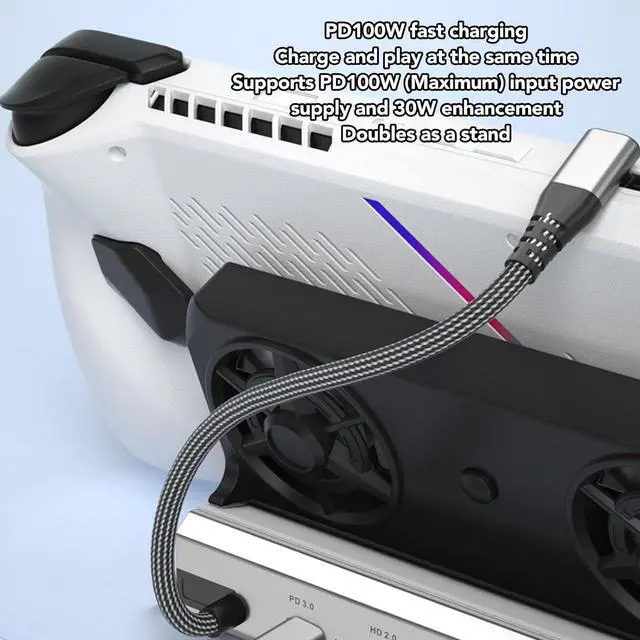
- APPLICABLE Modelss: USB C docking station for Steam Deck and for ROG ALLY is the combination of a 10 in 1 hub, fan cooler and stand base to create a neater, more organized desktop. And it perfectly supports TURBO 30W mode.
- HD MULTIMEDIA INTERFACE 2.0 OUTPUT: For Steam Deck docking station features HD Multimedia Interface 2.0 output and supports 4K resolution at 60Hz. By connecting an external 4K monitor, you can enjoy a clearer and smoother visual experience.
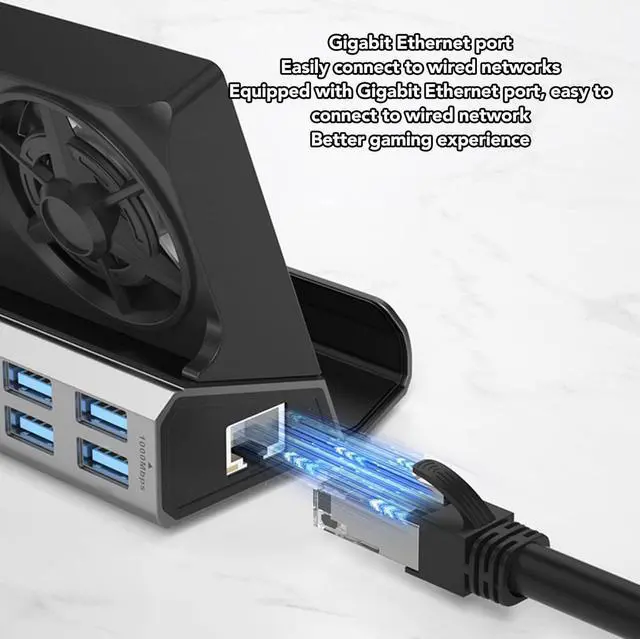
- 1000MBPS NETWORK PORT: RJ45 port provides stable and high speed Ethernet with network speeds up to 1000Mbps, ensuring efficient work and entertainment without worrying about lagging network speeds at all.
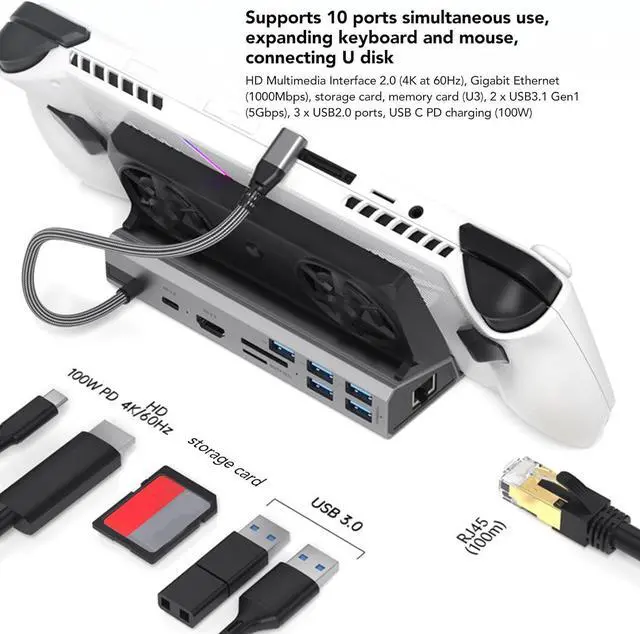
- 10 IN 1 DOCK: For Rog Ally docking station converts USB Type C ports into 10 ports, HD Multimedia Interface 2.0 (4K at 60Hz), Gigabit Ethernet (1000Mbps), storage card, memory card (U3), 2 x USB3.1 Gen1 (5Gbps), 3 x USB2.0 ports, USB C PD charging (100W).
- DUAL COOLING FAN: Cooling fans increase the speed of cooling air into
+
+
Overview
Specs
Reviews
DUAL COOLING FAN: Cooling fans increase the speed of cooling air into for Steam Deck and for ROG ALLY, allowing heat to dissipate faster. Good heat dissipation not only extends battery life, but also prevents other problems caused by overheating.
1000MBPS NETWORK PORT: RJ45 port provides stable and high speed Ethernet with network speeds up to 1000Mbps, ensuring efficient work and entertainment without worrying about lagging network speeds at all.
HD MULTIMEDIA INTERFACE 2.0 OUTPUT: For Steam Deck docking station features HD Multimedia Interface 2.0 output and supports 4K resolution at 60Hz. By connecting an external 4K monitor, you can enjoy a clearer and smoother visual experience.
1. APPLICABLE Modelss: USB C docking station for Steam Deck and for ROG ALLY is the combination of a 10 in 1 hub, fan cooler and stand base to create a neater, more organized desktop. And it perfectly supports TURBO 30W mode.
2. HD MULTIMEDIA INTERFACE 2.0 OUTPUT: For Steam Deck docking station features HD Multimedia Interface 2.0 output and supports 4K resolution at 60Hz. By connecting an external 4K monitor, you can enjoy a clearer and smoother visual experience.
3. 1000MBPS NETWORK PORT: RJ45 port provides stable and high speed Ethernet with network speeds up to 1000Mbps, ensuring efficient work and entertainment without worrying about lagging network speeds at all.
4. 10 IN 1 DOCK: For Rog Ally docking station converts USB Type C ports into 10 ports, HD Multimedia Interface 2.0 (4K at 60Hz), Gigabit Ethernet (1000Mbps), storage card, memory card (U3), 2 x USB3.1 Gen1 (5Gbps), 3 x USB2.0 ports, USB C PD charging (100W).
5. DUAL COOLING FAN: Cooling fans increase the speed of cooling air into for Steam Deck and for ROG ALLY, allowing heat to dissipate faster. Good heat dissipation not only extends battery life, but also prevents other problems caused by overheating.
Spec:
Item Type: For Steam Deck Docking Station
Material: Aluminum Alloy, ABS
Interface: Type C M To PD, 2 x USB3.0, 3 x USB2.0, Storage Card, Memory Card, RJ45, HD2.0, Dual Fan
HD Multimedia Interface Resolution: 4K At 60Hz
PD Power: 100W
RJ45 Port: 1000Mbps
Applicable Modelss: For Rog Ally And For Steam Deck
How to Use:
Plug and play
PackageList:
1 xfor Steam Deck Docking Station
1 x Instruction Manual
Docking Station for Steam Deck for ROG Ally, 10 in 1 Steam Deck Dock with HD Multimedia Interface 2.0 4K@60Hz, 100W USB C PD Charging, 3 USB 2.0, 2 USB3.1 Gen1, Dual Cooling Fan
Warranty & Returns
Warranty, Returns, And Additional Information
Warranty
- Please contact the Seller directly for warranty information. Warranty information may also be found on the Manufacturer's website.
- CONTACT
Return Policies
- Return for refund within: 30 days
- Return for replacement within: 90 days
- This item is covered by PartsPro Store Return Policy
Manufacturer Contact Info
- For a directory of all our manufacturers, please click below.
- Manufacturers Directory
LOADING...