



Meet Your Seller


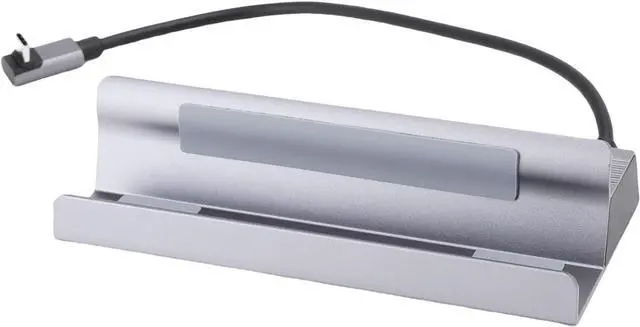


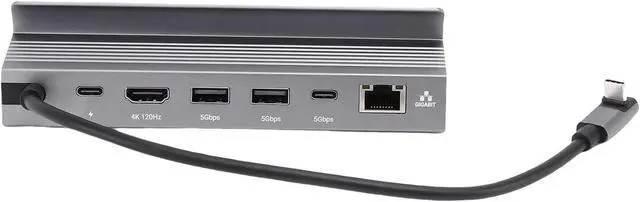


Bewinner 6 in 1 USB C Docking Station USB Hub 100W PD Charging RJ45 1000Mbps Port for Gaming Aluminum Alloy Shell
- [VERSATILE CONNECTIONS] 6 in 1 USB hub eliminates switching between ports
- [ENHANCED VIEWING EXPERIENCE] HD multimedia interface ensures clear images
- [EFFICIENT CHARGING] Power delivery technology for quick device charging
- [HIGH-SPEED NETWORKING] RJ45 port for online gaming, streaming, large files transfer
- [STYLISH & PORTABLE] Lightweight aluminum alloy shell for on-the-go professionals
+
+
Overview
Specs
Reviews
1. [VERSATILE CONNECTIONS] The 6-in-1 USB hub eliminates the need to switch between ports
2. [IMPROVED VIEWING EXPERIENCE] HD multimedia interface ensures clear images
3. [EFFICIENT CHARGING] Power delivery technology for fast device charging
4. [HIGH-SPEED NETWORKING] RJ45 port for online gaming, streaming and large file transfer
5. [STYLISH & PORTABLE] Lightweight aluminum alloy case on the go
Specifications:
Item type: USB C docking station
Material: metal, aluminum alloy shell
Input interface: Type C
USB3.0: 5Gbps
Type C: 5GBPS
HD Multimedia Interface: 4K120Hz
PD: 100W (maximum)
RJ45: 1000 Mbps - Maximum).
How to use:
Basic connection, plug and play
List of packages:
1 x docking station
Note:
1. Clean the interface of the docking station regularly to avoid poor contact caused by dust.
2. Avoid frequent plugging and plugging to reduce interface wear.
3. When not in use for a long time, disconnect the power and connect the wires.
2. [IMPROVED VIEWING EXPERIENCE] HD multimedia interface ensures clear images
3. [EFFICIENT CHARGING] Power delivery technology for fast device charging
4. [HIGH-SPEED NETWORKING] RJ45 port for online gaming, streaming and large file transfer
5. [STYLISH & PORTABLE] Lightweight aluminum alloy case on the go
Specifications:
Item type: USB C docking station
Material: metal, aluminum alloy shell
Input interface: Type C
USB3.0: 5Gbps
Type C: 5GBPS
HD Multimedia Interface: 4K120Hz
PD: 100W (maximum)
RJ45: 1000 Mbps - Maximum).
How to use:
Basic connection, plug and play
List of packages:
1 x docking station
Note:
1. Clean the interface of the docking station regularly to avoid poor contact caused by dust.
2. Avoid frequent plugging and plugging to reduce interface wear.
3. When not in use for a long time, disconnect the power and connect the wires.
Warranty & Returns
Warranty, Returns, And Additional Information
Warranty
- Please contact the Seller directly for warranty information. Warranty information may also be found on the Manufacturer's website.
- CONTACT
Return Policies
- Return for refund within: 30 days
- Return for replacement within: 90 days
- This item is covered by PartsPro Store Return Policy
Manufacturer Contact Info
- For a directory of all our manufacturers, please click below.
- Manufacturers Directory
LOADING...