



Meet Your Seller

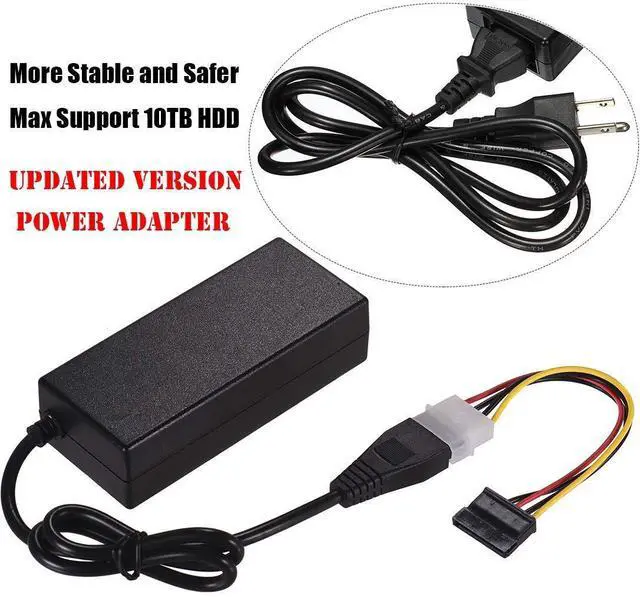
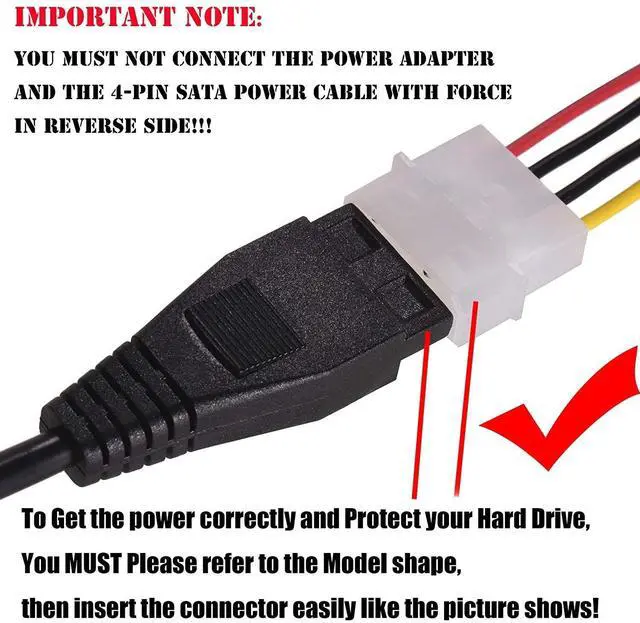
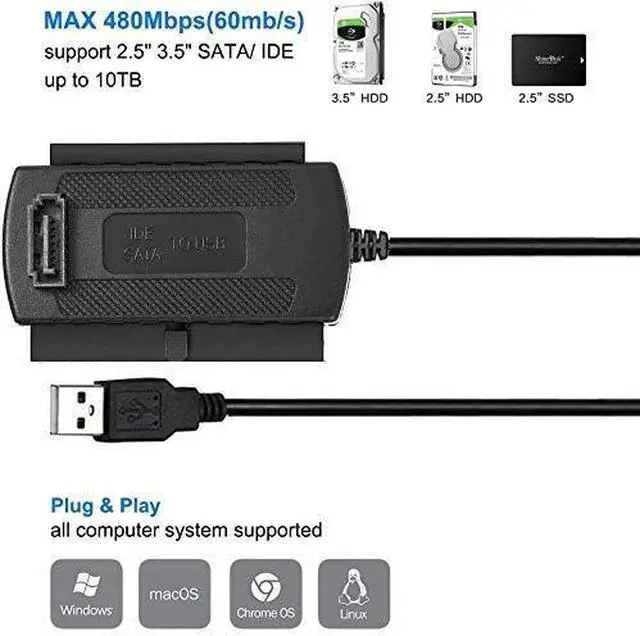


AGPtek® SATA/PATA/IDE Drive to USB 2.0 Adapter Converter Cable for 2.5 / 3.5 Inch Hard Drive / Optical Drive with External AC Power Adapter
- Use your 2.5" / 3.5" IDE hard drive or SATA hard disk as an additional external hard drive
- Connect your SATA / IDE device to your computer through a USB port
- Compliant with USB 1.1 and 2.0 standards
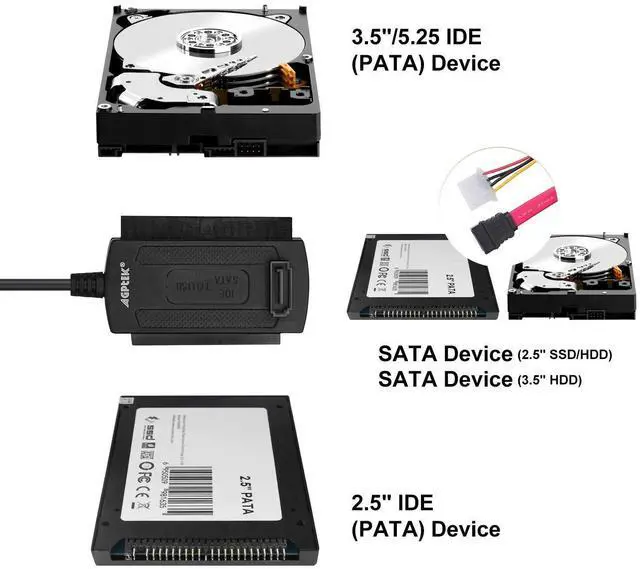
- Supports SATA Hard drive, 2.5" laptop hard drives, 3.5" desktop hard drives, CD-ROM, DVD-ROM, CD-RW, DVD-RW Combo devices
- Suggested Applications: 2.5" IDE Hard Disk / 3.5" IDE Hard Disk / SATA Hard Disk / CD/CD-RW ROM / DVD/DVD-RW ROM, etc.
+
+
Overview
Specs
Reviews
Easily Add Storage to Any System with USB
Supports HDD Capacity Up to 2TB
Transfer Rates Up to 480 Mbps with USB 2.0
Hot-Swappable: Plug and Play without Rebooting
Compatible Windows PC or Mac with Available USB 2.0 Port
Features:
1. USB2.0 interface, 480Mbps high-speed transfer rate, support 52xCD-ROM
2. Support hard disk, CD-ROM, DVD-ROM, CD-RW, combination device and DVD-RW
3. Support hot-swappable, plug and play
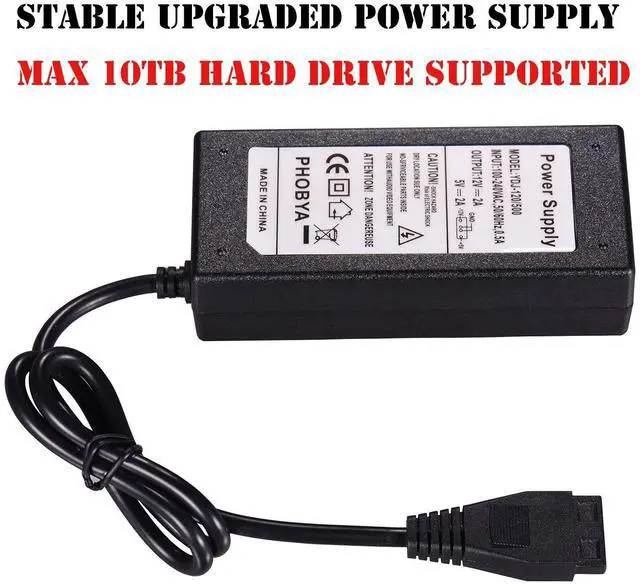
4. Power supply can be used to input 90V-260V AC voltage
5. Support Windows 98SE, Windows 2000, Windows me, Windows XP, Mac OS operating system
6. In Windows 2000 / ME / XP operating system, do not need to drive
7. Support 2.5 "/ 3.5" SATA / IDE HDD, CD / DVD-ROM, CD / DVD-RW and COMBO
8. Compatible with USB2.0, USB 1.1 and USB 1.0.USB 2.0 interface for 480 Mbps high speed data transfer.
9. Can connect SATA and IDE at the same time
10. IDE and SATA devices easy to connect, easy to carry
Specifications:
Type: USB cable
Interface type: SATA, IDE & USB2.0
Appropriate equipment: hard drives, optical drives
Working current: 1.5A
Plug : US Plug (110V)
Operating output voltage: 12V / 5V, adapt to SATA / IDE work of the two-wire output voltage
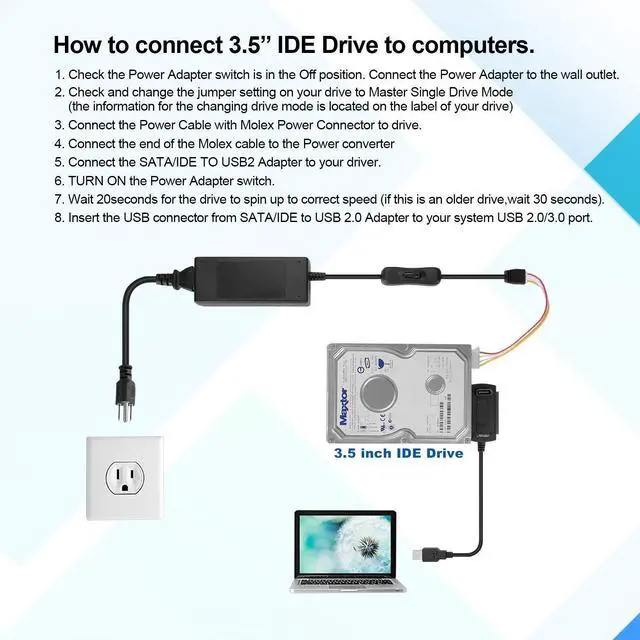
Device installation:
1. Verify that the device is in main mode
2. Connect the SATA / IDE connector to the SATA / IDE device
3. Connect the AC power to the SATA / IDE device
4. Connect the cable to the computer's USB port
Driver Installation:
1. Window 98: Insert the CD-ROM into the CD-ROM drive, and insert X: \ win98 \ setup.exe into the computer interface
2. Windows 2000 / me / XP: do not need to install any drivers
3. Mac8, 6 or higher: Copy the Gene USB SATA / IDE_05E3_0702, left, and double-click it to get the driver file. Then copy the driver file to [System Folder] [Extensions], connect the cable and restart the system
Uninstall:
1. Right-click the icon on the taskbar to stop the device
2. Pull out the cable
3. Unplug the power cord
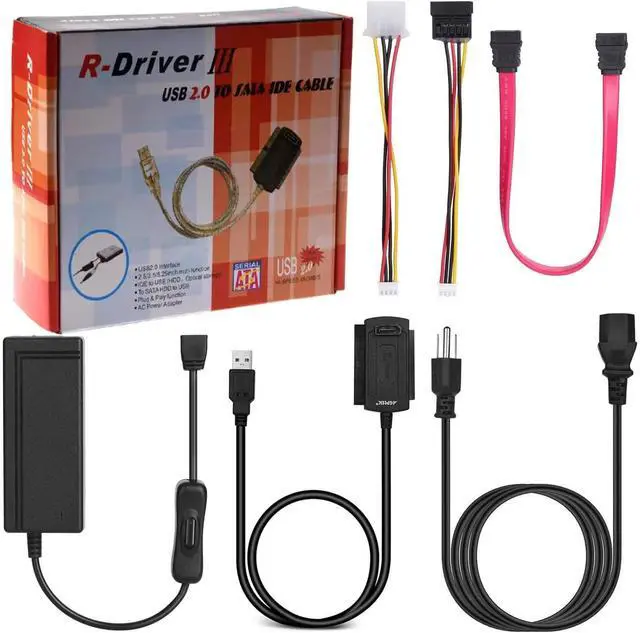
Sanoxy Sata IDE to USB Converter Adapter Package include:
1X USB to IDE / SATA cable adapter.
1X SATA Data cable.
1X AC adapter.
1X AC to IDE power converter.
1X IDE to SATA power cable.
Sanoxy USB 2.0 to IDE SATA S-ATA 2.5 3.5 Hard Drive HD HDD Converter Adapter Cable Supports hard disk, CD-ROM, DVD-ROM, CD-RW Interface type: SATA, IDE & USB2.0 SATA/IDE-USB Adapter gives you the flexibility of connecting almost any type of drive to your computer via USB
Supports HDD Capacity Up to 2TB
Transfer Rates Up to 480 Mbps with USB 2.0
Hot-Swappable: Plug and Play without Rebooting
Compatible Windows PC or Mac with Available USB 2.0 Port
Features:
1. USB2.0 interface, 480Mbps high-speed transfer rate, support 52xCD-ROM
2. Support hard disk, CD-ROM, DVD-ROM, CD-RW, combination device and DVD-RW
3. Support hot-swappable, plug and play
4. Power supply can be used to input 90V-260V AC voltage
5. Support Windows 98SE, Windows 2000, Windows me, Windows XP, Mac OS operating system
6. In Windows 2000 / ME / XP operating system, do not need to drive
7. Support 2.5 "/ 3.5" SATA / IDE HDD, CD / DVD-ROM, CD / DVD-RW and COMBO
8. Compatible with USB2.0, USB 1.1 and USB 1.0.USB 2.0 interface for 480 Mbps high speed data transfer.
9. Can connect SATA and IDE at the same time
10. IDE and SATA devices easy to connect, easy to carry
Specifications:
Type: USB cable
Interface type: SATA, IDE & USB2.0
Appropriate equipment: hard drives, optical drives
Working current: 1.5A
Plug : US Plug (110V)
Operating output voltage: 12V / 5V, adapt to SATA / IDE work of the two-wire output voltage
Device installation:
1. Verify that the device is in main mode
2. Connect the SATA / IDE connector to the SATA / IDE device
3. Connect the AC power to the SATA / IDE device
4. Connect the cable to the computer's USB port
Driver Installation:
1. Window 98: Insert the CD-ROM into the CD-ROM drive, and insert X: \ win98 \ setup.exe into the computer interface
2. Windows 2000 / me / XP: do not need to install any drivers
3. Mac8, 6 or higher: Copy the Gene USB SATA / IDE_05E3_0702, left, and double-click it to get the driver file. Then copy the driver file to [System Folder] [Extensions], connect the cable and restart the system
Uninstall:
1. Right-click the icon on the taskbar to stop the device
2. Pull out the cable
3. Unplug the power cord
Sanoxy Sata IDE to USB Converter Adapter Package include:
1X USB to IDE / SATA cable adapter.
1X SATA Data cable.
1X AC adapter.
1X AC to IDE power converter.
1X IDE to SATA power cable.
Sanoxy USB 2.0 to IDE SATA S-ATA 2.5 3.5 Hard Drive HD HDD Converter Adapter Cable Supports hard disk, CD-ROM, DVD-ROM, CD-RW Interface type: SATA, IDE & USB2.0 SATA/IDE-USB Adapter gives you the flexibility of connecting almost any type of drive to your computer via USB
Warranty & Returns
Warranty, Returns, And Additional Information
Warranty
- Please contact the Seller directly for warranty information. Warranty information may also be found on the Manufacturer's website.
- CONTACT
Return Policies
- Return for refund within: 30 days
- Return for replacement within: 90 days
- This item is covered by PartsPro Store Return Policy
Manufacturer Contact Info
- For a directory of all our manufacturers, please click below.
- Manufacturers Directory
LOADING...