• $297.40
  • Free 30-day Returns
  • Volume Discounts Available
    • $296.40 ea.
    • $295.40 ea.
    Ships from China.
    Price alert
    Shop it at NeweggBusiness.

    Meet Your Seller

    AUTYUE USB 3.0 Displayport + HDMI KVM Switch 2 Monitors 4 Computers, 4K@60Hz KVM Switches with Audio Microphone and 3 USB 3.0 Ports, 4 Port HDMI + DP Dual Monitor Switch for 4 PCs 2 Monitors

    Limited time offer, ends 02/24 By Goldendisk

    • 4 Port DisplayPort HDMI Dual Monitor KVM Switch: This KVM Switch allows you to control 4 computers or laptops with one set of keyboard, mouse, and single or dual monitors to make your workspace tidy and efficient.
    • Ultra HD 4K@60Hz: Support high resolution max up to 4K@60Hz, and also supports 3D and 1080P@60Hz or other lower resolution (Downward Compatible). Support up to 4K@60Hz for extended and mirrored display.
    • 3 USB 3.0 and Audio Microphone Ports: with 3 USB 3.0 ports which can recognize keyboard mouse,printer, or other USB devices. USB 3.0 has a faster data transfer speed of up to 5Gbps, backward compatible with USB 2.0/1.1 devices. Come with a 3.5mm Audio Jack port with a DAC chip inside and a 3.5mm microphone interface, which can be inserted into a 3-segment 3.5mm earpiece device and microphone.
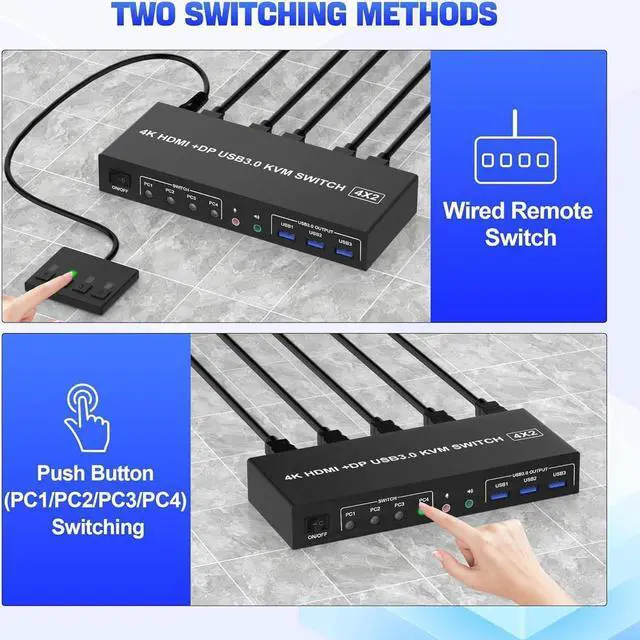
    • 2 Switching modes and Wide Compatibility: 1.Toggle selection on front panel 2. Wired remote switch. Compatible with Windows, Linux, Mac, Unix, Ubuntu, Raspberry and most other major OS;
    +
    +
    Overview
    Specs
    Reviews
    1. Insert the DC/5V adapter into the KVM;
    2. Plug the DP/HDMI cable into the KVM and monitor; (Output)
    3. Plug the DP/HDMI cable and USB cable into the KVM and your computer/laptop (DP cables are not included) (Input)
    DP IN1 + HDMI IN1 + USB IN1=PC1
    DP IN2 +HDMI IN2 + USB IN2=PC2
    DP IN3 + HDMI IN3 + USB IN3=PC3
    DP IN4+ HDMI IN4+ USB IN4=PC4
    4. Insert the mouse and keyboard into the KVM switch
    5. If needed, you can connect a microphone and audio port
    Note:


    1. Most of the reasons why only one video output works is because of incorrect connection. Please make sure each PC has(1 DP/HDMI cables+1 USB cable) connect to the KVM.
    2. If the KVM switch does not work, you can turn off the switch on the panel and turn it on again after 2-3 seconds, and it will return to normal.
    3. Before purchasing this DP/HDMI dual monitor KVM switch, please make sure that connecting your computer directly to the monitor can work normally, Otherwise, the KVM will not be available.
    4.
    Note: DP/HD-MI cables are not included

    Warranty & Returns

    Warranty, Returns, And Additional Information

    Warranty

    • Please contact the Seller directly for warranty information. Warranty information may also be found on the Manufacturer's website.
    • CONTACT

    Return Policies

    • Return for refund within: 30 days
    • Return for replacement within: 60 days
    • This item is covered by Goldendisk Return Policy

    Manufacturer Contact Info

    LOADING...