• $85.98
  • Free 30-day Returns
Volume Discounts Available
  • $84.98 ea.
  • $83.98 ea.
Ships from China.
Price alert
Shop it at NeweggBusiness.

Meet Your Seller

AUTYUE 8K@60Hz Displayport KVM Switch 1 Monitor 2 Computers, USB 3.0 DP KVM Switches 4 USB Ports for 2 Computers Sharing Monitor Keyboard Mouse Hard Drives, 2 USB Cable DC 5V Adapter and Controller

Limited time offer, ends 04/03 By Goldendisk

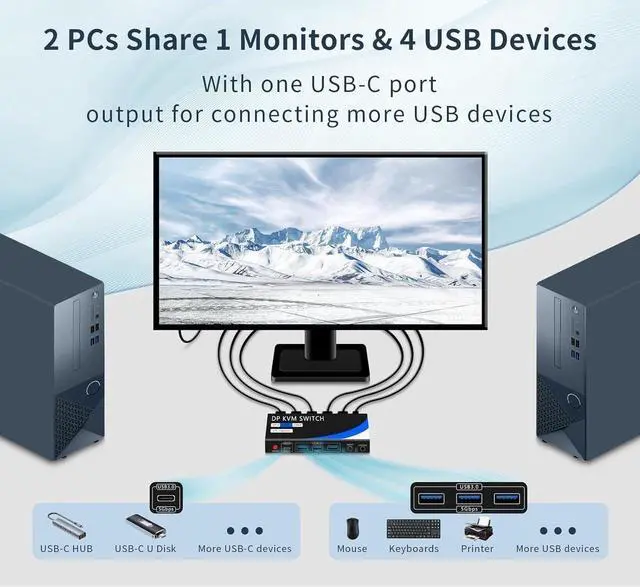
  • [DP KVM switch 1 monitor 2 computers] The KVM switch allowing 2 computers to share 1 monitor as well as a keyboard and mouse for switching. It is a USB switch and displayport switch in one. Compatible with Windows/XP, Linux, Mac and other operating systems.
  • [4 USB 3.0 Ports(3*USB-A& USB-C)] Equipped with 4 USB 3.0 (3*USB-A and 1*USB-C) ports with data transfer speeds of up to 5Gbps, as well as USB-A and USB-C ports for connecting more USB devices.
  • [High Resolution 8K@60Hz] Supports resolutions up to 8K@60Hz and is backward compatible with 4K@120Hz, 2560*1440@144Hz, and 1920*1080@165Hz.
  • [Two Switching Methods] Two switching methods: KVM switch button and desktop controller switching. We recommend using the desktop controller switching method, you can place the displayport KVM switch in a hidden or far away location to keep the desktop clean.
  • [Package content] 1* displayport KVM switch, 2* USB 3.0 cables, 1* wired controller, 1* charger and power cord, 1* user manual.

+
+
Overview
Specs
Reviews
[DP KVM switch 1 monitor 2 computers] The KVM switch allowing 2 computers to share 1 monitor as well as a keyboard and mouse for switching. It is a USB switch and displayport switch in one. Compatible with Windows/XP, Linux, Mac and other operating systems.
[4 USB 3.0 Ports(3*USB-A& USB-C)] Equipped with 4 USB 3.0 (3*USB-A and 1*USB-C) ports with data transfer speeds of up to 5Gbps, as well as USB-A and USB-C ports for connecting more USB devices.
[High Resolution 8K@60Hz] Supports resolutions up to 8K@60Hz and is backward compatible with 4K@120Hz, 2560*1440@144Hz, and 1920*1080@165Hz.
[Two Switching Methods] Two switching methods: KVM switch button and desktop controller switching. We recommend using the desktop controller switching method, you can place the displayport KVM switch in a hidden or far away location to keep the desktop clean.
[Package content] 1* displayport KVM switch, 2* USB 3.0 cables, 1* wired controller, 1* charger and power cord, 1* user manual.

Warranty & Returns

Warranty, Returns, And Additional Information

Warranty

  • Please contact the Seller directly for warranty information. Warranty information may also be found on the Manufacturer's website.
  • CONTACT

Return Policies

  • Return for refund within: 30 days
  • Return for replacement within: 60 days
  • This item is covered by Goldendisk Return Policy

Manufacturer Contact Info

LOADING...