

  • $399.99
  • Free 80-day Returns
  • Add to PC build list 
    Sold by Newegg

    Shipped by Newegg

    Price alert

    Best Sellers

    Hot Seller
    4.5 (3,589 total ratings)
    • $406.11
    • + $34.28 Shipping
    Shop it at NeweggBusiness.

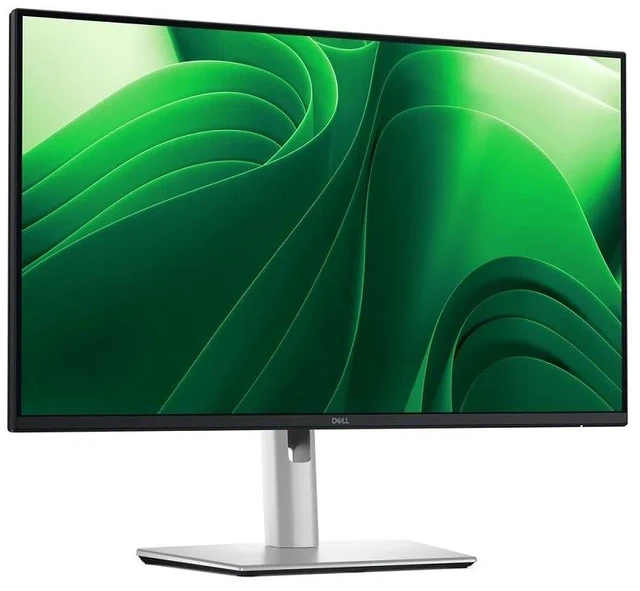
    Dell Pro 24 Plus QHD Monitor - P2425D

    • Enhance clarity with the Dell Pro P 24 Inch P2425D QHD monitor with sharp visuals, modern design, and reliable performance for professional workflows.
    +
    +
    Overview
    Specs
    Reviews
    Dell P2425D Pro 24 Plus QHD Monitor
    Dell P2425D Pro 24 Plus QHD Monitor
    P2425D
    Dell Pro 24 Plus QHD Monitor

    Certified by TÜV Rheinland® for 4-star eye comfort, this 23.8-inch QHD monitor offers enhanced productivity with visual comfort.

    Enhanced eye comfort

    TÜV 4-Star certified monitor for eye comfort1 reduces eye fatigue while you work.

    Dell P2425D Pro 24 Plus QHD Monitor
    Improved ComfortView Plus

    Reduced harmful blue light emissions to =35%, for all-day comfort without sacrificing color.

    Dell P2425D Pro 24 Plus QHD Monitor
    Refresh rate

    100Hz refresh rate delivers less flicker, more seamless scrolling and smoother motion.

    Dell P2425D Pro 24 Plus QHD Monitor
    Vivid colors

    Wide color coverage with up to 16.7 M displayable colors of 99% sRGB.

    Dell P2425D Pro 24 Plus QHD Monitor

    Clarity from any angle

    With high resolution, consistent colors across wide angles, and improved contrast ratio, your work has never looked this good.

    QHD resolution

    2560 x 1440 resolution makes every detail stand out.

    Color consistency

    Vibrant colors across wide viewing angles enabled by In-Plane Switching (IPS) technology.

    1500:1 contrast ratio

    For deeper blacks and brighter whites.

    Configure your workspace

    A wide variety of ports ensure you can connect all your accessories and create the perfect work setup to maximize your productivity.

    Dell P2425D Pro 24 Plus QHD Monitor
    Dell P2425D Pro 24 Plus QHD Monitor

    Quick access ports

    Experience the convenience of front-facing, pop-out USB-C (with up to 15W charging) and USB Type-A ports for easy connectivity. When you are done, just pop the ports back in for a clean look.

    Work comfortably

    Designed for comfort and style with adjustability features and an ultra-thin bezel.

    Dell P2425D Pro 24 Plus QHD Monitor
    Tilt

    Adjustability from -5°/+21°

    Dell P2425D Pro 24 Plus QHD Monitor
    Swivel

    Bi-directional adjustment up to 45°

    Dell P2425D Pro 24 Plus QHD Monitor
    Pivot

    Bi-directional adjustment up to 90°

    Dell P2425D Pro 24 Plus QHD Monitor
    Height

    Adjustability up to 150mm

    Dell Display and Peripheral Manager

    Experience Dell’s singular, innovative application to optimize the performance of your entire Dell PC workspace2.

    Dell P2425D Pro 24 Plus QHD Monitor
    Maximize productivity

    Easy Arrange tiles apps across screens with pre-set partitions and customizes up to five windows, enhancing multitasking. Easy Arrange Memory saves and restores app profiles manually, on schedule, or at start-up.

    Customize your views

    Work comfortably, day or night. Automate your brightness and contrast settings to match your schedule.

    More manageable

    Save time and boost IT efficiency with the Dell Device Management Console to manage your Dell peripheral fleet at scale, from a single cloud-based console. Discover expanded Command Line Interface features from Dell Display and Peripheral Manager3.

    Disclaimer: Screen image simulated for illustrative purposes only. Monitor model may vary.

    Environmentally-forward thinking

    Dell P2425D Pro 24 Plus QHD Monitor
    Material innovation

    Your monitor has been thoughtfully crafted with a selection of sustainable materials including up to 85% post-consumer plastic and closed-loop ITE-derived plastic4, 100% recycled aluminum5, 50% recycled steel6 and at least 20% recycled glass7 that make up to 31% recycled content by weight8. Using recycled materials helps conserve natural resources and contributes to a lower environmental footprint.

    Environmental standards

    This monitor is registered EPEAT Gold with Climate+, certified ENERGY STAR® and carries the latest TCO certified designation. With the new certification, this monitor is assured to be built using renewable energy while meeting high safety standards9.

    Seamlessly modernize your tech

    We can help you responsibly and securely retire your legacy IT equipment, regardless of brand, while addressing your sustainability goals.

    Packaging with purpose

    This monitor ships in a box made from 100% renewable materials. We are reducing plastic waste wherever possible and transitioning to a responsible fiber-based solution10.

    Dell P2425D Pro 24 Plus QHD Monitor
    Dell P2425D Pro 24 Plus QHD Monitor
    Dell P2425D Pro 24 Plus QHD Monitor

    Ports and slots

    Dell P2425D Pro 24 Plus QHD Monitor
    Rear view

    1Security lock slot (based on Kensington Security Slot™)

    2Power connector

    3Stand-lock

    4HDMI

    5DisplayPort 1.4

    6USB Type-B 5Gbps upstream

    7USB Type-A 5Gbps downstream (2)

    8Soundbar slots

    9USB-C 5Gbps downstream (Data only)

    10USB Type-A 5Gbps downstream

    Cables included

    Power cable | DisplayPort 1.4 (DisplayPort to DisplayPort), 1.8m | USB Type-A to Type-B 5Gbps, 1.8m

    Dimensions and Weight

    Dell P2425D Pro 24 Plus QHD Monitor

    1Monitor height with stand (extended / compressed): 19.55 in. (496.55 mm) / 14.33 in. (364.00 mm)

    2Monitor width: 21.21 in. (538.70 mm)

    3Monitor height: 12.41 in. (315.25 mm

    4Stand width: 9.83 in. (249.80 mm)

    Dell P2425D Pro 24 Plus QHD Monitor

    5Monitor depth: 1.96 in. (49.74 mm)

    6Stand height (extended / compressed): 16.17 in. (410.80 mm) / 14.33 in. (364.00 mm)

    7Stand depth: 7.15 in. (181.54 mm)

    Weight

    Weight with stand: 11.20 lb (5.08 kg)11

    Weight without stand: 7.05 lb (3.20 kg)12

    1. TÜV Rheinland® 4-star eye comfort certification.

    2. Based on Dell internal analysis, December 2024.

    3. Based on Dell internal analysis, November 2024.

    4. Percentage is based on plastic weight. Based on internal analysis, January 2025. Up to 67% post-consumer recycled plastic and up to 21% closed-loop ITE derived plastic.

    5. Recycled aluminum is in the monitor stand. Based on internal analysis, January 2025.

    6. Recycled steel is in the monitor head and stand. Based on internal analysis, January 2025.

    7. Applicable to all new monitors launching in CY 2024. Recycled glass is present in monitor panel. Based on internal analysis, January 2024.

    8. Based on internal analysis, January 2025.

    9. EPEAT registered where applicable. EPEAT registration varies by country. See www.epeat.net for registration status by country.

    10. Applies to all Dell monitors launched since 2023. Made from FSC mix sources which is a mix of material from FSC certified forests, recycled content and/or FSC controlled wood. Based on internal analysis, January 2025. Cushions now made from corrugated materials.

    11. Weights vary depending on configurations and manufacturing variability.

    12. Weights vary depending on configurations and manufacturing variability.

    Certified by TÜV Rheinland® for 4-star eye comfort, this 27-inch QHD monitor offers enhanced productivity with visual comfort.

    Warranty & Returns

    Warranty, Returns, And Additional Information

    Warranty

    • Limited Warranty period (parts): 1 year
    • Limited Warranty period (labor): 1 year
    • Read full details

    Return Policies

      We want to ensure your holiday shopping this year is hassle-free. That’s why we’re automatically extending our return policies on almost every product! For purchases placed between November 1st, 2026 and December 31, 2026 you will have until January 31, 2027 to return your product.

    • Return for refund until: January 31, 2027
    • Return for replacement until: January 31, 2027
    • This item is covered by Newegg.ca's Extended Holiday Return Policy.
    • Read full return policy for details.

    Manufacturer Contact Info

    LOADING...
    LOADING...

    The Dell Pro 24 Plus P2425D is a 23.8-inch QHD monitor with an IPS panel and 100Hz refresh rate, suited to professionals who want clear visuals and smoother scrolling for everyday office work.

    Recommended For

    • Office workers who keep spreadsheets, documents, email, or side-by-side windows open and want QHD detail on a compact 23.8-inch desk setup.
    • People who read or edit text for long work sessions and want an adjustable stand, IPS viewing angles, and Dell’s eye-comfort features.
    • Desk users who often switch between portrait and landscape layouts—for example, coding, reviewing long documents, or reading webpages—because the stand supports pivot adjustment.
    • Everyday work users who prefer smoother scrolling and cursor movement than a standard 60Hz office display, without needing a gaming-focused refresh rate.

    Real-World Use Scenarios

    • When working across spreadsheets, email, and reference documents, users can arrange several apps on the QHD screen and view more work at once, reducing the need to switch windows constantly.
    • For long office or study sessions involving reading and writing, the 24-inch QHD display provides a detailed workspace, while its adjustable stand lets users set the screen height and angle to suit their desk.
    • When a task involves long web pages, code, or portrait-format documents, users can rotate the screen vertically to see more lines at once and scroll less often.
    • At a desk with a keyboard, mouse, or other USB accessories, users can connect the monitor’s USB hub to their computer and plug accessories into the monitor for easier access; the monitor’s USB-C port is downstream, not a laptop video or charging input.
    • For everyday tasks with frequent scrolling or on-screen movement, the 100 Hz display can make motion appear smoother than a standard 60 Hz screen, while remaining aimed at general productivity rather than high-refresh competitive gaming.

    Spec Summary

    AttributeValue
    Best ForBusiness and multimedia viewing
    Panel And Resolution23.8-inch LED-backlit IPS panel with a 1920 × 1200 native resolution and 16:10 aspect ratio
    Refresh Rate And Response100 Hz refresh rate with a 5 ms response time
    Brightness300 cd/m²
    Ports And Connectivity1 HDMI port, 1 Thunderbolt 4 port, and 3 USB 3.0 ports
    Model IdentifiersDell P2425D

    Reference Q&A

    Q: Dell P2425D vs. P2425H: which should I choose for a 24-inch work monitor?

    A: Choose the Dell P2425D if you want QHD resolution (2560 × 1440) on a 23.8-inch screen for more detailed workspace. The P2425H is a 23.8-inch Full HD (1920 × 1080) option; both models support refresh rates up to 100 Hz and have adjustable stands.

    Q: Dell P2425D vs. P2425DE: which has the better setup for a laptop?

    A: Both are 23.8-inch QHD monitors with refresh rates up to 100 Hz. Choose the P2425D for a standard DisplayPort or HDMI desktop setup; choose the P2425DE when you want its USB-C connection with up to 90 W laptop power delivery, Ethernet, and DisplayPort daisy-chaining.

    Q: Dell P2425D vs. P2423D: is the newer model a meaningful upgrade?

    A: The P2425D is a 23.8-inch QHD monitor with a refresh rate up to 100 Hz; the P2423D is also 23.8-inch QHD and supports up to 60 Hz. Choose the P2425D if you want the higher listed refresh rate along with its 350-nit brightness and 1,500:1 contrast ratio.

    Q: Dell P2425D vs. P2425: which gives me more vertical screen space?

    A: The P2425D provides QHD resolution (2560 × 1440) in a 16:9 format, while the P2425 provides WUXGA resolution (1920 × 1200) in a 16:10 format. Choose the P2425D for higher pixel resolution; choose the P2425 if the taller 16:10 workspace is your priority.

    Q: Can I connect my laptop to the P2425D with USB-C and charge it at the same time?

    A: Not as a one-cable laptop connection. The P2425D’s USB-C port is a downstream data port, not a USB-C video input or laptop-charging connection. Use HDMI or DisplayPort for the display signal; the monitor’s USB ports can connect peripherals.

    Q: Can the P2425D adjust for portrait viewing and different desk heights?

    A: Yes. Its stand supports height adjustment, tilt, swivel, and a 90-degree pivot for portrait orientation.

    Q: Does the P2425D have a built-in webcam and microphone for video calls?

    A: No. The P2425D does not have a built-in webcam; use a separate webcam and microphone or a laptop’s camera and microphone for video calls.

    Q: Is the P2425D suitable for everyday office work and multitasking?

    A: It is suited to desk-based work such as documents, browsing, and side-by-side windows. The 23.8-inch QHD (2560 × 1440) IPS display provides a sharp workspace, and the stand can be adjusted for comfort. It is a desktop monitor, not a travel display.

    Q: Is the Dell P2425D a suitable choice for office work and coding?

    A: It may suit office work and coding if you want a compact QHD screen: users in a discussion about this model reported using it for work and described text clarity positively. Those are individual experiences, not a guarantee of comfort for every user.

    Q: Could QHD on the P2425D’s 23.8-inch screen make text too small or cause eye strain?

    A: It could be a trade-off. One owner reported eye strain after moving from 24-inch Full HD to this model’s 24-inch QHD format, while other users in a separate discussion reported good text clarity and comfortable work use. Text size and comfort may depend on scaling and personal preference, so consider whether you are comfortable adjusting display scaling.

    Q: Is the P2425D worth choosing over a similar 24-inch QHD LG monitor?

    A: The Reddit comparison discussion does not establish a clear winner. The P2425D is a 23.8-inch QHD monitor, but the discussion alone does not provide enough consistent evidence to say it is worth a higher price than the LG; compare the models’ features and prices before deciding.