


Best Sellers
 Top Rated
- $1,195.11
- + $10.99 Shipping





+
+
Overview
Specs
Reviews
HP 512GB PCIE NVME SSD
Warranty & Returns
Warranty, Returns, And Additional Information
Warranty
- Limited Warranty period (parts): 1 year
- Limited Warranty period (labor): 1 year
- Read full details
Return Policies
- Return for refund until: January 31, 2027
- Return for replacement until: January 31, 2027
- This item is covered by Newegg.ca's Extended Holiday Return Policy.
- Read full return policy for details.
We want to ensure your holiday shopping this year is hassle-free. That’s why we’re automatically extending our return policies on almost every product! For purchases placed between November 1st, 2026 and December 31, 2026 you will have until January 31, 2027 to return your product.
Manufacturer Contact Info
- Manufacturer Website
- Support Phone: 1-800-474-6836
- Support Website
- View other products from HP
LOADING...
LOADING...
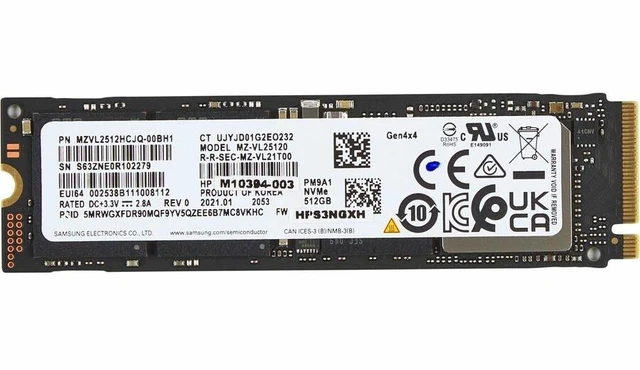
The HP AL0M8AA is a 512GB internal M.2 2280 PCIe NVMe SSD for users adding storage to a compatible computer with an M.2 PCIe/NVMe slot.
Recommended For
- Owners of an HP EliteBook or ZBook model listed by HP who need a compatible 512GB NVMe drive for a replacement or storage upgrade.
- Mobile professionals using a compatible HP laptop who want internal SSD storage for Windows, work applications, and everyday multitasking.
- HP EliteBook and ZBook users seeking an internal M.2 2280 PCIe Gen4 x4 NVMe drive rather than an external USB storage device.
- Users replacing a drive in a compatible HP laptop who value an HP-branded part with a listed three-year limited warranty.
Real-World Use Scenarios
- On an HP EliteBook or ZBook model listed as compatible, replace or upgrade the internal SSD to add storage for Windows, everyday applications, and work files; check the exact laptop configuration before purchase.
- For a work laptop running short on local space, use the 512GB drive for frequently used documents, applications, and active files, reducing the need to move those items between storage devices.
- When switching among several work applications, HP positions this SSD for quick application access and multitasking; the perceived improvement will depend on the laptop and the drive being replaced.
- In a compatible ZBook mobile workstation, use the drive for local work files and applications when additional internal storage is needed; 512GB is the drive’s stated capacity, and actual formatted space is lower.
Spec Summary
| Attribute | Value |
|---|---|
| Best For | Internal storage for a laptop or desktop PC, including operating systems and general data storage |
| Capacity | 512 GB SSD storage |
| Interface And Form Factor | Internal M.2 2280 SSD using PCIe 4.0 and NVMe |
| Read Write Performance | Listed data transfer rate is 8,000 MB/s, read speed is 4,950 MB/s, and media speed is 2,500 MB/s |
| Features | TRIM support and SMART |
| Model Identifiers | HP; PM9C1; model number MZ-VL85120 |
Reference Q&A
Q: HP AL0M8AA 512GB vs HP AL0M9AA 1TB: which should I choose?
A: Choose the HP AL0M8AA if 512GB is enough for your operating system, applications, and files. Choose the HP AL0M9AA if you need twice the listed capacity for larger software, project, or media libraries. HP identifies both as PCIe 4 x4 NVMe SSDs; the published information cited here does not establish a performance difference between them.
Q: Should I get the HP AL0M8AA 512GB or the HP AL0N0AA 2TB?
A: Choose the 512GB AL0M8AA when your storage needs are modest and you want less capacity than the 2TB option. Choose the 2TB AL0N0AA if you keep large games, work files, or media on the drive and want more room before needing another storage solution. Both are listed by HP as PCIe 4 x4 NVMe SSDs; compare current prices separately because they are not specified here.
Q: Is the HP AL0M8AA 512GB worth choosing over a 256GB SSD?
A: Choose the AL0M8AA if you want 512GB of listed capacity for applications, files, and future storage needs. A 256GB drive may suit a lighter setup if you regularly use cloud or external storage. This is a capacity comparison; the 256GB alternative is unspecified, so speed and price cannot be compared reliably.
Q: Will this SSD work in my laptop or desktop?
A: Only if the computer supports an M.2 2280 NVMe PCIe drive. Check the exact system model’s storage specifications before buying; an M.2 slot alone does not guarantee compatibility.
Q: Is 512GB enough for everyday work and general use?
A: 512GB can suit an operating system, common applications, documents, and a moderate amount of media. It may feel limiting if you keep large game libraries, high-resolution video, or many large files on the drive; usable capacity will be lower than the advertised amount.
Q: Can I use this as my computer’s main drive?
A: Yes, if the computer supports this M.2 2280 PCIe SSD and you install or clone an operating system onto it. The listed product information does not indicate that an operating system or drive-cloning software is included.