






ORIGBELIE focuses on the external CD/DVD drive, you can find us all over the world.
Our external CD/DVD drives don't just read/burn CDs DVDs for your computer, they offer the tech experience you want with zero restrictions.
What problem are we solving?
ORIGBELIE is dedicated to solving the problem of customers' anxiety being unable to read/burn CDs, DVDs, USB flash and SD/TF cards, whether they're on the go or using their computers daily.
Why do we love what we do?
We felt immensely proud when a recent customer told us that they had been using our product for five years without any issues.
What makes our products unique?
Every ORIGBELIE external CD/DVD drive has passed RoHS CE FCC UKCA certification and we have received countless positive reviews from our customers regarding our support and assistance.
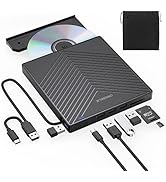
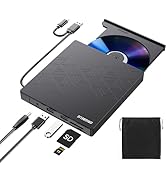
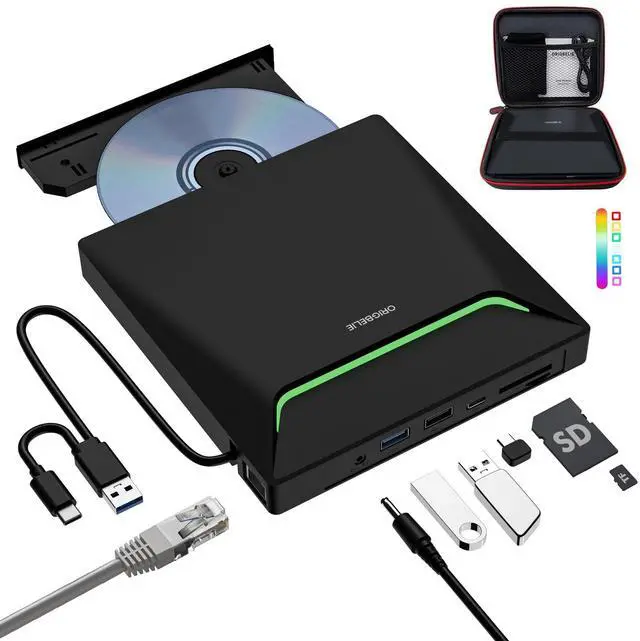
USB HUB+SD/TF Reader+DVD Drive
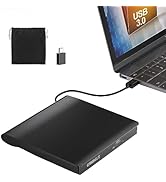
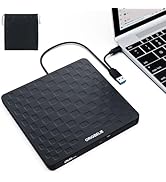
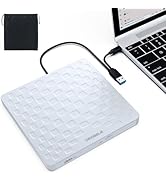
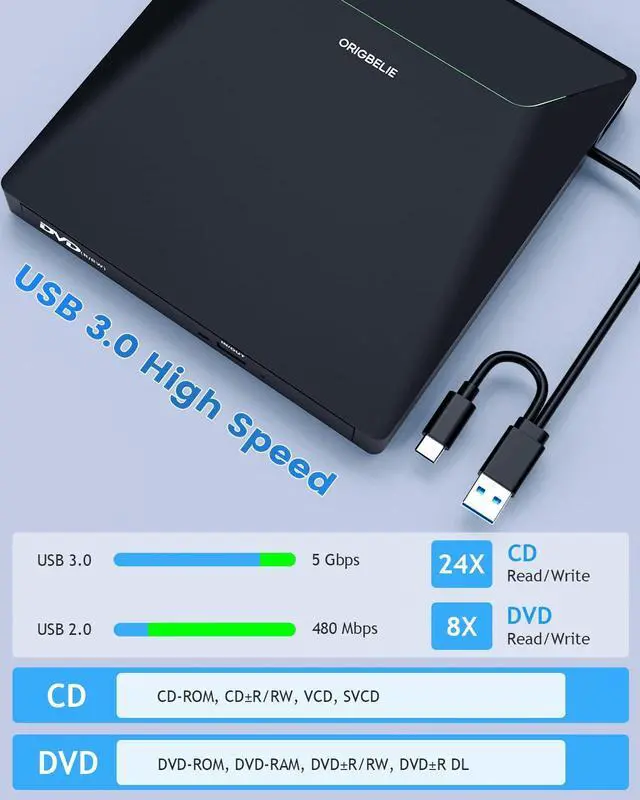
2 in 1 USB 3.0 CD/DVD Drive
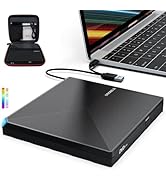
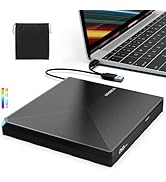
CD/DVD Drive with RGB LED
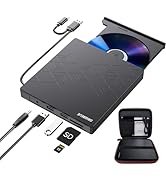
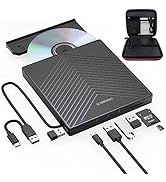
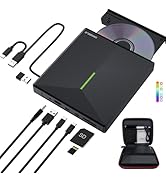
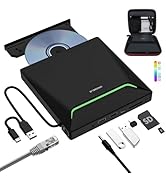
DVD Drive with Carrying Case


ORIGBELIE External CD/DVD Reader and Burner
Abandoning optical drives allows computer manufacturers to create thinner and more compact laptops. Most of the new notebooks on the market now do not built-in CD-ROM drive, and some only have a limited number of USB ports. In order to make laptops thinner and have higher transmission speeds, some even only have Type C ports. But we may have a large collection of 90s CDs, and we want to put them in a laptop to feel the nostalgia or insert a DVD collection to watch movies. Or, you may just need a CD/DVD drive for emergencies, such as data transfer, system backup, etc.
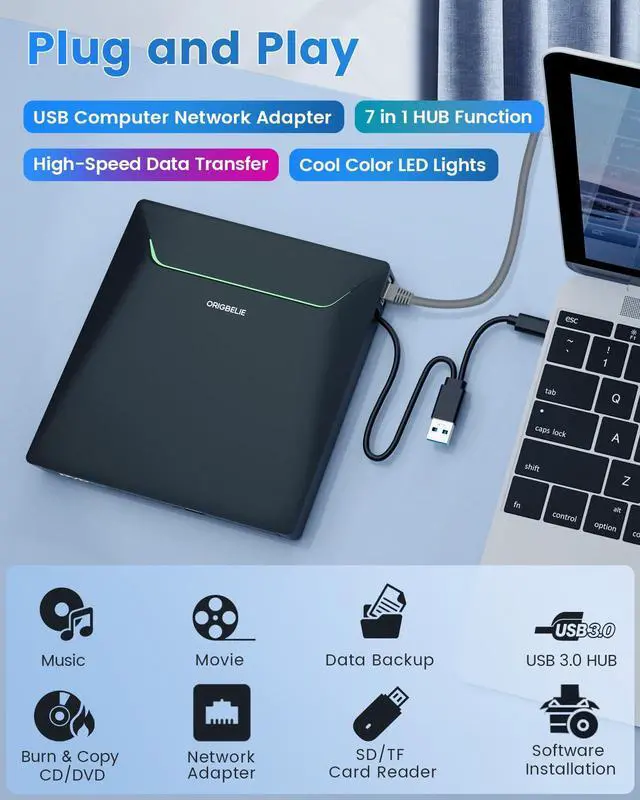
Fortunately, We have already done all the work for you. This multi-function 2 in 1 USB A/USB C data cable external USB 3.0 disc drive that we launched is not only a CD/DVD reader, but also it has the function of CD/DVD burner. At the same time, it is equipped with a variety of USB ports, SD/TF card slots and RJ45 Ethernet LAN network port to meet all your peripheral equipment needs - all for a decent price. This will allow you to have more budget to buy the latest laptops that are comfortable, smooth, and have powerful processors and graphics cards.
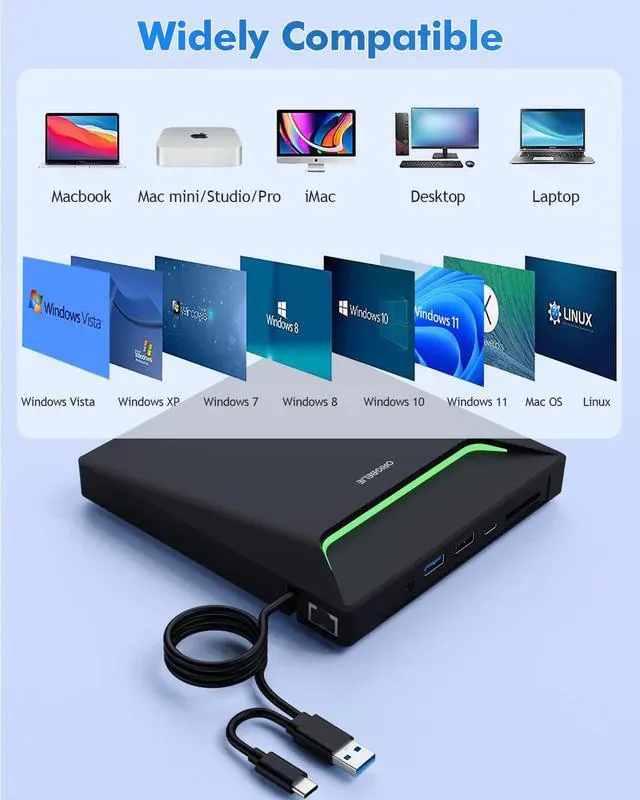
THESE THINGS YOU NEED TO KNOW BEFORE BUYING - This dvd rw drive can only start its job after it is connected to a laptop or a desktop, so it is not compatible with TVs, cars, trucks, projectors, tablets, iPads, phones, PS4/5, Xbox, Nintendo Switch, surface (some model), etc. In addition, it is compatible with Windows11/10/8/7/XP/Vista, Mac OS and Linux. Not compatible with Chrome OS, Ubuntu system and Blu-ray disc.

With this USB external CD/DVD RW Drive, you can read movies DVDs, play music CDs, burn and rip discs, copy photos, install software/games/system, backup data and more. And just slips easily into your travel bag, perfect companion for DVD lovers, using everywhere.

100Mbps Faster and More Stable Wired Network
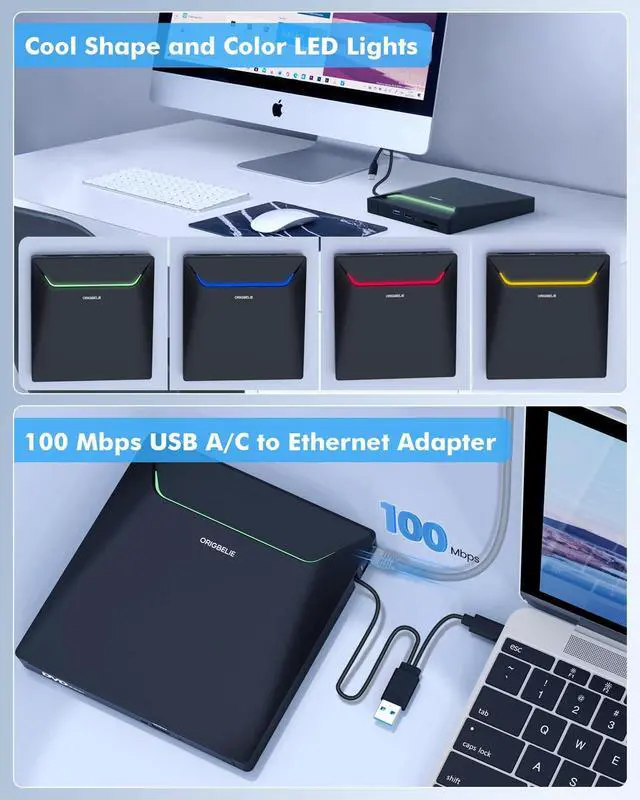
This ORIGBELIE super external CD DVD digital converter can provide a faster, more reliable and stable wired network. Let you no longer suffer from loss or loading. It's also good for avoiding Wi-Fi interference and privacy issues.
This cd dvd adapter can provide up to 100Mbps network speed. It can give full play to the network performance, ensure the stable speed of online games, meetings, classes, HD videos, uploads, downloads, etc., And say goodbye to the troubles of slow download speeds and network delays.
Tip: After inserting the Ethernet cable, the yellow connection indicator (power) of the RJ45 Ethernet interface is always on, and after connecting to the Ethernet signal, the green signal indicator (transfer data) of the RJ45 Ethernet interface flashes.
NOTE: The ethernet adapter for laptop is plug and play on Windows 11/10/8, Linux and Mac OS, no need to install driver. It requires installing the driver on Windows 7/ Vista and Windows XP.
Windows 7/ Vista system: Insert the CD-ROM drive into the computer > the system will automatically pop up an installation window > click "Run RTK NIC DRIVDR INSTALLER. sfx. exe" to automatically install.
Windows XP system: Insert the CD-ROM drive into the computer > open the computer's device manager > Other devices > USB 10/100 LAN > right-click > Update driver > the installation window pops up > click Next to complete.

Cool Shape with RGB LED Lights
Inspired by the appearance design of Iron Man, it is equipped with the latest RGB LED lights (which can cycle and gradually change colors). When the lights on, your USB disk drive is immediately full of technology, fashion, coolness, personality and other elements.

2-in-1 USB 3.0 Connector
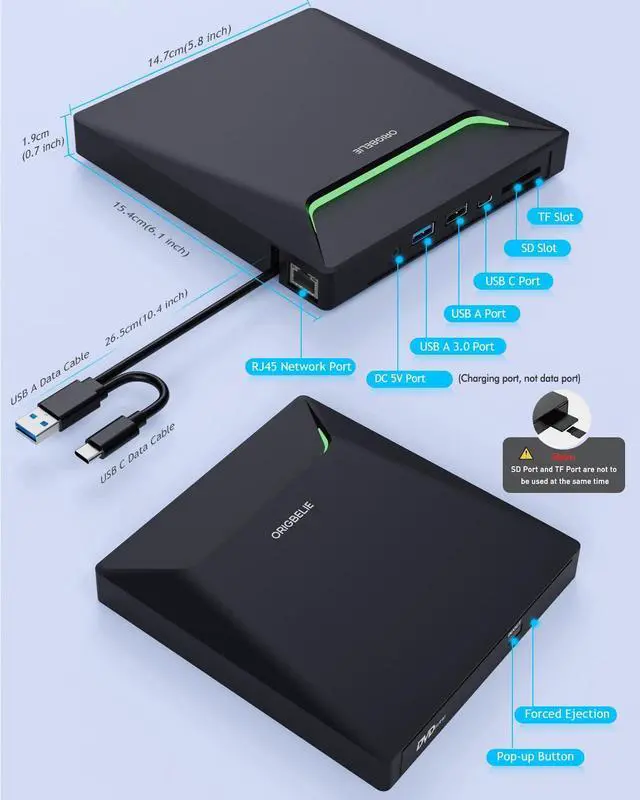
Equipped with USB-C and USB-A connectors (built-in on the back of the optical drive) make it easier to connect to more laptops and desktop computers, no USB hub/adapter required. Plug and Play.

All-in-1 USB 3.0 Hub
It is not only CD/DVD burner, but also a USB 3.0 hub, including RJ45 Network port*1, USB A 3.0 port*1, USB A 2.0 port*1, USB C port*1, TF card slot*1, SD card slot*1. Extra built-in SD/TF card reader is perfect for you to transfer photos shooting or videos by your camera from memory cards to your computers.

Package Contain
- External CD/DVD Drive * 1
- User Manual * 1
- USB A to DC Power Supply Cable * 1
- DVD Drive Storage Bag * 1
- USB DVD Drive Carrying Case * 1

Play a DVD movie on computer

Play a CD on laptop

Back Up Computer Files to CD/DVD

Install Software (If PC Lacks an Optical Drive)

Important Aspects to Note Of ORIGBELIE USB 3.0 CD ROM external drive
1. For Mac system, please note that Mac OS computer will not display the device icon until the disc is inserted into the optical drive and the disc is read successfully.
2. For Windows system, if your computer recognizes the external CD drive for PC, you can see the icon of "DVD RW Drive" in "My Computer" of your computer."
If External CD/DVD Drive can be recognized by your computer, the problem you are facing may be caused by the following two reasons:
- The product power supply is insufficient, please use a 5V charger/power bank to supplement it.(Note: For Apple computers, you must first connect the external CD DVD drive to your computer, and then connect the additional power to disc drive, otherwise the Apple computer will not recognized the device.
- WINDOWS 11 requires a media player (such as VLC) and a network connection.
3. The dvd drive should be connected with USB port on laptop rather than connect with USB HUB. In addition, please connect the item with USB port behind of computer host if you use a desktop.
4. Ensure CDs is placed well and not scratched. The raised fixing post in the middle of the CD drive tray has three spring buckles. You need to gently press the CD disc into the spring buckles to secure the disc.
5. Make sure your computer's CD/DVD driver is intact before using an external optical drive. The computer operating system comes with a CD/DVD driver. If the program is damaged or removed, the CD/DVD driver needs to be updated or reinstalled.
6. Setting the DVD Region to USA on the "DVD RW Drive" - Properties - click Hardware Tab - click Properties button - then choose country Region (USA is 1) and click OK to apply. Note: You are only allowed to change the region code 4-5 times.
7. Computers often do not natively support DVD movie playing, so a third-party media player (such as VLC) must be downloaded and installed to watch DVDs using this CD/DVD player. You can download and install a playing/burning software you like. You can also refer to the following software:
DVD player software: Any Media Player, Any DVD; Burning software for Windows operating systems: InfraRecorder, Ones, Express Disc Burner; Burning software for Mac OS: Burn for mac; Burning software for Linux OS/Unix OS: K3b (KDE Burn Baby Burn)
8. Because the video formats of most computers and mobile phones are not compatible with DVD, you need third-party software to convert the file format to a format that can be displayed on the disc, otherwise, even if you burn the file to a disc, it will not work.
9. The Mac OS system comes with a burning function:
Connect the optical drive and put the disc into it - click "File" on the top menu bar - click on the new "Burn Folder" - drag the files to be burned into the "Burn Folder" - click "Burn to Disc" - and then You can eject the disc. But one thing to note is that Mac OS computers can only burn blank discs, and a disc can only be burned once.
10. For the Mac OS, you need to eject the disc through the Mac OS command. At this time, pressing the eject key of the external optical drive will not work.
 All in 1 with RGB LED and Carrying Case |  8 in 1 with RGB LED and Carrying Case |  8 in 1 with Carrying Case |  6 in 1 with Carrying Case |  2 in 1 with RGB LED and Carrying Case |  2 in 1 with Carrying Case | |
|---|---|---|---|---|---|---|
| Customer Reviews | — | — | — | — | — | — |
| Price | — | — | — | — | — | — |
| USB 3.0 Port | 3 | 3 | 3 | 2 | 2 | 2 |
| USB Conector | USB C and USB A | USB C and USB A | USB C and USB A | USB C and USB A | USB C and USB A | USB A and USB C |
| RJ45 Ethernet LAN Network Port | ? | no data | no data | no data | no data | no data |
| USB HUB Port | 3 | 4 | 4 | 2 | no data | no data |
| SD/TF Card Reader | ? | ? | ? | ? | no data | no data |
| CD/DVD Reader & Burner | ? | ? | ? | ? | ? | ? |
| RGB LED Light | ? | ? | no data | no data | ? | no data |
| Compatible with | Laptop, Macbook, Desktop, PC, Mac, iMac | Laptop, Macbook, Desktop, PC, Mac, iMac | Laptop, Macbook, Desktop, PC, Mac, iMac | Laptop, Macbook, Desktop, PC, Mac, iMac | Laptop, Macbook, Desktop, PC, Mac, iMac | Laptop, Macbook, Desktop, PC, Mac, iMac |
| Support Operating System | Windows 11/10/8/7/XP/Vista, Mac OS, Linux | Windows 11/10/8/7/XP/Vista, Mac OS, Linux | Windows 11/10/8/7/XP/Vista, Mac OS, Linux | Windows 11/10/8/7/XP/Vista, Mac OS, Linux | Windows 11/10/8/7/XP/Vista, Mac OS, Linux | Windows 11/10/8/7/XP/Vista, Mac OS, Linux |
| Tips | Cars, TVs, Tablets, Ipads, PS4/5, Xbox, Cellphones, Projectors, Surface, Chromebook, Blu-ray disk and Ubuntu system are not supported | Cars, TVs, Tablets, Ipads, PS4/5, Xbox, Cellphones, Projectors, Surface, Chromebook, Blu-ray disk and Ubuntu system are not supported | Cars, TVs, Tablets, Ipads, PS4/5, Xbox, Cellphones, Projectors, Surface, Chromebook, Blu-ray disk and Ubuntu system are not supported | Cars, TVs, Tablets, Ipads, PS4/5, Xbox, Cellphones, Projectors, Surface, Chromebook, Blu-ray disk and Ubuntu system are not supported | Cars, TVs, Tablets, Ipads, PS4/5, Xbox, Cellphones, Projectors, Surface, Chromebook, Blu-ray disk and Ubuntu system are not supported | Cars, TVs, Tablets, Ipads, PS4/5, Xbox, Cellphones, Projectors, Surface, Chromebook, Blu-ray disk and Ubuntu system are not supported |
ORIGBELIE External CD/DVD Reader and Burner
Abandoning optical drives allows computer manufacturers to create thinner and more compact laptops. Most of the new notebooks on the market now do not built-in CD-ROM drive, and some only have a limited number of USB ports. In order to make laptops thinner and have higher transmission speeds, some even only have Type C ports. But we may have a large collection of 90s CDs, and we want to put them in a laptop to feel the nostalgia or insert a DVD collection to watch movies. Or, you may just need a CD/DVD drive for emergencies, such as data transfer, system backup, etc.
Fortunately, We have already done all the work for you. This multi-function 2 in 1 USB A/USB C data cable external USB 3.0 disc drive that we launched is not only a CD/DVD reader, but also it has the function of CD/DVD burner. At the same time, it is equipped with a variety of USB ports, SD/TF card slots and RJ45 Ethernet LAN network port to meet all your peripheral equipment needs - all for a decent price. This will allow you to have more budget to buy the latest laptops that are comfortable, smooth, and have powerful processors and graphics cards.
THESE THINGS YOU NEED TO KNOW BEFORE BUYING - This dvd rw drive can only start its job after it is connected to a laptop or a desktop, so it is not compatible with TVs, cars, trucks, projectors, tablets, iPads, phones, PS4/5, Xbox, Nintendo Switch, surface (some model), etc. In addition, it is compatible with Windows11/10/8/7/XP/Vista, Mac OS and Linux. Not compatible with Chrome OS, Ubuntu system and Blu-ray disc.
With this USB external CD/DVD RW Drive, you can read movies DVDs, play music CDs, burn and rip discs, copy photos, install software/games/system, backup data and more. And just slips easily into your travel bag, perfect companion for DVD lovers, using everywhere.
100Mbps Faster and More Stable Wired Network
This ORIGBELIE super external CD DVD digital converter can provide a faster, more reliable and stable wired network. Let you no longer suffer from loss or loading. It's also good for avoiding Wi-Fi interference and privacy issues.
This cd dvd adapter can provide up to 100Mbps network speed. It can give full play to the network performance, ensure the stable speed of online games, meetings, classes, HD videos, uploads, downloads, etc., And say goodbye to the troubles of slow download speeds and network delays.
Tip: After inserting the Ethernet cable, the yellow connection indicator (power) of the RJ45 Ethernet interface is always on, and after connecting to the Ethernet signal, the green signal indicator (transfer data) of the RJ45 Ethernet interface flashes.
NOTE: The ethernet adapter for laptop is plug and play on Windows 11/10/8, Linux and Mac OS, no need to install driver. It requires installing the driver on Windows 7/ Vista and Windows XP.
Windows 7/ Vista system: Insert the CD-ROM drive into the computer > the system will automatically pop up an installation window > click "Run RTK NIC DRIVDR INSTALLER. sfx. exe" to automatically install.
Windows XP system: Insert the CD-ROM drive into the computer > open the computer's device manager > Other devices > USB 10/100 LAN > right-click > Update driver > the installation window pops up > click Next to complete.
Cool Shape with RGB LED Lights
Inspired by the appearance design of Iron Man, it is equipped with the latest RGB LED lights (which can cycle and gradually change colors). When the lights on, your USB disk drive is immediately full of technology, fashion, coolness, personality and other elements.
2-in-1 USB 3.0 Connector
Equipped with USB-C and USB-A connectors (built-in on the back of the optical drive) make it easier to connect to more laptops and desktop computers, no USB hub/adapter required. Plug and Play.
All-in-1 USB 3.0 Hub
It is not only CD/DVD burner, but also a USB 3.0 hub, including RJ45 Network port*1, USB A 3.0 port*1, USB A 2.0 port*1, USB C port*1, TF card slot*1, SD card slot*1. Extra built-in SD/TF card reader is perfect for you to transfer photos shooting or videos by your camera from memory cards to your computers.
Package Contain
- External CD/DVD Drive * 1
- User Manual * 1
- USB A to DC Power Supply Cable * 1
- DVD Drive Storage Bag * 1
- USB DVD Drive Carrying Case * 1
How to Play a DVD Movie on Your Computer
You need to ensure that there is a program or app on your computer for playing DVD. Windows 11, unlike some of its predecessors, no longer ships with a built-in DVD player.
- Click “Start” button on the desk of your laptop. Search “Windows Media Player” to start the program.
- Connect an external DVD drive to your laptop via a USB cable and insert the DVD disc to the external DVD drive.
- Choose your DVD Disk and click “Play” button. Then you can watch DVD movie on your laptop.
How to Play a CD on Your Laptop
If you haven’t ripped your music CDs to audio files on your laptop yet, it’s not too late. All it takes is a ORIGBELIE CD drive and a bit of time. When you’re done, your physical music collection will become your digital music collection, You can then listen to that music on your computer or copy it over to your smartphone. There are even many services that will let you store that music online and stream it from anywhere!
- Connect an external cd drive to your laptop via a USB cable.
- Press the Eject button on the cd reader.
- Place the disc in the tray label-side up, and close the tray by pushing it.
- Click choose what to do with audio CDs, then Double-click your audio CD in the menu and you'll see all of the tracks appear in the center of the window. If nothing happens when you insert your disc, you can start Windows Media Player yourself.
How to Back Up Computer Files to CD/DVD
You’ve put a lot of work into creating your computer files, so you’ll want to remember to back them up. If you back up your computer files, if your computer is damaged or loses data, you’ll have a copy safely tucked away.
- Place a blank writable CD-R/RW (read/writable) or DVD-R/RW in your CD-RW /DVD-RW drive and then choose Start?Documents.
- Select all the files that you want to copy to disc. Right-click the files that you want and then choose Copy To Folder.
- In the Copy Items dialog box, click the CD-R/RW or DVD-RW drive and click Copy.
- Your files are copied.
How can i install software that’s stored on a CD or DVD If my PC lacks an optical drive?
When software comes on a CD or DVD and you want to install it on a laptop, you may can’t just pop open the disc drive or slide a disc into a slot, like you would on a computer with an optical drive. Generally speaking, the latest laptops forgoes the optical drive to keep it thin and small.
- So you can resort to ORIGBELIE external CD/DVD drive to get your programs installed.
- The ORIGBELIE external usb 3.0 drive equipped with USB-C and USB-A connectors make it easier to connect to more laptops and desktop computers, Plug and Play, Compatible with Windows 11 / 10 / 8 / 7 / Vista / XP, Linux and all versions of Mac OS. Ideal for laptop and desktop PC.
Important Aspects to Note Of ORIGBELIE USB 3.0 CD ROM external drive
1. For Mac system, please note that Mac OS computer will not display the device icon until the disc is inserted into the optical drive and the disc is read successfully.
2. For Windows system, if your computer recognizes the external CD drive for PC, you can see the icon of "DVD RW Drive" in "My Computer" of your computer."
If External CD/DVD Drive can be recognized by your computer, the problem you are facing may be caused by the following two reasons:
- The product power supply is insufficient, please use a 5V charger/power bank to supplement it.(Note: For Apple computers, you must first connect the external CD DVD drive to your computer, and then connect the additional power to disc drive, otherwise the Apple computer will not recognized the device.
- WINDOWS 11 requires a media player (such as VLC) and a network connection.
3. The dvd drive should be connected with USB port on laptop rather than connect with USB HUB. In addition, please connect the item with USB port behind of computer host if you use a desktop.
4. Ensure CDs is placed well and not scratched. The raised fixing post in the middle of the CD drive tray has three spring buckles. You need to gently press the CD disc into the spring buckles to secure the disc.
5. Make sure your computer's CD/DVD driver is intact before using an external optical drive. The computer operating system comes with a CD/DVD driver. If the program is damaged or removed, the CD/DVD driver needs to be updated or reinstalled.
6. Setting the DVD Region to USA on the "DVD RW Drive" - Properties - click Hardware Tab - click Properties button - then choose country Region (USA is 1) and click OK to apply. Note: You are only allowed to change the region code 4-5 times.
7. Computers often do not natively support DVD movie playing, so a third-party media player (such as VLC) must be downloaded and installed to watch DVDs using this CD/DVD player. You can download and install a playing/burning software you like. You can also refer to the following software:
DVD player software: Any Media Player, Any DVD; Burning software for Windows operating systems: InfraRecorder, Ones, Express Disc Burner; Burning software for Mac OS: Burn for mac; Burning software for Linux OS/Unix OS: K3b (KDE Burn Baby Burn)
8. Because the video formats of most computers and mobile phones are not compatible with DVD, you need third-party software to convert the file format to a format that can be displayed on the disc, otherwise, even if you burn the file to a disc, it will not work.
9. The Mac OS system comes with a burning function:
Connect the optical drive and put the disc into it - click "File" on the top menu bar - click on the new "Burn Folder" - drag the files to be burned into the "Burn Folder" - click "Burn to Disc" - and then You can eject the disc. But one thing to note is that Mac OS computers can only burn blank discs, and a disc can only be burned once.
10. For the Mac OS, you need to eject the disc through the Mac OS command. At this time, pressing the eject key of the external optical drive will not work.
All in 1 with RGB LED and Carrying Case | 8 in 1 with RGB LED and Carrying Case | 8 in 1 with Carrying Case | 6 in 1 with Carrying Case | 2 in 1 with RGB LED and Carrying Case | 2 in 1 with Carrying Case | |
|---|---|---|---|---|---|---|
| Customer Reviews | — | — | — | — | — | — |
| Price | — | — | — | — | — | — |
| USB 3.0 Port | 3 | 3 | 3 | 2 | 2 | 2 |
| USB Conector | USB C and USB A | USB C and USB A | USB C and USB A | USB C and USB A | USB C and USB A | USB A and USB C |
| RJ45 Ethernet LAN Network Port | ? | no data | no data | no data | no data | no data |
| USB HUB Port | 3 | 4 | 4 | 2 | no data | no data |
| SD/TF Card Reader | ? | ? | ? | ? | no data | no data |
| CD/DVD Reader & Burner | ? | ? | ? | ? | ? | ? |
| RGB LED Light | ? | ? | no data | no data | ? | no data |
| Compatible with | Laptop, Macbook, Desktop, PC, Mac, iMac | Laptop, Macbook, Desktop, PC, Mac, iMac | Laptop, Macbook, Desktop, PC, Mac, iMac | Laptop, Macbook, Desktop, PC, Mac, iMac | Laptop, Macbook, Desktop, PC, Mac, iMac | Laptop, Macbook, Desktop, PC, Mac, iMac |
| Support Operating System | Windows 11/10/8/7/XP/Vista, Mac OS, Linux | Windows 11/10/8/7/XP/Vista, Mac OS, Linux | Windows 11/10/8/7/XP/Vista, Mac OS, Linux | Windows 11/10/8/7/XP/Vista, Mac OS, Linux | Windows 11/10/8/7/XP/Vista, Mac OS, Linux | Windows 11/10/8/7/XP/Vista, Mac OS, Linux |
| Tips | Cars, TVs, Tablets, Ipads, PS4/5, Xbox, Cellphones, Projectors, Surface, Chromebook, Blu-ray disk and Ubuntu system are not supported | Cars, TVs, Tablets, Ipads, PS4/5, Xbox, Cellphones, Projectors, Surface, Chromebook, Blu-ray disk and Ubuntu system are not supported | Cars, TVs, Tablets, Ipads, PS4/5, Xbox, Cellphones, Projectors, Surface, Chromebook, Blu-ray disk and Ubuntu system are not supported | Cars, TVs, Tablets, Ipads, PS4/5, Xbox, Cellphones, Projectors, Surface, Chromebook, Blu-ray disk and Ubuntu system are not supported | Cars, TVs, Tablets, Ipads, PS4/5, Xbox, Cellphones, Projectors, Surface, Chromebook, Blu-ray disk and Ubuntu system are not supported | Cars, TVs, Tablets, Ipads, PS4/5, Xbox, Cellphones, Projectors, Surface, Chromebook, Blu-ray disk and Ubuntu system are not supported |
ORIGBELIE focuses on the external CD/DVD drive, you can find us all over the world.
Our external CD/DVD drives don't just read/burn CDs DVDs for your computer, they offer the tech experience you want with zero restrictions.
What problem are we solving?
ORIGBELIE is dedicated to solving the problem of customers' anxiety being unable to read/burn CDs, DVDs, USB flash and SD/TF cards, whether they're on the go or using their computers daily.
Why do we love what we do?
We felt immensely proud when a recent customer told us that they had been using our product for five years without any issues.
What makes our products unique?
Every ORIGBELIE external CD/DVD drive has passed RoHS CE FCC UKCA certification and we have received countless positive reviews from our customers regarding our support and assistance.
USB HUB+SD/TF Reader+DVD Drive
2 in 1 USB 3.0 CD/DVD Drive
CD/DVD Drive with RGB LED
DVD Drive with Carrying Case