



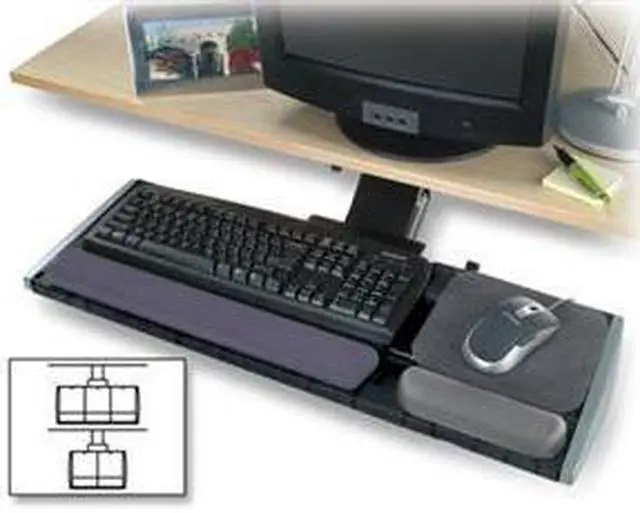

+
+
Specs
Reviews
Learn more about the Kensington 8589660087
| Brand | Kensington |
|---|---|
| Model | 8589660087 |
| Weight | 0.45 |
|---|
| First Listed on Newegg | September 13, 2018 |
|---|
Warranty & Returns
Warranty, Returns, And Additional Information
Warranty
- Limited Warranty period (parts): 2 years
- Limited Warranty period (labor): 2 years
- Read full details
Return Policies
- Return for refund until: January 31, 2027
- Return for replacement until: January 31, 2027
- This item is covered by Newegg.ca's Extended Holiday Return Policy.
- Read full return policy for details.
We want to ensure your holiday shopping this year is hassle-free. That’s why we’re automatically extending our return policies on almost every product! For purchases placed between November 1st, 2026 and December 31, 2026 you will have until January 31, 2027 to return your product.
Manufacturer Contact Info
- Manufacturer Website
- Support Phone: 1-800-535-4242
- Support Website
- View other products from Kensington
LOADING...
The Kensington 8589660087 is a SmartFit monitor stand for people who want to raise a compatible monitor to a more comfortable viewing height; its height adjusts without tools.
Recommended For
- Desk-based office workers who want to raise a monitor to one of the stand’s preset viewing heights rather than make frequent adjustments.
- People organizing a compact workstation who want room beneath the monitor stand for papers or small desk accessories.
- Workers setting up a fixed desk or a workstation with limited overhead clearance who want to choose a monitor height during setup and keep it there.
- Users seeking a simple desktop riser to bring a monitor closer to eye level without installing a desk-clamp mount.
Real-World Use Scenarios
- During a full workday at a desk, raise a monitor that sits too low so the screen is closer to eye level; the adjusted viewing position may make it easier to maintain a comfortable head and neck posture.
- When setting up a desk with limited surface space, store small accessories or papers beneath the monitor platform; this frees some of the desktop for everyday work items.
- For a shared desk or a workstation being adjusted for a different user, change the stand’s height setting to better match that person’s viewing position; the tool-free adjustment makes repositioning straightforward.
- When a monitor’s original base leaves the screen lower than preferred, place the monitor on the stand and choose one of its height settings; this gives a simple alternative to replacing the monitor or adding a monitor arm.
Spec Summary
| Attribute | Value |
|---|---|
| Best For | Monitor setups that need a dedicated stand |
| Model Identifiers | Kensington model 8589660087 |
| Weight | 0.45 |
Reference Q&A
Q: Kensington SmartFit monitor stand or a monitor arm—which should I choose?
A: Choose the SmartFit stand if you want a desktop riser with preset height choices and do not need to reposition the monitor often. Choose a monitor arm if you want to move the screen more freely or clear more of the desk surface. Check the arm’s mounting requirements and monitor compatibility before buying.
Q: Is the Kensington SmartFit stand worth choosing over a basic fixed-height riser?
A: Choose the SmartFit if you want to select among its preset height settings to better match your viewing position. A fixed-height riser is sufficient if its single height already places your monitor comfortably and you do not need adjustment.
Q: Kensington SmartFit stand or a wider monitor riser—which is better for a large monitor?
A: Choose a wider riser when its platform and stated monitor-size and weight limits better fit your display. The SmartFit model listed by Kensington supports monitors up to 21 inches and 40 pounds, so confirm your monitor meets those limits before choosing it.
Q: What size and weight monitor can this stand support?
A: The Kensington 8589660087 is specified for monitors up to 17 inches and a maximum weight of 40 lb. Check both your monitor’s size and weight before buying.
Q: Can I adjust the stand’s height without tools?
A: Yes. The product listing says its height adjusts without tools across one to three vertical settings. It does not specify the height of each setting, so confirm the screen position will suit your desk setup.
Q: Is this stand suitable for raising a monitor toward eye level?
A: It is designed to raise and position a monitor toward eye level, with adjustable risers. Whether it puts the screen at a comfortable height depends on your monitor and seating position.
Q: Can this stand help move my monitor farther back on the desk?
A: A Reddit user said a Kensington SmartFit monitor stand helped move their monitor farther back. The supplied product information does not include dimensions, so check the stand’s size against your desk before buying; the discussion does not confirm the exact 8589660087 model.
Q: Will it work with a monitor larger than 32 inches?
A: The supplied product information does not specify a supported screen size or weight limit, so compatibility cannot be confirmed. A Reddit user reported using a Kensington SmartFit stand with a monitor larger than the 32-inch maximum they cited, but that report does not verify this exact model.