
Your Browsing History
Best Sellers



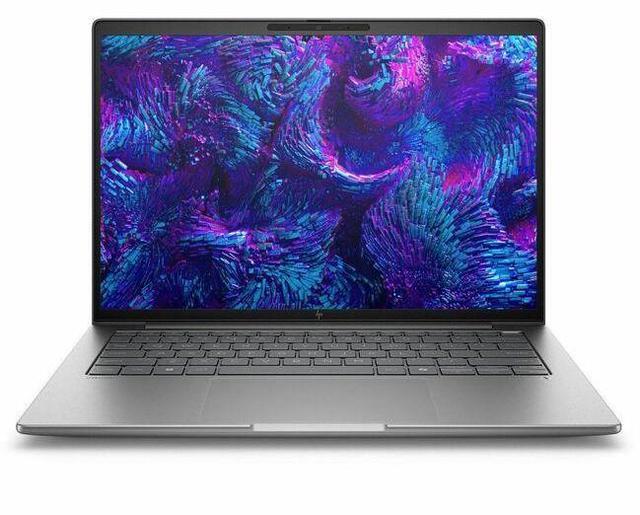
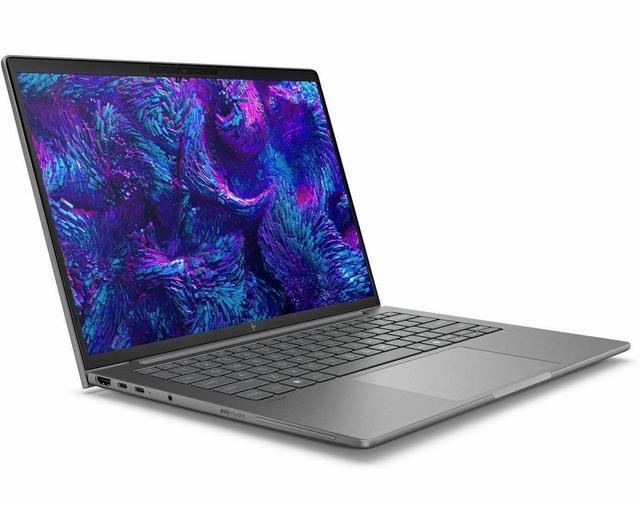


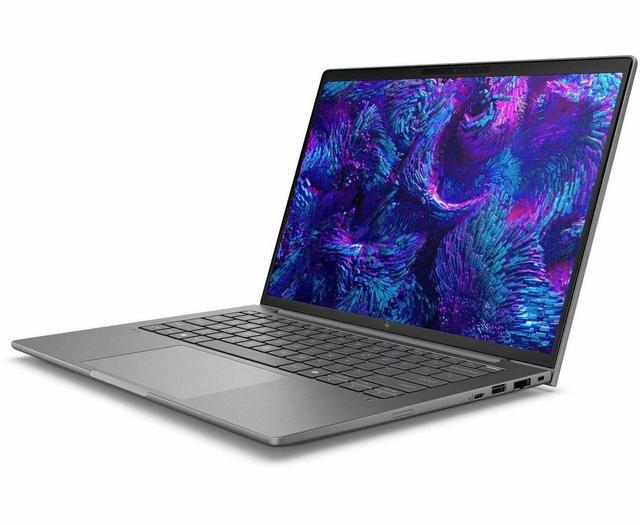
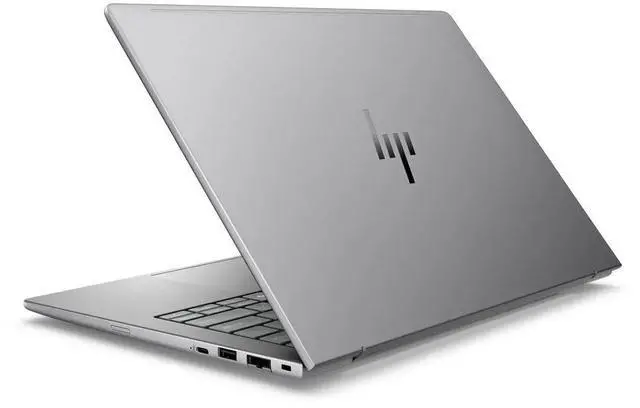


HP ZBook 8 G1i 14" Mobile Workstation - Intel Core Ultra 7 255H - 32GB - 1TB SSD - Windows 11 Pro - NVIDIA RTX 500 Ada Generation 4 GB - Webcam - IEEE 802.11be Wireless BX7T2UT#ABA
Free Intel AI Software w/ purchase, limited offer
- WUXGA
- Intel Core Ultra 7 255H
- 32 GB
- 1 TB SSD
- English Keyboard
- Meteor Silver
- Intel Chip
- 1920 x 1200
- Windows 11 Pro
- NVIDIA RTX 500 Ada Generation 4 GB
- In-plane Switching (IPS) Technology
- Front Camera/Webcam
- IEEE 802.11be Wireless LAN Standard
+
+
Overview
Specs
Reviews
HP ZBook 8 G1i 14" Mobile Workstation - Intel Core Ultra 7 255H - 32GB - 1TB SSD - Windows 11 Pro - Intel Arc 140T GPU with 4 GB - Webcam - IEEE 802.11 be Wireless BX7T2UT#ABA
Warranty & Returns
Warranty, Returns, And Additional Information
Warranty
- Limited Warranty period (parts): 1 year
- Limited Warranty period (labor): 1 year
- Read full details
Return Policies
- Return for refund within: 15 days
- Return for replacement within: 15 days
- This item is covered by Newegg.ca's 15-Day Return Policy.
- Read full return policy for details.
Manufacturer Contact Info
- Manufacturer Website
- Support Phone: 1-800-474-6836
- Support Website
- View other products from HP
LOADING...
LOADING...
Learn about this product
The HP ZBook 8 G1i 14-inch mobile workstation is a compact Windows 11 Pro laptop built for professionals who need workstation-class capability, featuring an Intel Core Ultra 7 255H, 32GB RAM, 1TB SSD, and WUXGA display for CAD, content work, and demanding business use on the go.
Recommended For
- Mobile CAD, BIM, and pro-app users who need a 14-inch workstation for travel or client-site work, but do not need high-end 3D or simulation performance. HP positions the ZBook 8 for certified professional apps, and reviews/community discussion consistently place it as a thinner entry workstation rather than a heavy 3D machine.
- Engineers, consultants, and field professionals who want workstation-class ports in a compact laptop, including Ethernet and USB-C charging from either side, instead of carrying dongles to every job site.
- Office-based creators and technical users who mostly work in Adobe apps, coding tools, large documents, light 3D review, or multitasking-heavy workflows, and want a business workstation chassis rather than a gaming laptop.
- Users who need sustained work performance in a quieter, cooler 14-inch system for long desk sessions, especially if fan noise and hot palm rests are a concern in day-to-day professional use.
- Professionals who occasionally work away from power and need a workstation that can still cover meetings, travel days, and lighter remote work without behaving like a plug-in-only desktop replacement.
Real-World Use Scenarios
- Using Revit, AutoCAD, or similar CAD tools while traveling between meetings: the 14-inch ZBook format is easier to carry than larger workstations, and this class of configuration is positioned for light 3D modeling, design reviews, and architectural layout work rather than very large or GPU-heavy scenes.
- Editing 1080p or moderate 4K project files in apps like Premiere Pro or DaVinci Resolve: users can expect smooth timeline work for typical professional edits, especially with proxies or optimized media, but longer exports and heavy effects stacks will still feel slower than on thicker laptops with higher-tier GPUs.
- Running several professional apps at once—such as large spreadsheets, a browser with many tabs, Teams or Zoom, and Adobe or CAD software: this setup is better suited to sustained multitasking than a standard business laptop, so day-to-day workflow should stay responsive without frequent app closing.
- Reviewing BIM models, product designs, or client visuals on-site: the likely experience is quick file opening, smooth navigation through moderate project files, and less setup friction than carrying a 15- or 16-inch workstation, making it a practical fit for field reviews and client presentations.
- Using certified professional software where stability matters more than gaming performance—such as engineering, design, or visualization apps: this workstation class is a safer choice than a consumer laptop because the platform is built around pro workflows, though it is still aimed at lighter workstation loads than flagship mobile workstations.
Spec Summary
| Attribute | Value |
|---|---|
| Best For | Specialized professional workflows on a 14.0-inch mobile workstation configured around an Intel Core Ultra 7 processor, 32 GB RAM, and a 1 TB SSD |
| Processor And Core Count | Intel Core Ultra 7 255H (7th Gen) single-processor configuration, up to 5.1 GHz max turbo, 24 MB L3 cache |
| GPU And VRAM | Integrated graphics (internal specification) |
| Display Spec | 14.0-inch WUXGA / 1920 x 1200 IPS display, 60 Hz refresh, up to 300 nits brightness, ~62% sRGB color gamut |
| Memory Configuration | 32 GB DDR5 installed (2 memory slots, maximum 32 GB) |
| Storage And Expansion | 1 TB solid-state drive (M.2 form factor / M.2 interface) |
| High Speed I O | Two Thunderbolt ports, one HDMI and two USB ports (4 total ports reported); M.2 storage interface for NVMe drives |
| External Display And Docking Fit | External displays supported via HDMI and Thunderbolt; compatible with USB/HDMI/Thunderbolt docking and accessories |
| Battery And Power | Includes lithium polymer battery and power adapter; batteries not required and not listed as included |
| Wired And Wireless Networking | Wi‑Fi 802.11be (Wi‑Fi 7) and Bluetooth support, with Ethernet capability listed in connectivity options |
| Webcam And Privacy | Built-in webcam |
| Keyboard And Control | Backlit keyboard with fingerprint reader and touchpad |
| Other Features & Security | Windows 11 Pro with Wolf Pro Security Edition indicated; AI Ready |
| Portability | Item dimensions 10.8 x 18.9 x 2.5 inches, package weight 5.9 pounds |
| Model Identifiers | HP / Hewlett Packard ZBook 8 G1i, model BX7T2UT#ABA (mobile workstation) |
Reference Q&A
Q: Should I buy the HP ZBook 8 G1i 14 or the HP ZBook Firefly 14 G11?
A: Choose the HP ZBook 8 G1i 14 if you want a newer 14-inch HP mobile workstation with a stronger H-series CPU class and more graphics headroom for certified pro apps, CAD, and heavier multitasking. HP positions the ZBook 8 as the step-up mobile workstation line, and review data shows the ZBook 8 testing noticeably ahead of the Firefly 14 G11 in both CPU and GPU benchmarks. Choose the Firefly 14 G11 if lower weight matters more than workstation throughput, since review coverage shows it around 1.5 kg versus about 1.7 kg for the ZBook 8. In short: ZBook 8 G1i for more sustained workstation work, Firefly 14 G11 for lighter mobile use.
Q: Is the HP ZBook 8 G1i 14 worth it over a lower-spec integrated-graphics configuration?
A: Yes, if your workload includes 3D design, GPU-accelerated creation, or ISV-certified workstation apps. The main reason to step up to this configuration is the dedicated NVIDIA RTX 500 Ada GPU alongside the Core Ultra 7 H-series platform, which gives it a clear advantage over integrated-graphics-only variants in graphics benchmarks and pro-app use cases. A lower-tier integrated configuration makes more sense for office productivity, browser-heavy work, and remote desktop workflows where 32GB RAM and the workstation chassis matter more than GPU acceleration.
Q: Should I choose this HP ZBook 8 G1i 14 or move up to a higher-end 14-inch workstation?
A: Choose this ZBook 8 G1i 14 when you want a balanced 14-inch workstation for professional productivity, moderate CAD, code, and content work without moving into larger or much more expensive workstation tiers. Move up if your work depends on heavier GPU rendering, larger assemblies, advanced simulation, or more VRAM, because higher-tier mobile workstations typically add stronger professional GPUs and higher sustained performance. This model is the better fit when portability and battery life still matter: review data shows roughly 10 hours of light-use runtime, which supports all-day mobile work better than many thicker performance-first workstations.
Q: How does the HP ZBook 8 G1i 14 compare with the previous Firefly-style 14-inch ZBook approach?
A: The practical difference is that the ZBook 8 G1i 14 is designed as a more performance-oriented successor to HP's lighter Firefly-style 14-inch mobile workstation category. External reviews show the ZBook 8 using a newer H-series platform and delivering materially higher benchmark results than Firefly 14 G11-class systems, especially on multi-core CPU workloads and graphics tests. The trade-off is portability: Firefly-class machines are lighter, while the ZBook 8 shifts the balance toward stronger workstation performance.
Q: Is the HP ZBook 8 G1i 14 a better choice than a portability-first 14-inch workstation like the Lenovo ThinkPad P14s?
A: Choose the HP ZBook 8 G1i 14 if you specifically want dedicated professional graphics in a compact 14-inch workstation and your apps benefit from that GPU. A portability-first 14-inch option such as some ThinkPad P14s configurations can be lighter and more travel-friendly, but integrated-graphics variants give up graphics acceleration for CAD, viewport work, and GPU-assisted creation. The ZBook 8 G1i is the better fit for users who need a small workstation without dropping to an iGPU-only setup.
Q: Is this a good fit for travel, meetings, and office work?
A: Yes, for that use case it is a strong fit. A 14-inch WUXGA display, webcam, Wi‑Fi 7, 32GB RAM, and 1TB SSD match the common buyer priorities seen on business-laptop retail Q&A pages: portability, video-call readiness, fast storage, and enough memory for heavy multitasking. The trade-off is that a mobile workstation is usually heavier and less battery-focused than a mainstream ultrabook, so it makes more sense for users who also run demanding work apps.
Q: Who is this laptop actually suitable for?
A: This model is best suited to professionals who need a compact workstation rather than a basic business laptop. It fits engineers, CAD users, analysts, developers, and other power users who benefit from 32GB RAM, 1TB SSD storage, Windows 11 Pro, and workstation-class positioning in a 14-inch size. It is less suitable for buyers whose needs are mainly email, browser tabs, documents, and streaming, because those users can usually spend less on a standard business notebook.
Q: Is it overkill for note-taking, Zoom, and normal office apps?
A: For basic productivity alone, yes. Retail buying guides repeatedly frame office work as a use case that can be handled by lighter, lower-cost business laptops with less memory and no workstation focus. This HP makes more sense if note-taking and meetings are only part of your workload and you also want headroom for large spreadsheets, multitasking, creative apps, or technical software.
Q: How does it compare with a ThinkPad P14s or Dell Precision 3490 style alternative?
A: The closest alternatives are other 14-inch mobile workstations such as the ThinkPad P14s and Dell Precision 3490. The main decision is not brand alone; it is whether you want a compact workstation with similar priorities: 14-inch portability, pro OS, high RAM, and room for technical workloads. Compared with that class, this HP is aligned on the core buying criteria. The practical trade-offs to compare model by model are weight, battery life, port selection, display options, and whether the GPU configuration is integrated-only or includes discrete professional graphics.
Q: Should I buy this instead of a regular consumer laptop?
A: Buy this if your work is professional and software-heavy, not just everyday computing. A regular consumer laptop is usually the better value for web use, schoolwork, media, and standard office tasks. This HP is the better choice when you want workstation positioning, more memory headroom, business OS features, and better suitability for demanding multitasking or specialized applications in a portable 14-inch format.
Q: Is the HP ZBook 8 G1i 14 a good fit for mobile professional work?
A: Yes, if your work benefits from workstation-class hardware in a 14-inch laptop. This configuration pairs a Core Ultra 7 255H with 32GB RAM and a 1TB SSD, which makes it better suited to multitasking, coding, office workflows, and professional apps than a typical ultrabook. The trade-off is portability versus efficiency: community discussion around the ZBook 8 G1i repeatedly frames it as a thinner workstation, not the lightest or quietest everyday laptop.
Q: Who is this laptop best for?
A: It is best for users who need a compact Windows workstation for work rather than a general-purpose consumer laptop. Based on the product specs, it fits professionals who need 32GB memory, a 1TB SSD, Windows 11 Pro, a 14-inch 1920x1200 display, and either Intel Arc 140T graphics or an RTX 500 Ada option for light-to-moderate GPU-assisted workflows. It is less suitable for buyers who mainly want maximum battery life, minimum weight, or gaming-first performance.
Q: Is it worth buying over a business laptop like an EliteBook?
A: It can be worth buying if you need more performance headroom than a business laptop usually provides. In Reddit comparisons, people weigh the ZBook 8 G1i against EliteBook models mainly for RAM, graphics, and workstation positioning. The trade-off is that the ZBook is generally the better choice for heavier professional workloads, while an EliteBook is the better choice if lower weight, quieter operation, and simpler office use matter more.
Q: Is the Intel Arc 140T version enough if I am not doing heavy 3D or GPU work?
A: Yes. For buyers focused on productivity, coding, note-taking, web work, and general professional use, the Arc 140T configuration should be enough. Reddit discussion around the ZBook 8 line specifically describes the integrated 140T option as sufficient when workloads are not heavy. If your work depends on sustained 3D, CAD, rendering, or specialized GPU acceleration, a configuration with the RTX 500 Ada is the safer choice.
Q: What are the main trade-offs of choosing this model?
A: The main trade-off is getting workstation-oriented specs in a smaller 14-inch chassis. That is good for RAM capacity, storage, professional Windows features, and higher performance potential, but it usually means more concern about weight, fan noise, and battery life than with a mainstream ultraportable. Community questions about the ZBook 8 G1i repeatedly focus on those exact trade-offs, especially versus thinner business laptops.