
Your Browsing History
Best Sellers
 Hot Seller
- $3,575.55
- + $20.38 Shipping
 Top Rated
- $3,629.99
- + FREE SHIPPING
- $3,899.09
- + FREE SHIPPING


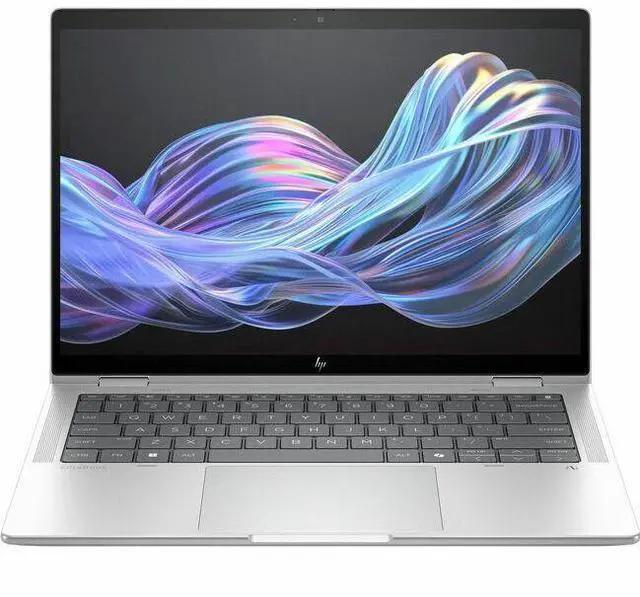
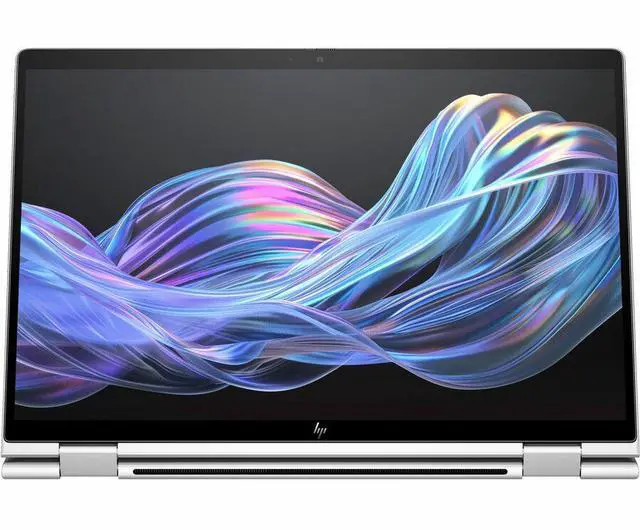
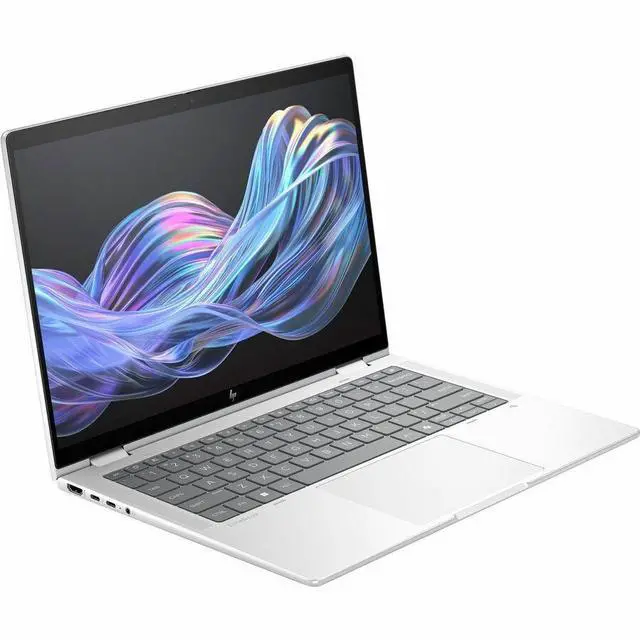
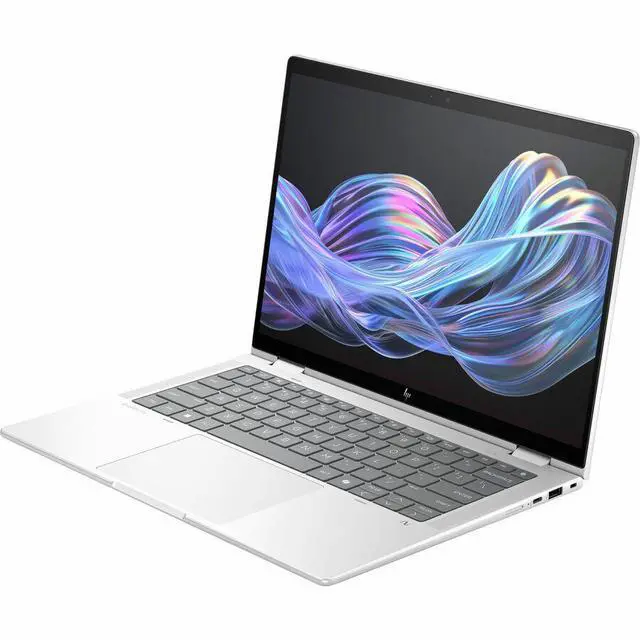
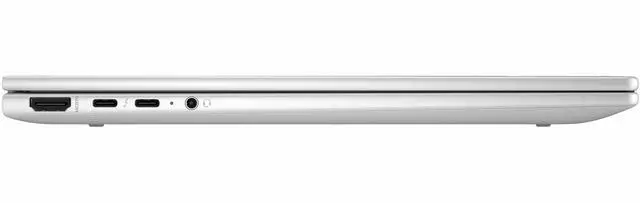
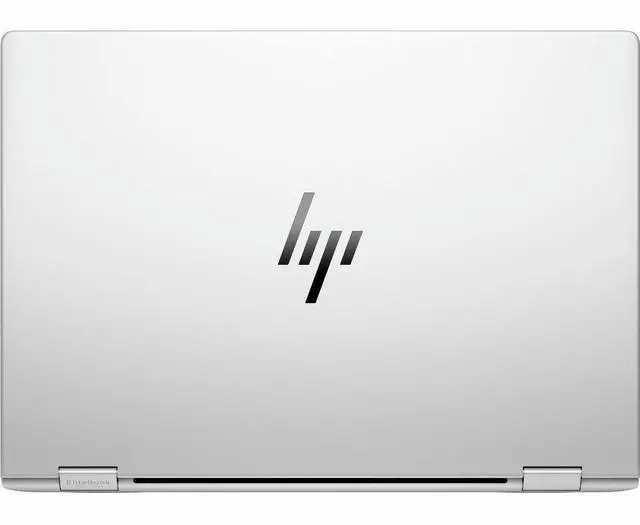



HP EliteBook X Flip G1i 14" Notebook Next Gen AI PC - WUXGA - 1920 x 1200 - (Intel Core Ultra 7 258V Octa-core (8 Core) - 32 GB Total RAM - 32 GB On-board Memory - 512 GB SSD - Intel Chip - 1920
Free Intel AI Software w/ purchase, limited offer
- WUXGA
- 1920 x 1200
- (Intel Core Ultra 7 258V Octa-core (8 Core)
- 32 GB Total RAM
- 32 GB On-board Memory
- 512 GB SSD
- Intel Chip
- 1920 x 1200
- Windows 11 Pro
- Intel Arc Graphics
- In-plane Switching (IP
+
+
Overview
Specs
Reviews
SBUY HP EBXFLG1I14AI U7 258V 14 32GB/512 PC INTEL U7 258V, 14 WUXGA AGLEDUWVA, U
Warranty & Returns
Warranty, Returns, And Additional Information
Warranty
- Limited Warranty period (parts): 1 year
- Limited Warranty period (labor): 1 year
- Read full details
Return Policies
- Return for refund within: 15 days
- Return for replacement within: 15 days
- This item is covered by Newegg.ca's 15-Day Return Policy.
- Read full return policy for details.
Manufacturer Contact Info
- Manufacturer Website
- Support Phone: 1-800-474-6836
- Support Website
- View other products from HP
LOADING...
LOADING...
Learn about this product
The HP EliteBook X Flip G1i is a 14-inch 2-in-1 business laptop with a touch WUXGA display, Intel Core Ultra 7 258V, 32GB memory, and 512GB SSD, making it well suited for professionals, hybrid workers, and power users who want strong everyday performance in a flexible flip design.
Recommended For
- Hybrid professionals and consultants who move between meetings, desk work, and travel, and want a business 2-in-1 with long battery life, quiet operation, webcam/privacy features, and a flexible flip design for presentations or note-taking.
- Executives, client-facing staff, and premium business buyers who value a polished, lightweight convertible with enterprise-oriented design, strong portability, and a more upscale build than mainstream consumer 2-in-1s.
- Users who regularly annotate documents, sketch ideas, or handwrite notes in OneNote or similar apps, and specifically want a 14-inch Windows convertible with touch support and an included pen rather than a standard clamshell laptop.
- Office-heavy users working in Microsoft 365, browsers, video calls, PDFs, and light creative tasks who want 32GB memory headroom and solid everyday responsiveness, but do not need workstation-class CPU or GPU performance.
- Frequent travelers who need modern connectivity without carrying many adapters for business use, especially those who benefit from Thunderbolt 4, HDMI, USB-A, and optional SIM-based mobile connectivity in one compact system.
Real-World Use Scenarios
- For hybrid workdays with lots of browser tabs, Office apps, Zoom/Teams calls, and cloud documents open at once, this model is likely to feel smooth and stable rather than strained; reviews place it as a business-first 2-in-1 that handles mainstream productivity well, even if it is not tuned for the highest multicore speeds in its class.
- For meetings, note-taking, and markup, the flip design makes more sense than a standard clamshell: users can type in laptop mode, switch to tent or stand mode for presentations or video calls, and use tablet mode for annotating documents with less keyboard interference.
- For travel-heavy professionals working away from a desk, the expected experience is long stretches of email, documents, web research, and video meetings without urgently hunting for a charger; multiple reviews position the EliteBook X family around strong battery life for mobile business use.
- For light creative and visual work such as slide design, photo selection, PDF review, and occasional GPU-assisted tasks, the integrated Intel Arc graphics should be adequate, but this is not the kind of 14-inch convertible typically chosen for sustained 3D rendering, large video exports, or serious gaming.
- For executives, consultants, and client-facing users who present often, the likely outcome is a polished everyday experience centered on portability, presentation flexibility, and business security features rather than workstation-class throughput.
Spec Summary
| Attribute | Value |
|---|---|
| Best For | Mobile professionals and power users who need a compact, AI-ready convertible Windows laptop for productivity and multitasking with a capacitive touchscreen and integrated Intel Arc graphics |
| Processor And Core Count | Intel (Processor Brand) Intel Core Ultra 7 258V (Series 2), single processor |
| Memory Configuration | 32 GB DDR5 installed; maximum listed 32 GB |
| Storage And Expansion | 512 GB SSD |
| Display Spec | 14.0-inch touchscreen with native 1920 x 1200 (WUXGA) resolution and capacitive touch input |
| GPU And VRAM | Integrated Intel Arc graphics (integrated card) |
| Operating System And Software | Windows 11 Pro; includes HP Wolf Security and Microsoft Copilot |
| Ports And High Speed I O | 1 x HDMI output plus touchscreen input; compatible with external displays, mice, keyboards, storage devices and printers |
| Wired And Wireless Networking | Wi‑Fi (802.11.be) wireless connectivity and Bluetooth support enabled |
| Webcam And Privacy | Built-in webcam capability |
| Form Factor And Portability | Convertible form factor; package dimensions ~11 x 15 x 3.1 inches and package weight 5.7 Pounds |
| Model Identifiers | HP / Hewlett Packard model B86CHUT#ABA |
Reference Q&A
Q: Should I buy the HP EliteBook X Flip G1i or the Lenovo ThinkPad X1 2-in-1 Gen 10?
A: Choose the HP EliteBook X Flip G1i if you want a premium 14-inch business 2-in-1 with a convertible design, Intel Core Ultra 7 258V, 32GB memory, and strong enterprise-focused features in a compact format. Choose the ThinkPad X1 2-in-1 Gen 10 if keyboard feel, battery-life-focused efficiency, and Lenovo’s established ThinkPad input and management ecosystem matter more. Reviews and community comparisons consistently position these two as direct premium business-convertible alternatives, with the Lenovo model often noted for efficiency and ThinkPad ergonomics, while the HP model is positioned as a high-end executive convertible with strong security and AI-PC credentials.
Q: Is the HP EliteBook X Flip G1i worth getting over a lower-tier Core Ultra 7 256V configuration?
A: The Core Ultra 7 258V version is the better fit if you want this laptop’s fuller premium configuration, especially 32GB onboard memory and a stronger long-life business setup for multitasking, larger browser workloads, and longer ownership. A lower-tier 256V version can make sense if your workload is lighter and price matters more than headroom. External CPU comparisons and reviewer commentary generally show the 256V and 258V as close in everyday use, so the practical decision is usually about memory, storage, and overall configuration rather than a large performance gap.
Q: How does the HP EliteBook X Flip G1i compare with the non-convertible HP EliteBook X G1i?
A: Buy the EliteBook X Flip G1i if you want pen-and-touch flexibility, presentation mode, tablet mode, or a single device for note-taking and business travel. Buy the non-convertible EliteBook X G1i if you prefer a traditional clamshell and want to prioritize simpler design and, in some reviews, slightly better performance from the same class of processor. Reviewer testing suggests the Flip model gives up a little performance efficiency versus some non-convertible alternatives, but it adds the main feature many buyers actually choose this class for: a full 2-in-1 form factor.
Q: Is the HP EliteBook X Flip G1i a better upgrade than an older HP EliteBook x360 model?
A: Yes, the EliteBook X Flip G1i is the more sensible upgrade if you are coming from an older EliteBook x360 and want newer Intel Core Ultra platform features, a stronger AI/NPU feature set, updated integrated Arc graphics, and the current HP premium business design direction. The main reason to stay with an older x360 is cost. HP’s current naming and product positioning show the X Flip G1i as the modern successor path for premium business convertibles, and review coverage of adjacent EliteBook G1i models points to clear platform gains over older generations.
Q: Should I choose the HP EliteBook X Flip G1i for portability and business travel, or buy a performance-first laptop instead?
A: Choose the EliteBook X Flip G1i if your priority is a light premium business 2-in-1 for meetings, travel, web apps, Office work, note-taking, and long unplugged sessions. Choose a performance-first laptop if your workload depends on sustained multicore output, heavier creative apps, or discrete-graphics-class performance. Review data around the Core Ultra 7 258V consistently suggests that this platform is tuned more for efficiency, battery life, and everyday responsiveness than for maximum sustained compute, which fits the EliteBook X Flip G1i’s intended role.
Q: Is this a good 2-in-1 for note-taking, meetings, and everyday office work?
A: Yes. This configuration is well suited to note-taking, video meetings, document work, browser-based workflows, and general productivity. The 14-inch 1920 x 1200 touch display gives more vertical space than 16:9 panels, Windows 11 Pro fits business use, and the Intel Core Ultra 7 with 32GB RAM is stronger than typical retail 2-in-1 office configurations. The main caveat is that integrated Intel Arc graphics are meant for productivity and light creative work, not heavy gaming or workstation-class 3D workloads.
Q: Is it worth buying as a travel work device?
A: For business travel, yes, if you want a premium convertible for work rather than a budget laptop. It offers a 14-inch 16:10 touchscreen, HDMI, multiple USB-C ports including Thunderbolt 4, and optional mobile broadband support in the platform. Those are the kinds of features buyers repeatedly ask about for travel and docking. The trade-off is that this model prioritizes business features and flexibility over gaming power or easy internal upgrades.
Q: Who is this laptop suitable for?
A: It is best for professionals, hybrid workers, and buyers who want a premium 14-inch convertible for office productivity, meetings, handwriting, and portable business use. It makes less sense for buyers who want upgradeable memory, a low-cost student machine, or a laptop mainly for AAA gaming. The 32GB onboard memory and business-oriented Windows 11 Pro setup fit long-term productivity use, but the memory is fixed rather than user-upgradeable.
Q: Does it include what I need for pen input, or will I need extras?
A: You should expect the touchscreen to support pen-focused use cases, but you should verify whether a pen is included in the exact SKU before buying. On comparable 14-inch 2-in-1 retail listings, pen questions are very common and the answer is often that the stylus is sold separately. Also, this HP model's 32GB memory is onboard, so if you want more RAM later, that is not the right reason to choose it now.
Q: Is this better than a typical consumer 14-inch 2-in-1 like a Yoga or Inspiron?
A: It is generally a better fit if your priority is business use, memory headroom, ports, and a more premium enterprise-style setup. Compared with many consumer 14-inch 2-in-1s that commonly ship with 8GB or 16GB RAM and Windows Home, this HP configuration offers 32GB RAM and Windows 11 Pro. The trade-off is that consumer alternatives may cost less, and some shoppers may not need the added business features.
Q: Is the HP EliteBook X Flip G1i a good fit for work, note-taking, and travel?
A: Yes, it fits productivity-focused users who want a 14-inch 2-in-1 with a touch display, Windows 11 Pro, 32GB RAM, and a compact design. It is better suited to office work, meetings, web use, and handwritten input than to gaming or heavy graphics workloads. The main trade-off is that you are paying for a business-class convertible rather than maximum performance per dollar.
Q: Is the HP EliteBook X Flip G1i worth buying over consumer 2-in-1 models?
A: It is worth considering if you specifically want a business-oriented convertible with Windows 11 Pro, 32GB memory, and enterprise-style positioning. It is less compelling if your priority is lower price or entertainment value, because community comparisons often question why it costs more than consumer HP flip models with similar core specs.
Q: Can the HP EliteBook X Flip G1i replace a ThinkPad X1 2-in-1 or similar premium work laptop?
A: For many buyers, yes. It targets the same premium business-laptop use case: portable work, meetings, typing, and pen-enabled flexibility. The decision comes down to preference on brand, price, and risk tolerance. Community discussion shows buyers cross-shopping it directly with ThinkPad X1 models, but also noting that the HP was newer and had fewer real-world owner reports at launch.
Q: What are the main trade-offs of the HP EliteBook X Flip G1i?
A: The main trade-offs are integrated graphics, limited headroom for gaming, and fewer signs that it is meant for heavy creative or 3D workloads. Its 512GB SSD is adequate but not large for users with big local files. The soldered onboard memory also means you should buy the RAM capacity you need upfront.
Q: Is the HP EliteBook X Flip G1i a good choice for gaming or demanding graphics use?
A: No, not as a primary gaming or graphics-heavy laptop. Its Intel Arc integrated graphics are fine for everyday visual tasks, but this model is fundamentally a business convertible. Community discussion around real use points to faster battery drain, fan activity, and visual issues under game-like workloads, which makes it a better fit for productivity than for sustained gaming.