





+
+
Overview
Specs
Reviews
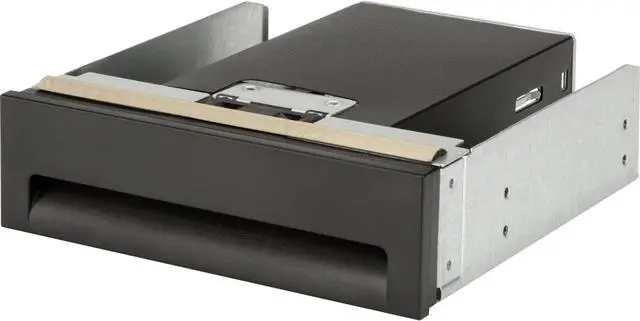
Easily Convert Your Standard Hp Workstation 5.25 Odd Slot To A Bay That Holds Two Hard Drives Or Solid State Drives (Sold Separately, Up To 15 Mm Each) With The Hp 2.5In Hdd/Ssd 2-In-1 Odd Bay Bracket.
Warranty & Returns
Warranty, Returns, And Additional Information
Warranty
- Limited Warranty period (parts): Lifetime
- Limited Warranty period (labor): Lifetime
- Read full details
Return Policies
- Return for refund within: 30 days
- Return for replacement within: 30 days
- This item is covered by Newegg.ca's Standard Return Policy.
- Read full return policy for details.
Manufacturer Contact Info
- Manufacturer Website
- Support Phone: 1-800-474-6836
- Support Website
- View other products from HP
LOADING...
The HP K4T74AA is a 2.5-inch drive carrier that converts a standard 5.25-inch odd bay in an HP workstation into space for two HDDs or SSDs, for users looking to add storage to a compatible system.
Recommended For
- Owners of a compatible HP workstation with an available 5.25-inch optical-drive bay who want to mount two 2.5-inch HDDs or SSDs in that bay.
- Workstation users adding internal storage for project files, media libraries, or other data who can use two 2.5-inch drives, each up to 15 mm tall.
- HP Z-series workstation owners who have confirmed their specific model and bay support the K4T74AA and want an internal, rather than external, drive-mounting solution.
- Desktop builders repurposing an unused optical-drive bay for additional internal HDD or SSD capacity, with the required drives and cabling available separately.
Real-World Use Scenarios
- When an HP workstation has an unused 5.25-inch optical-drive bay, install the bracket there to add space for two 2.5-inch HDDs or SSDs; the bay becomes an internal storage location instead of sitting unused.
- When a compatible Z640 needs additional 2.5-inch drive capacity, use the bracket to mount third or fourth HDDs or SSDs in the optical bay, subject to the workstation’s drive and cable support.
- When upgrading a workstation for both fast access and extra capacity, mount an SSD and a 2.5-inch HDD in the same bracket; the drives can serve separate storage roles, provided the computer supports and connects both.
- When a workstation is used for projects that generate large files, add compatible 2.5-inch drives in the optical bay to expand internal storage without placing a separate external drive enclosure on the desk.
- When fitting the bracket during a workstation storage upgrade, check the exact model’s compatibility and plan for data cables: HP notes that SATA/SAS data cables are not included, so the drives may need separate cabling before they can be used.
Spec Summary
| Attribute | Value |
|---|---|
| Best For | Users needing a 2.5-inch storage drive carrier or caddy |
| Model Identifiers | Hewlett-Packard K4T74AA |