
Your Browsing History


Aaron P.
Joined on 08/01/01
0
0
product reviews
- 3
Great for iPad Pros and backpacking
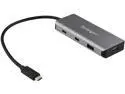
Startech 4 -Port USB-C Hub 10 Gbps HB31C2A2CB
Pros: 10Gbps throughput between ports Extremely lightweight with an aluminum exterior on all but the two smallest sides Build quality looks good Very useful on an iPad Pro for more ports
Cons: I wish the connecting cable could be detached. It's a minor complaint, but these things tend to get bent over time when stored in a backpack for hiking. And it would make storing a little easier and take up less space in a cramped pack or laptop bag.
Overall Review: I bought this to use with my iPad Pro 11" (which has a 10Gbps USB-C port) to backup large CFexpress cards from a camera or card reader to a portable NVMe SSD without needing to use any local storage space on my iPad. This saves me from having to hike with a larger, heavier, more power-hungry laptop on multi-day trips where I'm running off solar panels. Timing large transfers with a stopwatch, it appears I'm getting pretty close to the maximum speeds of my devices, which is about 8Gbps for writes on my SSD. I don't have anything faster to test. I highly recommend this hub if you need two or more 10Gbps ports to transfer large files between devices on an iPad Pro.
5/20/2020See more detail
Slow writes, constant disconnects, returning for a QNAP

LaCie 6big DAS Array 6 x HDD Supported 6 x HDD Installed 24TB Installed HDD Capacity Model STFK24000400
Pros: I bought a LaCie 6big 24TB array to use as RAID 5 over Thunderbolt 3. I have an ASRock Z270 Supercarrior motherboard, Intel i7-7700K CPU, 64GB RAM, 1TB Samsung 960 Pro, and 4x3TB WD Blacks in RAID 0 using Intel RST. I have the latest Intel chipset drivers, Thunderbolt drivers, Windows 10 updates, etc. installed. The LaCie 6big came with an impressive amount of data and power cables. It was well packaged and double-boxed. It came pre-initialized as RAID 5 which I appreciated to save many hours of time setting up. I installed the LaCie RAID Manager, rebooted as requested, plugged in the 6big via Thunderbolt 3 cable, updated the firmware via LaCie’s RAID Manager, formatted the array as NTFS in Windows’ Disk Management, and ran a few benchmarks.
Cons: I was disappointed to see a max write performance of 586.3MB/sec in CrystalDiskMark when LaCie’s specs list 1150MB/sec in RAID 5. Read performance was closer to the advertised 1200MB/sec at 940.9MB/sec. RAID 0 writes are also slower than advertised at 1311MB/sec read and 1067MB/sec writes when specs list 1400MB/sec. ATTO disk benchmark confirms the same terrible write performance across various file sizes, about 50-60% what was advertised. I started copying my data over and that’s when the real fun started. Anywhere between 600GB and 4TB of data being written will cause the LaCie to disconnect. I have spent the past 6 days over the long weekend and 4th of July testing various file copy programs, sizes of files, RAID modes, stripe sizes, TB3, USB 3.1, and USB 3.0 ports, and have had the same problems. Somewhere randomly between 600GB or so and 4TB the drive will become unresponsive. It will still appear in Windows Explorer, but I can’t write to the drive and file copy programs like SyncBackPro, Bvckup, and TeraCopy will give a generic Windows 1167 error, which basically means the device does not exist. LaCie RAID Manager fails to see the drive too. The hard drive LED lights are all still lit, it doesn’t appear to be going into any sort of power management or standby, especially since it can happen anywhere from several minutes to 8 hours of writes. Also, once the 1167 errors start, Windows will not restart or shutdown until the LaCie is unplugged. This has happened with both RAID 5, RAID 0, various stripe sizes, and several ports on my motherboard (both USB-C ports and USB-A ports, and as TB3, 10Gbps USB 3.1, and 5Gbps USB 3.0 protocols). I have not had any issues writing the same set of folders to my 10Gbps USB 3.1 SanDisk Extreme 900 1.92TB SSD over the same USB-C and USB-A ports several times over the past few days.
Overall Review: I have decided to not exchange this product to try another, but rather return it for a refund and buy a QNAP. It is possible that something is just wrong with this particular box and a replacement would fix the disconnects and unreliability, but I don’t think it would fix the poor write performance. I understand that manufacturers typically base specs on unrealistic, specific operating conditions to make their products look good but a friend of mine at PhotographyLife.com has tested a QNAP with 6 drives in RAID 6 (vs. RAID 5) over 10Gbps LAN (vs. 40Gbps TB3) and the same CrystalDiskMark benchmark is giving him 1166MB/sec read and 732.5MB/sec write. Even an 8-bay Synology DS1817+ over 10Gbps LAN is showing 1073MB/sec read and 476.8MB/sec write. The QNAP models will cost more than this LaCie 6big but have more connection options and the ability to do SSD caching. The Synology is considerably less with far more storage and not much slower than the LaCie in real-world write performance. The LaCie 6x4TB 6big would have been a good value at $3K in comparison if its write performance was not half the listed spec in RAID 5, assuming it could sustain more than 1-2TB of writes to begin with without failing.
7/5/2017See more detail
Intel Graphics
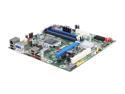
Intel BOXDQ57TM LGA 1156 Intel Q57 Micro ATX Intel Motherboard
Pros: Ignore the rating, I have not purchased this board, but to answer another person's question: "If using a processor with integrated graphics, the board will support only two of the three integrated graphics interfaces simultaneously: DisplayPort, DVI-I, DVI-D. Also, during the Power-On Self-Test (POST), the board will not output to the DisplayPort if DVI-I or DVI-D is used concurrently with DisplayPort." It also says it supports DisplayPort digital audio and adds, "DisplayPort output can be converted to High-Definition Multimedia Interface (HDMI) output using a DisplayPort-HDMI converter... DisplayPort 1.1 adds support for High Bandwidth Digital Content Protection (HDCP) version 1.3 which enables viewing of protected content from Blu-ray Disc and HD-DVD optical media over DisplayPort 1.1 connections." This is from Intel's Product Guide, link below.
Cons: Only 5.1, no 7.1 audio support?
Overall Review: http://www.intel.com/support/motherboards/desktop/DQ57TM/sb/CS-030950.htm
3/31/2010See more detail