


- $999.99
- Free 71-day Returns
$849.99
Add to PC build list
Sold by Newegg
Shipped by Newegg
Add to Wish List(Found on 1 wish list)

Get Educated
Make informed decisions with expert advice. Learn More

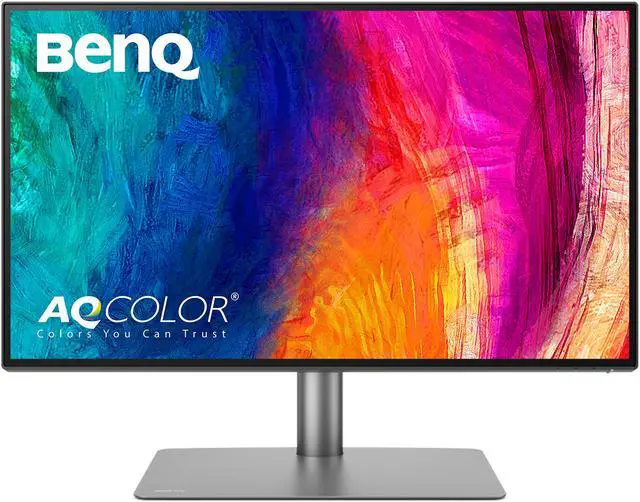


BenQ PD2725U 27" 4K UHD Thunderbolt 3 Monitor | HDR | Mac-Ready | 100% sRGB and 95% P3 ¦Hotkey Puck¦DualView¦Ergonomic| AQCOLOR and Eye-Care tech , Black
- 27 inch, 4K, 3840x2160 resolution IPS monitor with wide viewing angle and stunning images
- AQCOLOR TECHNOLOGY: 95% DCI-P3 and Display P3, 100% sRGB color space, 10-bit color shows more than a billion hues; Delta E = 3
- MAC-READY THUNDERBOLT 3 CONNECTIVITY: Daisy-chain two 4K monitors for fast data/audio/video transfer, HDMI, DisplayPort, USB-C, USB
- PROFESSIONAL DESIGNER MONITOR CAPABILITIES: M-book Mode for Mac color matching; View files side-by-side with DualView; Easily compare/edit photos and videos in specialized CAD/CAM, Darkroom, or Animation modes; HDR10 support; Out-of-the-box factory calibrated with report
- PRODUCTIVITY BOOSTS: Keyboard Video Mouse (KVM) Switch to display files, photos or videos from two computers on one screen. Hotkey Puck G2 enables you to switch modes quickly and easily with preset and customizable options
- ERGONOMICS & EYE CARE: Height/tilt/swivel/pivot/portrait mode adjustability; Avoid eye strain and damage: Flicker-Free eliminates screen flicker,
+
+
Overview
Specs
Reviews (2)
Warranty & Returns
Warranty, Returns, And Additional Information
Warranty
- Limited Warranty period (parts): 3 years
- Limited Warranty period (labor): 3 years
- Read full details
Return Policies
- Return for refund until: January 31, 2027
- Return for replacement until: January 31, 2027
- This item is covered by Newegg.ca's Extended Holiday Return Policy.
- Read full return policy for details.
We want to ensure your holiday shopping this year is hassle-free. That’s why we’re automatically extending our return policies on almost every product! For purchases placed between November 1st, 2026 and December 31, 2026 you will have until January 31, 2027 to return your product.
Manufacturer Contact Info
- Manufacturer Product Page
- Manufacturer Website
- Support Phone: 1-866-600-2367
- Support Email: benqtech@benq.com
- Support Website
- View other products from BenQ
LOADING...
LOADING...
The BenQ PD2725U is a 27-inch 4K IPS monitor for designers and other creative professionals who need broad color coverage, factory calibration, and Mac-friendly features, including M-book mode and Thunderbolt 3 connectivity.
Recommended For
- MacBook users editing photos or standard-dynamic-range video at a fixed desk who want a single Thunderbolt cable for display, data, and up to 65W laptop charging, plus a Mac-matching M-Book mode.
- Photo and video editors working in sRGB, Display P3, or Rec.709 who want a factory-calibrated 4K display, color-focused modes, and room to compare or edit content side by side.
- Designers and CAD users who spend long sessions at a workstation and want dedicated display modes, an adjustable stand, and the Hotkey Puck for switching settings.
- People switching between a work laptop and another computer who want to share one display and connected peripherals, with picture-by-picture or KVM features for multitasking.
Real-World Use Scenarios
- When editing photos for web or client delivery, users can work with detailed 4K images and switch to sRGB or P3-oriented color workflows; the factory-calibrated display gives them a useful starting point, though color-critical work may still call for checking calibration and settings.
- When editing or reviewing standard video projects, users can see a detailed 4K timeline and use Rec.709-oriented color settings; it suits typical editing and review work better than demanding, high-brightness HDR mastering.
- When connecting a compatible MacBook for desk work, a Thunderbolt connection can carry display and data while charging the laptop, reducing cable clutter; the 65W power delivery may be insufficient for some higher-power laptop workloads.
- When a user alternates between a work laptop and a desktop, the KVM feature can pair display switching with shared peripherals, while picture-by-picture can keep two computer inputs visible for comparison or multitasking.
- When working on CAD drawings, animation, or other design tasks, users can switch to task-specific display modes to make the workspace better suited to the content they are inspecting; these modes support workflow changes but do not replace application-specific review.
Spec Summary
| Attribute | Value |
|---|---|
| Best For | Photo and video editing and business use, with 4K detail, wide color coverage, and Mac-friendly Thunderbolt 3 connectivity |
| Panel And Resolution | 27-inch IPS LCD with 3840 × 2160 (4K UHD) resolution, 16:9 aspect ratio, 178° horizontal and vertical viewing angles, and a matte anti-glare finish |
| Refresh Rate And Response | 60Hz refresh rate, 5ms response time, and FreeSync adaptive sync |
| Color And HDR | 100% sRGB and Rec.709, 95% P3, 1.07 billion display colors, Delta E ≤ 3, 1,200:1 contrast ratio, 250-nit typical and 400-nit peak brightness, with HDR10 and VESA DisplayHDR 400 support |
| Ports And Connectivity | 1 HDMI 2.0, 1 DisplayPort 1.4, 2 Thunderbolt 3 ports (65W power delivery and DisplayPort Alt Mode input; 15W power delivery output), 1 USB-B upstream, 2 USB-A downstream ports, and a headphone jack; supports daisy chaining |
| KVM And Controls | KVM switch configuration with button-based controls |
| Stand And Ergonomics | Height-adjustable up to 150mm, with tilt from −5° to 20°, 30° swivel in each direction, and 90° pivot; listed as wall-mountable |
| Eye Care | Flicker-free technology and Low Blue Light |
| Audio | Built-in stereo speakers rated at 2 × 2.5W |
| Power And Compatibility | 65W Thunderbolt 3 power delivery, 100–240 VAC power supply, and HDCP 2.2 support |
| Power Consumption | 44W typical, 185W maximum, and less than 0.5W in sleep mode |
| Physical Specifications | 18.30 lb with stand and 12.40 lb without stand; with-stand dimensions are 17.70–23.6 × 24.20 × 7.40 inches, and without-stand dimensions are 14.20 × 24.20 × 3.20 inches |
| Model Identifiers | BenQ PD2725U |
Reference Q&A
Q: BenQ PD2725U vs PD2705U: which is better for P3 color work?
A: Choose the PD2725U when your workflow benefits from wider P3 coverage: BenQ specifies 95% P3 for the PD2725U, while the PD2705U is specified for sRGB and Rec.709 coverage. Both are 27-inch 4K monitors with 65W laptop power delivery; the PD2725U also has Thunderbolt 3 ports for display daisy-chaining.
Q: BenQ PD2725U vs PD3220U: should I choose 27 or 32 inches?
A: Choose the PD2725U for a more compact 27-inch 4K workspace; choose the PD3220U when you want a larger 31.5-inch 4K canvas. Both offer 95% P3 coverage and Thunderbolt 3 daisy-chain connectivity, while the PD3220U provides 85W laptop power delivery compared with 65W on the PD2725U.
Q: BenQ PD2725U vs PD2705U: which fits a dual-monitor Thunderbolt setup?
A: The PD2725U is the better fit when you want to connect a second compatible monitor through a Thunderbolt daisy chain: BenQ lists Thunderbolt 3 input and output on the PD2725U. The PD2705U offers USB-C with 65W power delivery for a one-cable laptop connection, while the PD2725U also supplies 65W to a connected laptop.
Q: Can I connect two computers and switch between them?
A: Yes. The PD2725U supports a two-computer setup with its built-in KVM switch, letting you switch between connected computers while using one keyboard and mouse. It also has HDMI, DisplayPort, and Thunderbolt 3 inputs.
Q: Will it work with a Mac, including a Mac Studio?
A: Yes. The PD2725U has Thunderbolt 3 connectivity and supports Mac use. A compatible Mac can connect by Thunderbolt; the monitor also has HDMI and DisplayPort inputs. It delivers up to 65W of power to a connected laptop, which may be insufficient for some higher-power computers or workloads.
Q: Is it suitable for photo editing and other color-focused work?
A: It is designed for creative desktop work, including photo editing: the 27-inch IPS display is 4K, covers 100% sRGB and 95% P3, and comes with a factory calibration report. Its 60Hz refresh rate and HDR support are listed, but the provided specifications do not establish that it meets every professional print-proofing workflow.
Q: Can one Thunderbolt cable connect and charge my laptop?
A: Yes, a compatible laptop can send video, data, and audio over Thunderbolt 3 while receiving up to 65W of power from the monitor. Check the laptop’s power requirements: 65W may not fully power or charge every model, especially under heavy use.
Q: Is the BenQ PD2725U a good fit for a Mac-based design or editing setup?
A: It can suit desk-based Mac work if you want a 27-inch 4K display, Thunderbolt connectivity, and an M-Book mode intended to bring its appearance closer to a MacBook display. It supplies up to 65W laptop charging, so check whether that meets your laptop’s power needs. A Reddit user found the Mac-matching mode useful but noted that the display’s blacks were not as deep as a MacBook’s.
Q: Is the PD2725U accurate enough for photo and video editing?
A: Its 4K IPS panel, stated 95% P3 coverage, factory calibration, and average Delta E of 3 or less make it relevant for general creative editing. For color-critical work, especially print matching, verify the display with your own calibration workflow: users have discussed color differences and drift, and factory calibration alone may not ensure a match to every workflow.
Q: Is the PD2725U worth buying at its price?
A: It is most compelling when you will use its specific features, such as Thunderbolt, KVM, adjustable stand, and creative color modes. Community opinions on value vary: some owners describe it as a useful editing display, while others criticize its price or color results. Compare the current price with your need for those features rather than treating it as a universal value pick.
Q: Can the PD2725U run two computers and two daisy-chained monitors?
A: The monitor’s KVM feature is designed to switch between two computers on one screen. Its Thunderbolt output can also support a daisy-chained display setup, but the host computer and connection must support the required display path. In one Reddit discussion, the chain worked with a Mac mini, while the user needed separate DisplayPort connections for the PC setup.