


- $599.99
- Free 71-day Returns
$499.99
Add to PC build list
Sold by Newegg
Shipped by Newegg
Add to Wish List(Found on 10 wish lists)
Best Sellers
 Hot Seller
- $620.11
- + $38.45 Shipping
- $680.95
- + FREE SHIPPING
Hot Seller- $893.37
- + FREE SHIPPING

Get Educated
Make informed decisions with expert advice. Learn More

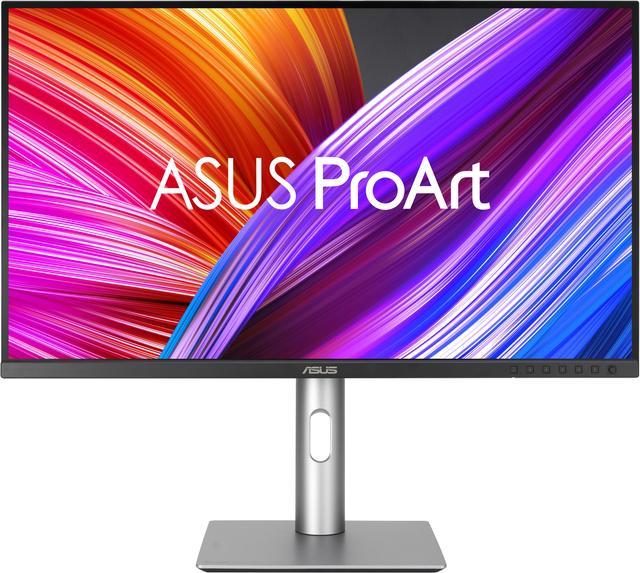


ASUS ProArt 27 inch UHD 4K 60Hz IPS 99% DCI-P3/Adobe RGB, Delta E < 2, Calman Verified, USB-C Computer Monitor with Height Adjustable, Swivel, Pivot & Tilt Stand ideal for editing PA279CRV
- 27-inch 4K (3840 x 2160) LED backlight HDR display with 178° wide-view IPS panel
- Wide color gamut with 99% DCI-P3 and 99% Adobe RGB coverage
- Calman Verified and factory pre-calibrated to Delta E < 2 color accuracy
- Extensive connectivity, including DisplayPort over USB-C with 96-watt Power Delivery, DisplayPort, HDMI, and USB hub
- Slim profile and compact base, plus wall-mountable design to maximize desk space
- Ergonomic design with tilt, swivel, pivot, and height adjustments for comfortable viewing
- ASUS Eye Care technology features TÜV Rheinland-certified Flicker-free and Low Blue Light technologies to ensure a comfortable viewing experience
- What's in the Box: Color pre-calibration report, DisplayPort cable, HDMI cable, Power cord, Quick release stand, Quick start guide, USB-C cable, Warranty Card, Welcome Card
- Free 3-month Adobe Creative Cloud Subscription: Receive complimentary access with the purchase of this product (offer valid from 9/15/2021 to 8/31/2024)
+
+
Overview
Specs
Reviews (5)
Warranty & Returns
Warranty, Returns, And Additional Information
Warranty
- Limited Warranty period (parts): 3 years
- Limited Warranty period (labor): 3 years
- Read full details
Return Policies
- Return for refund until: January 31, 2027
- Return for replacement until: January 31, 2027
- This item is covered by Newegg.ca's Extended Holiday Return Policy.
- Read full return policy for details.
We want to ensure your holiday shopping this year is hassle-free. That’s why we’re automatically extending our return policies on almost every product! For purchases placed between November 1st, 2026 and December 31, 2026 you will have until January 31, 2027 to return your product.
Manufacturer Contact Info
- Manufacturer Product Page
- Manufacturer Website
- Support Phone: 1-510-739-3777
- Support Website
- View other products from ASUS
LOADING...
LOADING...
The ASUS ProArt PA279CRV is a 27-inch 4K IPS monitor for photographers, video editors, and other color-focused creators, with 99% DCI-P3 and Adobe RGB coverage, Calman Verified factory calibration, and Delta E < 2 accuracy.
Recommended For
- Photographers and graphic designers editing color-sensitive SDR work who want a sharp 4K preview, factory-calibrated color, and selectable color-space modes.
- Video editors working mainly in SDR who need a 4K desktop monitor with creator-focused color modes; it is less suited to workflows that depend on reliable HDR preview or mastering.
- Laptop-based desk workers whose computer supports USB-C video and can be powered within 96W, and who want one cable for display, charging, and access to the monitor’s USB hub.
- Programmers and office users who want a 27-inch 4K workspace for crisp text and multitasking, with an adjustable stand for a comfortable desk or portrait-oriented setup.
Real-World Use Scenarios
- When editing photos in Lightroom or Photoshop, the 4K screen gives you a detailed view of images, while its wide color coverage and factory calibration provide a useful starting point for color-conscious work. For print-critical results, use a consistent color-managed workflow and verify output with a calibrated setup.
- For SDR video editing, the 4K resolution and Rec. 709 color mode help with reviewing detailed footage and working in a standard video color space. It is better suited to SDR editing than to judging demanding HDR grades, which reviewers found limited by the display’s contrast and HDR performance.
- At a laptop-based desk, connect a compatible computer over USB-C to send video, connect the monitor’s USB hub, and charge the laptop through one cable. This can reduce desk cabling and makes it easier to connect or disconnect a laptop between work sessions.
- For graphic design that moves between web and video deliverables, the monitor’s color-space modes can help you work in common targets such as sRGB and Rec. 709. Its wide gamut is also useful for viewing richer colors in compatible content, though the display alone cannot ensure that colors will match across every device or print.
- When reviewing documents, code, or a long design layout, the sharp 4K image and adjustable stand support detailed viewing; rotating the display to portrait can make tall pages or code files easier to scan. The 27-inch screen still offers a moderate workspace, so very large timelines or complex projects may benefit from an additional display.
Spec Summary
| Attribute | Value |
|---|---|
| Best For | Photo and video editing, business, and entertainment, with a 4K IPS display and wide color coverage |
| Panel And Resolution | 27-inch flat IPS LCD with a matte, non-glare finish, 3840 × 2160 4K resolution, 16:9 aspect ratio, 178° horizontal and vertical viewing angles, and 0.155 mm pixel pitch |
| Color And HDR | 1.07 billion display colors, 350 cd/m² brightness, 1,000:1 contrast, and HDR-10 support; covers 100% sRGB, 100% Rec. 709, and 99% DCI-P3, with Delta E < 2 color accuracy and Calman verification |
| Refresh Rate And Response | 60 Hz refresh rate, 5 ms response time, and FreeSync adaptive sync |
| Ports And Connectivity | 2 × HDMI 2.0, 2 × DisplayPort 1.4, USB-C with DisplayPort Alt Mode and 96 W Power Delivery, 3 × USB 3.2 Gen 1 Type-A, 1 × USB 3.2 Gen 1 Type-C, and an earphone jack |
| Stand And Mounting | Height, pivot, swivel, and tilt adjustments; supports 100 × 100 mm VESA mounting and wall mounting |
| Audio And Eye Care | Built-in 2 × 2 W speakers, TÜV-certified Flicker-Free and Low Blue Light features |
| Power And Efficiency | 100–240 V AC, 50/60 Hz power input; typical power consumption of 26.14 W, under 0.5 W in power-saving mode, and 0 W when switched off |
| Certifications And Compliance | EPEAT Gold, Energy Star, TCO, Calman Verified, TÜV Flicker Free, TÜV Low Blue Light, and VESA DisplayHDR 400 among listed certifications and compliance marks |
| Dimensions And Weight | With stand: 16.07–21.19 × 24.10 × 8.46 inches and 12.74 lb; without stand: 14.29 × 24.10 × 1.74 inches and 8.97 lb |
| Model Identifiers | ASUS ProArt PA279CRV; part number 90LM08E0-B01KB0 |
Reference Q&A
Q: ASUS ProArt PA279CRV vs PA279CV: which is better for Adobe RGB photo editing?
A: Choose the PA279CRV when Adobe RGB coverage is important: it is a 27-inch 4K display with 99% Adobe RGB and 99% DCI-P3 coverage, plus 96W USB-C power delivery. The PA279CV is also a 27-inch 4K ProArt display, specified for 100% sRGB and 100% Rec. 709 coverage with 65W USB-C power delivery, making it a fit for workflows centered on those color spaces.
Q: Should I choose the ASUS ProArt PA279CRV or the PA278CV for a 27-inch editing monitor?
A: Choose the PA279CRV for 4K resolution, 99% Adobe RGB and DCI-P3 coverage, and 96W USB-C power delivery. The PA278CV offers QHD resolution, 100% sRGB and Rec. 709 coverage, a 75Hz refresh rate, and 65W USB-C power delivery. The PA279CRV is the more color-gamut-focused option for 4K creative workflows; the PA278CV is configured around QHD and sRGB/Rec. 709 work.
Q: ASUS ProArt PA279CRV vs PA32UCXR: which is suited to HDR color grading?
A: The PA32UCXR is the more specialized option for HDR grading, with a 32-inch 4K mini-LED display, 2,304-zone local dimming, 1,600-nit peak brightness, and a built-in motorized colorimeter. The PA279CRV is a 27-inch 4K IPS monitor with 99% DCI-P3 and Adobe RGB coverage, factory calibration to Delta E < 2, and 96W USB-C power delivery, suiting a compact creative workstation setup.
Q: Is the ASUS ProArt PA279CRV a step up from the PA279CV for a one-cable laptop setup?
A: Both monitors support USB-C video and laptop charging. The PA279CRV raises USB-C power delivery to 96W, compared with 65W on the PA279CV, and adds DisplayPort daisy-chain support. Choose the PA279CRV when those connectivity features and its 99% Adobe RGB and DCI-P3 coverage match your setup.
Q: Is this monitor suitable for photo and video editing?
A: It is well suited to color-focused editing: the 27-inch 4K IPS screen covers 99% of DCI-P3 and Adobe RGB, and is factory calibrated to Delta E < 2. Its 60Hz refresh rate is aimed more at creative work and general productivity than high-refresh gaming.
Q: Can I connect and charge my laptop through one USB-C cable?
A: Yes, its USB-C port supports DisplayPort video, USB data, and up to 96W Power Delivery, so one compatible cable can connect and charge a laptop. The laptop’s USB-C port must support video output and charging; check its specifications to confirm.
Q: Can I use it for video meetings and everyday office work?
A: Yes. Its 4K screen, adjustable stand, USB hub, and built-in 2W speakers suit office tasks and video calls. It has no built-in webcam, so you’ll need a separate camera for meetings; the small speakers may also be less suitable when fuller audio is important.
Q: Can I adjust the screen height and rotate it vertically?
A: Yes. The included stand supports height adjustment, tilt, swivel, and 90-degree pivot for portrait orientation. It is also VESA 100 × 100 mm compatible if you prefer a separate monitor arm or wall mount.
Q: Is it a good choice for high-refresh-rate gaming?
A: It can display games at up to 4K and 60Hz, but it is not designed for high-refresh-rate play. Choose it primarily for color-focused work and general use if smooth motion above 60Hz is not a priority.
Q: Is the PA279CRV a good choice for photo or video editing?
A: It is suited to detailed SDR editing: it has a 27-inch 4K IPS panel, wide color coverage, and factory calibration. Reddit users also discuss using it for photo and print workflows, but some report green or yellow tint concerns. For color-critical work, check the individual unit and verify its color with your own workflow rather than relying only on the calibration claim.
Q: Does its factory calibration mean I can skip calibrating it?
A: Not necessarily. The product is listed as factory-calibrated to Delta E < 2, but Reddit users report that tint and color appearance can vary by unit or setup, including after calibration. If color matching matters, plan to assess the monitor with your own color-managed workflow and consider a colorimeter.
Q: Can I connect a laptop with one USB-C cable and use the monitor as a hub?
A: Yes, if the laptop’s USB-C port supports DisplayPort video output. The monitor’s main USB-C connection carries video and provides up to 96W power delivery; its USB hub also needs that upstream connection to the computer. The separate USB-C port on the monitor is for connecting devices, not for the laptop’s video input.
Q: Is it a good monitor for HDR or high-refresh-rate gaming?
A: It is not the best fit if strong HDR or smooth high-refresh gaming is a priority: the listed refresh rate is 60Hz, and the product’s HDR support does not by itself indicate high-end HDR performance. Its 4K resolution and color-focused features are more aligned with editing and general work.