


- $449.99
- Free 91-day Returns
Add to PC build list
Sold by Newegg
Shipped by Newegg
Add to Wish List(Found on 10 wish lists)
Best Sellers
 Hot Seller
- $435.22
- + $38.45 Shipping
Hot Seller- $473.62
- + FREE SHIPPING
 Top Rated
- $484.27
- + FREE SHIPPING

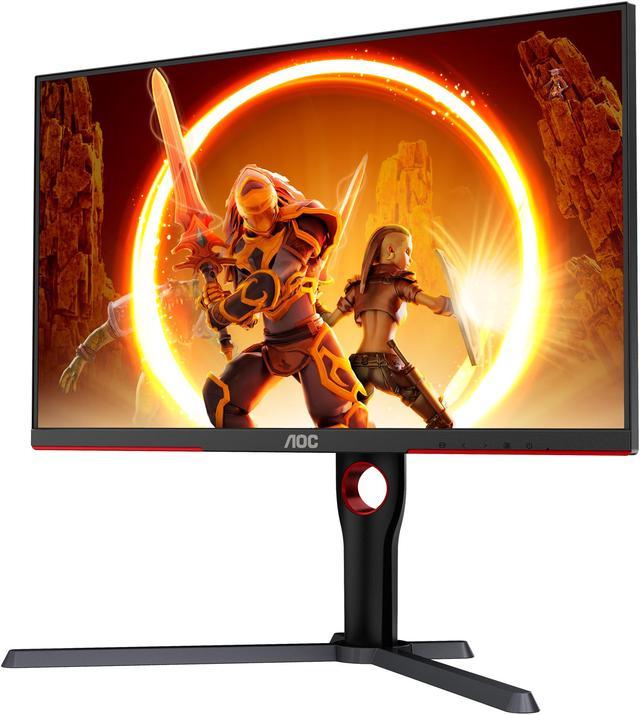


AOC Q27G3XMN 27" Mini LED Gaming Monitor, 2K QHD 2560x1440, 180Hz 1ms, 2X HDMI 2.0, 2X Display Port, Height Adjustable, Xbox/PS5/Switch Ready, 3-Year Zero-Bright-dot
- 27"
- VA Panel, mini-LED Backlight, QHD 2560 x 1440 (2K)
- 180 Hz (Using DP 1.4), 144 Hz (Using HDMI 2.0)
- DCR 80M:1 (Static 4000:1)
- 1.073B (8bits+FRC)
- Height, Pivot, Swivel, Tilt
- 1 x DisplayPort 1.4 / 2 x HDMI 2.0
- Monitor with stand, Cables: HDMI cable, DP cable, Power cable, User Documentation
+
+
Overview
Specs
Reviews (32)
Warranty & Returns
Warranty, Returns, And Additional Information
Warranty
- Limited Warranty period (parts): 3 years
- Limited Warranty period (labor): 3 years
- Read full details
Return Policies
- Return for refund until: January 31, 2026
- Return for replacement until: January 31, 2026
- This item is covered by Newegg.ca's Extended Holiday Return Policy.
- Read full return policy for details.
We want to ensure your holiday shopping this year is hassle-free. That’s why we’re automatically extending our return policies on almost every product! For purchases placed between November 1st, 2025 and December 31, 2025 you will have until January 31, 2026 to return your product.
Manufacturer Contact Info
LOADING...
LOADING...
The AOC Q27G3XMN is a 27-inch QHD Mini LED gaming monitor for PC players who want sharp 1440p detail and high refresh rates. Its VA panel, 336-zone local dimming, DisplayHDR 1000 certification, 1ms GtG response time, and up to 180Hz refresh rate over DisplayPort suit fast-paced gaming and HDR-focused play.
Recommended For
- PC gamers who play HDR-supported, single-player games and want bright highlights and deeper blacks from Mini LED local dimming alongside a 1440p display.
- PC gamers who want a mix of 1440p detail, high-refresh gameplay up to 180Hz, and stronger contrast than a typical gaming LCD, especially for mid-speed rather than highly competitive play.
- Solo desk users who want a high-contrast screen for gaming and video, and can sit centered in front of the VA panel rather than regularly sharing the display from the side.
Real-World Use Scenarios
- Playing HDR story-driven PC games in a dim room: local dimming can deepen dark areas while bright effects stand out, making scenes look more contrast-rich; some haloing around bright objects may still be visible.
- Playing fast-paced PC games: connect over DisplayPort to use the monitor’s highest refresh rate; motion and input response feel quick, though dark transitions can show some smearing and variable frame rates may cause VRR flicker.
- Gaming on a PS5 or Xbox in a bedroom or desk setup: the 1440p picture, responsive play, and HDR support suit console gaming, but HDMI 2.0 means it cannot use the consoles’ full HDMI 2.1 capabilities.
- Watching HDR movies or streaming video from a connected PC: bright highlights and darker image areas can appear together with stronger contrast; local dimming may produce visible halos around small bright details against dark scenes.
- Working with documents, browser tabs, or spreadsheets at a desk: the 27-inch 1440p screen provides clear text and adjustable positioning, while turning local dimming off can avoid distracting brightness changes or halos around desktop elements.
Spec Summary
| Attribute | Value |
|---|---|
| Best For | PC gaming and compatible Xbox, PS5, or Switch setups, with QHD resolution and high refresh support |
| Panel And Resolution | 27-inch flat VA panel with mini-LED backlight and 336-zone local dimming, 2560 × 1440 QHD resolution, 16:9 aspect ratio, 178° horizontal and vertical viewing angles, and 0.2331 mm pixel pitch |
| Image Quality And Color | 450 cd/m² brightness, DisplayHDR 1000 certification, 4000:1 static contrast (80M:1 DCR), 1.073 billion colors (8-bit + FRC), and 113.2% NTSC / 137.5% sRGB color gamut; glossy screen finish |
| Refresh Rate And Response | Up to 180 Hz over DisplayPort 1.4 or 144 Hz over HDMI 2.0, with 1 ms GtG response time and FreeSync adaptive sync |
| Ports And Connectivity | 1 × DisplayPort 1.4, 2 × HDMI 2.0, and an earphone output; no USB ports |
| Stand And Ergonomics | Height adjustment up to 130 mm, tilt from −3.5° to +21.5°, swivel ±30°, and pivot ±90°; supports 100 × 100 mm VESA mounting |
| Power And Consumption | 100–240 VAC, 50/60 Hz input; typical Eco mode consumption of 54 W and standby consumption below 0.3 W |
| Physical Specifications | Black and red cabinet; 15.56 lb (7.06 kg). Dimensions with stand: 21.00 × 24.18 × 11.91 inches |
| Model Identifiers | AOC Q27G3XMN |
Reference Q&A
Q: Should I buy the AOC Q27G3XMN or the Dell G2724D?
A: Choose the AOC Q27G3XMN if HDR brightness, deeper blacks, and Mini LED local dimming are priorities: its 336-zone backlight is designed for stronger HDR contrast than the Dell’s Fast IPS display. Choose the Dell G2724D if you prefer IPS viewing angles and smoother motion handling; in RTINGS’ testing, it showed less black smearing. Both are 27-inch 1440p gaming monitors, while the AOC reaches 180Hz over DisplayPort and the Dell reaches 165Hz.
Q: AOC Q27G3XMN or Acer Nitro XV275U P3 for 1440p HDR gaming?
A: Both are 1440p Mini LED gaming monitors. Choose the AOC Q27G3XMN if gaming response and reduced blooming matter most: RTINGS found it responds faster and shows less blooming in its comparison. Choose the Acer Nitro XV275U P3 if you need higher brightness in a well-lit room; RTINGS found the Acer gets brighter.
Q: Should I get the AOC Q27G3XMN or spend more on a 1440p OLED gaming monitor?
A: Choose the AOC Q27G3XMN if you want Mini LED HDR, strong brightness for a bright room, and a screen suited to mixed gaming and desktop use. Choose a 1440p OLED if near-instant pixel response and OLED-level contrast are your priorities and you accept the greater cost and the risk of burn-in with prolonged static content. The AOC uses a VA LCD panel with 336 Mini LED dimming zones, so it does not offer OLED’s per-pixel lighting.
Q: Can it run at 180Hz over HDMI?
A: No. The Q27G3XMN supports up to 180Hz over DisplayPort 1.4 and up to 144Hz over HDMI 2.0. Reaching the maximum refresh rate also depends on the connected device and its settings.
Q: Will it work with a game console?
A: Yes. The monitor has HDMI 2.0 inputs and is listed as ready for Xbox, PS5, and Switch. Its maximum refresh rate over HDMI is 144Hz; the resolution and frame rate you get also depend on the console and game.
Q: Does it support HDR?
A: Yes. It is VESA DisplayHDR 1000 certified and uses a Mini LED backlight with 336 local-dimming zones. It is a suitable option if HDR support is a priority.
Q: Can I adjust the stand or mount it on an arm?
A: Yes. The included stand supports height, tilt, swivel, and pivot adjustments. The monitor also has a 100 × 100 mm VESA mount pattern for a compatible arm or wall mount.
Q: Is the AOC Q27G3XMN worth buying for gaming?
A: It may suit buyers who want 1440p gaming with Mini-LED local dimming and HDR, without moving to an OLED. Its refresh rate is up to 180 Hz over DisplayPort and 144 Hz over HDMI. Whether it is worth the price depends on current alternatives and how much you value HDR; community discussions also mention VA-panel trade-offs.
Q: Is it a better fit for story games or competitive FPS?
A: It is a more compelling fit for story-driven games if HDR and darker-scene contrast matter to you. It also supports high refresh rates, but players focused mainly on competitive FPS may prefer to compare it with fast IPS alternatives and consider the VA-panel trade-offs discussed by owners.
Q: What are the main trade-offs of the Q27G3XMN?
A: The Mini-LED backlight and 336 local-dimming zones support HDR, but Reddit discussions raise potential VA-panel concerns such as dark-scene smearing and viewing-angle shifts. One owner also reports VRR flicker with unstable frame rates, so that behavior may be worth checking with your setup. It has one DisplayPort input and two HDMI 2.0 inputs.