



Newegg.ca - A great place to buy computers, computer parts, electronics, software, accessories, and DVDs online. With great prices, fast shipping, and top-rated customer service - once you know, you Newegg.

If you are reading this message, Please click this link to reload this page.(Do not use your browser's "Refresh" button). Please email us if you're running the latest version of your browser and you still see this message.

Newegg.ca - Computers, Computer Parts and Electronics

My Account
All prices shown in Canadian dollars unless otherwise specified. 

About UsBrowse Entire SiteShop All BrandsHelp & Info
topNavRowBottom  
Home
Home. > 
Computer Hardware0_. > 
Motherboards1_. > 
Intel Motherboards2_. > 
ASUS3_. > 
Item#: N82E16813131400

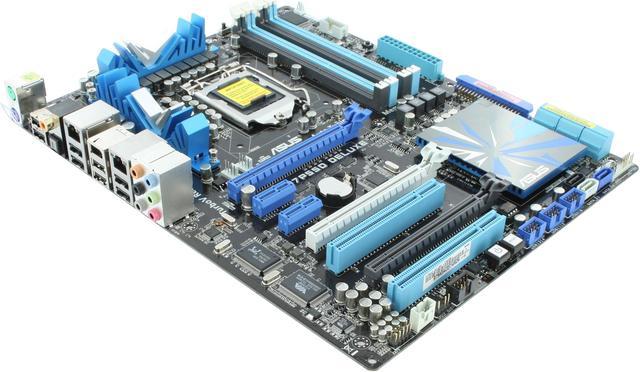
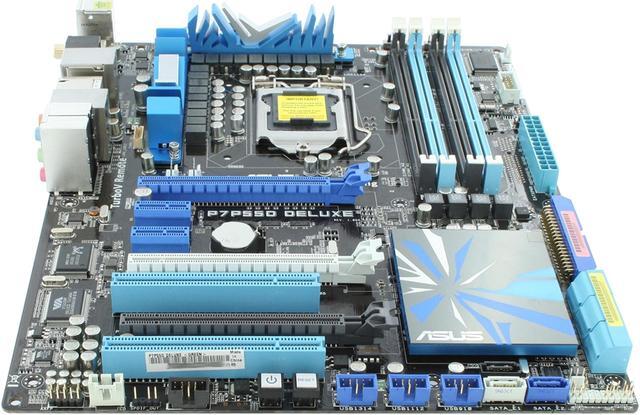
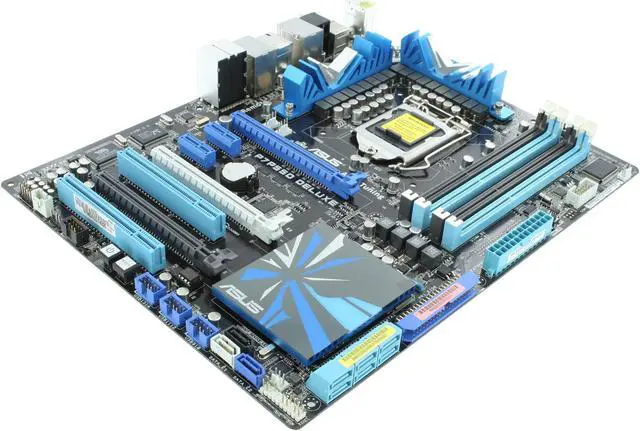
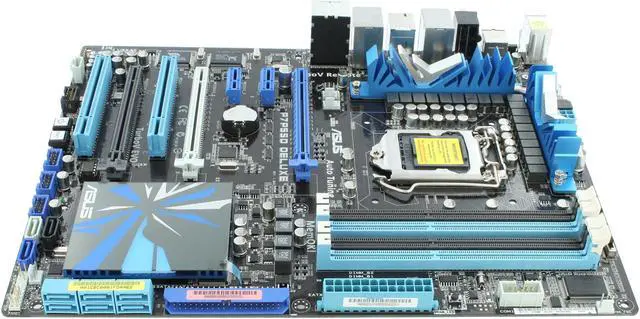
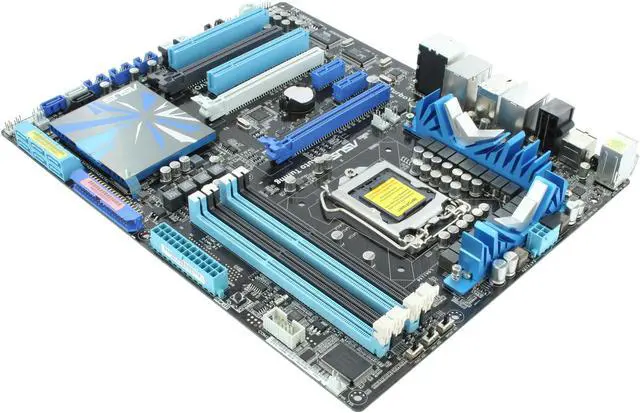
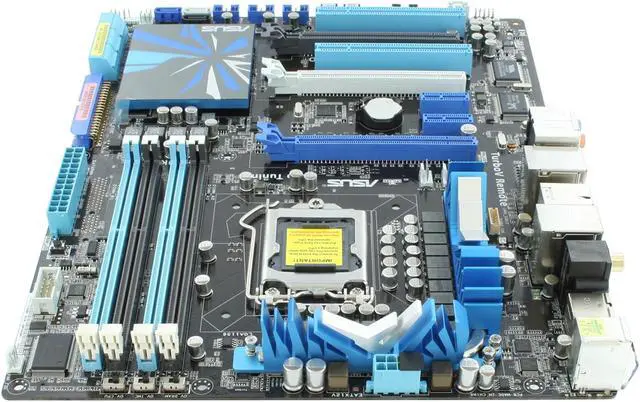
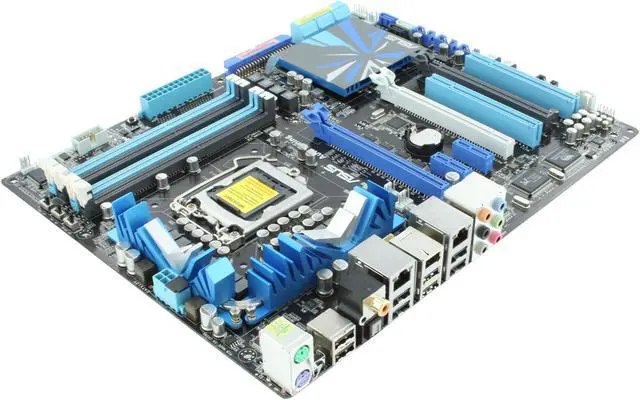
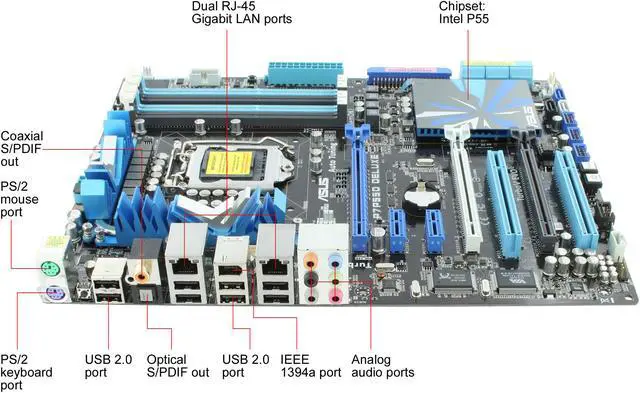
ASUS P7P55D Deluxe LGA 1156 Intel P55 ATX Intel Motherboard

Average Rating

4 out of 5 eggs(45 reviews)

In stock.

Was: $239.99
Now: $219.99
Save: $20.00
 Add to Cart
  • Add to WishlistAdd to Wishlist
  • Log In RequiredPrice Alert
  • PrintPrint This Page
  • Email This Page Facebook Twitter Sharethis Share...
$20.00 Rebate Card
Receive a $20 prepaid card by mail from ASUS! Expires on 9/30/10 (print rebatenewegg)

$12.24 Shipping
Buzz
Update to Original Review
5 out of 5 eggs
I am the original reviewer of the first review (2 egg rating posted 9/13/09). I felt the need to write an ...
— 9/30/2009
Jam Packed with Features
4 out of 5 eggs
* Motherboard's layout is perfect for Cosmos 1000 if you are not overclocking. My cables do not run all over the ...
— Palooka 5/12/2010


Quick Info
Manufacturer Warranty
  • Manufacturer Limited Warranty period (parts): 3 years
  • Manufacturer Limited Warranty period (labor): 3 years


Return Policies

This item is covered by Newegg.ca's Standard Return Policy.

  • Return for refund within: 30 days
  • Return for replacement within: 30 days
  • Restocking Fee: Yes
 
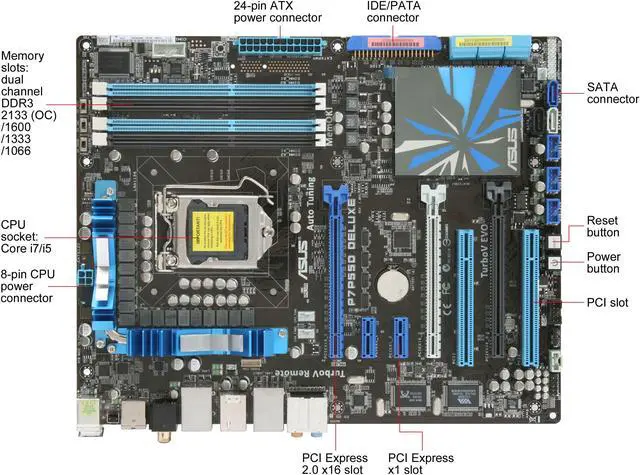
Number of Memory Slots:
4×240pin
Memory Standard:
DDR3 2200(O.C.)/1600/1333
PCI Express 2.0 x16:
2 x PCIe 2.0 x16 (single at x16 or dual at x8/x8 mode) 1 x PCI Express 2.0 x16 slots (at x4 mode, 2.5GT/s)
Onboard Video Chipset:
None
Audio Chipset:
VIA VT2020
Max LAN Speed:
Dual 10/100/1000Mbps
SATA 3Gb/s:
7 x SATA 3Gb/s connectors 2 x Drive Xpert SATA connectors (navy blue and gray)
CPU Type:
Core i7 (LGA1156)/i5 (LGA1156)

Get the most from your ASUS P7P55D Deluxe with these extras!

Select Additional Items
Popular Intel Core i7-860 Lynnfield 2.8GHz LGA 1156 95W Quad-Core Processor BX80605I7860Intel Core i7-860 Lynnfield 2.8GHz LGA 1156 95W Quad-Core Processor BX80605I78600
CORSAIR XMS3 4GB (2 x 2GB) 240-Pin DDR3 SDRAM DDR3 1600 (PC3 12800) Desktop Memory Model CMX4GX3M2A1600C9CORSAIR XMS3 4GB (2 x 2GB) 240-Pin DDR3 SDRAM DDR3 1600 (PC3 12800) Desktop Memory Model CMX4GX3M2A1600C91
  • Selected Items: 0
  • Featured Product plus Selected: $219.99
Add to cart

Learn more about the ASUS P7P55D Deluxe

Model
Brand
ASUS
Model
P7P55D Deluxe
Supported CPU
CPU Socket Type
LGA 1156
CPU Type
Core i7 (LGA1156)/i5 (LGA1156)
Supported CPU Technologies
Supports Intel Turbo Boost Technology
Chipsets
North Bridge
Intel P55
Memory
Number of Memory Slots
4×240pin
Memory Standard
DDR3 2200(O.C.)/1600/1333
Maximum Memory Supported
16GB
Channel Supported
Dual Channel
Expansion Slots
PCI Express 2.0 x16
2 x PCIe 2.0 x16 (single at x16 or dual at x8/x8 mode)
1 x PCI Express 2.0 x16 slots (at x4 mode, 2.5GT/s)
PCI Express x1
2
PCI Slots
2
Storage Devices
PATA
1 x ATA133 2 Dev. Max
SATA 3Gb/s
7 x SATA 3Gb/s connectors
2 x Drive Xpert SATA connectors (navy blue and gray)
SATA RAID
0/1/5/10
Onboard Video
Onboard Video Chipset
None
Onboard Audio
Audio Chipset
VIA VT2020
Audio Channels
10 Channels
Onboard LAN
LAN Chipset
Realtek 8112L
Second LAN Chipset
Realtek 8110SC
Max LAN Speed
Dual 10/100/1000Mbps
Rear Panel Ports
PS/2
2
USB 1.1/2.0
8 x USB 2.0
IEEE 1394
1 x IEEE 1394a
S/PDIF Out
1 x Optical, 1 x Coaxial
Audio Ports
6 Ports
Onboard USB
Onboard USB
3 x USB connectors support additional 6 USB ports
Onboard 1394
Onboard 1394
1 x 1394a
Physical Spec
Form Factor
ATX
Dimensions
12.0" x 9.6"
Power Pin
24 Pin
Features
Features
Intel LGA1156 Platform / Intel P55 Express Chipset
TurboV EVO / TurboV Remote
ASUS 24 Hybrid Phase Design
Quad-GPU SLI & Quad-GPU CrossFireX Support!
ASUS Drive Xpert
MemOK!
Manufacturer Warranty
Parts
3 years limited
Labor
3 years limited

Customer Reviews of the ASUS P7P55D Deluxe

Do you own this product? Write a Review
Filter Results
Go
  • kbcflash
  • 8/24/2010 6:06:34 PM
  • Tech Level: above average
  • Ownership: 1 month to 1 year
1 out of 5 eggs

Pros: Worked great. I liked having two Ethernet wires working together.

Cons: For about 3 months! First my graphics card stopped working, A new 260 GTX So I put my old 8800 GTS in it & that kept it running for another 2 of the 3 months that it worked. But My 260 GTX card is Good it's the motherboard wouldn't tell my TV to come on though the HDMI wire. I up dated the bios to the newest bios release. Then not long after that but not because of the bios update I noticed my dual LAN was only running off One Then it quit all together Saying bad wire or wire not connected. Then it said the express gate stopped working & started taking around 15 minutes to boot. Now the picture constantly roles.

Other Thoughts: I had the core i5 quad core bumped up to 3.05 GHz Water cooled. Ripjaws Series Dual Channel DDR3 1600 7-8-7-24-2N @ 1.6 V. 260 GTX With windows 7 64 Bit. Maybe I'll flash the bios with something a little older & see what happens.
For now I've put my 260 GTX card in my old computer With my old lan wires Actually they're new & everything works just fine. Like I said this motherboard only lasted 3 months

0 out of 1 people found this review helpful. Did you? Yes No

  • N/A
  • 8/4/2010 11:08:39 AM
  • Tech Level: above average
  • Ownership: 1 month to 1 year
  • Verified Owner
5 out of 5 eggsGood Baord

Pros: Stable, good for overclocking (though it's hard with an un-airconditioned house right now). NEVER had a crash whether I'm set to stock or OC'ed. I have seen this board overclock to 4.0 ghz stably (w/ i5-750). Audio is better than my old ECS as well but...

Cons: ... my mic port died. Im sure it was an isolated incident (could have something to do with the 14 speakers chained into the onboard sound). USB3.0/Sata6 would have been nice. With that said...

Other Thoughts: ...at this point, if you are building a system that you plan on using and upgrading over the next 4-5 years then perhaps a different board would be a better fit. With the new Intel chipset coming out in less than 6 months the 1156 mobos will start to fade away. If you ware planning on a your build lasting 2-3 years this board will do a very good job.

0 out of 1 people found this review helpful. Did you? Yes No

  • El Pez
  • 8/2/2010 10:40:48 AM
  • Tech Level: above average
  • Ownership: 1 day to 1 week
  • Verified Owner
5 out of 5 eggsNo sweat & no BSOD

Pros: This build went together easy as pie. I chose the Core I5 and G.Skill 2x2gb ram with my old 650 watt psu and 8800GT. The ram slots are slightly tight but I reckon that is a good thing. Just make sure you get the sticks seated properly.

Cons: I cut myself on the i/o shield thingy in the back dang.

Other Thoughts: This was an effortless build and my rig screams! I was on a budget and this satisfied my needs...
Played BFBC2 with everything on high for like 2 hours and not a core went over 43 degrees C.

I like it!

2 out of 2 people found this review helpful. Did you? Yes No

  • SilverZeus
  • 8/2/2010 8:31:19 AM
  • Tech Level: above average
  • Ownership: 1 day to 1 week
  • Verified Owner
5 out of 5 eggsAmazing Board

Pros: Easy installation. Easy Setup. Lots of Features. Clip Locks on included SATA Cables. Foam Cushioned Backplate! Two Realtek Gigabit Lan Ports (Teaming capable) Great Layout for PCIe slots (x16 x1 x1 x8 PCI x8 PCI) Remote Controlled BIOS for case closed BIOS Profile administration. Single Ear Memory DIMM sockets so that you dont need to push down two ears to remove or "double click" to seat the RAM modules properly. when the ear snaps up you KNOW its seated.

Cons: No FDD port. ( I know I know its a dead medium but Im an old guy and I hate building a pc without a FDD) but with the advent of booting from thumb drives I suppose its time to finally retire the FDD's for good)

Other Thoughts: Core i7-875K @2.93GHZ (for now till burn in is complete)
Arctic Cooling Freezer Pro 7 Rev 2 HS/Fan
ASUS P7P55D Deluxe LGA 1156
8GB (2x4GB) G.Skill Ripjaw Series 1600 RAM
Silverstone 1kw Modular PSU
1x250GB WD 2500WJS HDD (OS)
1x1TB WD Caviar Black HDD (Data)
2xPlextor 716A DVD Burners
1xThermaltake Armor Series 8000VBS All Aluminium Case

1 out of 1 people found this review helpful. Did you? Yes No

  • Engineer
  • 7/26/2010 1:24:35 PM
  • Tech Level: above average
  • Ownership: 1 month to 1 year
  • Verified Owner
2 out of 5 eggsGood Board Bad support

Pros: When functioning correctly this is a very good board. It has 3 PCI-e slots which I need. One for the ASUS Nvidia ENGTX465 and two for Adaptec SAS disk controllers. It overclocks easy to 3.36Ghz when water cooled and runs very stable.

Cons: The memory slots don't always work. I have purchased more than one of these boards and 2 came in and worked with the G.Skill DDR3-2200 (PC3-17600) memory perfectly. One board will only see 4GB or two slots out of 4 for 8GB. I sent it back to Asus support. They didnt fix it or anything just sent it back to me. Still with two bad slots saying nothings wrong with the board. It wont see 8GBs with 4 chips only 4GB with 2 chips. This is my third build with this board and ASUS claims its not the board. I have two other computers running perfectly with the exact same memory and hardware but this one wont work. I hope you dont get a board with bad chip slots because Asus support will not fix or replace it.

Other Thoughts: Asus support is terrible. I cant tell you how many hours I have wasted trying to get this board fixed or replaced. I send it to them and they send it back saying nothing is wrong with it. I tell them that this is only board that is having this problem and they claim it is the CPU. Give me a break. This is the third computer I have built with this board. The first two did not have a broken or malfunctioning memory chip slot. I don't know what to do but try to find a different board manufacturer with better support. I hope you don't have broken memory slots.

1 out of 1 people found this review helpful. Did you? Yes No

  • N/A
  • 7/20/2010 8:06:13 PM
  • Tech Level: above average
  • Ownership: 1 month to 1 year
4 out of 5 eggsSolid Motherboard

Pros: Everything installs nice.
SOME good and useful software.

Cons: Had to manually turn off on-board lans from bios. Without this they interfered with PCIe LAN card. Win7.

Other Thoughts: I wish motherboard manufactures would not even include junk lans.

Did you find this review helpful? Yes No

  • Palooka
  • 5/12/2010 9:28:54 AM
  • Tech Level: above average
  • Ownership: 1 week to 1 month
  • Verified Owner
4 out of 5 eggsJam Packed with Features

Pros: * Motherboard's layout is perfect for Cosmos 1000 if you are not overclocking. My cables do not run all over the place.
* Lots of USB ports
* EPU-6 Control is definitely a plus for managing power and heat

Cons: * I'm not even sure if the EZ Backup feature is actually mirroring my drives.
* RAM Slots are really tight which may be good. kept getting blue screen of death and "Memory management" for first two days. Found out RAM was not seated correctly. Moved RAM around and reinserted, no problems since.
* Doesn't detect GTX-295 under EPU-6
* Didn't come with installation disc. A request from Asus will cost you $11.95. NewEgg didn't want to help either.

Other Thoughts: My Specs (Not Overclocked):

Intel i7-860
Asus P7P55D Deluxe
OCZ 1000W Gold+ Power Supply
CORSAIR XMS3 8GB (4 x 2GB) 240-Pin DDR3 SDRAM
EVGA GTX-295
Inno3D GTX-295
Thermaltake Silent 1156 CLP0552 92mm CPU Cooler
Sound Blaster Fatal1ty X-Fi
Sony Optiarc DVD Burner with LightScribe
Pioneer Black Blu-ray Disc/DVD/CD Writer
WD 500GB Hard Drives (times 5)
Windows 7 Home 64-Bit
ThermalTake HDD Fan
Cooler Master Cosmos 1000

4 out of 4 people found this review helpful. Did you? Yes No

  • Palooka
  • 5/12/2010 9:16:02 AM
  • Tech Level: above average
  • Ownership: 1 week to 1 month
  • Verified Owner
5 out of 5 eggsRuns Quiet In Appropriate Case

Pros: * Mounts securely to CPU if you follow instructions
* Runs quiet alltogether in Cosmos 1000 case
* Keeping i7-860 at 40-C to 50-C regular load
* Includes thermal grease

Cons: * Would like to know what the average temperature you can obtain with included thermal grease

Other Thoughts: My Specs (Not Overclocked):

Intel i7-860
Asus P7P55D Deluxe
OCZ 1000W Gold+ Power Supply
CORSAIR XMS3 8GB (4 x 2GB) 240-Pin DDR3 SDRAM
EVGA GTX-295
Inno3D GTX-295
Thermaltake Silent 1156 CLP0552 92mm CPU Cooler
Sound Blaster Fatal1ty X-Fi
Sony Optiarc DVD Burner with LightScribe
Pioneer Black Blu-ray Disc/DVD/CD Writer
WD 500GB Hard Drives (times 5)
Windows 7 Home 64-Bit
ThermalTake HDD Fan
Cooler Master Cosmos 1000

1 out of 1 people found this review helpful. Did you? Yes No

  • Hank
  • 4/22/2010 4:18:40 PM
  • Tech Level: above average
  • Ownership: 1 week to 1 month
  • Verified Owner
5 out of 5 eggsExtreeemly easy build

Pros: Great manual Easy to install. Information not included in the manual easy to find on the net. This build was easier than my previous build w/ P4C800-e Deluxe. I do not Overclock I just want a durable premium system. I am a photographer ... I value redundency available with RAID 1

Cons: Would like to have used Intel RAID but did not want to dedicate 6-SATA 3.0 for RAID 1 exclusively. Used JMicron RAID seems ok. will have to see. Very easy interface

Other Thoughts: My Build P7P55d-Deluxe; i7-860 processor; 4GB Corsair 1600; BFG 1Gb Green 9800 ... 500 Gb Green WD SATA drive for OS; 2x - 1Tb WD 7200 Black Caviar drives for RAID I; Antec P160 Case Antec TP 750 PSU; Windows 7 64 bit Ultimate; Sun Microsystems Virtualization

1 out of 1 people found this review helpful. Did you? Yes No

  • bubbared123
  • 4/19/2010 5:51:27 PM
  • Tech Level: above average
  • Ownership: 1 day to 1 week
  • Verified Owner
5 out of 5 eggssweet motherboard

Pros: overclocking made easy for those who want to. 9.1 surround sound. instruction manual was very easy to understand and computer booted up first time no problems and has run great since.

Cons: mail in rebates suck to fill out and send

Other Thoughts: i haven't got into overclocking very deeply but if i were to get into it it even has a remote to instant change clock speed w/o restarting or powering down machine.

Did you find this review helpful? Yes No

Home
Home. > 
Computer Hardware0_. > 
Motherboards1_. > 
Intel Motherboards2_. > 
ASUS3_. > 
Item#: N82E16813131400
Shop by Region: United States | Canada | China
Affiliated Sites:
EggXpert.com
Newegg Community
VeriSignReliability Seal1PaypalVerify GoldenSealThis site protected by Trustwave's Trusted Commerce program

Policy & Agreement | Privacy Policy

 © 2000-2010 Newegg Inc.  As used herein, “Newegg.ca” means Newegg Canada Inc. unless the context specifically refers to the www.newegg.ca web address.
If the Adobe Reader does not appear when you click on a link for a PDF file, you can download Adobe Reader from the Adobe web site. nassau